



 0 Comment
 Customer Reviews

In the fast-paced business world, Success greatly relies on efficiency. And do you know what many organizations struggle with? Managing invoices. Imagine an environment in which processing bills is accurate, timely, and hassle-free. This is the goal of effective invoice processing.
Now Imagine,
You are running a busy café. You have suppliers delivering fresh ingredients, utility bills to pay, and staff needing their wages. Each requires an invoice—a detailed bill showing what's owed and to whom. Now, imagine this situation multiplied by hundreds or thousands, and you can understand the challenge larger businesses face every day. Efficiently managing these invoices can mean the difference between smooth operations and financial chaos.
What is the Invoice Process?
Processing invoices, which involves keeping track of, organizing, and paying supplier bills, is a crucial business task. The department in charge of accounts payable typically carries these responsibilities. It is the last phase in the procurement procedure and is essential to the procure-to-pay (P2P) workflow. When an invoice is received, the procedure starts and concludes when the payment is entered into the general ledger. These days, invoice processing is typically done by automated software.
Studies have shown that businesses can reduce processing costs by up to 80% by automating invoice processing.
How Does Invoice Processing Work?
Invoice processing typically involves the following steps:
Invoice Receipt: An invoice receipt is initiated when a business gets an invoice from a vendor or supplier. This may come in formats like PDF, email, paper, or computerized invoicing systems.
Invoice Capture: Details from the invoice are recorded to process further This may include manual data entry, scanning paper invoices, or automatic data extraction for electronic invoices.
Invoice Validation: The collected data is checked for accuracy by comparing it to delivery notes and purchase orders. Compliance checks are also performed, such as valid invoice numbers and correct amounts.
Approval of Invoice: After verification, the invoice is accepted for payment. The number of permissions needed for this could vary based on the organization's size and invoice amount.
Payment: After approval, the invoice is scheduled for payment according to the agreed terms.
Recording and Archiving: The paid invoice is logged into the accounting system for financial monitoring, reporting, and auditing purposes and then stored according to the business's document retention policy.
Come along as we explore invoice processing and reveal the keys to efficient operations. SlideTeam brings you a PowerPoint deck that you can customize entirely, designed to simplify your tasks and save precious time. Let's take a closer look at some crucial slides that you can’t miss.

# Cover Slide
This cover slide introduces the presentation by clearly showing the title and the company name. It sets up the presentation by giving a professional start and it can be important for making a good first impression.

# Steps to Improve Invoice Processing in Organization
This slide describes the process of improving invoice processing efficiency in the company. It includes details about internal audits, KPIs, and improvement.
This slide is significant because it provides practical strategies to make invoice management faster and more accurate. This slide helps organizations boost efficiency, speed up payments, and build better vendor relationships. It guides to adopting best practices, ensuring the invoicing process is smooth, cost-effective, and compliant with financial regulations.

# SAP Invoice Management Framework to Streamline Processing
This slide explains invoice processing and management structure for SAP software that helps optimize cash flows. It includes details about preparation, transformation, exception handling, approval, pay, etc.
This slide is crucial because it highlights how SAP streamlines invoice processing. By automating and optimizing the workflow, this framework reduces manual errors, speeds up approval times, and ensures compliance with company policies. It easily connects with current systems, offering real-time access and management of financial information. This boosts efficiency, accuracy, and decision-making, leading to cost savings and better financial oversight for the business.

# Automated Invoice Process Reporting Flow Diagram
This slide showcases the invoice process flowchart to help the accounts payable team understand the sequence of activities. It further includes details about purchasing, operations, and financial management.
This slide is crucial as it visually represents the streamlined steps of handling invoices automatically. This slide helps viewers quickly grasp how automation improves efficiency, reduces errors, and speeds up the invoice processing cycle. The diagram clarifies the workflow by showing each stage in the process, from invoice receipt to final payment, making it easier to understand and implement.

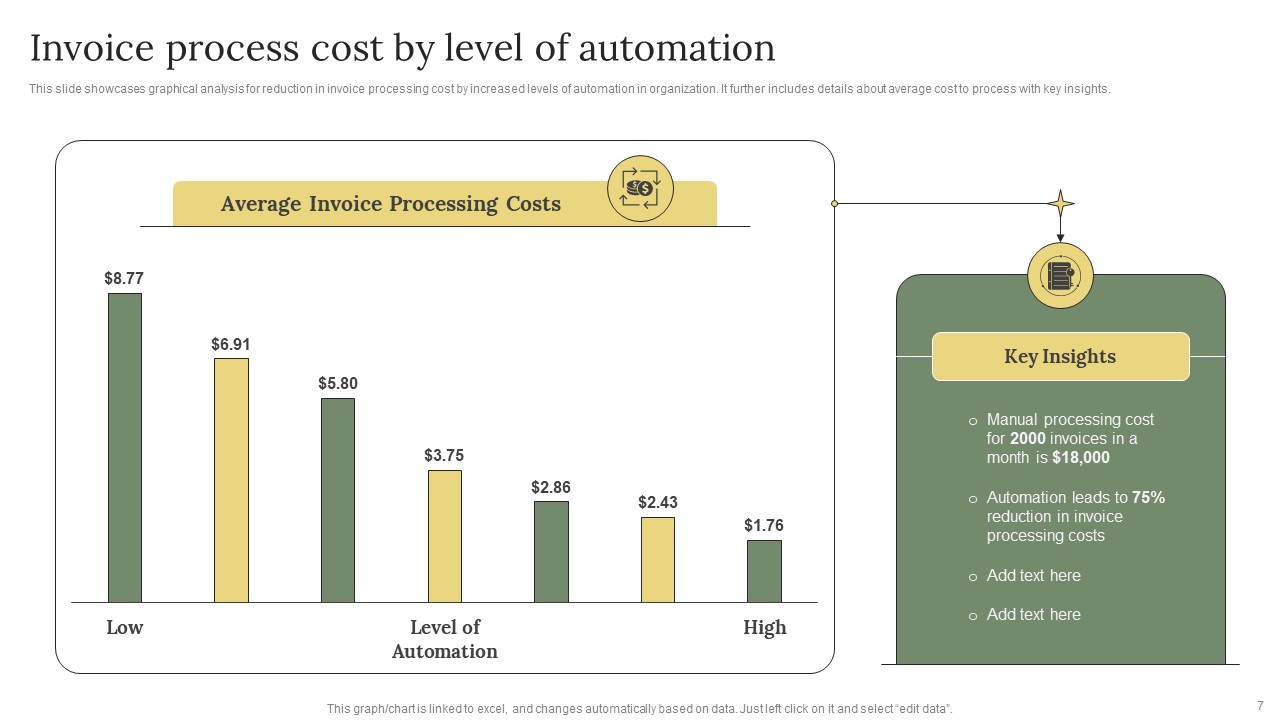
# Invoice Process Cost by Level of Automation
This slide showcases graphical analysis of how increased levels of automation in the organization can reduce invoice processing costs. It further includes details about the average cost to process with key insights.
This slide is crucial because it highlights how automation can significantly reduce costs in invoice processing. The slide underscores the financial benefits of investing in automation by showing the cost differences between manual, semi-automated, and fully automated systems. Lower costs increase efficiency and savings, freeing up resources for other business activities.
# Best Practices to Increase Efficiency of Invoice Process
This slide displays tools and techniques to simplify and manage the invoice process in an organization. It includes elements such as automated procurement, business strategy, ERP, etc.
This slide is crucial because it guides businesses on streamlining their invoicing procedures. Implementing these practices helps reduce errors, speed up processing times, and improve cash flow management.

Wrapping-Up
Invoice processing is vital for businesses of all sizes. It ensures timely payments, maintains healthy vendor relationships, and boosts overall financial efficiency. Companies can streamline their invoicing workflows and reduce errors by embracing automation tools and adopting best practices like accurate data entry and regular reconciliation. Further, SlideTeam has prepared an editable PPT on the same; download it now!
Download Free PPT
FAQ
What is the invoice process?
A1: The invoice process involves creating, sending, and managing invoices for goods or services provided. It includes tracking payments, ensuring accuracy, and maintaining records for financial reporting.
Q2: How do I ensure my invoice is accurate?
A2: To ensure accuracy, double-check details like the recipient's information, itemized list of services/products, quantities, prices, and payment terms before sending the invoice.