


Invoice Process Flow Diagram For Paperless Accounts




Try Before you Buy Download Free Sample Product
 Impress Your
 Audience
 100%
100% Editable
 Save Hours
 of Time


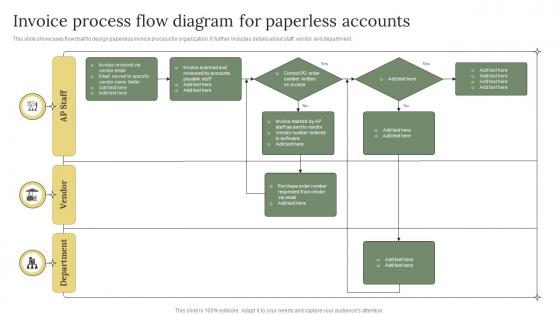
This slide showcases flowchart to design paperless invoice process for organization. It further includes details about staff, vendor and department.
People who downloaded this PowerPoint presentation also viewed the following :
Invoice Process Flow Diagram For Paperless Accounts with all 6 slides:
Use our Invoice Process Flow Diagram For Paperless Accounts to effectively help you save your valuable time. They are readymade to fit into any presentation structure.





FAQs for Invoice Process Flow Diagram
So you'll want to map out the basic steps first: getting invoices, validation and approvals, data entry, then matching everything with POs and receipts before payment goes out. Map out who does what at each step too - especially when stuff moves between departments or different systems. The real trick is figuring out decision points, like what happens when numbers don't match or approvals are missing. Honestly, I'd keep it simple at first and just focus on the happy path. You can always add the messy exception stuff later once you've got the main flow working smoothly.
So you map out every step of your billing process visually - super helpful for catching where things get stuck. Maybe approvals drag on forever or you're entering the same data twice (been there). I'd start by documenting what you actually do now, not what you think you do. Then tackle the worst bottlenecks first. You'll spot redundancies way easier when it's all laid out in front of you. Plus you can see exactly where invoices disappear into the void. Once that's done, automate the boring repetitive stuff and fix those messy handoffs between teams.
Honestly, invoice processing is a nightmare - you've got bottlenecks everywhere, approvals taking forever, and stuff just disappears into email black holes. Flow diagrams are actually pretty helpful here because they show you exactly where everything falls apart. You can see who's supposed to do what and when things get stuck. Map out your current mess first (trust me, it'll be ugly), then figure out where invoices sit too long or which departments are the worst offenders. Once you spot all the redundant approvals and ridiculous delays, redesign the whole thing to cut out the BS.
Honestly, update it whenever stuff starts breaking down. Invoices getting stuck somewhere? Customers griping about mistakes? New software throwing everything off? Time to fix your diagram. I'd do a quick check every quarter, but don't wait if things feel wonky. Business growing fast or you added new approval steps? Your old process probably doesn't match what's actually happening anymore. Just map out your real workflow versus what the diagram shows - you'll spot the problems pretty fast. Payment terms changed recently? That's another red flag to update things.
Automated invoicing totally changes your flow diagram - way fewer people passing things around. Most of those approval bottlenecks just disappear. The system matches purchase orders automatically, flags weird stuff, and routes approvals based on rules you set up. Your diagram gets super linear instead of all that back-and-forth mess. I'd focus on mapping the exceptions though, since that's where people still need to jump in. Like when the system can't read something or finds a mismatch - that's the important stuff to show. Makes the whole thing cleaner, honestly.
You absolutely need to talk to everyone who actually deals with invoices day-to-day. The AP team knows where things get stuck. Finance sees all the approval headaches, and procurement gets the vendor side of things. Honestly, I've watched so many people try to map processes from their desk and totally miss obvious stuff. Each group has different insights about timing and where things go wrong - details you'd never think of. Interview them separately first (people are more honest that way), then get everyone in a room to check your final diagram. Otherwise you're just guessing at how work actually flows.
Just build the compliance stuff right into your existing invoice steps instead of adding them separately. Like, add verification boxes for tax calcs and approval limits exactly where they happen in your flow. Trust me, auditors will thank you later! Set up automatic flags too - anything over X amount or from sketchy new vendors gets flagged. I learned this the hard way at my last job. Map out what compliance rules you actually need first, then figure out where they fit naturally. Way better than trying to bolt everything on afterward.
Honestly, I'd go with draw.io first since it's free and way better than you'd expect. Lucidchart is solid too - both have decent templates for invoice workflows. If your company's already paying for Microsoft stuff, Visio works but it's kind of annoying for simple diagrams. Oh, and Miro's great if you need to work on it with other people at the same time. I always forget about that one but it's actually pretty smooth. Start with the free option and see how it goes - you can always switch later if you need fancier features.
Oh absolutely, industry makes a huge difference in how you set up your invoice flow. Healthcare is brutal with all the compliance stuff and insurance verifications - retail has it so much easier! Manufacturing usually needs these crazy long approval chains for materials, while SaaS keeps things super simple. You'll want to map out what you're doing now first. Then look at what others in your industry are doing to see if you're missing any steps. The basic invoice process is pretty similar everywhere, but you might need extra stages for regulatory stuff or different approval levels depending on your sector.
Start by documenting every step from when the invoice hits your desk until payment goes out. Map who does what and when - the boring details matter here. Most process diagrams I've seen are garbage because they skip the messy stuff like approvals and what happens when invoices get rejected (which is constantly, by the way). Build in those error paths and checkpoints. Make it detailed enough that someone totally new could follow along without bugging you every five minutes. Oh, and actually test it with real invoices before you call it finished - you'll catch stuff you missed.
Track your invoice processing time first - from when it hits your desk to final payment. Error rates matter too, plus where things get stuck (approval chains are usually the worst culprit, trust me). Once you implement your new flow, compare the numbers. Processing should speed up with fewer manual fixes needed. I'd do monthly check-ins since bottlenecks shift as your business grows. The real victory? When people stop bugging you about missing invoices every five minutes. Set up simple tracking so you can actually see what's working.
Ugh, a messy invoice process is basically cash flow suicide. Your invoices get stuck waiting for approvals forever, bounce between departments like ping pong balls, or go out with stupid errors that need fixing. I've watched companies literally wait an extra month for payments because nobody knew what step came next - it's honestly infuriating. Without a clear process mapped out, you can't even spot where things are breaking down. Start by drawing out your current mess of a workflow, find the worst bottlenecks, then fix those first. Trust me, your bank account will thank you.
So for your invoice diagram, color-coding is a game changer - like different colors for each department. Throw in some icons too (approve/reject buttons, that kind of stuff). Diamond shapes work great for decision points. Honestly, nobody wants to stare at boring text boxes everywhere. Make it scannable so people can actually figure out who's doing what without getting lost. When it's visual like that, you'll get way better feedback in meetings. Oh, and definitely add a legend at the top - saves you from explaining the same stuff over and over. Trust me on this one.
Don't make it one straight line - that's asking for trouble. Build in branches everywhere the process might split: different invoice types, approval amounts, weird exceptions. Make it modular so you can swap pieces without starting over. Oh, and definitely keep approval limits flexible. Trust me, someone's always changing dollar thresholds or adding new managers to the mix. Manual overrides are clutch for those random edge cases that'll definitely happen. Way easier to design for changes upfront than trying to hack flexibility in later when everything's already built.
Honestly, the people actually using your invoice flow are gonna catch problems you totally missed. They'll point out confusing steps or where things get stuck - like approval bottlenecks that look fine on your diagram but are a nightmare in real life. Different departments see the same process completely differently too, which is kinda wild when you think about it. Just chat with your accounting and procurement folks regularly, maybe do some quick surveys. Then fix the stuff they complain about - simplify the confusing parts, add missing steps, whatever. Don't make it a one-and-done thing though.
-
Great product with highly impressive and engaging designs.
-
Wow, never been this impressed with any online service provider. Really appreciate the customer support all along from the navigation to purchasing the right products.