


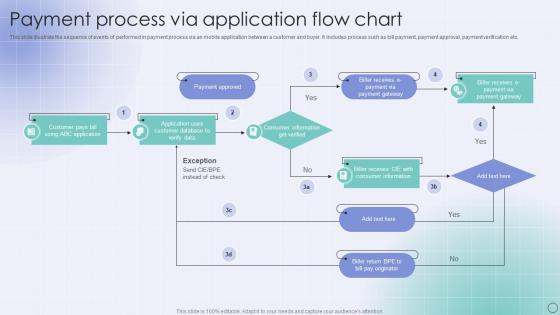
Payment Process Via Application Flow Chart




Try Before you Buy Download Free Sample Product
 Impress Your
 Audience
 100%
100% Editable
 Save Hours
 of Time


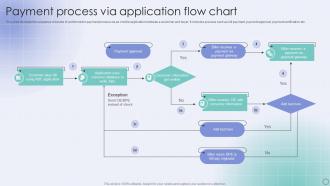
This slide illustrate the sequence of events of performed in payment process via an mobile application between a customer and buyer. It includes process such as bill payment, payment approval, payment verification etc.
People who downloaded this PowerPoint presentation also viewed the following :
Payment Process Via Application Flow Chart with all 6 slides:
Use our Payment Process Via Application Flow Chart to effectively help you save your valuable time. They are readymade to fit into any presentation structure.





FAQs for Payment Process Via
So basically your customer types in their card info, it gets encrypted and shoots over to the payment processor. They ping the bank to check if there's money and whether to approve it. Takes like 3 seconds max (unless your customer's still rocking 2005 internet lol). Once it's approved, money moves from their account to yours minus whatever fees they take. Oh and definitely shoot them a confirmation email right away - I've seen people panic and try to buy the same thing twice when they don't get instant proof their order went through.
So I've been down this rabbit hole before - Stripe and PayPal are your safest bets for security, both do PCI compliance and fraud protection well. Square's solid too. Fee-wise, they're all pretty much the same at 2.9% + 30¢ per transaction (PayPal's sometimes a bit more, which is annoying). Stripe's definitely the easiest if you're doing any custom development stuff. PayPal's got better buyer protection though, which customers love. Honestly I'd just test out their checkout flows first - some feel clunky depending on your setup.
Transaction fees will eat into your profits if you're not careful - definitely compare those first. Payment options matter too since customers get annoyed when their preferred method isn't available. Security stuff like PCI compliance is non-negotiable, obviously. Integration with your current systems should be smooth because dealing with tech issues sucks. Processing speed affects your cash flow, and honestly, good customer support is worth paying a bit extra for. Watch out for sketchy contract terms - some companies lock you in with crazy cancellation fees. I'd make a list of your dealbreakers and test out maybe 3 options.
Dude, checkout flow is everything. People bail if it's annoying - I've done it myself when sites force you to make accounts for one stupid purchase. Make it dead simple: guest checkout, clear steps, tons of payment options. Security badges help too since everyone's paranoid about their card info (honestly can't blame them). Short forms work better than long ones. Also test it yourself regularly - you'd be shocked how many broken links or glitchy buttons slip through. The whole point is removing every possible reason someone might say "forget this" and leave.
Usually it's the obvious stuff - not enough money in your account, expired card, or you fat-fingered the CVV. Your billing address has to match exactly what's on file too, which honestly catches more people than it should. Banks love flagging weird purchases as fraud, especially big ones or from sketchy-looking sites. Network issues are super common during busy times when everyone's trying to buy stuff at once. Oh, and sometimes the payment system just craps out for no reason. Double-check your card details first though - saves you time.
Mobile payments basically cut out all the annoying steps with cards and cash. Just tap your phone and boom, you're done - honestly feels like magic sometimes. Your card info never actually gets shared with stores, which is way more secure. Checkout lines move faster, you can track everything easier, and customers love how smooth it is. Though not everyone's jumped on board yet (my mom still writes checks lol), so you'll probably want to keep other payment options around too. The speed difference is pretty crazy once you get used to it.
Ugh, cart abandonment is the worst! First thing - strip down your checkout process. Guest checkout is huge because people hate creating accounts. Be super transparent about shipping costs upfront, not at the very end when they're ready to buy. That's just annoying honestly. Mobile optimization matters since everyone's shopping on their phones now. Payment options should include the basics like PayPal and Apple Pay. Oh, and throw in some trust badges - people get sketchy about entering credit card info. Really though, just think about every possible friction point. Each extra step gives them another reason to click away instead of completing the purchase.
PCI compliance is basically your safety net when you're dealing with credit card stuff. It's security standards that protect customer payment data - you know, encrypting cardholder info, keeping networks secure, testing systems regularly. Sounds scary but it's really not that bad once you dive in. The whole point is avoiding data breaches, which trust me, you don't want those fines or the PR nightmare. Plus customers actually care about this stuff now. If you're processing payments, just make sure your payment processor is compliant and audit your own systems every so often. Way better to be proactive than sorry later.
So your payment gateway basically talks directly to whatever platform you're using - Shopify, WooCommerce, all that. No more manually processing every single transaction. Everything just syncs on its own: inventory, order updates, receipts, refunds. Honestly made my life so much easier once I got it working right. Your customers get that smooth checkout they want, and you don't have to worry about screwing up data entry anymore. Oh, and definitely check what integrations your current processor already has built in - might save you some headache there.
Ugh, late payments are the worst - you're basically lending money to customers while still having to pay your own bills. Your suppliers don't care that Jim from accounting hasn't paid his invoice yet, they want their money NOW. I've seen businesses go under just from this cash flow squeeze, even when they were profitable on paper. You end up scrambling for expensive loans or burning through savings just to make payroll. Honestly, being a hardass about payment terms from day one is totally worth the awkward conversations. Chase those overdue invoices relentlessly.
So recurring payments basically save your customer's card info and bill them automatically on whatever schedule you set up. One-time transactions just process once and that's it - no data gets stored. Recurring is way more convenient since it handles all the subscription stuff for you, but you'll need better security compliance because you're holding onto sensitive payment data. One-time is simpler to set up but then you're manually processing everything each time (which honestly gets old fast). If you go the recurring route, just make sure your payment processor does tokenization - keeps everything secure.
Klarna and Afterpay are everywhere now - those buy-now-pay-later things are huge. Digital wallets got way better with the fingerprint stuff too. QR codes basically took over (I can't remember the last time I actually swiped my card lol). Crypto payments are showing up more but still pretty niche. Voice payments through Alexa and those smart speakers are picking up steam. Some places are even doing facial recognition at checkout now, which is kinda wild. Most people expect like 3-4 payment options minimum these days, so you should probably check what you're offering and see what's missing.
So for payment support, I'd do it in tiers. Start with self-service stuff - FAQs and basic troubleshooting for the simple problems. Payment issues freak people out more than literally anything else, so you need a dedicated team that can jump on refunds and failed transactions fast. Make sure they can actually see payment logs and process refunds right away - nobody wants to wait three days when their card got charged twice. Give customers multiple ways to contact you, and honestly? Try to fix everything on the first call. For the really messy cases, have a direct line to escalate with your payment processor.
Honestly, I'd start with whatever payment processor you're using - Stripe and PayPal both have decent dashboards that'll show you the basics without any extra setup. Google Analytics is clutch for seeing where people bail in your funnel. Hotjar's heatmaps are actually pretty eye-opening... you'll see people clicking on stuff that isn't even clickable, which is always fun. For digging deeper into user behavior, Mixpanel or Amplitude work well. If you need to get fancy later and pull data from everywhere, Tableau's solid but maybe overkill right now. Start simple first.
International transfers are such a pain compared to domestic ones. You're dealing with currency conversion, SWIFT networks, and compliance checks that drag on for days. Fees will be way higher than you expect - that part always stings. Processing takes 1-5 business days instead of same-day stuff we're used to. Exchange rates keep shifting on you, plus every country has different banking rules and documentation requirements for bigger amounts. Honestly, I learned the hard way to double-check all recipient details upfront. Build in extra time because these things love to get delayed.
-
Best way of representation of the topic.
-
Placing an order on SlideTeam is very simple and convenient, saves you a lot of your time.