


Payment Approval Process Flowchart For Financial Management




Try Before you Buy Download Free Sample Product
 Impress Your
 Audience
 100%
100% Editable
 Save Hours
 of Time


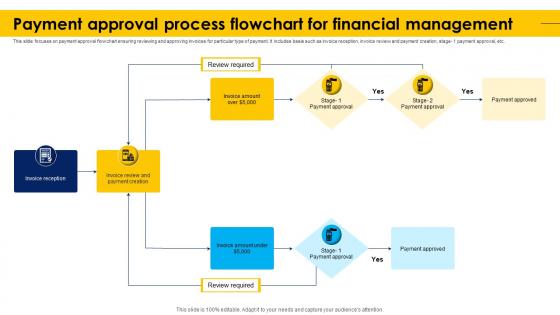
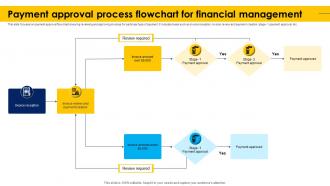
This slide focuses on payment approval flowchart ensuring reviewing and approving invoices for particular type of payment. It includes basis such as invoice reception, invoice review and payment creation, stage- 1 payment approval, etc.
People who downloaded this PowerPoint presentation also viewed the following :
Payment Approval Process Flowchart For Financial Management with all 9 slides:
Use our Payment Approval Process Flowchart For Financial Management to effectively help you save your valuable time. They are readymade to fit into any presentation structure.








FAQs for Payment Approval Process Flowchart
So basically you submit your request with all the docs, then it gets reviewed for completeness. The approval chain depends on the amount - your manager might handle small stuff, but bigger payments need multiple sign-offs. Finance usually gets involved too (kinda annoying but whatever). After approval it goes to accounts payable. Oh and seriously, check your paperwork first. I learned that the hard way - nothing's worse than those endless email chains asking for missing receipts or whatever. The whole thing's pretty straightforward once you know the drill.
Set clear dollar limits for who approves what, then automate the routing. Most delays? Invoices just sitting in people's inboxes forever. Been there. Automated reminders help tons. Try parallel approvals instead of the usual one-person-then-the-next chain. Finance and department heads can review at the same time, you know? Also double-check that your approval limits actually match how you spend money - I've seen companies where a $50 office supply order needs three signatures but somehow that made sense to someone. Map out where things get stuck first though. That's where you'll see the biggest improvement.
Honestly, automation is a game-changer for approval workflows. It cuts out all the manual back-and-forth that slows everything down. You can set rules so invoices automatically route to the right people based on dollar amounts or departments - no one has to babysit the process. Real-time tracking means you'll actually know where stuff is instead of sending those awkward "hey, did you see my request?" messages. Exception handling takes care of weird cases while routine approvals just flow through. I'd start by writing down your current steps first, then figure out which decisions happen over and over. Those are perfect for automating.
Ugh, the worst part is always managers being MIA when you need approvals. Missing paperwork is another huge pain. Plus you've got these bizarre approval loops that nobody even remembers creating - seriously, some of those rules are from like three company restructures ago and they're still haunting your system! Set up backup approvers so things don't just die when someone's on vacation. Make simple checklists for required docs. Actually go through and clean out those old workflows because they're probably slowing everything down. Oh, and bump up approval limits for vendors you trust. Those automated reminders are clutch too - nothing worse than stuff sitting there for weeks because people forgot.
Set up approval levels with dollar thresholds - different amounts need different people signing off. Don't let anyone control the whole payment process alone, that's asking for trouble. Nobody should approve their own expenses either (learned that one the hard way). Dual approval for big transactions is clutch. Keep audit trails for everything and require receipts/documentation. Regular reconciliations catch weird stuff before it becomes a problem. Basically you want multiple checkpoints so if someone messes up or tries something shady, it gets flagged before the money walks out the door.
Honestly, documentation is everything with payment approvals. Digital signatures and timestamps through your software are great, but always keep backup records too - approval amounts, reasons, the whole deal. Our last audit was brutal because we missed some of this stuff. Store everything centrally so other people can grab what they need. Short sentences work better than rambling explanations. Set up those automated reminders or approvals will just sit there forever (been there). Pick a process and don't deviate from it. Consistency saves your butt when auditors come knocking.
So it really depends on what industry you're dealing with. Healthcare has like 5 different approval layers because of all the compliance stuff - it's honestly kind of insane. Tech companies usually keep things pretty streamlined and digital. Financial services though? They're super rigid about everything. Multiple sign-offs, audit trails, the whole nine yards. Manufacturing focuses heavily on matching purchase orders, and retail moves quickly but they're watching those margins like hawks. Oh, and startups generally just wing it more than established companies. Understanding what specific pain points your industry has will save you so much frustration later.
Track your approval cycle time first - that's submission to final approval. Approval rates by department matter too, plus queue times at each stage (there's always someone who just... sits on these things). Exception rates show you which payments get bounced back. Cost per approval helps with the operational side. Honestly, most places mess up by not watching where the actual bottlenecks are. Set up a monthly dashboard - nothing fancy - so you can actually see patterns instead of just guessing what's broken.
Ugh, those silos are the worst! Breaking them down seriously speeds up payment approvals though. Getting finance, procurement, and operations to actually communicate means way less "wait, who signed off on this?" chaos. You'll see fewer approval bottlenecks when everyone uses the same workflows too. Honestly, people just need to know who to contact directly instead of that endless email ping-pong game. Set up regular department head meetings first - maybe weekly? Then create some kind of shared dashboard so everyone can spot where things are getting stuck. Makes life so much easier.
Honestly, I'd go with a dedicated AP tool like Bill.com or Stampli over trying to jury-rig your existing ERP. Sure, NetSuite can handle approvals, but the standalone tools just work better - way cleaner interfaces. Map out your current process first though. Then demo a few options that fit your workflow. You'll need multi-level approvals based on dollar amounts, mobile access for traveling managers, and solid integration with your accounting system. Bill.com's pretty popular for a reason, but Tipalti's solid too if you've got international stuff going on. Just don't overthink it - pick something and actually use it.
Look, having solid payment approvals totally changes your cash flow game. You can actually see money going out before it happens instead of scrambling after. Catches so many stupid mistakes too - duplicate payments, random expenses nobody approved, weird timing stuff. My favorite part? You can hold off on non-critical payments when you know that big client check is hitting next week. The trick is matching your approval setup to how your business actually works, not just whoever's around to rubber-stamp things. Honestly makes budgeting way less stressful.
Dude, staff training on payment stuff is seriously a game changer. Your team needs to know the basics - verify vendor info, double-check invoice amounts against POs, stick to authorization workflows. Otherwise people just make it up as they go, which gets messy fast. Short sentences work better than long training manuals nobody reads. Monthly refreshers keep everyone sharp, and those quick reference guides? Total lifesaver when someone's rushing through payments. Plus auditors love good documentation - trust me on that one. It's honestly worth the time investment upfront.
You'll want a solid escalation process that everyone actually knows exists. Start with clear approval levels - team lead handles smaller stuff, department head takes the bigger issues, finance director gets the real headaches. Set dollar limits for each tier so there's no confusion about who deals with what. Write everything down because people have terrible memories about what they agreed to! Timeline limits are crucial too, otherwise payments just sit there forever. Honestly, a simple flowchart works wonders - just make sure your whole team sees it and knows how to use it.
Oh man, this bit me so hard when I started working with global teams! Some cultures like Japan need everything to go through like 5 different people before anyone signs off. Super consensus-heavy. Then you've got other places where one person just makes the call quickly. Documentation expectations are all over the map too - what feels urgent to us might not even register elsewhere. Our APAC payments were constantly stuck because I didn't get this at first. Now I just map out how each region actually makes decisions and build different approval paths instead of cramming everyone into the same process.
Honestly, having a solid payment process is a game changer with vendors. They'll know exactly when to expect their money, which means no more awkward phone calls asking where their check is. Better terms, faster service, priority treatment - vendors totally play favorites with clients who pay predictably. I learned this the hard way at my last job. Short version: set clear approval steps, tell them your timeline upfront, then actually stick to it. Sounds obvious but you'd be surprised how many companies mess this up. Your vendors will go from dreading your calls to actually wanting to work with you.
-
Based on my personal experience, I would recommend other people to subscribe to SlideTeam. No one can be disappointed here!
-
SlideTeam is very efficient when it comes to saving time. I am happy that I chose them for my presentation.