

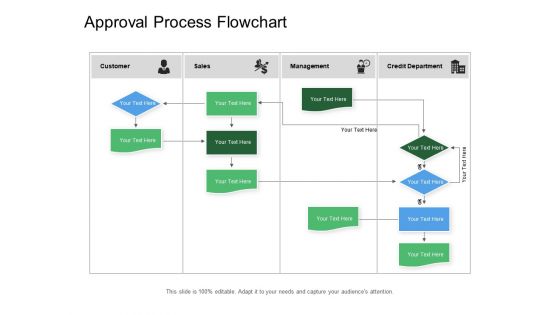
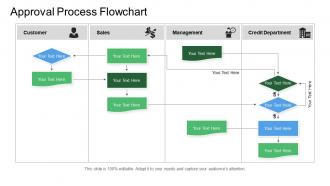
Approval process flowchart





Try Before you Buy Download Free Sample Product
 Impress Your
 Audience
 100%
100% Editable
 Save Hours
 of Time


Really wow them at your next presentation. Approval Process Flowchart in a range of modern designs are available.
People who downloaded this PowerPoint presentation also viewed the following :
Approval process flowchart with all 5 slides:
Interpose between groups with our Approval Process Flowchart. Bring an end to angry exchanges.

FAQs for
Start with clear entry/exit points and map out every decision branch - yes/no stuff. Don't forget the rejection paths because honestly, that's where everything falls apart. You need specific people assigned to each approval stage, not just "management reviews it" or whatever. Show which approvals can happen at the same time vs. ones that have to wait - makes a huge difference for timing. Oh, and actually walk through it with your team using a real example. I've seen too many flowcharts that look perfect on paper but completely miss how things actually work. The devil's really in those details.
Honestly, approval flowcharts are lifesavers. You won't be texting random people asking "wait, who signs off on this?" anymore. They show exactly who needs to approve what and in what order – no more emails ping-ponging around forever. The visual part is clutch because you can actually see where things get stuck. Plus managers can spot which steps are totally pointless (there are always a few). I'd start with whatever process annoys you most. You'll probably find some obvious fixes right away. Way better than the current chaos, trust me.
Honestly, I'd go with Lucidchart or Visio for approval flowcharts - they're built for handling all those branching decision points. Draw.io is decent too and completely free (your finance team will thank you). Miro's fun if everyone loves collaborating on a digital whiteboard, but things can get pretty chaotic with complex processes. Whatever you do, don't torture yourself with PowerPoint for anything detailed. Trust me on this one. Lucidchart has some solid approval workflow templates you can just customize instead of starting from scratch.
Honestly, it's pretty easy once you know what to look for. Check where your flowchart shows delays piling up or tons of approval steps stacked together. Decision points that branch into like 20 different paths? Those are total mess-makers. Also watch for loops where stuff keeps cycling back to the same person - I've seen processes where one manager has to sign off on everything three separate times, which is just ridiculous. The cool thing about flowcharts is you can literally see where work gets stuck versus where it moves fast. Once you've spotted these problem areas, focus on redesigning just those sections to cut down wait times.
Scope creep is your biggest enemy here. Stakeholders love throwing in "just one more approval step" until your neat process looks like a disaster. Been down that road way too many times! Exception handling is another headache - what if someone's on vacation or quits? Start with your core approvers and build out slowly. Don't try mapping every weird scenario right away or you'll go insane. The trick is finding that sweet spot between thorough and actually workable. Oh, and good luck getting everyone to agree on decisions - that's always fun.
Honestly, flowcharts are game-changers for approval stuff. Nobody can pretend they don't know whose turn it is anymore - everything's right there visually. When things get stuck (and they always do), you can spot the holdup immediately instead of playing detective. Your team stops bugging you with "where are we on this?" because they can see the progress themselves. I know it sounds boring, but having that clear chain of who signs what actually saves so much headache. Plus people can't randomly skip steps when it's all mapped out.
You absolutely have to get stakeholders involved - they're the ones who know what actually happens vs what's supposed to happen. Talk to them individually first to map out the real approval chain. Trust me, there's always some random step that everyone does but nobody wrote down anywhere. It's honestly wild how many "unofficial" processes exist. After those interviews, bring everyone together to review your draft flowchart. This way they'll actually buy into using it instead of just nodding politely then ignoring it completely.
Map your compliance checkpoints right into the flowchart as required stops - nobody gets to skip them. Have your compliance people or experts sign off at specific review points before anything moves ahead. Honestly, teams that try adding compliance later always regret it. Document everything at each stage, set up auto-escalation when things go sideways, and make it crystal clear who's responsible for each decision. Oh, and build in your documentation requirements too - you'll thank yourself later. The whole point is making compliance feel natural, not like some annoying extra step.
So basically, simple approval flows have like one or two steps - your boss says yes, you're good to go. Complex ones? Total nightmare with multiple people, different paths depending on the amount or department, stuff happening at the same time. I learned this the hard way with our budget process last year, ugh. Expense reports are simple, but something like project approvals gets messy fast. You've got different routes based on risk levels and all that. My advice? Don't overcomplicate things from the start. Build simple first, then add the crazy stuff only if you actually need it.
Talk to the people actually using it first - they know exactly where stuff breaks down. Then map out every single step, including those ridiculous email chains that somehow multiply overnight. Pull whatever documentation exists (if any lol) and check system logs for timing patterns. I'd honestly recommend shadowing someone through the whole thing at least once. Sounds boring but you'll spot things they don't even realize they're doing. After gathering all that mess, the bottlenecks become pretty obvious and your flowchart will basically write itself.
Diamonds for decisions, rectangles for actions - that's your basic setup. Go top to bottom with your arrows and color-code everything (green = yes, red = no, yellow = waiting). I'm big on swimlanes because nobody wants to play "whose turn is it anyway?" Text should be short and punchy. Oh, and pick a font that doesn't require a magnifying glass. Here's the real test though - grab someone who's never seen this process and walk them through it. If they look confused after 30 seconds, you need to cut more stuff out. Trust me on this one.
Honestly, you gotta measure this stuff or you'll never know if it actually worked. Track how long approvals take before and after - that's your big one. Check where things get stuck and completion rates too. I'd totally survey people about whether they're less annoyed with the whole process now. Are requests coming back for corrections as much? The monthly review thing is clutch for spotting patterns. Really though, the main question is simple: are decisions happening faster and more consistently? If yes, you nailed it.
Talk to the people who actually DO the work, not just the higher-ups who signed off on it. Look for the usual suspects - bottlenecks, confusing decision points, steps everyone skips anyway. Group similar complaints together or you'll go crazy trying to fix every little thing. Prioritize changes that either make things faster or less confusing. Run a pilot with a few people before you unleash it on everyone (learned that one the hard way). And yeah, update your documentation after - otherwise people will keep doing it the old way forever.
Honestly, just digitize the whole thing and make it async-friendly. Map out your current process first - you'll probably find half the steps don't even need to happen in order. Tools like Slack workflows or Monday.com work great, but even a shared Google Sheet where people can update status works. The main thing is visibility so nobody has to chase people down across time zones (ugh). Set clear deadlines for each stage with auto-reminders. Oh, and definitely have backup approvers because your main person will inevitably be offline when something's urgent.
Track your cycle time from start to finish first - that's the big one. Then look at approval rates and where things get stuck most often. Revisions are usually the worst bottleneck honestly, drives everyone crazy. Monitor how many people need to sign off on each request and how long each approver takes. Oh, and definitely track escalations - those tell you when your process is breaking down. I'd throw together a weekly dashboard so you can catch issues early. Way easier than dealing with angry stakeholders later asking why everything takes forever.
-
Wonderful templates design to use in business meetings.
-
Amazing product with appealing content and design.