


Approval process flowchart good ppt example




Try Before you Buy Download Free Sample Product
 Impress Your
 Audience
 100%
100% Editable
 Save Hours
 of Time


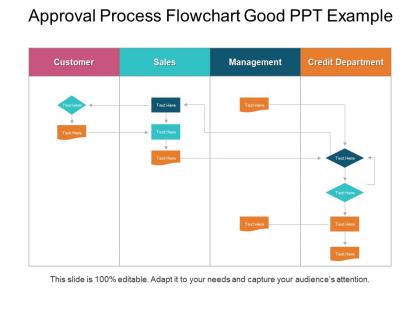
Describe the whole approval segment prevailing for your business with our approval process flowchart PPT image. It will help in representing the level of authoritative controls for your business functions. You can even define the roles and responsibilities of each approving authority with this PPT layout diagram. Use this approval flowchart Presentation model to design the process of approving any of your essential business decisions. Thus, the same can be used for various concepts such as for investment approvals, for Purchase order approval process, for approving any business payment, for initializing any business function and many more. Design the process of approving your business sales, purchases and other business operations with this informational planning process PowerPoint diagram. Therefore, prepare an interactive business model with the help of this PPT design diagram. Therefore, to prepare a ready to use authority matrix for your entity than simply click on the download link and start working over this professional PPT diagram. Flaunt your style with our Approval Process Flowchart Good Ppt Example. Go through your presentation with customary elan.
People who downloaded this PowerPoint presentation also viewed the following :
Approval process flowchart good ppt example with all 5 slides:
Be competitive with our Approval Process Flowchart Good Ppt Example. You will be counted among the best.

FAQs for Approval process flowchart
Start by mapping what you're actually doing now - trust me, the real process is probably messier than what's written down. Clear start/end points are key. Use decision diamonds for yes/no branches and spell out who approves what at each level. Define your approval criteria upfront (saves so much arguing later). Set realistic timeframes for each stage. What happens when something gets rejected? Build in escalation paths too, because approvals always get stuck somewhere. The flow should go request → approval without those weird loops that make everyone confused. I've definitely seen my share of those!
Honestly, flowcharts are a game changer for this stuff. No more "wait who handles this next?" chaos in every single thread. Everyone can literally see where requests go and who's doing what. Timeline expectations become obvious too, which is clutch. New people get up to speed way faster since it's all visual - way better than trying to explain your process through scattered messages. I'd stick it somewhere accessible, like pinned in your main project channel or whatever. You'll probably save yourself from answering the same basic questions fifty times a week.
Honestly, the worst thing you can do is overcomplicate it. Too many decision points and everyone's eyes glaze over instantly. Keep approval levels simple - maybe 2-3 max? And for the love of all that's holy, don't make everything go through one person or they'll hate you forever. You need clear criteria at each step, plus what happens if someone ghosts you or says no. Timeline expectations help too. Oh, and definitely test it out first! I learned this the hard way when I created this weird approval loop that nobody could escape from. Sounds dramatic but it was actually pretty embarrassing.
Honestly, it's all about who's gonna read it. Compliance docs? Go super detailed with every little step. But executives just want the big picture stuff - don't bog them down. I usually start broad, then think "would my mom understand this process?" Sounds dumb but it works. You've hit the sweet spot when people can actually follow it without bugging you every five minutes asking what something means. Focus on the main approval points first. Then add details wherever you know people always get lost - those are your problem areas.
Honestly, I'd just go with Lucidchart - their approval workflow templates are pretty solid and the interface doesn't make you want to pull your hair out. Draw.io is decent if you're trying to save money (it's free), but sometimes you get what you pay for, you know? Your company might already have Visio lying around, though it feels kind of dated compared to everything else out there. All three will handle your decision points and routing stuff just fine. I'd probably test Lucidchart's free trial first. Worst case, you're out like 15 minutes of setup time.
First thing - figure out who actually makes decisions in your approval chain. Department heads, legal, finance, the actual users. Anyone who can kill your project or slow it down. Honestly, I always do this over coffee with a colleague because you'll definitely forget someone obvious. Map each person to where they fit in your flowchart. Are they approving stuff, just reviewing, or do they need a heads up? Don't forget their contact details and how long they usually take to respond. Otherwise your fancy flowchart becomes totally useless when you're sitting there waiting for Karen from accounting to get back from vacation.
Oh man, you definitely need feedback once you roll that flowchart out. Trust me, your first version won't survive real users - I've literally never seen one that does! People will spot bottlenecks you missed, confusing steps, the whole deal. Like they'll tell you "this approval actually takes three days, not one" or point out you need backup approver routes. The trick is setting up regular check-ins and being ready to change things. Maybe schedule a review after the first month? That's when the real pain points usually surface. It's honestly kind of fascinating how different reality is from what you plan on paper.
Honestly, color coding saves lives here - different colors for each approval stage so people don't get lost. Icons work great for decision points too. I'd add swim lanes showing who does what (super helpful when Karen from accounting claims it's not her job). Bold arrows are key because nobody wants to squint at tiny lines. Consistent colors throughout so it actually makes sense. The whole point? Someone should glance at it and get the process without having to decode some messy spaghetti diagram. Trust me, I've seen flowcharts that look like a toddler drew them.
Oh man, healthcare and pharma are huge on these things - all those regulations mean they can't mess around. Financial services too, obviously. Manufacturing uses them for quality checks, and don't get me started on government agencies (they flowchart everything, I swear). Software teams love them for releases. Honestly, if you're dealing with multiple people signing off on stuff or have compliance headaches, flowcharts are a lifesaver. They really help spot where things get stuck in the approval pipeline.
Quarterly reviews are a good baseline, but honestly? Do it whenever people start complaining or things get stuck. Staff changes, new rules, big org shifts - all reasons to take another look right away. Why wait three months if it's obviously not working? The people actually using your process daily will catch problems you totally miss from your office. Set those calendar reminders for every quarter, but also - and this might sound obvious - actually ask the team what's driving them crazy. Sometimes the flowchart looks perfect on paper but completely falls apart in real life.
Honestly, standardized flowchart templates are such a game changer. You don't have to start from scratch every single time, which saves me hours when I'm swamped with different projects. Everyone on your team will follow the same visual setup and decision points - makes it so much clearer for people to actually get what's happening. I've found you can catch workflow problems way faster too when everything's mapped out consistently. Oh, and stakeholders love it because they're not constantly learning new formats. Start basic then tweak it for whatever you need.
So you know how flowcharts just sit there looking pretty? Automation actually makes them DO stuff. Set up rules that trigger actions automatically - expenses under $500 get approved instantly, anything sitting for 48 hours gets bumped upstairs. Most tools have that drag-and-drop thing going on now (way better than those endless email threads we all hate). Here's what works: sketch out your current manual mess first, then figure out what can run itself vs. what actually needs a human brain. Some decisions are just too nuanced for robots, you know?
Oh totally! Flowcharts are honestly amazing for this stuff. When you map everything out, the problem spots just jump out at you - like that manager who's never at their desk or three people all doing the same review (why??). It gets pretty obvious where things are getting jammed up. Then you can actually fix it. Set up parallel approvals, add delegation rules, cut the stupid redundant steps. I'd probably start with whatever process is driving you the most crazy right now - you'll see results faster and it's way more satisfying.
Start with cycle time - that's your bread and butter metric. How long do requests actually take vs what you promised? Track approval rates at each stage too, because that'll show you where stuff gets stuck or rejected all the time. The revision loops are huge - honestly, if people keep having to redo things, your process probably sucks. Don't forget completion rates and how fast stakeholders respond. Oh, and track bypasses because people will absolutely find workarounds when your system's annoying. Run this for a month to see where you stand, then fix the worst parts first.
Dude, you absolutely have to train people properly or your flowchart becomes wall decoration. Walk them through every step and explain why each approval matters. Show them what goes wrong when someone cuts corners - trust me, it gets messy fast. Make sure they actually know how to use whatever software or tools are involved. One training session won't cut it though, people's brains are like sieves. I'd do quick refreshers every few months and maybe throw together some cheat sheets they can keep handy.
-
Awesomely designed templates, Easy to understand.
-
Perfect template with attractive color combination.