

Process documentation flow chart ppt background




Try Before you Buy Download Free Sample Product
 Impress Your
 Audience
 100%
100% Editable
 Save Hours
 of Time


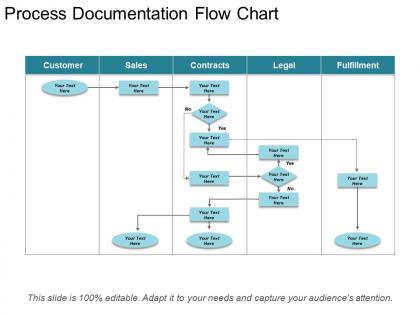
Outline the exact steps needed to carry out in a process with our process documentation flow chart PPT background. This presentation layout of documenting workflow processes has been created by our team of professional team members and allows you to showcase the activities that need to be done to get the process from start to finish. With the help of this process flow diagram PPT template, you can showcase the benefits of implementing the flow such as uncovering inefficient processes, to encourage the staff members to proactively seek improvements and to create consistency in the flow. This PowerPoint slide of process flow chart you can present how business works from a top to end, and also helps in identifying its potential flaws, weaknesses, and areas for improvement. Our process flow documentation PPT layout can be used to keep track of the process in real time so that you can see who is responsible for what and what the process timeline. Our Process Documentation Flow Chart Ppt Background are great for brand definition. Give them a clear idea of your brilliance.
People who downloaded this PowerPoint presentation also viewed the following :
Process documentation flow chart ppt background with all 5 slides:
Your ideas generate a huge impact due to our Process Documentation Flow Chart Ppt Background. You will build an impressive image.




FAQs for Process documentation flow
Honestly, you NEED to document your processes - it's like insurance for your project. New people can actually jump in without bugging you every five minutes. Also saves you when you're staring at something you did weeks ago like "wait, why did I do it this way?" Documentation keeps everything consistent too. No more weird handoffs where someone's like "um, Sarah usually handles this but she's out sick." I always tell people to start small though - just grab your most important stuff first and write down the main steps. You don't need some fancy system right away.
Dude, process docs are literally a game changer. No more "wait, how did Sarah do that thing again?" when she's on vacation. New hires can actually figure stuff out without bugging everyone every five minutes - which honestly saves your sanity more than theirs. Your whole team stays on the same page instead of everyone doing their own version of things. The best part? You'll stop answering the same basic questions over and over. I'd start with whatever process people ask about most - that's probably your biggest pain point right now.
Start with your biggest pain points first - those are the ones that'll actually get used. Write down the purpose upfront, then map out each step with who does what. That's honestly where most processes fall apart, when nobody knows whose job it is. Include decision points and exceptions too. Screenshots are clutch for anything complicated. Oh, and document WHY you do certain steps, not just what to do - when someone's panicking at 3am they need context to figure out what went wrong. Keep the language simple because future you will be grateful you didn't overcomplicate it.
So first thing - figure out what would totally screw you over if someone quit tomorrow. Customer-facing stuff, compliance things, you know the drill. Then hunt for wherever your team keeps asking the same questions over and over (dead giveaway right there). Honestly, just ask people what they're struggling with - they'll straight up tell you where the mess is. Focus on the complex stuff that happens a lot or has big consequences when it goes sideways. Oh, and anything where different people are getting wildly different results doing the "same" process.
Oh man, biggest mistakes? Writing way too much detail - nobody's reading that novel. Then there's the opposite problem where it's so vague people are just lost. Also seen tons of docs that throw around acronyms like everyone's supposed to magically know what they mean. Here's the thing though - actually talk to the people doing the work when you write it up. They know all the weird quirks and shortcuts. And for the love of god, update the damn things! Set a quarterly reminder or something. Test it out on someone new first. Short sentences work better than rambling paragraphs anyway.
Dude, visuals are a game-changer for process docs. People absorb images way faster than text blocks. Flowcharts work great for decision points, screenshots help with step-by-step stuff. Ever tried following a 20-step text-only guide? Absolute nightmare. Videos are clutch for tricky tasks, and simple icons can flag warnings or tips. Just don't throw random graphics everywhere - match the visual to what you're explaining. Oh, and start with your most confusing processes first. That's where you'll see the biggest impact. Trust me on this one.
Dude, process docs are a lifesaver for training new people. Your fresh hires get the full picture instead of whatever scattered info their trainer feels like sharing that day. I'd start with documenting the stuff everyone does constantly - that's what newbies trip up on most. Having clear steps written down makes people way less anxious too. Honestly, it'll save your sanity because you won't get pinged with the same basic questions constantly. Create some kind of structured onboarding around it and give them something to reference when they're lost.
Don't treat documentation updates like some separate chore you'll get to later. Instead, bake review cycles right into how you already work. Get the people who actually use each process to own keeping it current - they spot outdated stuff way faster than anyone else. Yeah, schedule quarterly reviews, but honestly? The real win is updating docs the moment someone finds an issue. Skip the whole "we'll fix this later" pile - that never works. Create templates that make updates super quick, and use tools where everyone can jump in and edit together. Trust me, it saves so much headache down the road.
Honestly, just start with whatever your team's already using - Google Docs is totally fine if you don't want to overthink it. Notion and Confluence are solid for when multiple people need to jump in and edit stuff together. I'm personally a fan of visual tools like Lucidchart or Miro if you're doing flowcharts - way easier to follow than walls of text. Process Street's pretty cool for the step-by-step workflow thing, though I've only messed around with it briefly. Nintex does similar stuff but feels more enterprise-y. You can always upgrade later once you figure out what's actually missing.
Look, process documentation is basically your get-out-of-jail-free card when auditors show up. Having detailed docs proves you're not just making things up as you go along - which trust me, never works out. It shows regulators that you've got real procedures and controls actually doing their job. Your team benefits too since everyone knows exactly what steps they should be following. Honestly, I'd start with whatever processes have the most regulations around them first. Those are gonna be your biggest headache during audits anyway.
Getting people to actually follow processes? You've gotta make them want to, not just have to. Let your team help create the documentation - they'll buy in way more if they built it. Show them the real benefits too, like how it prevents those 3am fire drill situations we all hate. Celebrate when someone does it right! I swear most teams forget this part. Oh and make sure it's ridiculously easy to find and use - if it's buried somewhere, forget it. The biggest thing though? You have to follow your own rules consistently or nobody else will.
So here's the thing - you can't improve what you can't see clearly. Writing down your processes shows you exactly where things get stuck or take way too long. Think of it like... I dunno, trying to fix a recipe without knowing what you actually did last time. Once you've got it documented, testing changes becomes so much easier since you know your starting point. Honestly, most teams overthink this part. Just pick one process that's driving everyone nuts and write it down. Then spot the three biggest problems and fix those first. The bottlenecks will jump out at you once it's all laid out.
Honestly, documenting your processes is a game changer for customer experience. Your team will stop giving different answers to the same questions - you know how frustrating that is as a customer. Fast issue resolution becomes automatic when everyone follows the same steps. I learned this the hard way at my last job where we just made stuff up as we went along. New hires can actually help customers properly from day one instead of fumbling around for weeks. Start with whatever processes your customers see most. Trust me, they'll notice the difference immediately.
Okay so process documentation is literally the foundation of good knowledge management. You're building a searchable database that saves all the important stuff before people quit and take their knowledge with them. Here's how I think about it - each process doc is like a puzzle piece, and knowledge management is the whole puzzle put together. Critical processes first, then expand from there. Without solid documentation, you'll just end up with fancy digital storage full of outdated garbage that nobody uses. Trust me on this one.
Honestly, just ask your users directly - they'll tell you what sucks. Throw up some "helpful?" buttons on each page or send out quick feedback forms. I swear, watching someone struggle through your instructions teaches you way more than sitting in some boring review meeting ever will. Oh, and track the questions people keep asking over and over. That's your roadmap right there. Make it super easy for folks to complain (they love doing that anyway) then actually fix the stuff they're griping about. Simple feedback loops beat fancy processes every time.
-
Great designs, Easily Editable.
-
Out of the box and creative design.