

Process documentation template ppt example file




Try Before you Buy Download Free Sample Product
 Impress Your
 Audience
 100%
100% Editable
 Save Hours
 of Time


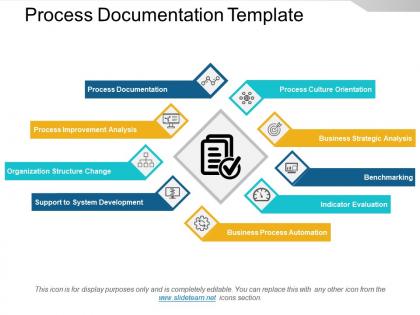
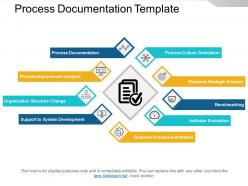
Outline the fundamental steps necessary to complete process with our process documentation template PPT example file. This presentation layout of business process workflow has been created by our team of professional designers and helps in gaining insight into the inner workings of the company. With the help of this business process documentation PPT template, you can identify the current state of a process to know how you can improve it when business is going through the constantly changing environment. This template of workflow management helps you to create the roadmap for your organization, where you can rethink about how to carry out a business process which may include policies, checklists, tutorials, screenshots and process maps. Use this workflow diagram PowerPoint template to improve the processes, train the employees and mitigate risks and maintain operational consistency. This layout can also be used to showcase a reduction in time spent on tasks, eliminate flaws while Improve overall quality and efficiency. Check out our BPM workflow template. Our Process Documentation Template Ppt Example File will fill them with compassion. They will begin to feel charitable.
People who downloaded this PowerPoint presentation also viewed the following :
Process documentation template ppt example file with all 5 slides:
Take a leap off the starting blocks with our Process Documentation Template Ppt Example File. They will put you ahead of the competition in quick time.
FAQs for Process documentation template
Start with the purpose and scope - people need to know why they're doing this stuff. Map out each step with inputs, outputs, and who owns what. Decision points are crucial too, plus any tools or systems you'll need (seriously, everyone forgets those). Add sections for exceptions and approval workflows. Success metrics help people know they're not screwing up. Oh, and definitely include revision history because processes change constantly - more than any of us want to deal with, honestly. These basics will get you started, then just tweak based on what you actually need.
Honestly, templates are a game-changer for this stuff. When everyone uses the same format, you're not constantly hunting around for basic info or dealing with that one person who writes everything backwards. New people can actually figure out what's going on without bugging you every five minutes. Updates become way less painful too - like, you know exactly which section covers troubleshooting instead of scrolling through someone's novel-length explanation. I'd start basic and let people tweak it. Trust me, once your team gets used to it, handoffs will actually make sense for once.
Honestly, the worst thing you can do is go too detailed or way too generic. Like, I've watched teams create these insanely complex templates that sit unused for months because nobody wants to deal with them. Super frustrating. Keep it simple and focus on what actually matters. Don't write it just from your perspective either - test it with real people first. What clicks for you might totally confuse someone else. Also leave room for exceptions because let's be real, nothing ever goes exactly according to plan. Short version: useful beats perfect every time.
Honestly, adding visuals to your process docs is a total game changer. People absorb flowcharts and screenshots way faster than reading through paragraphs - I've seen it firsthand. Decision points become super clear with a simple diagram. Nobody wants to hunt through text walls to find which button to click, you know? Screenshots save everyone time and confusion. Your team can scan docs quickly and jump straight to whatever step they need. Even something basic like a flowchart for your messiest process will make a huge difference. Trust me, once you add one visual element, you'll wonder why you didn't do it sooner.
Think of SOPs as your step-by-step playbook for getting stuff done. They break down exactly what to do, which tools you need, and what the end result should look like. Without them, you're basically winging it every time - not ideal when you need consistent results. I'd start with whatever processes you do most often or the ones that would cause chaos if someone screwed them up. Your process docs need dedicated SOP sections because that's where the rubber meets the road. High-level maps are nice, but SOPs are what actually get people moving in the right direction.
So first figure out what's actually critical for your industry, then tweak the template from there. Healthcare needs all those patient privacy protocols and regulatory stuff. Manufacturing? Safety procedures and quality control are huge. Tech companies love their version control and testing phases - though honestly they make it way more complicated than it needs to be sometimes. Financial services can't skip audit trails and risk assessments. Just start by listing out your industry's non-negotiable compliance requirements. Then work those into whatever standard template structure you're using. It's really about catching what makes your field different and building that in.
Build review cycles right into your workflow - quarterly at minimum, but monthly's better for anything critical. Make sure someone actually owns each document, otherwise it just becomes dead weight sitting around forever. The biggest mistake? People treat documentation like a one-and-done thing. Set up automatic reminders and bake updates into your regular routine, not just when someone new starts. Oh, and create an easy way for users to report outdated stuff when they spot it. Start small with one process, get the rhythm down, then expand from there.
So it really depends on who's gonna use it and how complicated the process is. New people or tricky procedures? Yeah, you'll want step-by-step everything. But experienced folks doing basic stuff can handle bullet points just fine. I always do this "hit by a bus" test - sounds morbid but honestly, could someone else figure this out without you? Also think about how much the process changes. If you're updating it constantly, maybe don't go crazy with details or you'll hate your life maintaining it. Test it with a couple people first - they'll show you exactly where it breaks down.
So workflow templates are for stuff you do over and over - like how someone gets approved for time off or new employee setup. Project templates? Totally different beast. Those are for one-off things with deadlines and budgets. I still get confused sometimes tbh! But think of it this way: workflows answer "what's our process for X?" Projects are more "how do we finish Y by March?" Workflow docs need those swimlane diagrams showing who does what. Project ones focus on timelines and deliverables. Pick based on whether it's something you'll repeat or just tackle once.
Dude, digital process docs will save your sanity. Workflow software like Lucidchart makes visual templates super easy. Your team can edit together without those annoying email chains back and forth. Version control tracks every change automatically - no more "wait, which file is the latest?" moments. Most tools sync with whatever systems you're already using, so data just flows in. Oh, and automated reminders actually work (unlike hoping people remember stuff). I started with Notion because it's pretty intuitive. Seriously though, going back to paper feels prehistoric once you make the switch.
Honestly, just sit down with people and walk through the docs while they're actually doing the work. Way more effective than dumping a manual on someone's desk. Quick screen recordings are gold too - I swear a 3-minute video saves everyone hours of confusion later. Check in regularly to see what's not making sense. People won't volunteer that info otherwise. Oh, and definitely assign someone to own the documentation - otherwise it'll get outdated fast and you're back to square one. The interactive approach really works though. Nobody learns from just reading anymore.
Honestly, start by checking if people are actually using the thing - like, are they filling out every section or just cherry-picking the easy parts? Quality matters too - is the documentation actually helping or just creating busywork? About 30 days in, just ask people directly. They'll be brutally honest if something sucks or doesn't make sense. Also watch for whether you're getting fewer "how do I do this?" questions since you launched it. Quick survey works, but I've found casual conversations give you the real dirt on what's working and what isn't.
Templates are honestly a lifesaver for keeping docs consistent. Otherwise you'll miss stuff that someone else desperately needs later. Plus when everyone uses the same format, finding info becomes so much faster - and training new people is way less painful. I've seen too many random docs that read like novels where the good stuff is buried somewhere deep. Templates actually make you think about edge cases and dependencies beforehand instead of realizing them at 2am. Oh, and don't overthink it - start basic and adjust based on what your team actually uses.
Build feedback right into your template with sections for comments, version tracking, and lessons learned. I always throw a simple feedback box at the end - people actually use it when it's not buried somewhere weird. Schedule quarterly reviews where you dig through all the collected input and fix what's broken. The trick is making feedback part of the actual workflow instead of something you remember later (spoiler: you won't remember). Get your team to suggest improvements based on real experience using the process. Your docs get way better over time, honestly makes such a difference.
So there's a bunch of stuff you can track to see if your docs are actually working. Time-to-completion for tasks is huge - plus error rates and how long it takes new people to get up to speed. Search frequency is honestly my favorite metric because it shows people are genuinely using what you built, not just ignoring it. Also track compliance rates and get feedback scores from users. Oh, and don't go crazy trying to measure everything at once. Pick like 3-4 metrics that match your biggest headaches and focus on those first. Way more manageable that way.
-
Very unique and reliable designs.
-
Excellent work done on template design and graphics.