

Process workflow example ppt sample download




Try Before you Buy Download Free Sample Product
 Impress Your
 Audience
 100%
100% Editable
 Save Hours
 of Time


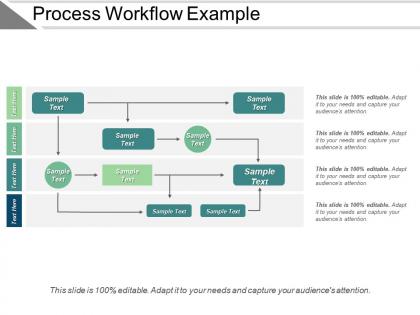
Pick this process workflow example PPT sample download PowerPoint shape to create a business presentation on the concept that how the smooth workflow can be attained among team members, employees and other staff members of your organization in order to achieve beneficial results. The business process modelling PowerPoint diagram has been designed to be used in the operations management as well in which people uses various methods to discover, model, analyze, measure, improve, optimize, automate the business processes and focus on improving the corporate performance by managing business processes. The integrated components of the workflow management system PowerPoint presentation is easy to with changes as the PPT can be structured or unstructured and used repeatedly as and when required. Furthermore, the framework of the template assist the user to promote the adoption of a process approach when developing, implementing and improving the effectiveness of a quality management system to enhance customer satisfaction by meeting customer requirements. Leave the groundwork to our Process Workflow Example Ppt Sample Download. They will assemble all the desired data.
People who downloaded this PowerPoint presentation also viewed the following :
Process workflow example ppt sample download with all 5 slides:
Our Process Workflow Example Ppt Sample Download believe in give and take. They give their all and you take the credit.
FAQs for Process workflow example
You'll want clear start and end points, plus each step mapped out logically. Add decision points with yes/no paths and assign owners to tasks. Feedback loops are clutch - nobody wants stuff vanishing into the void. Show what triggers each next step and build in approval gates or quality checks. Timing estimates help too, along with escalation paths for when things inevitably get stuck. Honestly, just grab some paper first and map your current process before getting fancy with tools. Way easier to catch gaps and redundant steps that way.
Honestly, flowcharts are lifesavers for messy projects. Your team can actually see what's happening instead of digging through endless emails or whatever. Everyone knows their role and when stuff needs to get done. The visual thing really works - you'll catch problems before they blow up. New people joining halfway through? They get it immediately just from looking at the chart. I always tell people to start with their most chaotic process first. You'll be like "oh wow, no wonder this takes forever." Trust me, once you see those bottlenecks mapped out visually, you can't unsee them.
Honestly, I'd just start with whatever your team already uses. Lucidchart and Visio are solid but kinda overkill sometimes. Miro's become my go-to lately - super easy for everyone to jump in and collaborate. Figma works too if you're already in there for design stuff. For basic workflows? Draw.io is free and gets the job done. Google Drawings too, though it's pretty bare bones. The real trick is finding something that won't make people groan when they have to update it. Nothing worse than a fancy tool that sits there getting dusty because it's too much of a pain to use.
So automation just takes all those boring, repetitive tasks off your plate. Files get moved automatically, notifications send themselves, status reports update without you touching anything. Game changer for real. You'll mess up way less too since there's no manual typing or forgetting steps - been there, done that. Your team gets to work on stuff that actually matters instead of mindless busy work. Oh, and start by looking at what you do exactly the same way every time. Those repetitive processes? Perfect for automating first.
Honestly, good collaboration makes or breaks everything. You'll catch problems way earlier when people actually talk about handoffs and what they need from each other. I've watched so many projects blow up because everyone just assumed the other person knew what was going on - total disaster. Map out where your work connects with other people's stuff first. Then set up regular times to check in and course-correct. Shared docs help too, but the real magic happens when you're not working in your own little bubble. Trust me on this one.
Start by mapping your process and timing each step - seriously, this part's crucial. Ask your team where they're getting stuck because they'll tell you exactly what's broken. Look for work piling up or sitting around waiting. Those handoffs between departments? Total bottleneck traps every time. Measure your actual cycle times against what you expected. Check which steps consistently run long, mess up a lot, or create those annoying queues. I'd probably tackle whatever's hurting your biggest goals first, but honestly depends on how much bandwidth you have.
Biggest thing I've seen? People go way too complex from day one. Also - and this might sound obvious but everyone forgets - talk to the people who'll actually use it first. Seven approval layers for office supplies is just insane, trust me on that one. Real life gets messy so plan for weird edge cases your "perfect" system won't handle. Map what you're doing now before designing something new. Test it small first. Don't roll out company-wide and pray it works. Keep it simple, then build from there.
So feedback loops are clutch because you can spot issues early instead of discovering everything's broken at the end. Picture GPS - it reroutes when there's traffic rather than letting you drive into a dead end, right? You're making tiny adjustments based on actual data as you go. Way smarter than just crossing your fingers and hoping for the best. Honestly, most people skip this step and then wonder why their projects go sideways. Just pick 2-3 spots in whatever you're working on where you can pause and check if things are on track.
Honestly, just track 3-4 things max or you'll go crazy with data. Cycle time is huge - how long stuff actually takes start to finish. Then watch your error rates and see if people are actually working or just sitting around waiting. Oh, and find those annoying bottlenecks where everything gets jammed up. If customers are involved, their satisfaction scores matter too obviously. Here's what I'd do: measure everything for like two weeks to get your baseline, make some changes, then compare. Otherwise you won't know if you're actually improving things or just rearranging deck chairs.
Honestly, templates are a game changer for this stuff. Instead of reading through some boring 10-step list, you can actually *see* how everything connects. Who does what, where things might get stuck - it's all right there visually. Your team will pick it up so much faster too. I've found that once everyone uses the same template format, there's way less confusion about processes. You'll catch weird gaps or duplicate work almost immediately when it's mapped out. Oh and flowcharts work great for this - nothing fancy needed. Trust me, the difference is night and day.
Look at healthcare intake - they nail the handoffs and documentation checks. Assembly lines are solid too since they've got those quality gates figured out. Banks do complex decision trees really well with loan approvals, lots of moving parts there. Even McDonald's has their order system down to a science, which sounds dumb but honestly it works. I'd focus on industries where mistakes are expensive - they usually have the best checkpoint systems. Just pick something that matches your complexity level and steal their process. The error prevention stuff translates pretty well across different types of work.
Honestly, don't skip the training part - I've watched so many rollouts crash and burn because of it. People will just go back to doing things the old way if they're confused or don't get why you're changing stuff. Make sure they understand both how to do the new process AND why it matters. Oh, and definitely do hands-on practice with real examples they'll actually encounter - way better than boring presentations. The upfront time investment is worth it because you won't be constantly putting out fires later. Start training before you launch everything.
Honestly, the trick is bringing people into the process from the start instead of springing changes on them later. Nobody likes being blindsided at work - I learned that the hard way once. Map out who's actually impacted and have real conversations with them first. Get your key influencers helping design solutions and test stuff out. People need to feel like partners, not like things are just happening to them. Keep everyone updated on progress too. Oh, and answer the obvious question upfront: what's in it for them? Make it collaborative and you'll save yourself so much drama.
Honestly, just get rid of all that manual copy-paste stuff first - that's where you'll see the biggest wins. Map out your current process and find where people are literally sitting around waiting for approvals or bouncing between systems. Then automate those specific bottlenecks. Real-time notifications help tons, and connecting your systems so data flows automatically cuts processing time crazy fast. I'd start with just one annoying handoff rather than trying to fix everything at once. My last team probably saved like 50% of their time doing this approach.
Honestly, flowcharts are your best friend here - I use Lucidchart but even sketching on paper works. Visual stuff just clicks faster than reading through paragraphs, you know? Write out who's responsible for each step and don't forget the "what if this breaks" scenarios. Oh, and timestamp everything! I learned that the hard way when I couldn't remember which version was current. Loom videos are clutch for capturing those little details that get lost in writing. Throw it all in Notion or wherever your team actually hangs out. Just start with whatever process is driving everyone nuts first.
-
Great experience, I would definitely use your services further.
-
Awesome presentation, really professional and easy to edit.