


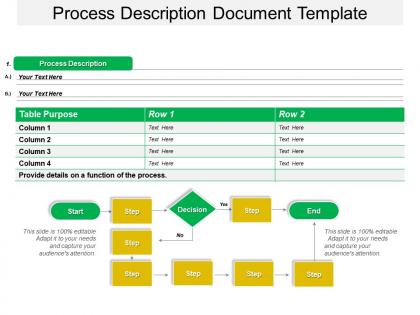
Process description document template powerpoint slide




Try Before you Buy Download Free Sample Product
 Impress Your
 Audience
 100%
100% Editable
 Save Hours
 of Time


As the size of the business grows, its complexity increases too. Our process description document template PowerPoint slide will help you out to represent a detailed description of how to carry out business processes. This business process document template works perfectly fine as a guide to help organizational employees at all levels, including important stakeholders and decision makers to easily understand the business process. You can highlight process purpose, description and steps to be followed to accomplish a given task with this process and procedures documentation design template. This professional process documentation best practices has multiple applications. You can use it to improve business processes, provide training to internal team members, preserve the company’s operations knowledge, mitigate risks and maintain business consistency. PPT acts as an easy guide to process documentation, which is important for any business to be successful. So, download this awesome slideshow and use it to document processes and procedures in the most comprehensive manner. Our Process Description Document Template Powerpoint Slide are effective in delivering appeals. They will believe your cause is convincing.
People who downloaded this PowerPoint presentation also viewed the following :
Process description document template powerpoint slide with all 5 slides:
Our Process Description Document Template Powerpoint Slide have extraordinary characteristics. They will have the audience gaping.
FAQs for Process description document
You'll want to cover the basics first: process purpose, scope, step-by-step procedures, and who's responsible for what. Input/output requirements and success metrics are crucial too. Honestly, flowcharts are a game-changer - way easier than reading walls of text. Don't skip the boring stuff like version control and approval workflows, even though they're tedious. Edge cases matter more than you think. A glossary helps if your team throws around acronyms like confetti. Oh, and start simple! You can always add more sections later based on what actually works for your processes.
Honestly, it's like having a cheat sheet so you don't have to explain the same thing over and over. New people can actually figure stuff out without bugging you every five minutes. Plus it stops that annoying thing where everyone's doing their own version of the process - you know what I mean? Handoffs get way less messy when people aren't guessing what comes next. I'd start with whatever process makes you want to pull your hair out the most. Those are usually the ones that need documenting first anyway.
Honestly, manufacturing, healthcare, and finance see the biggest wins with process templates. Those industries deal with crazy strict regulations - miss one step and you're looking at major fines or safety issues. Think FDA stuff or ISO standards. Software teams are obsessed with them too, mainly for deployments and testing. Basically anywhere consistency trumps being creative. Templates let you standardize everything across different teams and locations so nothing important slips through the cracks. My advice? Start with whatever processes are screwing up most often or have the heaviest compliance requirements.
Flowcharts are total game-changers for process docs - they show decision points super clearly. Screenshots help tons when you're walking through software stuff. Sometimes I'll even do a messy hand-drawn diagram because it explains things way better than writing it all out (probably looks unprofessional but whatever). Tables and checklists work great too. The key thing is putting visuals right next to the text they're explaining, not at the bottom where people forget about them. Try adding one visual per major step and you'll see how much easier everything becomes to follow.
Think of it as your project's roadmap - shows exactly how work moves from A to Z. Really saves your sanity when onboarding new people because you won't have to explain everything a million times. It keeps the whole team on the same page about who handles what and when things need to happen. Plus you'll catch those annoying bottlenecks before they mess up your deadlines. Honestly, I'd start with just your most important processes first. Don't go crazy trying to document everything at once - that's a recipe for burnout. Build it out gradually as you actually need it.
Make a master template first - purpose, steps, roles, outcomes, all that stuff. Everyone has to use the exact same format, no exceptions. The chaos I've seen when teams just make it up as they go... ugh, don't even get me started! Get someone to review new docs before they go live. Short, longer sentences help break things up too. Training your people properly makes the biggest difference though. You can't just hand them a template and expect magic. Actually walk them through it or you'll be back to square one.
Honestly, the worst mistake is being too vague - like writing "communicate with stakeholders" without explaining how or when. Super frustrating for anyone trying to follow it later. You've gotta include the messy stuff too: what happens when things break? Who decides what? I learned this the hard way when my "simple" process left people totally confused. Oh, and don't write everything from just your perspective if other people are involved. Test it with someone who's never done it before - they'll spot holes you missed. Include timing and what tools they'll need. Basically, pretend you're writing instructions for your most detail-oriented friend who asks a million questions.
Honestly, just grab a basic template and mess around with it until it works for your team. Maybe you need a "tools required" section but couldn't care less about risk assessment stuff - so swap 'em out. Most are just Word docs anyway, so you can add dropdown menus, change headings, whatever. The whole point is making something your people won't hate filling out. I've seen teams waste so much time on overly complex forms that nobody wants to touch. Keep tweaking the layout and sections until it feels natural. Don't overthink it - if it's annoying to use, people just won't.
Honestly? Just use whatever your team already has - Word, Google Docs, whatever. Don't overthink it. If you need flowcharts, Lucidchart is pretty decent, or Visio if your company has it. Notion's actually really good for this stuff since everyone can edit and comment. I've even seen people make surprisingly good process docs in Canva when they wanted something that looked less boring. The main thing is picking something people will actually open and use - I learned this the hard way after spending hours on docs nobody ever looked at.
At minimum, check your process docs once a year. But honestly? If you're in a fast-paced environment, quarterly makes way more sense. Update them whenever you spot gaps between what's written down and what people actually do - happens quicker than you'd expect. Set calendar reminders (seriously, you'll forget otherwise) and assign someone to own each document. I learned this the hard way during our last audit when half our processes were completely outdated. Way better to stay current than panic-update everything at once.
Honestly, clear writing saves everyone's sanity. When you use fancy jargon or write something vague like "handle appropriately," people just guess what you meant - and they'll guess wrong. I've watched entire processes crash because of this! Short sentences work better than rambling ones. Bullet points are your friend since nobody has time to dig through dense paragraphs anymore. Oh, and definitely test your draft on someone who doesn't know the process - they'll catch the confusing parts you missed. You want people scanning your doc and actually finding what they need quickly.
Honestly, good process docs are a game changer for new hires. First days are already stressful enough without people scrambling to figure out basic stuff. When everything's written out clearly, they can just follow the steps instead of constantly bugging their manager with questions. Plus they actually know if they're doing things right, which is huge for confidence. I mean, nobody wants to spend their first week wondering if they're screwing up. Your new people will hit the ground running way faster - and your managers will thank you for not having to repeat the same instructions fifty times.
Honestly, the best approach is mixing different feedback methods. Send your docs to key people with specific questions about what's unclear or missing. Those live walkthrough sessions are pure gold - you'll catch so many gaps when people ask questions in real time. Set up surveys for the broader team who'll actually use this stuff day-to-day. Here's what really works though: grab someone totally unfamiliar with the process and watch them try to follow your steps. It's painful but so revealing. Oh, and definitely track all the feedback somewhere simple so you can actually prioritize what to fix first.
Look, regulations aren't suggestions - they run the whole show. Your template has to include specific stuff like risk assessments and approval workflows, even if they mess up your ideal layout. Pharma and finance are absolute nightmares for this btw. The rules literally tell you what info goes where, how detailed everything needs to be, plus who signs what. So annoying but that's reality. Map out your industry's requirements first, then build your template around those. You can organize whatever's left however you want, but those mandatory sections come first no matter what.
Okay so version numbers are huge - like v1.0, v1.1, whatever works. Always stick revision dates on there too. I'd put a version history table right at the beginning so people can see what actually changed. Trust me, there's nothing more annoying than stumbling across some random doc and wondering if it's from last week or 2019! One person should own the master copy to avoid that whole "wait which version is real" mess. Don't delete old versions though - just archive them somewhere. Oh and obviously keep everything in a shared spot where everyone can grab the latest version. Start this habit now, you'll definitely thank yourself later when things get crazy.
-
Excellent design and quick turnaround.
-
Helpful product design for delivering presentation.