

 0 Comment
 Customer Reviews

Any organization will need a help desk as a vital function that is the first front for customer support, as well as for IT assistance. The dedicated professionals manage them to address employee and customer issues on time and thus maintain smooth operations and high satisfaction. Most help desks function across different levels, incorporating the levels of IT support, customer service, and technical assistance, all of which demand structured processes to process requests, incidents, and queries on a systematic basis.
The help desk dashboard is an essential tool for making these processes tight. It offers a single point of reference for help desk teams to trace and manage tickets, monitor response time, assign high-low-priority tasks, and classify bottlenecks. The key metrics of open and overdue tickets, request status, and resolution progress can be easily consolidated in real–time on dashboards that aid managers in monitoring operations with ease and completing the action on time.
The organization provides Top 10 Helpdesk Templates with examples and samples to help you access ready-to-use and customizable templates that fit their help desk needs. These ticket management systems and performance reports can help improve team efficiency, tweak workflows, and provide better service delivery options.
Template 1: Helpdesk Dashboard Illustrating First Response Time and Current Open Ticket Status
This helpdesk dashboard template helps simplify your support tracking processes. It demonstrates important metrics like first response time, ticket volume, and top accounts by tickets to get a big picture of how your support team is performing. Not only does it look better, but this graphical layout also helps in better data interpretation and quickly picking the trends, as well as areas of improvement. With this template, you can easily share KPIs with stakeholders to make sure that the support goals are mapped towards larger claims or objectives of the organization. In other words, it's not just a dashboard; it's a way to achieve efficient, data-driven customer support with faster response times, fewer backlogs, and happier clients.

Template 2: Organization Service Helpdesk Management Report With Status
The service request template in this helpdesk management report gives you a powerful tool to follow, analyze, and efficiently track your service requests. This slide is designed to give a snapshot of both new and ongoing requests and gathers the key details such as request origin, type, status, and creation log, providing an immediate flow of the service desk activities. How it enables a consolidated view of per request view, enabling your team to prioritize tasks, handle bottlenecks, and reduce response times while still maintaining a high standard of service. Their layout is intuitive and informs what's going on in an easy-to-understand and monitor way, making it easy to see trends and see the performance of your helpdesk over time. This report template is perfect for team meetings or management reviews to ensure everyone is on the same page for service priorities and resource allocation, leading to more productivity and accountability.

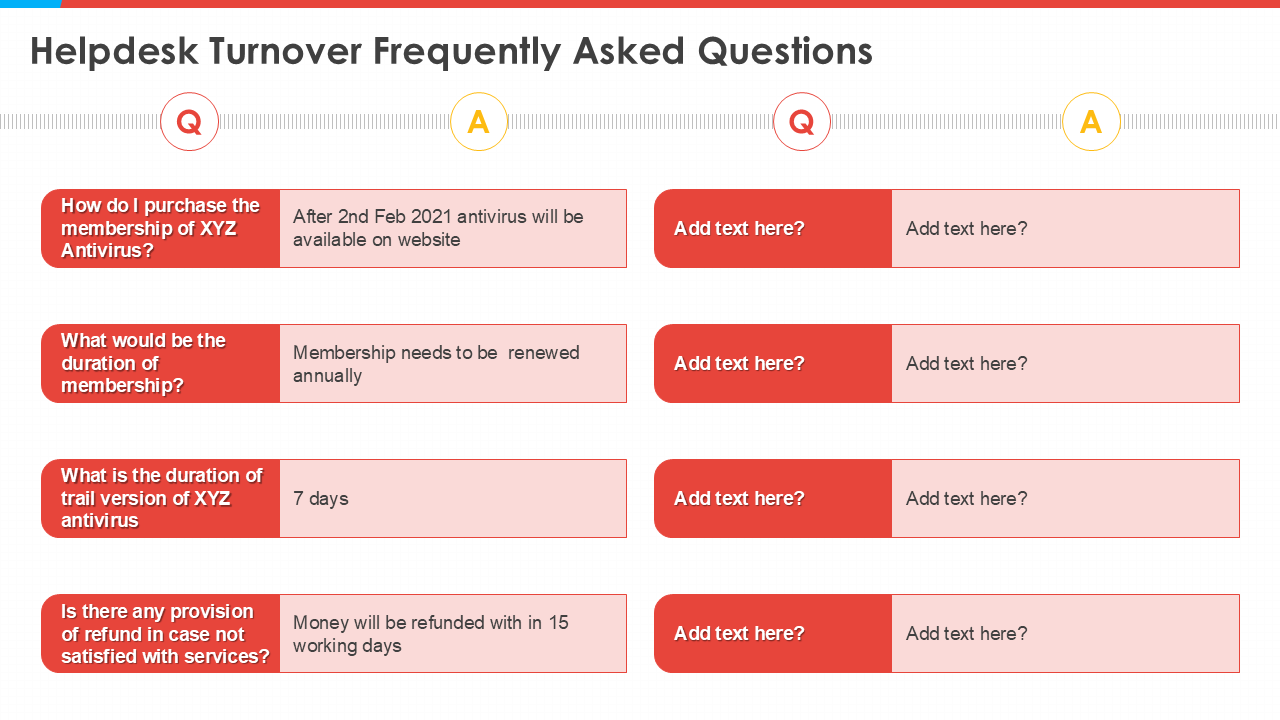
Template 3: Construction templates bundle helpdesk turnover frequently asked questions
Helpdesk turnover FAQ construction templates bundle that gives you clear and structured answers that accelerate your business. The strategies that you intend to implement for your company are outlined in the slide, which emphasizes customer acquisition and a competitive edge in the market while maintaining it. This template breaks down key stages in the helpdesk turnover process and provides transparency about what your audience is buying into along the way. This tool helps with engagement regardless of whether you're talking to internal teams or potential clients by providing a stepped path that shows how each stage supports the rest of your goals. This guarantees that each key point is easily digestible so that decision-makers are able to make well-informed decisions that allow long-term success as well as a growing customer base.
Template 4: Helpdesk Ticket Management System Dashboard
The dashboard is handmade to assist in contacting the ticket status of the helpdesk ticket management system. What it does is take important data, like how many overdue tasks, open tickets for support teams, and tickets on hold for support teams, and it lets them see what kind of load they are under and what the priorities are. Because this data is visualized in a pie chart, we can easily identify the areas of concern, and thereby, it is possible to avoid the risk of delays. This is going to be a super important resource in terms of speeding up our response times and making sure that there's a nice, happy trail of basically closed tickets there. Teams can use it to monitor real-time progress, keep customer satisfaction high, and smooth daily support tasks.

Template 5: IT Support Helpdesk Business Model
The IT Support Helpdesk Business Model slide provides the ability to gain insights into key ticket management system metrics to help improve your support operations. In doing so, it brings to your attention vital data like overdue tasks, open tickets, tickets due today, and tickets on hold, which provides you with a clear picture of the current workload. This pie chart allows us to easily track ticket statuses along with the areas that need attention with no delay. This slide is an important tool for managing team efficiency, increasing response time, and preventing ticket backlog. Monitoring these metrics allows organizations to help improve customer support and workflow and, therefore, help solve customer problems faster to create higher customer satisfaction as well as higher service quality.

Template 6: Helpdesk Ticket Management Summary Report
Maintaining a well-organized Support System is necessary for having a Helpdesk Ticket Management Summary Report dashboard. It does this by aggregating critical data like overdue tasks, open tickets, tickets due today, and tickets on hold to provide a transparent, real-time view of the ticket management process. It permits the support staff to give precedence to urgent and solve urgent issues speedily, bringing down delays and accelerating reaction time. With the dashboard, no ticket is left behind, making the whole operation more efficient and increasing customer satisfaction. It helps decision-makers visualize key metrics so they can monitor team performance and make data-driven improvements that result in a more streamlined, more responsive help desk operation.

Template 7: Customer support flowchart for helpdesk officers
The Customer Support Flowchart for Helpdesk Officers slide is necessary for the standardization of processes and support in the process of supporting customer support processes. This flowchart charts out the entire support process in one single, easy-to-follow stage of how helpdesk officers can solve customer problems. A schematic of a basic incident response plan and explanation of its benefits (standard response, reduced errors, efficiency). The flowchart is a training tool for new staff and a reference for an experienced team member who needs to pick up where another person left off, leading to quicker resolution times and better service quality. This slide will aid organizations in making the overall customer experience better, improving team performance, and maintaining an orderly structure of the system to support management.

Template 8:Determine Multi Tiered HR Case Management Helpdesk Policies Next Generation HR Service Delivery PPT Grid
This slide can scale any organization in monitoring employee requests in different layers of resolution. It defines the hierarchical structure for HR service delivery, depicting the roles of Employee Self Service, HR service Centre Representatives, Specialists, and Case managers. This tiered approach guarantees that the wrong people will never receive requests and thus can be answered much faster and more efficiently. Through this slide, companies can advance the HR processes, perfect service delivery, and guarantee that employees get the support they require at a suitable level. Also, it enables managing and tracking requests for smoother workflows and effective resource allocation in cross-HR teams.

Template 9: Help Desk Process Powerpoint PPT Template Bundles
The Help Desk Process PowerPoint template bundle gives a complete Help Desk slide deck that organizations can utilize to present, explain, and improve their help desk operations. This template contains 12 slides providing you with the necessary information about help desk processes at different levels as well as different types of help desks, i.e., IT, service, customer support, etc. It enables a definition of roles, depicts the process stages, and divides the help desks categorically depending on function and service level. Businesses can utilize this template to streamline their support strategies, align teams, and train their staff appropriately. It's a great asset for presenting to stakeholders, training new employees, or auditing how help desk operations are performing today.
[product_image id=508289]
Template 10: Service Help Desk Process and Request Management
The Service Help Desk Process and Request Management slide is an important part of the help desk process template bundle. This document took me through steps involved in handling the new requests and how to assign them to their respective queues for resolution by a representative. This template breaks down the steps a request is captured, what categories get applied, and mapped to the proper team to get it moved along based on urgency and expertise. Having a clear flow of stages helps the processing of requests faster, thus reducing response times and maximizing customer satisfaction. The template helps support teams communicate the process in terms of these stages by visualizing them—making it easier to follow standard procedures and manage requests throughout the resolution cycle.

Final Word
The resources contained in this PPT bundle provide great resources that could be used to optimize help desk operations from ticket management to performance monitoring. Suppose you want more ideas to boost customer support. In that case, we have a few more blogs up our sleeves on helpdesk templates, customer issue tracking templates, and customer service action templates to get your idea wheels turning even further. By simplifying workflows, these templates help teams to respond speedily and efficiently to the needs of customers and provide a smooth service experience