


Helpdesk Ticket Management Summary Report




Try Before you Buy Download Free Sample Product
 Impress Your
 Audience
 100%
100% Editable
 Save Hours
 of Time


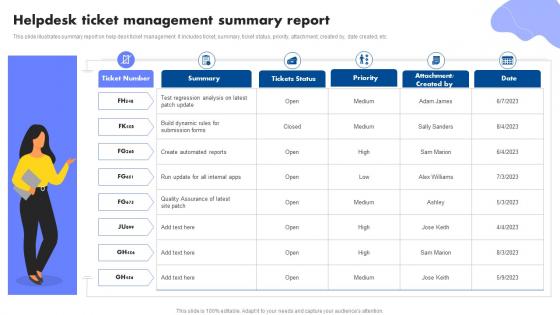
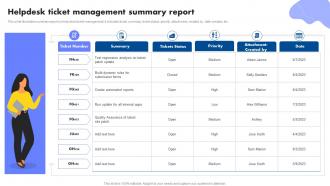
This slide illustrates summary report on help desk ticket management. It includes ticket, summary, ticket status, priority, attachment, created by, date created, etc.
People who downloaded this PowerPoint presentation also viewed the following :
Helpdesk Ticket Management Summary Report with all 6 slides:
Use our Helpdesk Ticket Management Summary Report to effectively help you save your valuable time. They are readymade to fit into any presentation structure.





FAQs for Helpdesk Ticket
Honestly, start with categorizing and prioritizing tickets - otherwise urgent stuff gets lost in all the random requests. Set up automated routing so tickets hit the right team immediately. SLA tracking is clutch when your boss starts asking why everything's taking forever. You also need escalation workflows for when shit hits the fan (and it will). Oh, and reporting - sounds boring but you'll thank me later when you can actually spot where things are breaking down. Just audit what you have now against these five things and fix whatever's most broken first.
Dude, automation is a game changer for response times. You can set up rules that instantly sort tickets by keywords or customer type instead of having everything pile up in one messy queue. Auto-replies are clutch too - customers get that "we got your message" confirmation right away. Cuts down on those annoying "hello??" follow-up emails. Your team stops wasting time playing ticket shuffleboard and actually fixes stuff. I'd start small with basic routing rules. Oh, and pro tip - don't overthink the setup initially or you'll never launch it.
Start with the basics - first response time, resolution time, and customer satisfaction scores. Ticket volume and escalation rates are solid too since they show you workload patterns. Agent utilization matters, plus nobody wants a giant backlog sitting there forever. Track resolution rates by category so you can spot knowledge gaps or those annoying issues that keep coming back. Honestly, less is more here - pick maybe 5-7 metrics that'll actually change how your team works instead of drowning in data. You can always add more detailed stuff later once everyone's used to checking these regularly.
So basically you're creating different buckets for support tickets - like "billing," "tech issues," "account stuff" - so they automatically go to the right person. No more random forwarding or people going "uh, not my department." Response times get way better since tickets aren't ping-ponging around. Plus you'll actually start noticing patterns, like when everyone's suddenly having the same login problem or whatever. Oh, and your reporting won't be a total mess anymore. I'd start with maybe 3-4 categories max - you can always add more later but don't overcomplicate it from day one.
Listen, customer feedback is literally your best friend here. They'll tell you straight up when your process sucks - like if tickets are taking forever or your solutions don't actually work. Honestly, we always think we know what good support looks like, but customers are living through the reality of it. Track those feedback patterns and you'll spot the same issues popping up over and over. Set up surveys after you close tickets (and actually read them, don't just collect them). Then use what you learn to fix your knowledge base or retrain your team on the stuff that keeps breaking.
Start with a simple priority matrix - impact vs urgency. Critical outages hitting tons of users? That's P1. Random feature requests can wait at P3 or P4. Your ticketing system probably has some automation built in (thank god, because doing this manually sucks). Factor in your SLA deadlines and whether it's a premium customer too. The tricky part is that priorities shift constantly - something minor can blow up into a disaster real quick. I'd dump your current backlog into categories first. You'll be shocked at how much stuff feels urgent but really isn't.
Ugh, okay so the worst thing is when tickets just stack up because nobody's deciding what's urgent. Also don't forget to actually tell customers what's happening - radio silence drives people crazy. Document your fixes too, trust me on this one. The team ping-pong thing is brutal - tickets getting bounced around with zero ownership until they disappear into the void. Never close stuff without double-checking it's actually fixed. Oh and categorize consistently so you can catch patterns before they become bigger headaches. Set reminders or tickets will just sit there forever.
Honestly, you should start with automating the boring stuff - password resets, status updates, basic troubleshooting questions. AI can handle all that without breaking a sweat. It'll sort tickets and send them to the right teams instantly, which is honestly a game-changer. 24/7 support becomes automatic too, so customers aren't stuck waiting when your team's gone for the day. The best part? Your actual agents get to focus on problems that need real problem-solving skills instead of answering "how do I reset my password" for the hundredth time. I'd map out your most repetitive tickets first and automate those.
Train your front-line people better - like, way better. Give them actual authority to solve common problems instead of escalating everything. Your knowledge base probably sucks too, so fix that so they can actually find answers quickly. Honestly, most companies mess up the ticket sorting part - get the right issues to the right teams from the start. I'd also do regular check-ins reviewing escalated tickets to see where people are struggling. Short version: empower your frontline but give them crystal clear rules about when something needs to go upstairs.
Knowledge bases are honestly a game-changer for cutting down tickets. Customers can fix their own problems instead of waiting for you - win-win. I'd start by turning your most annoying repeat questions into KB articles (seriously, how many password reset tickets can one person handle?). When similar issues pop up, just link to the article. Your team will love having consistent answers ready to go instead of typing the same response over and over. Track which articles get the most hits too - shows you what's really bugging people. Focus on your top 10 ticket types first.
Skip generic training examples - use actual scenarios your team deals with daily. Cover ticket prioritization, escalation paths, and whatever SLA stuff you have. Role-playing angry customers feels weird but honestly builds confidence fast. Documentation standards are huge so tickets don't become mysteries when handed off. Pair new people with experienced staff for mentoring. Oh, and definitely do refresher training every quarter. People forget processes way faster than you'd expect, plus your systems probably change constantly anyway. The consistent documentation thing can't be overstated - saves everyone's sanity later.
Honestly, remote helpdesk can work really well once you get past the initial awkwardness. Your agents won't deal with constant office interruptions, which is huge for focus. Plus you can cover more time zones if your team's spread out. The downside? Communication gets trickier without those quick hallway conversations. Response times might drag at first. But I've seen most teams actually resolve tickets faster once they settle into it - there's something about working from home that just lets people concentrate better. Just make sure your collaboration tools don't suck and document your escalation processes clearly. SLA numbers usually improve after the adjustment period.
Honestly, cloud-based ticketing is so much better than on-premise stuff. You can check tickets from literally anywhere - your couch, vacation, wherever. Scaling happens instantly without buying expensive hardware. Finance loves the predictable monthly costs instead of those massive upfront purchases. Oh, and your IT people won't hate you since there's no server maintenance. Security patches happen automatically too, which is nice. I'd definitely try a free trial first though - see how it plays with your current setup before you commit to anything major.
Honestly, these systems just make everything way less messy. Everyone can see who's handling what, and you don't have to bug people constantly for updates. The best part? All those random fixes get saved automatically - like when Sarah figured out that printer thing, it's actually documented now instead of lost forever. Your team starts catching patterns in problems too, which is pretty useful. Oh and the handoff thing works great when you're stuck on something outside your wheelhouse. Just make sure people actually use the comment features or it's pointless.
Start with access controls - only let authorized people see tickets, especially the sensitive stuff. Role-based permissions are clutch so junior techs don't accidentally stumble into executive drama or HR nightmares. Encrypt stored data and definitely use MFA. Trust me, helpdesk breaches happen way more than you'd think since these systems are goldmines of passwords and personal info. Audit trails help track who's snooping around which tickets. Oh, and do regular security reviews of your ticket categories - some need way more protection than others. That part's honestly pretty tedious but worth it.
-
Excellent Designs.
-
The designs are super attractive. Me and my team love using SlideTeam’s presentations.