Powerpoint Templates for Ticketing System
Save time and engage your audience with our fully editable PowerPoint PPT Templates and Slides.
-

Ticketing System Implementation Framework PPT Designs AT
Ditch the Dull templates and opt for our engaging Ticketing System Implementation Framework PPT Designs AT deck to attract your audience. Our visually striking design effortlessly combines creativity with functionality, ensuring your content shines through. Compatible with Microsoft versions and Google Slides, it offers seamless integration of presentation. Save time and effort with our pre designed PPT layout, while still having the freedom to customize fonts, colors, and everything you ask for. With the ability to download in various formats like JPG, JPEG, and PNG, sharing your slides has never been easier. From boardroom meetings to client pitches, this deck can be the secret weapon to leaving a lasting impression.
-

Streamline Customer Issues With Ticketing System PPT Designs AT
Ditch the Dull templates and opt for our engaging Streamline Customer Issues With Ticketing System PPT Designs AT deck to attract your audience. Our visually striking design effortlessly combines creativity with functionality, ensuring your content shines through. Compatible with Microsoft versions and Google Slides, it offers seamless integration of presentation. Save time and effort with our pre designed PPT layout, while still having the freedom to customize fonts, colors, and everything you ask for. With the ability to download in various formats like JPG, JPEG, and PNG, sharing your slides has never been easier. From boardroom meetings to client pitches, this deck can be the secret weapon to leaving a lasting impression.
-
ITSM Ticketing System Overview For Modern PPT Structure AT
Do not compromise on a template that erodes your messages impact. Introducing our engaging ITSM Ticketing System Overview For Modern PPT Structure AT complete deck, thoughtfully crafted to grab your audiences attention instantly. With this deck, effortlessly download and adjust elements, streamlining the customization process. Whether you are using Microsoft versions or Google Slides, it fits seamlessly into your workflow. Furthermore, it is accessible in JPG, JPEG, PNG, and PDF formats, facilitating easy sharing and editing. Not only that you also play with the color theme of your slides making it suitable as per your audiences preference.
-
Customer Service Ticketing System Benefits PPT Slides AT
Ditch the Dull templates and opt for our engaging Customer Service Ticketing System Benefits PPT Slides AT deck to attract your audience. Our visually striking design effortlessly combines creativity with functionality, ensuring your content shines through. Compatible with Microsoft versions and Google Slides, it offers seamless integration of presentation. Save time and effort with our pre designed PPT layout, while still having the freedom to customize fonts, colors, and everything you ask for. With the ability to download in various formats like JPG, JPEG, and PNG, sharing your slides has never been easier. From boardroom meetings to client pitches, this deck can be the secret weapon to leaving a lasting impression.
-
Key Features Every Ticketing System Must Have PPT Information AT
Do not compromise on a template that erodes your messages impact. Introducing our engaging Key Features Every Ticketing System Must Have PPT Information AT complete deck, thoughtfully crafted to grab your audiences attention instantly. With this deck, effortlessly download and adjust elements, streamlining the customization process. Whether you are using Microsoft versions or Google Slides, it fits seamlessly into your workflow. Furthermore, it is accessible in JPG, JPEG, PNG, and PDF formats, facilitating easy sharing and editing. Not only that you also play with the color theme of your slides making it suitable as per your audiences preference.
-
Help Desk Ticketing System Overview PPT Information AT
While your presentation may contain top-notch content, if it lacks visual appeal, you are not fully engaging your audience. Introducing our Help Desk Ticketing System Overview PPT Information AT deck, designed to engage your audience. Our complete deck boasts a seamless blend of Creativity and versatility. You can effortlessly customize elements and color schemes to align with your brand identity. Save precious time with our pre-designed template, compatible with Microsoft versions and Google Slides. Plus, its downloadable in multiple formats like JPG, JPEG, and PNG. Elevate your presentations and outshine your competitors effortlessly with our visually stunning 100 percent editable deck.
-
Ticketing System Powerpoint Ppt Template Bundles
Deliver a credible and compelling presentation by deploying this Ticketing System Powerpoint Ppt Template Bundles. Intensify your message with the right graphics, images, icons, etc. presented in this complete deck. This PPT template is a great starting point to convey your messages and build a good collaboration. The fiveteen slides added to this PowerPoint slideshow helps you present a thorough explanation of the topic. You can use it to study and present various kinds of information in the form of stats, figures, data charts, and many more. This Ticketing System Powerpoint Ppt Template Bundles PPT slideshow is available for use in standard and widescreen aspects ratios. So, you can use it as per your convenience. Apart from this, it can be downloaded in PNG, JPG, and PDF formats, all completely editable and modifiable. The most profound feature of this PPT design is that it is fully compatible with Google Slides making it suitable for every industry and business domain.
-
Ticketing System Software Best Practices Overview PPT Sample AT
Ditch the Dull templates and opt for our engaging Ticketing System Software Best Practices Overview PPT Sample AT deck to attract your audience. Our visually striking design effortlessly combines creativity with functionality, ensuring your content shines through. Compatible with Microsoft versions and Google Slides, it offers seamless integration of presentation. Save time and effort with our pre designed PPT layout, while still having the freedom to customize fonts, colors, and everything you ask for. With the ability to download in various formats like JPG, JPEG, and PNG, sharing your slides has never been easier. From boardroom meetings to client pitches, this deck can be the secret weapon to leaving a lasting impression.
-
Department Roadmap For Building Improved Ticketing System PPT Guidelines AT
Do not compromise on a template that erodes your messages impact. Introducing our engaging Department Roadmap For Building Improved Ticketing System PPT Guidelines AT complete deck, thoughtfully crafted to grab your audiences attention instantly. With this deck, effortlessly download and adjust elements, streamlining the customization process. Whether you are using Microsoft versions or Google Slides, it fits seamlessly into your workflow. Furthermore, it is accessible in JPG, JPEG, PNG, and PDF formats, facilitating easy sharing and editing. Not only that you also play with the color theme of your slides making it suitable as per your audiences preference.
-
Implementing A Ticketing System For Helpdesk Efficiency PPT Example AT
While your presentation may contain top notch content, if it lacks visual appeal, you are not fully engaging your audience. Introducing our Implementing A Ticketing System For Helpdesk Efficiency PPT Example AT deck, designed to engage your audience. Our complete deck boasts a seamless blend of Creativity and versatility. You can effortlessly customize elements and color schemes to align with your brand identity. Save precious time with our pre designed template, compatible with Microsoft versions and Google Slides. Plus, its downloadable in multiple formats like JPG, JPEG, and PNG. Elevate your presentations and outshine your competitors effortlessly with our visually stunning 100 percent editable deck.
-
Help Desk Ticketing System PPT Template AT
Do not compromise on a template that erodes your messages impact. Introducing our engaging Help Desk Ticketing System PPT Template AT complete deck, thoughtfully crafted to grab your audiences attention instantly. With this deck, effortlessly download and adjust elements, streamlining the customization process. Whether you are using Microsoft versions or Google Slides, it fits seamlessly into your workflow. Furthermore, it is accessible in JPG, JPEG, PNG, and PDF formats, facilitating easy sharing and editing. Not only that you also play with the color theme of your slides making it suitable as per your audiences preference.
-
Digital Ticketing System PPT Information VA
Dive into the realm of streamlined operations with our digital ticketing system PowerPoint presentation. This expertly crafted deck showcases modern slide design that enhances your narrative perfect for stakeholders eager to understand your innovative approach. Featuring visually appealing infographic templates and dynamic presentation graphics your ideas will shine vividly. Each editable slide allows for customization to fit your unique branding making it an ideal choice for corporate presentations or startup pitches. Unveil the future of ticket management and data visualization with a presentation that not only informs but captivates your audience paving the path for impactful discussions.
-
Ultimate Ticketing System Roadmap Overview PPT Sample AT
Ditch the Dull templates and opt for our engaging Ultimate Ticketing System Roadmap Overview PPT Sample AT deck to attract your audience. Our visually striking design effortlessly combines creativity with functionality, ensuring your content shines through. Compatible with Microsoft versions and Google Slides, it offers seamless integration of presentation. Save time and effort with our pre-designed PPT layout, while still having the freedom to customize fonts, colors, and everything you ask for. With the ability to download in various formats like JPG, JPEG, and PNG, sharing your slides has never been easier. From boardroom meetings to client pitches, this deck can be the secret weapon to leaving a lasting impression.
-
Online Ticketing System Integration With Mobile PPT PowerPoint AT
Step up your game with our enchanting Online Ticketing System Integration With Mobile PPT PowerPoint AT deck, guaranteed to leave a lasting impression on your audience. Crafted with a perfect balance of simplicity, and innovation, our deck empowers you to alter it to your specific needs. You can also change the color theme of the slide to mold it to your companys specific needs. Save time with our ready-made design, compatible with Microsoft versions and Google Slides. Additionally, its available for download in various formats including JPG, JPEG, and PNG. Outshine your competitors with our fully editable and customized deck.
-
Help Desk Ticketing System Overview PPT Example AT
Do not compromise on a template that erodes your messages impact. Introducing our engaging Help Desk Ticketing System Overview PPT Example AT complete deck, thoughtfully crafted to grab your audiences attention instantly. With this deck, effortlessly download and adjust elements, streamlining the customization process. Whether you are using Microsoft versions or Google Slides, it fits seamlessly into your workflow. Furthermore, it is accessible in JPG, JPEG, PNG, and PDF formats, facilitating easy sharing and editing. Not only that you also play with the color theme of your slides making it suitable as per your audiences preference.
-
Service Desk Ticketing System Overview PPT Structure AT
Ditch the Dull templates and opt for our engaging Service Desk Ticketing System Overview PPT Structure AT deck to attract your audience. Our visually striking design effortlessly combines creativity with functionality, ensuring your content shines through. Compatible with Microsoft versions and Google Slides, it offers seamless integration of presentation. Save time and effort with our pre-designed PPT layout, while still having the freedom to customize fonts, colors, and everything you ask for. With the ability to download in various formats like JPG, JPEG, and PNG, sharing your slides has never been easier. From boardroom meetings to client pitches, this deck can be the secret weapon to leaving a lasting impression.
-
E Ticketing System PPT Graphics VA
Discover a dynamic eticketing system through our captivating PowerPoint presentation graphics. These thoughtfully crafted PPT slides invigorate your presentation deck seamlessly illustrating the nuances of your digital ticketing solution. With modern slide designs and visually engaging infographic templates you can showcase operational workflows data visualization and unique selling points. Designed for executives and consultants alike our editable slides empower you to articulate your strategy and drive interest from stakeholders. Whether you are pitching to potential investors or preparing a corporate presentation this collection enhances your visual storytelling and ensures a compelling delivery that stands out.
-
Ticketing System Workflows From Request To Resolution PPT Template AT
Step up your game with our enchanting Ticketing System Workflows From Request To Resolution PPT Template AT deck, guaranteed to leave a lasting impression on your audience. Crafted with a perfect balance of simplicity, and innovation, our deck empowers you to alter it to your specific needs. You can also change the color theme of the slide to mold it to your companys specific needs. Save time with our ready-made design, compatible with Microsoft versions and Google Slides. Additionally, its available for download in various formats including JPG, JPEG, and PNG. Outshine your competitors with our fully editable and customized deck.
-
Ticketing System Lifecycle From Creation To Escalation PPT Guidelines AT
Do not compromise on a template that erodes your messages impact. Introducing our engaging Ticketing System Lifecycle From Creation To Escalation PPT Guidelines AT complete deck, thoughtfully crafted to grab your audiences attention instantly. With this deck, effortlessly download and adjust elements, streamlining the customization process. Whether you are using Microsoft versions or Google Slides, it fits seamlessly into your workflow. Furthermore, it is accessible in JPG, JPEG, PNG, and PDF formats, facilitating easy sharing and editing. Not only that you also play with the color theme of your slides making it suitable as per your audiences preference.
-
HR Ticketing System Dashboard PPT Slides VA
Your support team might be drowning in a sea of unresolved tickets but tracking every query no longer has to feel like guesswork. This presentation deck turns scattered employee requests into a clear action ready overview giving you instant visibility into response times issue categories and queue status. Whether you need to brief leadership on staffing needs or show stakeholders where bottlenecks keep forming these PowerPoint templates make the data effortless to absorb. The modern slide design blends bold metrics with clean visual storytelling so every dashboard view translates into a story your audience actually remembers. Stop juggling spreadsheets and start steering the service operation with clarity and confidence.
-
IT Ticketing System Workflow PPT Slides VA
Every minute an issue sits unresolved your teams momentum stalls and frustration compounds. This IT Ticketing System Workflow PPT slides deck turns chaotic support queues into a clear visual journey from first report to final resolution. You get editable slides that map ticket triage priority levels and SLA timelines with crisp data visualization helping your service desk communicate its process with total clarity. Use these presentation graphics to align stakeholders train new agents or pitch an upgraded support strategy. Your workflow presentation becomes a practical roadmap not just a status update. Stop describing the chaos and start showing the solution with this modern slide design built for action.
-
IT Support Ticketing System Dashboard PPT Summary VA
Every support team dreads the Friday afternoon flood of unresolved tickets. That scramble dissolves when your metrics are finally visible at a glance. This presentation deck transforms raw helpdesk data into a clear operational story allowing you to spot bottlenecks before they become outages. The slide structure walks your audience from high level status overviews down to individual agent workload making your daily standups shorter and your stakeholder reports more persuasive. With modern slide design and data visualization built into the editable slides you can update the numbers in minutes without touching the creative layouts. Use these PowerPoint templates to turn your ticketing system dashboard into a proactive management tool not just a reactive log.
-
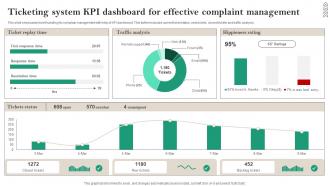
Ticketing System KPI Dashboard For Effective Complaint Management
This slide showcases ticket handling for complain management with help of KPI dashboard. This further includes current ticket status, new tickets, closed tickets and traffic analysis. Introducing our Ticketing System KPI Dashboard For Effective Complaint Management set of slides. The topics discussed in these slides are Traffic Analysis, Hippieness Rating, Complaint Management. This is an immediately available PowerPoint presentation that can be conveniently customized. Download it and convince your audience.
-
Zendesk Ticketing System Streamline Customer Support Workflow PPT Template AT
Step up your game with our enchanting Zendesk Ticketing System Streamline Customer Support Workflow PPT Template AT deck, guaranteed to leave a lasting impression on your audience. Crafted with a perfect balance of simplicity, and innovation, our deck empowers you to alter it to your specific needs. You can also change the color theme of the slide to mold it to your companys specific needs. Save time with our ready made design, compatible with Microsoft versions and Google Slides. Additionally, its available for download in various formats including JPG, JPEG, and PNG. Outshine your competitors with our fully editable and customized deck.
-
Integrating Ticketing Systems With Other Business Tools PPT Guidelines AT
While your presentation may contain top-notch content, if it lacks visual appeal, you are not fully engaging your audience. Introducing our Integrating Ticketing Systems With Other Business Tools PPT Guidelines AT deck, designed to engage your audience. Our complete deck boasts a seamless blend of Creativity and versatility. You can effortlessly customize elements and color schemes to align with your brand identity. Save precious time with our pre-designed template, compatible with Microsoft versions and Google Slides. Plus, its downloadable in multiple formats like JPG, JPEG, and PNG. Elevate your presentations and outshine your competitors effortlessly with our visually stunning 100 percent editable deck.
-
Event Ticketing System Dashboard PPT Outline VA
Selling tickets is only half the battle the real win is understanding every data point that flows through your system. This slide deck transforms raw sales numbers into a clear operational story giving your team a dashboard overview that tracks attendance trends revenue streams and real time capacity at a glance. Each slide in this event ticketing system dashboard PPT outline focuses on actionable control turning complex patron data into simple visual snapshots. Whether you are planning a festival or a conference these editable slides function as your strategic command center helping you optimize pricing and staffing with confidence. An animated presentation keeps your stakeholders engaged while you present concrete insights that drive smarter decisions for your next big event.
-
Integrating Knowledge Bases With Ticketing Systems PPT Guidelines AT
Ditch the Dull templates and opt for our engaging Integrating Knowledge Bases With Ticketing Systems PPT Guidelines AT deck to attract your audience. Our visually striking design effortlessly combines creativity with functionality, ensuring your content shines through. Compatible with Microsoft versions and Google Slides, it offers seamless integration of presentation. Save time and effort with our pre-designed PPT layout, while still having the freedom to customize fonts, colors, and everything you ask for. With the ability to download in various formats like JPG, JPEG, and PNG, sharing your slides has never been easier. From boardroom meetings to client pitches, this deck can be the secret weapon to leaving a lasting impression.
-
Benefits Of Help Desk Ticketing System Explained PPT Designs AT
While your presentation may contain top-notch content, if it lacks visual appeal, you are not fully engaging your audience. Introducing our Benefits Of Help Desk Ticketing System Explained PPT Designs AT deck, designed to engage your audience. Our complete deck boasts a seamless blend of Creativity and versatility. You can effortlessly customize elements and color schemes to align with your brand identity. Save precious time with our pre-designed template, compatible with Microsoft versions and Google Slides. Plus, its downloadable in multiple formats like JPG, JPEG, and PNG. Elevate your presentations and outshine your competitors effortlessly with our visually stunning 100 percent editable deck.
-
Help Desk Ticketing System Comparison Summary Inspiration PPT PowerPoint AT
Ditch the Dull templates and opt for our engaging Help Desk Ticketing System Comparison Summary Inspiration PPT PowerPoint AT deck to attract your audience. Our visually striking design effortlessly combines creativity with functionality, ensuring your content shines through. Compatible with Microsoft versions and Google Slides, it offers seamless integration of presentation. Save time and effort with our pre designed PPT layout, while still having the freedom to customize fonts, colors, and everything you ask for. With the ability to download in various formats like JPG, JPEG, and PNG, sharing your slides has never been easier. From boardroom meetings to client pitches, this deck can be the secret weapon to leaving a lasting impression.
-
How To Apply Helpdesk Ticketing System
This slide showcases the steps for implementing help desk ticketing system which helps an organization to enhance teams efficiency with automation and provide self service options for users. ITinclude details such as set sla policies, include user contacts, etc. Introducing our premium set of slides with How To Apply Helpdesk Ticketing System Ellicudate the Three stages and present information using this PPT slide. This is a completely adaptable PowerPoint template design that can be used to interpret topics like Include User Contacts, Define Support Metrics So download instantly and tailor ITwith your information.
-
Using Ticketing Systems For Service Management Efficiency PPT Guidelines AT
Ditch the Dull templates and opt for our engaging Using Ticketing Systems For Service Management Efficiency PPT Guidelines AT deck to attract your audience. Our visually striking design effortlessly combines creativity with functionality, ensuring your content shines through. Compatible with Microsoft versions and Google Slides, it offers seamless integration of presentation. Save time and effort with our pre-designed PPT layout, while still having the freedom to customize fonts, colors, and everything you ask for. With the ability to download in various formats like JPG, JPEG, and PNG, sharing your slides has never been easier. From boardroom meetings to client pitches, this deck can be the secret weapon to leaving a lasting impression.
-
Key Features Of Effective Ticketing Systems PPT Slides AT
Ditch the Dull templates and opt for our engaging Key Features Of Effective Ticketing Systems PPT Slides AT deck to attract your audience. Our visually striking design effortlessly combines creativity with functionality, ensuring your content shines through. Compatible with Microsoft versions and Google Slides, it offers seamless integration of presentation. Save time and effort with our pre-designed PPT layout, while still having the freedom to customize fonts, colors, and everything you ask for. With the ability to download in various formats like JPG, JPEG, and PNG, sharing your slides has never been easier. From boardroom meetings to client pitches, this deck can be the secret weapon to leaving a lasting impression.
-
How Ticketing Systems Streamline Support Processes PPT Example AT
Step up your game with our enchanting How Ticketing Systems Streamline Support Processes PPT Example AT deck, guaranteed to leave a lasting impression on your audience. Crafted with a perfect balance of simplicity, and innovation, our deck empowers you to alter it to your specific needs. You can also change the color theme of the slide to mold it to your companys specific needs. Save time with our ready-made design, compatible with Microsoft versions and Google Slides. Additionally, its available for download in various formats including JPG, JPEG, and PNG. Outshine your competitors with our fully editable and customized deck.
-
Benefits Of Multi Channel Ticketing Systems Explained PPT Outline AT
Step up your game with our enchanting Benefits Of Multi Channel Ticketing Systems Explained PPT Outline AT deck, guaranteed to leave a lasting impression on your audience. Crafted with a perfect balance of simplicity, and innovation, our deck empowers you to alter it to your specific needs. You can also change the color theme of the slide to mold it to your companys specific needs. Save time with our ready-made design, compatible with Microsoft versions and Google Slides. Additionally, its available for download in various formats including JPG, JPEG, and PNG. Outshine your competitors with our fully editable and customized deck.
-
Flight Ticketing System Monotone Icon In Powerpoint Pptx Png And Editable Eps Format
Monotone PowerPoint Icon on Ticket Counter is a simple and visually appealing icon that can be used to represent ticket counters in PowerPoint presentations. It is a vector-based icon that can be easily customized and resized to suit any presentation needs. It is a great way to add a professional touch to your presentation.
-
Benefits Of Ticketing Systems In Managing Customer Requests PPT Presentation AT
Ditch the Dull templates and opt for our engaging Benefits Of Ticketing Systems In Managing Customer Requests PPT Presentation AT deck to attract your audience. Our visually striking design effortlessly combines creativity with functionality, ensuring your content shines through. Compatible with Microsoft versions and Google Slides, it offers seamless integration of presentation. Save time and effort with our pre-designed PPT layout, while still having the freedom to customize fonts, colors, and everything you ask for. With the ability to download in various formats like JPG, JPEG, and PNG, sharing your slides has never been easier. From boardroom meetings to client pitches, this deck can be the secret weapon to leaving a lasting impression.
-
Using Ticketing Systems To Track Requests PPT Presentation AT
Step up your game with our enchanting Using Ticketing Systems To Track Requests PPT Presentation AT deck, guaranteed to leave a lasting impression on your audience. Crafted with a perfect balance of simplicity, and innovation, our deck empowers you to alter it to your specific needs. You can also change the color theme of the slide to mold it to your companys specific needs. Save time with our ready made design, compatible with Microsoft versions and Google Slides. Additionally, its available for download in various formats including JPG, JPEG, and PNG. Outshine your competitors with our fully editable and customized deck.
-
Flight Ticketing System Colored Icon In Powerpoint Pptx Png And Editable Eps Format
This coloured powerpoint icon is a perfect representation of a ticket counter. It is a vibrant, high-resolution image with a realistic 3D effect. It is ideal for presentations, websites, and other digital projects. It is easy to use and can be resized without losing quality.
-
Ticketing System Process For Technical Support
This slide presents workflow for technical support team that manages ticketing system, helpful in defining steps involved in routing issues to different agents for resolution delivery. It includes sending email for support, checking ticket status and closing issue after resolution.Introducing our premium set of slides with Ticketing System Process For Technical Support. Ellicudate the one stage and present information using this PPT slide. This is a completely adaptable PowerPoint template design that can be used to interpret topics like Future Reference, Verify Customer, Resolution Confirmation. So download instantly and tailor it with your information.
-
How Ticketing Systems Improve Support Efficiency PPT Slides AT
Ditch the Dull templates and opt for our engaging How Ticketing Systems Improve Support Efficiency PPT Slides AT deck to attract your audience. Our visually striking design effortlessly combines creativity with functionality, ensuring your content shines through. Compatible with Microsoft versions and Google Slides, it offers seamless integration of presentation. Save time and effort with our pre designed PPT layout, while still having the freedom to customize fonts, colors, and everything you ask for. With the ability to download in various formats like JPG, JPEG, and PNG, sharing your slides has never been easier. From boardroom meetings to client pitches, this deck can be the secret weapon to leaving a lasting impression.
-
Traditional Ticketing System Key Issues
This slide presents traditional ticketing system issues, that highlights inefficiencies of using outdated set up and their impact on organisational working. It includes issues such as complicated, slow, impersonal and lack of integration. Presenting our set of slides with Traditional Ticketing System Key Issues. This exhibits information on four stages of the process. This is an easy to edit and innovatively designed PowerPoint template. So download immediately and highlight information on Multiple Tasks , IT Workflow, Technology.
-
Information Technology Ticketing System Features
This slide presents key features in IT ticketing system that helps in resolving issues speedily and efficiently. It includes omnichannel support, tagging and categorization, tracking and management, integrations and automation.Introducing our premium set of slides with Information Technology Ticketing System Features. Ellicudate the five stages and present information using this PPT slide. This is a completely adaptable PowerPoint template design that can be used to interpret topics like Omnichannel Support, Tracking Management, Integrations. So download instantly and tailor it with your information.
-
Ticketing System And Issue Tracking Matrix
This slide presents issue tracking matrix for ticketing system that helps in managing queries from submission to resolution and prioritizing support requests. It includes Date, client, issue type, details, approval status and issue status.Introducing our Ticketing System And Issue Tracking Matrix set of slides. The topics discussed in these slides are Request Exchange, Antivirus Update, Procurement Request. This is an immediately available PowerPoint presentation that can be conveniently customized. Download it and convince your audience.
-
Ticketing System Lifecycle From Creation To Escalation
This slide presents steps in lifecycle of ticketing system that provides overview of service provided and devise better desk strategies. It includes omnichannel ticket creation, conversion of email into ticket, automatic category allotment, closure and continuous improvement.Presenting our set of slides with Ticketing System Lifecycle From Creation To Escalation. This exhibits information on seven stages of the process. This is an easy to edit and innovatively designed PowerPoint template. So download immediately and highlight information on Ticket Resolution, Technician Allotted, Ticket Escalation.
-
Ticketing System Review And Management Icon
Presenting our set of slides with Ticketing System Review And Management Icon. This exhibits information on three stages of the process. This is an easy to edit and innovatively designed PowerPoint template. So download immediately and highlight information on Ticketing System, Review Management.
-
Ticketing System And Helpdesk Icon For Information Technology
Presenting our set of slides with Ticketing System And Helpdesk Icon For Information Technology. This exhibits information on three stages of the process. This is an easy to edit and innovatively designed PowerPoint template. So download immediately and highlight information on Ticketing System, Helpdesk Icon, Information Technology.
-
Integrating Help Desk Ticketing With CRM Systems PPT Structure AT
Step up your game with our enchanting Integrating Help Desk Ticketing With CRM Systems PPT Structure AT deck, guaranteed to leave a lasting impression on your audience. Crafted with a perfect balance of simplicity, and innovation, our deck empowers you to alter it to your specific needs. You can also change the color theme of the slide to mold it to your companys specific needs. Save time with our ready-made design, compatible with Microsoft versions and Google Slides. Additionally, its available for download in various formats including JPG, JPEG, and PNG. Outshine your competitors with our fully editable and customized deck.
-
Software Implementation Process For Ticketing System
This slide presents steps in software implementation process of ticketing system that helps to track, manage, speed-up and effectively deal with incidents. It includes defining goals, determining service level agreement, assigning roles, creating workflows, testing system and creating performance report. Introducing our premium set of slides with Software Implementation Process For Ticketing System. Ellicudate the five stages and present information using this PPT slide. This is a completely adaptable PowerPoint template design that can be used to interpret topics like Document Goals, Determine Service, Assign Roles. So download instantly and tailor it with your information.
-
Customer Service Ticketing System Benefits
This slide presents benefits of ticketing system in providing customer service that helps organization to cater to problems faced by their clients and improve ratings. It includes greater agent productivity, better customer interactions, transparent customer service and effective internal collaboration.Presenting our set of slides with Customer Service Ticketing System Benefits. This exhibits information on four stages of the process. This is an easy to edit and innovatively designed PowerPoint template. So download immediately and highlight information on Greater Agent Productivity, Customer Interactions, Transparent Customer.
-
Comparative Assessment Of Issue Resolving Ticketing System
This slide presents best software to prevent ticketing system issues along with respective pricing and features, that would help organisations to select most appropriate one for process management and task completion. It includes. HubSpot, HappyFox, LiveAgent and Front. Introducing our Comparative Assessment Of Issue Resolving Ticketing System set of slides. The topics discussed in these slides are Software, Service Desk, Ticketing System. This is an immediately available PowerPoint presentation that can be conveniently customized. Download it and convince your audience.
-
Ticketing System Software Best Practices
This slide presents best practices for using ticketing system software that helps to automate customer issue management with less errors. It includes providing new system training, building self-service base, creating smooth tagging system and automating with target actions.Introducing our premium set of slides with Ticketing System Software Best Practices. Ellicudate the four stages and present information using this PPT slide. This is a completely adaptable PowerPoint template design that can be used to interpret topics like Training Program, Trained Employees, Ticket Submission. So download instantly and tailor it with your information.
-
Senior Escalation Matrix For Ticketing System
This slide presents senior escalation matrix for effective ticketing system management, that helps in quick redressal for inconvenience caused to customers. It includes levels, role of agents, time, response and escalation reason.Presenting our well structured Senior Escalation Matrix For Ticketing System. The topics discussed in this slide are Customer Support, Customer Support Manager, Senior Management. This is an instantly available PowerPoint presentation that can be edited conveniently. Download it right away and captivate your audience.
-
Issue Ticketing System Multiple Types
This slide presents types of ticketing systems for issue management that helps in distinguishing categories of queries raised and deliver quick solutions. It includes service request tickets, incident request tickets, problem tickets and change request tickets.Introducing our Issue Ticketing System Multiple Types set of slides. The topics discussed in these slides are Service Request Tickets, Problem Tickets, Change Request Tickets. This is an immediately available PowerPoint presentation that can be conveniently customized. Download it and convince your audience.
-
It department six months roadmap for building improved ticketing system
Presenting IT Department Six Months Roadmap For Building Improved Ticketing System PowerPoint slide which is percent editable. You can change the color, font size, font type, and shapes of this PPT layout according to your needs. This PPT template is compatible with Google Slides and is available in both 4,3 and 16,9 aspect ratios. This ready to use PowerPoint presentation can be downloaded in various formats like PDF, JPG, and PNG.
-
It department five years roadmap for building improved ticketing system
Presenting IT Department Five Years Roadmap For Building Improved Ticketing System PowerPoint slide. This PPT theme is available in both 4,3 and 16,9 aspect ratios. This PowerPoint template is customizable so you can modify the font size, font type, color, and shapes as per your requirements. This PPT presentation is Google Slides compatible hence it is easily accessible. You can download and save this PowerPoint layout in different formats like PDF, PNG, and JPG.
-
Revamping Ticket Management System For Efficient PPT Sample AT
Ditch the Dull templates and opt for our engaging Revamping Ticket Management System For Efficient PPT Sample AT deck to attract your audience. Our visually striking design effortlessly combines creativity with functionality, ensuring your content shines through. Compatible with Microsoft versions and Google Slides, it offers seamless integration of presentation. Save time and effort with our pre designed PPT layout, while still having the freedom to customize fonts, colors, and everything you ask for. With the ability to download in various formats like JPG, JPEG, and PNG, sharing your slides has never been easier. From boardroom meetings to client pitches, this deck can be the secret weapon to leaving a lasting impression.
-
Systematic Streamlining Of Ticketing Process In IT
This slide shows streamlining of ticketing process as it allows IT support to track, manage, and speed up workflow. It includes steps such as detect and capture tickets, and organize tickets for resolution Introducing our premium set of slides with Systematic Streamlining Of Ticketing Process In IT. Elucidate the two stages and present information using this PPT slide. This is a completely adaptable PowerPoint template design that can be used to interpret topics like Detect Capture Tickets, Organize Tickets Resolution. So download instantly and tailor it with your information.
-
Dashboard Highlighting CRM Ticketing Tool Operations Revamping Ticket Management System
This slide illustrates dashboard showcasing customer relationship management ticketing tool operations. It provides information about satisfaction, new tickets, chats, calls, invoicing, tech support, sales, engineers, replies, etc. Deliver an outstanding presentation on the topic using this Dashboard Highlighting CRM Ticketing Tool Operations Revamping Ticket Management System. Dispense information and present a thorough explanation of Pending Agent Tickets, Online Agents, Satisfaction Rate using the slides given. This template can be altered and personalized to fit your needs. It is also available for immediate download. So grab it now.
-
Dashboard Highlighting Customer Ticketing Tool Operations Service Desk Ticket Management System
This slide illustrates dashboard of service desk professionals for managing ticketing tool operations. It provides information about satisfaction, new tickets, chats, calls, invoicing, tech support, sales, engineers, replies, etc. Deliver an outstanding presentation on the topic using this Dashboard Highlighting Customer Ticketing Tool Operations Service Desk Ticket Management System. Dispense information and present a thorough explanation of Operations, Dashboard, Highlighting using the slides given. This template can be altered and personalized to fit your needs. It is also available for immediate download. So grab it now.
-
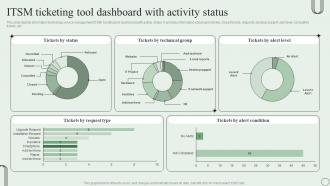
ITSM Ticketing Tool Dashboard With Activity Status Revamping Ticket Management System
This slide depicts information technology service management ITSM ticketing tool dashboard with activity status. It provides information about open tickets, closed tickets, requests, desktop support, alert level, completed tickets, etc. Present the topic in a bit more detail with this ITSM Ticketing Tool Dashboard With Activity Status Revamping Ticket Management System. Use it as a tool for discussion and navigation on Tickets By Status, Technical Group, Alert Level. This template is free to edit as deemed fit for your organization. Therefore download it now.