


Ticket Reservation Process Flow Chart





Try Before you Buy Download Free Sample Product
 Impress Your
 Audience
 100%
100% Editable
 Save Hours
 of Time


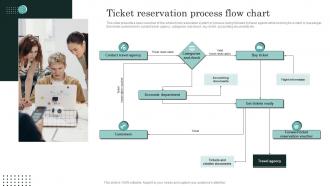
This slide presents a basic overview of the whole ticket reservation system or process being followed by travel agents while booking for a client or passenger. Elements covered are to contact travel agency, categorize and check, buy ticket, accounting documents etc.
People who downloaded this PowerPoint presentation also viewed the following :
Ticket Reservation Process Flow Chart with all 6 slides:
Use our Ticket Reservation Process Flow Chart to effectively help you save your valuable time. They are readymade to fit into any presentation structure.





FAQs for Ticket Reservation
Definitely prioritize real-time inventory tracking - overselling tickets is a nightmare you don't want. Mobile optimization is huge since nobody books on desktop anymore (I mean, when's the last time you did?). Look for flexible seating charts and multiple payment options. The system should handle refunds without making you want to pull your hair out. Good reporting features are clutch for tracking sales trends. Don't forget automated emails for confirmations and reminders - saves you tons of time. Integration with your current tools matters too. Test it yourself first though. If the interface feels clunky to you, your customers will hate it even more.
Honestly, speed is everything here - nobody wants to wait around clicking through endless pages. Keep your booking flow super short, like 3-4 steps tops. Real-time seat availability is a must, and your search filters better be dead simple to use. Mobile's obviously huge since everyone's booking on their phones now. That seat hold timer thing is clutch too - I've literally rage-quit sites when my seats disappeared while I was typing in my card info. Social logins save people time, and definitely let returning customers store their payment info. Test it with real users though. They'll tell you exactly where your checkout sucks.
Dude, mobile is everything now for booking stuff. I literally book flights, concerts, movies, whatever right from my phone and boom - digital ticket goes straight to my wallet. So much better than printing things out (seriously, I used to lose those paper tickets constantly). The GPS thing is actually pretty cool - it'll show you events happening near you that you might not have known about. Payment is super quick too since everything's already saved. Honestly? If a business doesn't have their reservation system working smoothly on mobile, I just go somewhere else. Most people do the same thing.
Okay so automated confirmations are literally a lifesaver - they kill that whole "wait did my booking actually work?" panic people get. Send them instant SMS or email confirmations right after they book, then maybe a reminder closer to the date. Honestly cuts down on so many support calls because nobody's frantically calling to double-check anymore. Throw in all the good stuff like seat numbers, venue info, QR codes. Customers love having that confirmation sitting in their inbox too. I'd start simple with just the booking confirmations first, then add reminder sequences once you've got it running smooth.
Set up alerts when inventory hits like 20% so you don't get blindsided. I track booking patterns obsessively now - shows you exactly when demand jumps and you can bump prices up. Learned that lesson the hard way after overselling last year's big event, what a nightmare. Always hold back some tickets for VIP stuff or comps. Real-time numbers are everything. Manual counting is just asking for trouble. Oh, and start by figuring out where your current system is screwing up - there's always gaps you don't see at first.
You can basically track everything - demand patterns, what competitors are charging, how customers actually behave. Super helpful for figuring out which prices actually work and when demand peaks. Way better than just guessing, honestly. The cool part is spotting weird trends, like maybe people in certain areas always book last-minute or whatever. Set up some alerts so you're not constantly checking - then you can jump on it when demand suddenly spikes or tanks. Real-time adjustments make such a difference compared to that old "set the price once and pray" method.
SSL/TLS is non-negotiable for everything - data, payments, the works. Get a PCI DSS compliant payment gateway and don't even think about storing full card numbers. Use tokenization instead. Multi-factor auth is clutch for user accounts. Honestly, fraud detection will blow your mind with how much weird stuff it catches. Rate limiting helps block bots too. Oh, and make sure your whole checkout is HTTPS obviously. Regular security audits are worth it since hackers are constantly probing for weaknesses.
Honestly, dynamic pricing is crazy effective at making people panic-buy. When customers see prices jumping around, they get that FOMO feeling and just go for it instead of waiting. Fixed prices? Totally different story - people will sit on it forever, compare everything, maybe never actually buy. You'll definitely get more impulse purchases with dynamic pricing, especially those last-minute "oh crap the price dropped" bookings. Fixed pricing builds more trust though, even if people abandon their carts more. For your system, think about what you actually want - do you want quick decisions or customers who really think it through first?
Yeah, social media integration can seriously bump up ticket sales - like 20-40% if you do it right. The trick is making sharing ridiculously easy during checkout. People post their ticket purchases on Instagram or Facebook, and boom - free advertising to all their friends. FOMO kicks in hard when everyone sees who's going. Honestly, I'd throw in small incentives too, maybe 5% off their next buy if they share. Event pages where people can check out the guest list work great - nobody wants to miss out when they see their crew attending. Just make the whole sharing thing seamless and your reach basically multiplies itself.
Definitely send out surveys after events - that's where you'll find all the good stuff. Check what made people mad during booking: slow website, hidden fees, mobile site being trash? Most of the problems are totally invisible to us. Payment failures are huge, plus confusing seat maps and people just giving up at checkout. Honestly, if ten people complain about the same calendar widget being awful, just replace it already. The key is actually fixing stuff instead of collecting feedback that sits in a folder somewhere. Set up something ongoing so you're not making the same mistakes every single time.
Honestly, consumer protection laws should be your starting point - they're the biggest headache if you mess them up. Your refund policies need to be super clear and follow local rules about cancellation windows. Data privacy is another massive thing since you're handling payment info. Accessibility requirements are no joke either - your platform has to work for everyone or you're looking at potential lawsuits. I'd definitely get a lawyer to review your terms of service too, even though it seems boring. Oh, and audit what you've got now against your local consumer laws. That'll show you where the gaps are.
So each industry does reservations totally differently. Sports venues change prices based on how the team's doing and push those season packages hard. Concert ticketing is honestly a mess - presale codes, fan club stuff, it's chaotic. Travel companies are obsessed with flexible policies since flights and hotels change every second. Timing's weird too. Sports plan months ahead, concerts drop tickets whenever they feel like it, and travel? Could be a year out or literally tomorrow. Just match whatever your customers usually do, I guess.
Honestly, you're going up against Ticketmaster and their crazy exclusive deals with venues - those guys have everything locked down tight. The tech side alone will kill your budget. Payment systems, fraud stuff, servers that won't crash when everyone's buying at once (can you imagine?). Customer acquisition is rough too since people just use what they're used to. I'd say forget trying to beat them at their own game. Find some weird niche they're ignoring instead - maybe local events or something super specific. Way smarter than going head-to-head with giants who have infinite money.
Look, partnerships are basically like having multiple storefronts instead of just one. You can get your events listed on Eventbrite, StubHub, social media - all at the same time. Way more people see your stuff that way. Here's the thing though - don't just go for the biggest platforms. Find where your actual audience hangs out. I'd start by checking what your competitors are doing successfully, then pick maybe 2-3 platforms that match your event type. The cross-posting can be automated too, which is nice. Honestly beats trying to build everything from scratch.
Honestly, dynamic pricing with AI is everywhere now - kinda annoying but makes sense. Mobile-first is obvious at this point. Blockchain ticketing's getting big for stopping fraud, which is cool I guess. Personalized recommendations are way better than they used to be, using your buying history and where you are. The social aspect is huge - people want to see who's going and buy with friends instantly. COVID made flexible cancellation policies pretty much required everywhere now. Oh and the green stuff is picking up steam - digital tickets, carbon offsets, all that. If you're updating anything, I'd definitely prioritize mobile and flexible policies first.
-
I am extremely pleased with these PPT slides that we used for our event. They were easy to modify and came out great in all aspects!
-
Happy to incorporate such stunning templates in my presentation. Made my presentation look professional and engaging.