

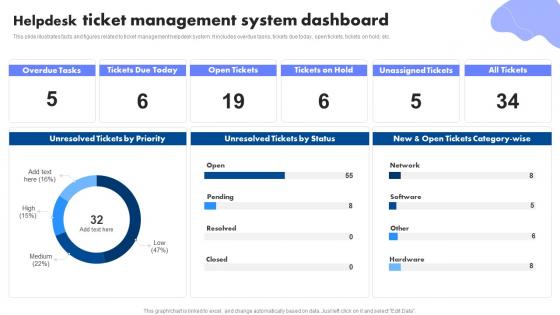
Helpdesk Ticket Management System Dashboard




Try Before you Buy Download Free Sample Product
 Impress Your
 Audience
 100%
100% Editable
 Save Hours
 of Time


This slide illustrates facts and figures related to ticket management helpdesk system. It includes overdue tasks, tickets due today, open tickets, tickets on hold, etc.
People who downloaded this PowerPoint presentation also viewed the following :
Helpdesk Ticket Management System Dashboard with all 7 slides:
Use our Helpdesk Ticket Management System Dashboard to effectively help you save your valuable time. They are readymade to fit into any presentation structure.





FAQs for Helpdesk Ticket
Honestly, start with ticket routing and automation - that's where you'll see the biggest time savings. Multi-channel support is a must since customers reach out everywhere these days. I'd focus on customizable workflows, SLA tracking, and definitely get a knowledge base so people can help themselves with basic questions. The reporting needs to actually be useful, not just those flashy dashboards that look impressive but tell you nothing. Oh, and don't underestimate how much integrations with your current tools will matter down the road. My advice? Write down your biggest headaches first, then demo only the systems that fix those specific problems. It's easy to get sidetracked by cool features you'll never use.
Honestly, ticket systems are a game changer - they stop stuff from getting lost in email chaos. Your customers can actually see what's happening with their issues instead of sitting there wondering if you disappeared. Response times get way faster because everything's organized and your team knows what needs attention first. I mean, we've all been that customer sending "following up again..." emails, right? With tickets, people get automatic updates when status changes, so they feel like someone's actually working on their problem. Just make sure you set up your priority levels properly from day one or it'll be messy.
So automation takes care of all the boring repetitive tasks - auto-assigning tickets by keywords, escalating old issues, sending customer updates. Your team can actually solve problems instead of just moving stuff around constantly. Set up rules for priorities and department routing, plus it'll auto-close resolved tickets. Works around the clock too, which is clutch when everyone's gone home. I'd start simple though - maybe just auto-assign by ticket type first. Then you can get fancy with more complex rules once you see how it goes. Trust me, it makes a huge difference.
So here's the thing - analytics basically turn your hunches into actual proof. Like, you'll finally see which issues blow up on Mondays or whatever, plus which team members are killing it vs those who need help. The bottlenecks become super obvious too. I got weirdly obsessed with the data once I started looking at it regularly lol. But yeah, you can make way better staffing calls and catch problems early. My advice? Pick maybe 2-3 metrics to start with. Don't go crazy with dashboards right away or you'll just get overwhelmed.
Honestly, user adoption is gonna be your biggest headache. People absolutely hate changing how they work - I've seen grown adults throw actual tantrums over new software lol. Data migration is another pain point, especially if your old system is ancient. Then there's trying to customize everything without making it stupidly complicated. Integration with your existing tools? Good luck with that mess. Training always takes way longer than you think, plus you'll get pushback from teams convinced their current setup is perfect. My move would be finding a few people who actually want to try it first, work out the bugs, then expand from there.
So instead of your ticket system sitting there doing its own thing, integrations connect it to everything else. Your CRM data shows up right in the ticket - customer history, past purchases, all that stuff. No more tab-switching madness. Chatbots can create and route tickets automatically, which honestly saves so much time. Plus the reporting gets way better since everything talks to each other. Your team stops wasting time digging for context and actually fixes problems faster. Oh, and don't try to integrate everything at once - pick whatever's driving you crazy first.
Start with response time and how long it takes to actually solve stuff - those are your bread and butter. Customer satisfaction scores matter obviously, plus tracking your ticket volume so you know when things get crazy. First-call resolution is honestly where you'll see the biggest wins for keeping people happy. I'd watch escalation rates too since those show where your team's struggling. Agent productivity is fine to track but don't get obsessed with raw numbers over quality work. Oh, and reopened tickets - that one stings but tells you a lot about whether issues are really getting fixed. Build from there once you've got the basics down.
So multi-channel support basically puts all your customer stuff - email, chat, phone, social - into one queue. Game changer, honestly. Your agents aren't switching between different systems anymore, which speeds everything up. Customers can start on email then call later without you losing track of what happened. The visibility is way better too since nothing falls through cracks between platforms. Oh and set up routing rules so tickets automatically hit the right people - saves you from manually sorting everything. It's like having one inbox instead of checking five different ones all day.
Start with multi-factor authentication and role-based access - that's where you'll get the most protection right away. Encrypt everything, both stored data and anything moving between systems. Honestly, I can't stress MFA enough since most hacks I hear about come from crappy passwords. You'll also need audit logs tracking who's looking at what tickets and when. Don't forget regular security patches for your system. If you're connecting to other tools, lock down those API endpoints too. Oh, and set up encrypted backups that run automatically. The access controls and MFA should be your starting point though.
Dude, you absolutely need to train people properly or your helpdesk will be a disaster. I've watched companies blow serious money on fancy systems that totally flopped because - get this - nobody bothered teaching users the basics. Without training, people create duplicate tickets everywhere and mess up categorization. Your team won't know when to escalate issues either. Do hands-on sessions before launch covering ticket creation and workflows. Focus on prioritization too. Good training means faster resolution and way better adoption rates. Honestly, your whole ROI depends on getting this part right from day one.
So basically cloud stuff runs on their servers - you just login and they deal with all the annoying maintenance crap. On-premise means it's sitting on YOUR servers, which sounds cool until your IT guy quits and suddenly nobody knows how to update anything. Cloud's honestly just easier these days. Most places I've worked went that route because you can be up and running same day instead of waiting weeks for setup. Plus no more "sorry the server's down" excuses from IT. Your call though - depends what you're comfortable with.
Oh man, helpdesk systems are such a lifesaver for team stuff. Everyone can see what tickets are open and who's handling what - no more confusion. You can assign things to specific people and leave internal notes (customers can't see those obviously). Way better than the email chaos we used to deal with. Multiple people can jump on tricky problems without duplicating work. Managers love the real-time workload view too. Over time you'll build this searchable database of solutions which is pretty clutch. My advice? Set up assignment rules from day one and get everyone hooked on using those internal notes.
Dude, ticket prioritization is seriously a lifesaver. When you sort stuff by urgency and category, the important fires don't get lost in the pile of random requests. I used to waste so much time just figuring out what to do next - now it's obvious. You start noticing weird patterns too, like when the same system keeps crashing every Tuesday (why is it always Tuesday?). Response times get way better since urgent tickets stay visible. Just set up basic priority levels that actually match how your team works. Don't overcomplicate it at first.
Honestly, customer feedback is like having a GPS for your system upgrades. Users will straight-up tell you what's broken or missing - stuff like crappy search features, clunky mobile experience, or workflows that make no sense. Yeah, some feedback stings, but those complaints are actually treasure maps pointing to what needs fixing first. Set up ways to collect this stuff regularly - surveys work, but I've found user interviews give you way better insights than just rating scores. Oh, and definitely track your support tickets since those show recurring problems. Review everything every few months to spot the biggest headaches.
Escalated tickets need immediate attention - grab a senior tech or specialist right away. Never let them sit around collecting dust because that's honestly how you lose customers for good. Keep talking to the customer even when you don't have answers yet, just so they know what's happening timeline-wise. Write down everything since different people will probably jump on the ticket. Oh, and set up alerts so nothing gets forgotten about. After you fix it, spend a few minutes figuring out how to avoid the same mess next time.
-
Understandable and informative presentation.
-
Content of slide is easy to understand and edit.