


Document Management System Dashboard For Insights




Try Before you Buy Download Free Sample Product
 Impress Your
 Audience
 100%
100% Editable
 Save Hours
 of Time


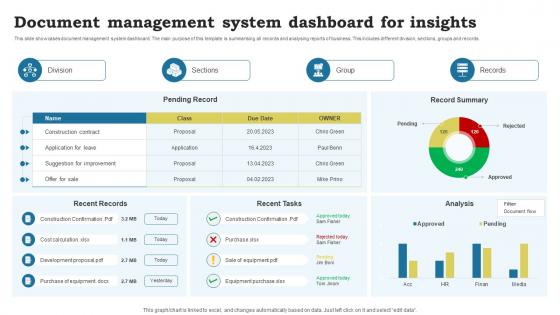
This slide showcases document management system dashboard. The main purpose of this template is summarising all records and analysing reports of business. This includes different division, sections, groups and records
People who downloaded this PowerPoint presentation also viewed the following :
Document Management System Dashboard For Insights with all 10 slides:
Use our Document Management System Dashboard For Insights to effectively help you save your valuable time. They are readymade to fit into any presentation structure.









FAQs for Document Management System
Track the basics first - document creation, storage use, who's accessing what. Version control stuff too. Search metrics are huge because honestly, if people can't find files quickly, they'll hate the whole system. Don't skip compliance tracking like retention policies and audit trails (learned that the hard way). User adoption rates tell you if anyone's actually bothering to use it. Oh, and modification rates help spot workflow issues. Start simple though. You can always add more metrics later based on what your team keeps bugging you about.
So basically you get this live view of who's touching what files and when. Comments go straight on documents instead of messy email chains. Version control actually works - no more "final_draft_v47_FOR_REAL_THIS_TIME.docx" nonsense (we've all been there). Notifications pop up when someone edits stuff you care about. You can dump tasks and deadlines right in there too, which honestly saves so much back-and-forth. My advice? Don't try to move everything at once - just start with whatever documents your team shares most. Way less overwhelming that way.
Go with a flowchart setup using colors - green for done, yellow for in progress, red for stuck stuff. Show how docs move from start to finish in a straight line that's super easy to read. Real talk, people always make this way harder than it needs to be. Track things like how long each stage takes and how many docs are waiting around. That's where you'll catch the slowdowns. Make it update automatically so you can click into specific documents when needed. Oh and start with whatever workflow is driving everyone crazy first - you can always add more later.
So basically user access controls are like having different keys to different rooms - some people can only peek through the window while others get the master key. Your dashboard will look totally different from your coworker's depending on what you're allowed to do. Some folks get stuck with read-only access (honestly the worst), while others can upload, edit, delete, whatever. If buttons are grayed out or missing, that's why. Your manager probably sees way more stuff than you do. Need something you can't access? Just bug your IT admin - they'll hook you up.
Honestly, most places track the stuff that'll bite you if it goes missing - contracts with renewal dates, invoices, HR records, compliance docs. Legal stuff is probably the biggest one since you need version control and can't miss those renewal deadlines. Financial documents get heavy monitoring too (obviously money's involved). Oh, and regulatory filings depending on your industry - that's a nightmare if you mess it up. Don't just throw everything in there though. Focus on documents with actual deadlines or approval workflows first. Start with whatever's currently making your life hell when it disappears.
Look, automated alerts are basically your backup for catching compliance stuff before it blows up. They'll ping you when documents are expiring, need renewals, or haven't been reviewed on time. The system also flags weird access patterns or gaps in your audit trails - honestly saved my butt more than once. Way better than trying to manually track hundreds of deadlines (who has time for that?). Just set your alert preferences based on whatever regulations you're dealing with. Then you can actually focus on responding to issues instead of hunting for them constantly.
Cloud storage is what makes your document dashboard actually work. You'll be able to access and sync files from anywhere, which beats being stuck with local storage limits. Your team can collaborate way better too. Automatic backups are clutch, plus you get version control and can scale up storage when your document library inevitably gets massive. I mean, nobody wants to mess with USB drives anymore, right? The dashboard becomes your control center, but cloud storage is what makes everything searchable in real-time. Honestly, set up cloud integration first, then worry about customizing your dashboard views later.
Honestly, just customize each department's dashboard around what they actually need day-to-day. HR wants employee files and compliance stuff right there. Marketing needs their campaign assets easy to grab. Finance? They're obsessed with invoices and contracts - typical, right? Set up role-based permissions so people only see what matters to them. Custom widgets help too. Here's what worked for us: ask each team their top 3 daily document tasks first. Then build their dashboards around that. Way easier than guessing what they want.
Search is huge - being able to find stuff fast will save you hours. Version control too so you don't mess with old files by accident. Don't sleep on access permissions either. Seems boring but trust me, it matters when your team grows. The AI bells and whistles? Skip 'em for now. Basic organization beats fancy features every time. Mobile access is clutch since you'll need docs when you're not at your desk. Make sure it plays nice with whatever you're already using - Google Drive, Dropbox, whatever. Start simple, add the complicated stuff later.
Honestly, the integrations can make or break the whole thing. You want your document dashboard talking to whatever you're already using - your CRM, email, project tools, whatever. That way you're not constantly jumping between apps like some kind of digital ping pong ball. Check what connects before you commit to anything. Trust me, without decent integrations you'll end up manually moving files around and doing the same work twice. Which is basically the opposite of what you want from a centralized system. Just make sure it'll play nice with your current setup first.
Honestly, the worst mistake is shoving everything onto one screen - instant user overload. Generic layouts are another killer, especially when they don't match how your team actually uses documents day-to-day. I've seen so many "pretty" dashboards that are completely useless for real work. Search has to be lightning fast too. People get impatient quick. Those fancy charts everyone loves? Skip them unless they actually help users do their jobs better. Oh, and definitely test with real people before launch - not just your dev team. Build the basics first, then add features based on what users tell you they need.
So you know how you're always wondering if Sarah actually signed off on that contract? Real-time updates fix that completely. You can see exactly what's happening right now - no more guessing games. When someone gets buried under work, you'll catch it before things pile up. Same with urgent stuff that's about to go overdue. Honestly, it's kind of amazing how much more on top of things you feel. Next meeting, just pull up your dashboard and you'll actually know what's going on instead of making stuff up.
Honestly, start with user permissions - that's your biggest win. Role-based access so people only see what they need to see. Like, why would some random intern have access to executive contracts? Makes no sense. After that, encrypt everything. Both stored data and stuff moving between systems. Backups are obvious but worth mentioning. Oh and audit trails - track who's looking at what and when. Super boring but compliance teams love that stuff. The monitoring features can wait until you've got permissions locked down tight.
Oh man, feedback is everything for dashboards. Drop some feedback buttons right in the interface - when users hit a snag, they'll actually tell you about it in the moment. Analytics are your best friend here, showing exactly where people bail out or get confused. Monthly user sessions are awkward as hell but you'll learn so much watching people stumble through your design. In-app surveys work too, though keep them short. Honestly, direct interviews reveal stuff you'd never think of. Make a roadmap from the most common complaints and tackle one thing at a time. Pick one method and start this week!
Honestly, mobile accessibility can make or break your document management system. People won't use it if they can't search or approve stuff on their phones - they'll just skip it and complain later about missing things. Make sure buttons are big enough to actually tap, text doesn't require zooming, and the main features work on small screens. Bad mobile experience kills adoption super fast. Oh, and definitely test on real devices, not just your desktop browser's mobile view - that thing lies constantly about how it'll actually look.
-
SlideTeam has helped me take my presentation to the next level. Everyone at the office is impressed! I’ll be using their designs for a long-long time.
-
My search for complete decks ended with SlideTeam. Such a surplus collection of HD PowerPoints. Moreover, their standard and widescreen formats have helped me in delivering bullseye presentations.