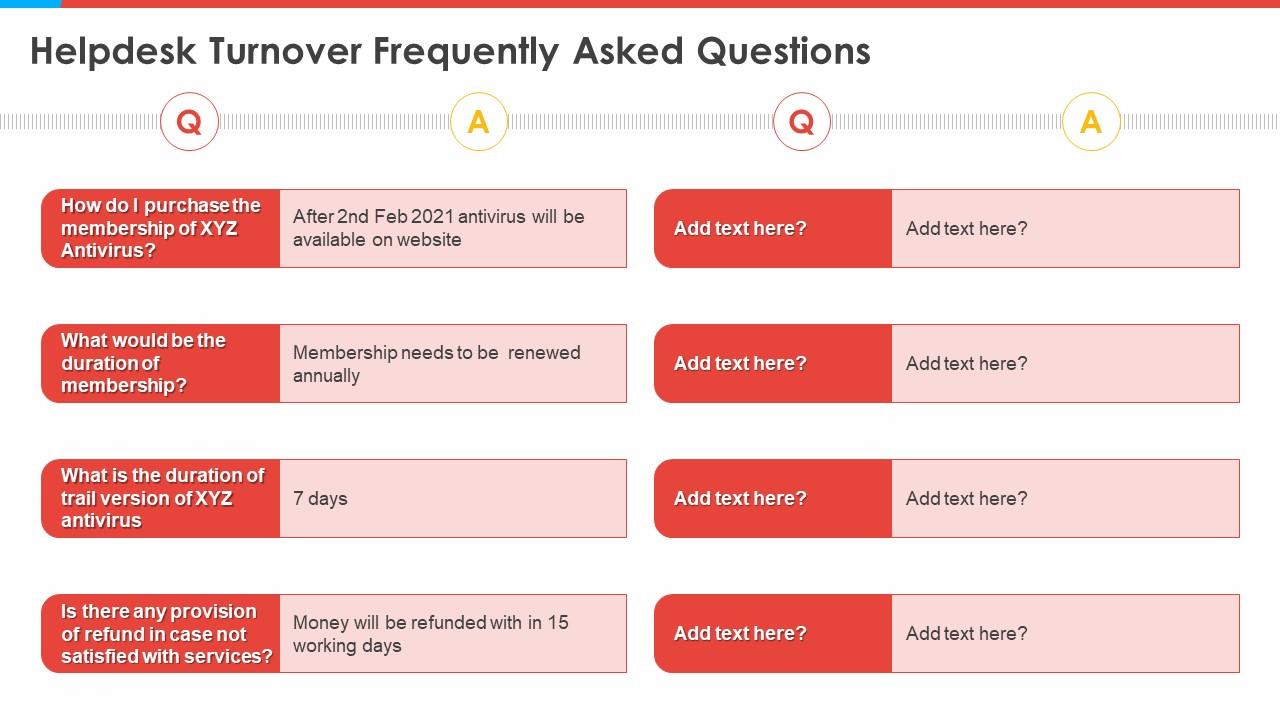
Construction templates bundle helpdesk turnover frequently asked questions

Rating:
100%
Construction templates bundle helpdesk turnover frequently asked questions
Slide 1 of 6
Favourites Favourites

Try Before you Buy Download Free Sample Product

Audience Impress Your
Audience
Editable 100%
Editable
Time Save Hours
of Time
The Biggest Sale is ending soon in
0
0
:
0
0
:
0
0
AI-Ready
Upload this template to AI and ask it to make any changes to content or color
100% editable Powerpoint Template for AI-assisted presentations. Finish your work in less time. Download Prompt Kit ​
Works with
Microsoft PowerPoint
Microsoft 365
Claude for PowerPoint
ChatGPT
Google Slides
Microsoft Copilot
Rating:
100%
Increase audience engagement and knowledge by dispensing information using Construction Templates Bundle Helpdesk Turnover Frequently Asked Questions. This template helps you present information on eight stages. You can also present information on Helpdesk Turnover Frequently Asked Questions using this PPT design. This layout is completely editable so personaize it now to meet your audiences expectations.

FAQs for Construction templates bundle helpdesk turnover

Think of construction templates as your project starter pack - all the schedules, checklists, and budget formats already set up so you don't have to reinvent the wheel every time. Just swap in your specific details and you're good to go. Your team will actually thank you because everyone knows what's happening when. No more awkward "uh, what's next?" meetings that drag on forever. The consistency thing is huge too. I'd start with templates for whatever project types you do most - probably makes the biggest difference right away. Saves so much headache honestly.

So basically, templates save your ass by making sure you don't forget stuff. Like, they already have all the fields laid out - permit numbers, safety protocols, material specs, whatever. Your whole crew uses the same format, so nobody's scrambling around trying to figure out where Bob put the structural details this time (we all know a Bob, right?). Everything's in the same spot every time. Way less room for screwups. I'd start with the docs you use most - change orders, inspection reports, that kind of thing. Makes the whole process pretty much dummy-proof.

Okay so the big ones are project schedules, budget trackers, daily reports, and safety checklists. Change orders and inspection forms too - those are everywhere on sites. Daily reports honestly save your ass the most because everyone stays updated on what's actually happening. Budget templates catch cost overruns before they spiral, which is clutch. Oh and inspection checklists keep you compliant (learned that one the hard way). I'd start with a decent schedule template and daily reporting setup. Then just add whatever else you need as projects get more complex. Works way better than trying to build everything upfront.

Honestly, templates are a game changer for construction projects. They get everyone speaking the same language, which cuts down on so much confusion. Use them for progress reports, change orders, safety stuff - basically anything you do repeatedly. Your contractors and clients will know what to expect every time, no more guessing games about formats or missing info. Handoffs between team members become way smoother too since everything's organized the same way. I'd start with whatever you're doing most often, then just build from there. Trust me, it's worth the upfront effort.

Yeah, definitely! Templates are meant to be starting points anyway. You can tweak timelines, swap out tasks, adjust who's doing what - basically mold them to fit your actual project. Some platforms let you add custom fields too if you need weird stuff like special permits or whatever. I'd just pick whichever template feels closest to what you're building, then hack it up from there. Way better than starting from scratch every time. The whole idea is they save you the grunt work of setting everything up while still letting you make it yours.

So I've tried a bunch of these. Procore and Buildertrend are solid for the whole project management thing - they've got templates built right in. Microsoft Project works but honestly it's kind of a pain to learn at first. Smartsheet surprised me though - way better than trying to hack Excel for this stuff. CoConstruct is good too, especially if you're doing houses and not commercial work. My take? Just pick whatever plays nice with what you're already using. Don't overthink it. You can always try something fancier once everyone gets the hang of it.

Honestly, construction templates are a game changer - they bake compliance straight into your process instead of making it an afterthought. You get pre-built checklists and all the documentation requirements for OSHA, building codes, ACI, AISC, whatever you need. No more wondering what to track or when. The system prompts you for inspections, safety stuff, and material certs at exactly the right moments. I've seen too many crews scramble at the end trying to pull together compliance docs. With templates, you're building that paper trail as you work. Trust me, your next audit will be so much smoother.

First thing - get everyone on the same page about which templates to use when. Put them all in a shared folder so people aren't hunting around for the right version. Your team needs to actually get WHY each template exists, not just mindlessly fill in boxes. Nobody wants to do work that feels stupid, you know? Train people properly instead of just dumping templates on them. Oh, and definitely have someone own keeping them updated - that's huge. Ask for feedback regularly too. Templates should make things smoother, not add more annoying steps to everyone's day.

Dude, templates are a lifesaver for construction budgets. They give you the same cost breakdown format every time, so you're not reinventing the wheel on each project. Just plug in your numbers and boom - all the math's done for you. Honestly saves me so much time I can't even tell you. You'll catch budget problems way earlier since everything's laid out consistently. Your whole crew will be on the same page too, which cuts down on those awkward "wait, what does this line item mean?" meetings. I'd start basic and tweak it as you go.

Construction templates are honestly lifesavers for managing risk. They standardize your processes so you spot problems before they turn into budget nightmares. You'll get consistent documentation and clear accountability - makes it way easier to identify issues early. Having templates forces you to plan for contingencies upfront instead of panicking when something goes wrong (which always happens). They also keep you compliant with safety regulations, cutting down on liability. My advice? Start with templates for your riskiest activities first. That's where you'll notice the biggest difference right away.

Dude, focus on three main things when picking a template provider. You want comprehensive coverage for your specific projects, regular updates that actually keep up with new regulations, and a solid track record. Some of these companies are literally just hawking old Word docs for insane money - total ripoff. Their customer support better be decent too because you'll definitely need help figuring stuff out. I'd check client reviews first, then ask for samples before you buy anything. Most have free trials anyway, so test it out with your actual workflow first. Way smarter than jumping in blind.

Dude, construction templates are seriously worth it. You get all the standard tasks and timelines already laid out, so you're not building everything from zero each time. Just grab one and tweak it for whatever you're working on. It's like borrowing someone else's years of experience - honestly wish I'd started using them sooner. They're great for catching scheduling problems before they bite you. Oh, and you won't forget those random but critical deadlines that always seem to pop up. Start simple, then adjust as you figure out what clicks with your crew.

Templates are basically your safety net for quality control. They standardize everything so nothing gets missed. Your whole crew follows the same checklists and inspection steps, which means you catch problems early instead of finding them during the final walkthrough - trust me, that's a nightmare you want to avoid. Material specs stay consistent, sequencing stays on track. Subcontractors know exactly what you expect from them. Plus you'll have solid documentation if issues pop up later. Honestly, I'd start with templates for whatever processes are giving you the most headaches first.

Honestly, templates are a game changer for looking professional. Clients definitely pick up on it when your whole presentation flows together nicely - like your proposal matches your timeline docs and everything. You'll cut your prep time in half, maybe more once you get the hang of it. Instead of starting from zero every damn time, you can just focus on the actual content. Makes your whole firm seem way more legit too. Oh, and don't try to template everything at once - just start with whatever project types you do most often.

Yeah totally! Check out the "Green Building" section - that's where all the sustainability stuff lives. There's templates for LEED docs, energy tracking, waste management plans, material sourcing checklists, the whole deal. That carbon footprint calculator one is honestly pretty sweet, saves me so much time on reports. Oh and they've got pre-built sections for green certifications too so you won't forget anything important. I'd probably start with the sustainability project overview template first, then just grab whatever else you need based on your specific project. Should have you covered!

Ratings and Reviews

100% of 100
Review Form
Write a review
Most Relevant Reviews
  1. 100%

    by William King

    Great quality slides in rapid time.
  2. 100%

    by Darrel Burns

    Very unique, user-friendly presentation interface.

2 Item(s)

per page: