

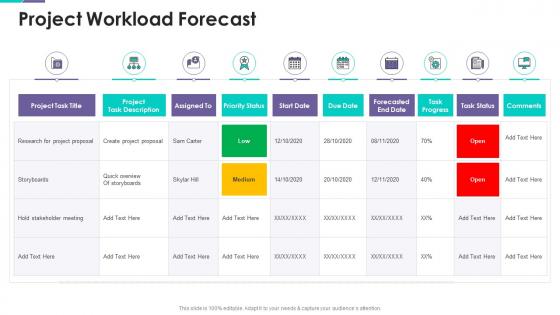
Project Workload Forecast Project Support Templates Bundle




Try Before you Buy Download Free Sample Product
 Impress Your
 Audience
 100%
100% Editable
 Save Hours
 of Time


Our Project Workload Forecast Project Support Templates Bundle are topically designed to provide an attractive backdrop to any subject. Use them to look like a presentation pro.
People who downloaded this PowerPoint presentation also viewed the following :
Project Workload Forecast Project Support Templates Bundle with all 6 slides:
Use our Project Workload Forecast Project Support Templates Bundle to effectively help you save your valuable time. They are readymade to fit into any presentation structure.





FAQs for Project Workload Forecast Project
Honestly, start with tracking your team's actual capacity and how complex tasks really are. Historical velocity is gold - it'll show you what you can actually deliver vs what you think you can. Buffer time is non-negotiable because stakeholders will always have "one quick change." Dependencies kill timelines faster than anything else, so map those out early. Don't sleep on tracking holidays and training days either - I've seen too many sprints tank because someone forgot about that conference. Track how accurate your estimates were on past projects. You'll probably find patterns in where you're consistently off, which helps you get better at this whole thing.
Look at your past project data - it's like having a cheat sheet for future estimates. Pull up your last 5-10 similar projects and compare what you thought tasks would take vs. reality. You'll probably find patterns, like maybe QA always takes 30% longer than planned (happens to everyone). Also track where projects hit roadblocks or scope creep - certain types just seem cursed that way. The trick is logging actual completion times, not just the rosy estimates. Once you see these patterns, your forecasts get way more realistic. Honestly beats guessing every time.
So project management frameworks actually help tons with predicting workload. Agile breaks things into sprints and story points, while Waterfall maps everything out in phases upfront. Both work, just depends what you're building. The real win is catching dependencies and bottlenecks way earlier - like you'll see resource conflicts before they bite you. Honestly, I've seen teams waste weeks because they didn't spot these issues during planning. Pick whatever methodology fits your project type and use their planning tools. Makes forecasting way less of a guessing game.
Dude, your predictions are only as good as your team's actual availability. Half your devs taking vacation next month? Your forecast is screwed if you don't account for that. I learned this the hard way lol. Map out PTO, sick days, other projects - even people having rough weeks happens. Build your workload estimates around real availability, not some perfect world scenario. Honestly, I always add like 20% buffer because there's always some random thing. Way better to be pleasantly surprised than scrambling when everything falls behind.
Honestly, I'd mix a few approaches. Bottom-up estimation is solid - break everything into tiny pieces and estimate each one (though add extra time because we all suck at this). Three-point estimation gives you best/worst/likely scenarios. If you've got old projects lying around, that historical data is pure gold. Planning poker with the team catches stuff you'll miss solo - plus Sarah always spots the weird edge cases. Don't just pick one method though. Combine two or three and your estimates won't be complete garbage.
Your team knows stuff that'll never show up in your data - like when priorities are about to flip or if there's some weird dependency lurking around. I bombed this once when my "brilliant" forecast missed a huge client deadline that literally everyone knew about except me, whoops. The people actually doing the work understand realistic timelines way better than spreadsheets do. Ask them specific questions about where things get stuck, not just "how busy are you?" Getting their input early makes your forecasts actually useful instead of just... math.
Honestly? Start with Microsoft Project or Smartsheet - Smartsheet's great if your team digs the spreadsheet vibe. Asana and Monday.com work well too, especially for visual timeline stuff. But here's the thing - I've watched people crush forecasting with just Excel and pivot tables. Sometimes the fancy tools are overkill, you know? Your team actually using it matters way more than bells and whistles. Grab free trials of maybe 2-3 options, see what clicks with how you guys work. Don't overthink it at first - you can always add more complex features later once everyone's comfortable.
Dude, external stuff will mess up your workload predictions big time if you're not watching. When the economy's good, clients flood you with work. Bad times? Projects vanish overnight. I learned this the hard way last year tbh. Industry changes hit different too - like when AI exploded, suddenly everyone wanted tech projects instead of the usual stuff. Don't forget seasonal patterns either, that's a sneaky one. Best bet is staying flexible with your forecasts and actually reading industry news to catch trends early.
Ugh, time estimates are the worst - we're always way too optimistic about how long stuff takes. Dependencies make everything take forever, plus you've got holidays and sick days eating up time. And don't even get me started on random interruptions (looking at you, chatty coworkers). Here's what actually works: plan for like 70-80% productivity, not 100%. Nobody's that efficient all the time. Build buffer time into everything upfront - I learned this the hard way. Track your guesses vs reality so you get better at it. Scope creep will also try to murder your timeline, so watch for that sneaky bastard.
Ditch those long-term estimates - they're basically useless in agile. Focus on rolling wave forecasting instead, maybe 2-3 sprints out max. Story points work way better than hours, trust me on this one. Update your forecasts after each retro based on what actually happened. Your team's velocity will start showing patterns after a few sprints. Don't forget to account for the usual stuff - holidays, meetings, random scope changes that always pop up. Weekly check-ins with your product owner help tons. Honestly, the whole thing should feel more like a living document that shifts with your backlog rather than some set-in-stone plan.
Set up weekly or bi-weekly review cycles depending how fast your project moves. Track actual vs predicted workload and write down what's causing the differences - scope changes, team issues, random blockers that pop up. Most people totally skip analyzing the "why" part but honestly that's where you learn the most. Rolling forecasts work way better than static ones. Get your team involved since they spot changes before anyone else does. Oh and set alerts when actual work goes 15-20% off your forecast so you can fix things fast.
Look, team capacity is literally the backbone of any decent workload forecast. Without it you're just throwing darts at a board hoping something sticks. Check each person's actual availability first - their skills, what they're already juggling, all that stuff. I can't tell you how many times I've watched forecasts completely bomb because someone figured the whole team was free when half of them were drowning in other projects. Once you know what your people can realistically handle, then you can figure out timelines that won't make everyone want to quit.
Honestly, workload forecasting is a lifesaver - it shows you exactly where your team's gonna crash and burn before it happens. You'll spot bottlenecks weeks out, catch those impossible deadlines everyone loves to set, and see when you're burning out specific people. The weird thing is it also reveals when everyone's suddenly free at once, which... yeah, that's usually not good news. Means you probably missed something big. Best part? You can actually do something about it - shift deadlines around, move work between people, or at least give your stakeholders a heads up before everything goes sideways.
Your team absolutely needs to be part of workload forecasting - they're doing the actual work, so they know how long stuff really takes. You'll get way more realistic timelines instead of management just guessing (been there, done that). People are way more likely to hit deadlines they helped set rather than ones dropped on them from above. They'll also catch roadblocks you'd totally miss from your bird's-eye view. I usually start by having everyone estimate their own tasks, then we hash it out as a group to find any weird conflicts or gaps.
Definitely works, sometimes even better than in-person teams honestly. Remote teams are already tracking everything more systematically anyway, so you get cleaner data to work with. The tricky part is time zones - makes real-time adjustments harder, but it also forces you to plan more strategically which isn't terrible. Just make sure everyone's actually using the same project management tools and updating stuff consistently. Oh, and whatever forecasting tool you pick should integrate with platforms your team already uses daily. Nobody wants another login to remember. Start with solid reporting rhythms and you'll be good.
-
Fantastic and innovative graphics with useful content. The templates are the best and latest in the industry.
-
SlideTeam is my one-stop solution for all the presentation needs. Their templates have beautiful designs that are worth every penny!