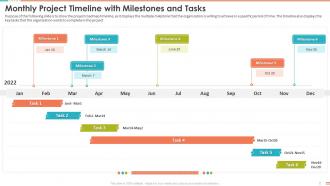
Monthly Project Timeline With Milestones And Tasks Project Management Bundle
Try Before you Buy Download Free Sample Product
Audience
Editable
of Time
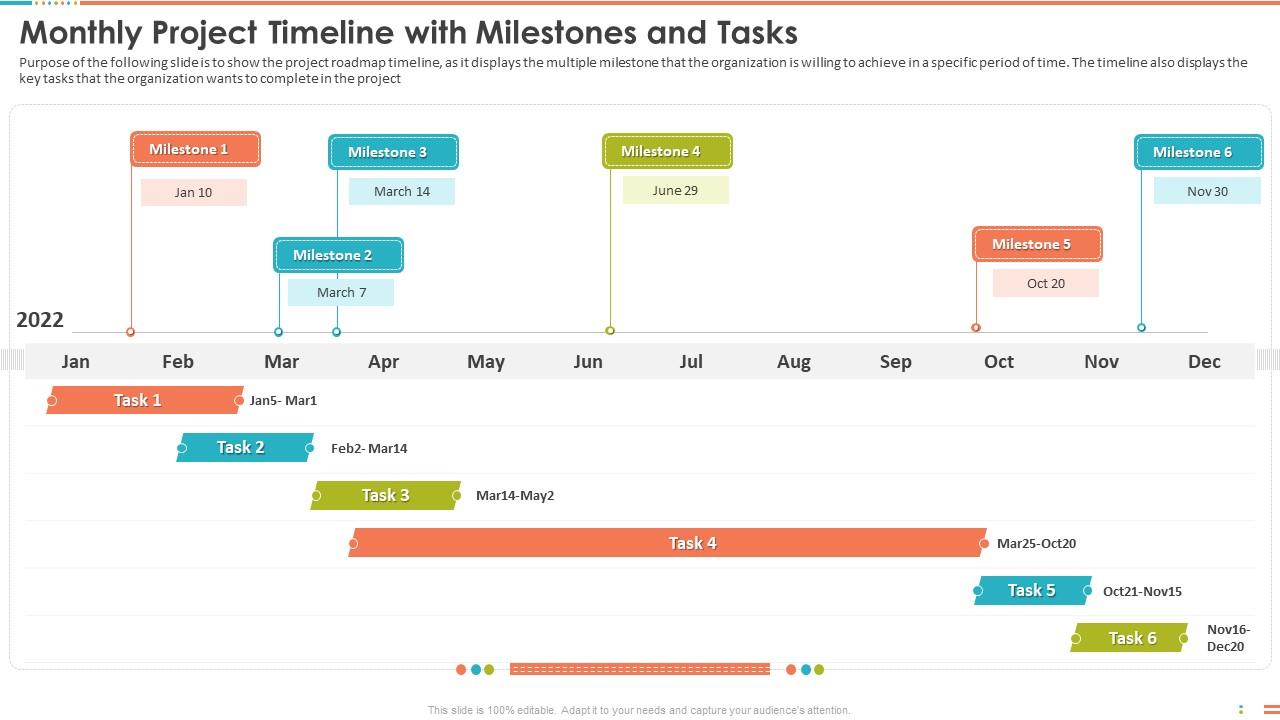
Purpose of the following slide is to show the project roadmap timeline, as it displays the multiple milestone that the organization is willing to achieve in a specific period of time. The timeline also displays the key tasks that the organization wants to complete in the project.
People who downloaded this PowerPoint presentation also viewed the following :
Monthly Project Timeline With Milestones And Tasks Project Management Bundle with all 6 slides:
Use our Monthly Project Timeline With Milestones And Tasks Project Management Bundle to effectively help you save your valuable time. They are readymade to fit into any presentation structure.
FAQs for Monthly Project Timeline With Milestones And Tasks
You'll want clear milestones and realistic time estimates for each task. Dependencies are huge - like, seriously, most people completely ignore which tasks need to happen before others and then act shocked when everything implodes. Build in buffer time because literally nothing ever takes as long as you think it will. Make sure someone's name is attached to every deliverable with actual due dates. Oh, and pick a format your team will actually use - could be a fancy Gantt chart or just a simple list, whatever works. The best timeline is the one people will actually look at and keep updated.
Honestly, visual timelines are game-changers. People actually look at them (unlike those boring project docs nobody opens). Your team can see dependencies and deadlines right away instead of scrolling through a million emails asking "wait, when's this due again?" It's way easier to spot conflicts too - like when two people are supposed to finish something on the same day but one depends on the other. I swear decisions happen twice as fast when everyone's looking at the same timeline. Even my most scattered teammates stay on track with these things.
Honestly, Microsoft Project is solid if you need all the bells and whistles, but Asana or Monday.com work great for most teams. Gantt charts still crush it for showing dependencies - I know they look old school but they just work. Going solo? Trello's timeline power-up is decent, or you could even hack together something in Google Sheets. The real trick is finding what your team will actually stick with. I've seen too many fancy setups die because nobody wanted to update them. Start with whatever you've got already, then move up if it's not cutting it.
Honestly, milestones are like those save points in video games - total lifesavers when stuff goes wrong. You can break your huge project into smaller pieces and actually see when you're falling behind. Hit a milestone? Perfect time to figure out if you need to move people around or push some deadlines back. The trick is picking ones that actually matter, not just random dates you threw on a calendar. I usually check mine every week or so. Makes catching problems way easier before they turn into disasters. Way better than realizing you're screwed at the very end.
Dude, you'll blow past every deadline if you don't pad your estimates. Seriously. Tasks always take longer than expected - I can't remember the last project that finished early, can you? Dependencies between tasks will mess you up too. Oh and don't just guess from your office - actually ask the people doing the work how long stuff takes. They know way better than management does. Also factor in holidays, sick days, all that normal life stuff that slows things down. Buffer time isn't optional, it's survival.
Honestly, forget rigid timelines - they're just setting you up for stress. Break everything into 2-4 week sprints but keep those end dates flexible. Map out your big milestones and definitely build in buffer time between sprints because priorities WILL shift (learned this the hard way). Burndown charts are actually pretty helpful for tracking progress within sprints. Plan regular retrospectives too so you can adjust as you go. Keep your final deadline visible but stay flexible on how you get there. Oh, and start with your MVP timeline first - that's your foundation. Then you can add the fancy stuff later.
Dude, stakeholder feedback is like your reality check moment. You'll share your timeline thinking it's solid, then they drop bombs about dependencies you totally missed or tell you that key person is on vacation for two weeks. Resources you counted on? Not happening when you need them. I swear, no timeline ever survives that first feedback round - mine definitely don't! But honestly that's good because they catch the unrealistic stuff before you're deep in the project scratching your head wondering why you're behind. Always get their input before locking anything down.
Dude, break everything down into tiny pieces - seriously, that's what saved me. Don't estimate "build feature" as 2 weeks. Instead do "design API endpoints," "write tests," etc. I used to blow deadlines constantly until I figured this out. Always add buffer time too (like 20-30% extra). Base estimates on what you've actually done before, not your dream scenario where nothing goes wrong lol. Oh and track how long stuff really takes. You'll get way better at guessing over time.
Okay so first thing - figure out what's actually blocking other stuff vs what just *feels* urgent. Those are totally different. Then immediately tell everyone what's changed with real timeline estimates. Don't just say "we're working on it" because honestly, that pisses people off more than bad news does. Add buffer time if you can - maybe 20% extra? Also write down what happened and why, because someone will definitely ask later why you're behind. The whole trick is resetting expectations upfront instead of crossing your fingers that you'll magically catch up somehow.
So basically, your timeline shows you exactly when you'll need people and resources - no more last-minute panic when you realize two tasks need the same developer. I always start with the critical path, then figure out who goes where. You can spot conflicts way ahead of time and see when to bring people on or let them go work on other stuff. Plus you'll catch those moments when someone's sitting around doing nothing while another team is drowning. It's like having a heads up on everything that's coming - honestly makes the whole thing way less stressful.
Okay so basically regular timelines are super simple - just tasks in order by date. Gantt charts though? Way more detailed and visual. You can see which tasks depend on others, what's happening at the same time, who's working on what. It's like comparing a grocery list to one of those fancy project dashboards. Plus Gantt charts have those little progress bars that are oddly satisfying to fill in. Honestly, if you're juggling multiple people or anything remotely complicated, just go with the Gantt chart. Regular timelines work fine for simple stuff but you'll probably outgrow them fast.
Oh yeah, color-coding is a game changer! I always do red for urgent stuff, blue for dev work, green when things are done. Works great. You could organize by team member instead, or maybe project phase - whatever clicks for your situation. Honestly the most important thing is just being consistent with whatever system you pick. Otherwise people get confused about what each color means, and then you're back to square one. Oh and use the same colors across all your project docs too, not just the timeline.
Look, I've seen this firsthand - good timelines can bump your success rate by like 20-30%. Break everything into weekly chunks instead of staring at one massive deadline (trust me on this). Your team actually knows what they're doing and when, which prevents so much chaos later. You'll spot problems before they become disasters, and stakeholders won't constantly bug you for updates. Plus when stuff goes wrong - and it will - you've got something to measure against. I always tell people to map out those dependencies upfront. Makes resource planning way less of a headache too.
Honestly? Weekly check-ins work for most stuff, but if you're dealing with crazy deadlines or things keep changing, maybe bump it to every few days. I used to be terrible at this - would make these beautiful timelines then never look at them again lol. Now I just set a quick calendar reminder and actually follow through. Takes like 10 minutes tops. The main thing is updating it when big stuff happens - new requirements, team changes, or when everything goes sideways. Don't let it collect dust. Oh, and daily reviews during those super intense phases? Totally worth it.
Deadlines are a lifesaver - seriously, without them your project will just drift forever. Everyone knows exactly when their stuff is due, so no more "wait, I thought you were doing that" moments. Tasks have this annoying habit of expanding to fill whatever time you give them (learned that the hard way). You can catch problems early too instead of panicking at the end. I always work backwards from the final date and build in some buffer time. Trust me, something always goes sideways. Start with realistic time estimates for each piece, then map it all out.
-
Great product with effective design. Helped a lot in our corporate presentations. Easy to edit and stunning visuals.
-
Unique design & color.