

Project Tracking Powerpoint Ppt Template Bundles





Try Before you Buy Download Free Sample Product
 Impress Your
 Audience
 100%
100% Editable
 Save Hours
 of Time


Our Project Tracking Powerpoint Ppt Template Bundles are topically designed to provide an attractive backdrop to any subject. Use them to look like a presentation pro.
People who downloaded this PowerPoint presentation also viewed the following :
Project Tracking Powerpoint Ppt Template Bundles with all 17 slides:
Use our Project Tracking Powerpoint Ppt Template Bundles to effectively help you save your valuable time. They are readymade to fit into any presentation structure.


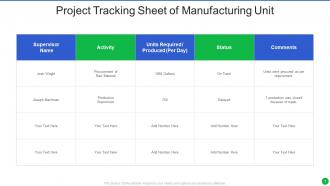

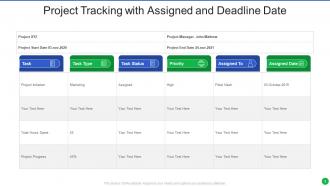
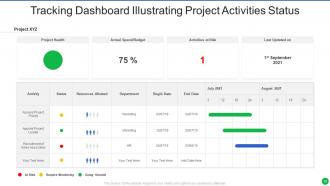
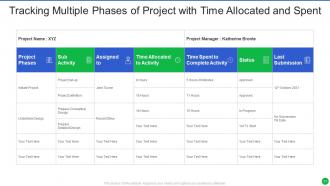






FAQs for Project Tracking Powerpoint
Honestly, dashboard tools are your best bet - Monday.com, Asana, Jira, whatever clicks with your team. Daily standups work wonders too. Just 15 minutes to catch problems before they snowball. Here's the thing though: if updating progress feels like a chore, people will skip it every time. Kanban boards give you that visual overview everyone loves. Automated status reports help, but don't rely on them completely. Pick one tool first - seriously, just one that people actually want to open. Then you can build everything else around it. The friction has to be minimal or you're fighting an uphill battle.
Honestly, these tools are lifesavers - no more digging through email chains to figure out what's actually happening. Your team gets one place where everyone can see progress, deadlines, who's stuck on what. Real-time updates mean you're not constantly asking "did you see my message?" The tagging feature is clutch too, you can loop people in on specific stuff without spamming the whole group. Remote teams especially need this. Oh, and you can finally tell who's drowning in work versus who's got time to help. Just pick one small project to start with - you'll see the difference immediately.
Track your schedule and budget variance first - those are the big ones that'll bite you. Scope creep is another killer to watch. Quality stuff like defect rates matter too, obviously. I'd also keep an eye on how loaded your team is because nobody wants people burning out halfway through. Oh, and don't forget milestone completion and how happy stakeholders are (trust me on that one). Pick maybe 4-6 metrics that actually make sense for your project. Seriously, don't go overboard tracking everything. Just set up something simple you can check weekly.
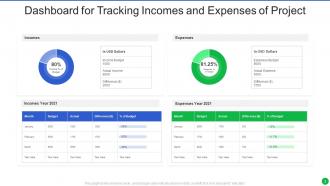
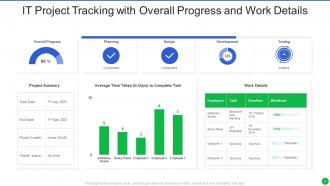
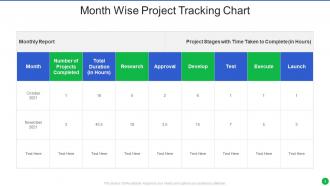
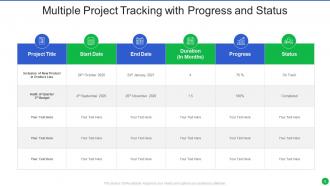
Honestly, think of project tracking like a dashboard for your whole operation. You'll see where your time and money are actually going vs. where you thought they'd go. Super useful when someone gets stuck or a task drags on way longer than expected - you can shuffle people around or grab extra help before everything falls apart. I mean, projects never go exactly as planned anyway, right? The trick is actually looking at your data regularly (not just when things are already on fire) and being flexible enough to move resources when needed. Way better than crossing your fingers and hoping.
Dude, integration is such a lifesaver - no more copying stuff between apps all day. Your time tracker talks to billing automatically, tasks pop up on your calendar, reports just appear. I used to waste like an hour daily on that copy-paste nonsense. Now everything syncs in real time and I actually trust the data since there's no chance I fat-fingered something during transfer. Honestly wish I'd done this years ago. Start small though - just connect your two main tools first and build from there.
Honestly, try doing short sprint cycles with daily check-ins - like two weeks max. You'll catch problems in days instead of waiting weeks to realize everything's gone sideways. Those burndown charts are actually pretty cool for seeing if you're on track or falling behind. Daily standups sound annoying but they're just 15 minutes and suddenly everyone knows what's happening. Oh, and do retrospectives after each sprint so your team can tweak how they track stuff. I was skeptical at first but the visibility is so much better than traditional project management.
Honestly, most people either track way too much stuff or forget to update anything regularly. Both are disasters waiting to happen. Don't be the person obsessing over every tiny detail - you'll get buried in spreadsheets. Focus on maybe 3-5 things that actually move the needle for your project. Weekly check-ins work best, but here's the thing everyone misses: budget and scope matter just as much as hitting deadlines. I've seen so many projects "on time" but completely over budget. Oh, and skip the fancy tools if your team won't use them - sometimes Google Sheets beats expensive software. Set calendar reminders or you'll be scrambling Sunday night before Monday's meeting.
Dude, you NEED to try Gantt charts or something visual for tracking projects. Everyone can actually see what's happening instead of drowning in random emails and spreadsheets. Stakeholder meetings become so much easier - no more blank stares when you explain why stuff is delayed lol. Your team will finally get how their work affects everyone else's deadlines. When things go sideways (and they always do), you can show exactly what the ripple effects look like and people actually understand why timelines need to shift. Monday.com or Asana are decent starting points if you want to test it out first.
Dude, cloud project tracking is seriously clutch when your team's all over the place. Everyone can jump in from wherever and see updates in real time - no more "which version are we using" chaos. Multiple people can edit stuff at once without breaking anything, which is pretty sweet. The best part? You don't deal with backups or updates since it handles itself. Oh, and most have free trials so you can test drive a few before committing. Some interfaces are way better than others, trust me on that one.
Honestly, you've gotta match your tracking to whatever industry you're in - no point using generic templates. Construction needs safety milestones and weather stuff. Software teams do better with sprints and feature tracking. Healthcare? That's all regulatory checkpoints and patient safety protocols (which makes sense). Figure out what actually matters for your situation first. Budget burn rates? Quality gates? Timeline flexibility? I'd start by mapping out the critical success factors for your field, then build your dashboard around those instead of some cookie-cutter approach. Way more useful that way.
Look, stakeholder feedback and tracking work together like this - you show people real progress data, they tell you if you're heading in the right direction. Regular check-ins with your tracking dashboard help catch problems before they blow up. I've watched so many teams get burned by keeping everything internal until the very end (huge mistake). Their feedback also helps you figure out which metrics actually matter instead of tracking random stuff. Set up those regular meetings where you share updates and actually ask what they think. Sometimes they'll spot things you totally missed.
Watch out for schedule delays when you're missing milestones. Budget overruns are bad news too - anything over 10-15% means trouble. Scope creep will kill you if timelines don't adjust with it. Your team hitting 90%+ capacity consistently? Burnout's inevitable. Quality stuff like defect rates going up is a massive red flag. Sprint velocity dropping over time sucks and usually means deeper problems. Honestly, automated alerts for these thresholds will save your ass - way better than finding out during some awkward status meeting when everything's already on fire.
So automation just takes over all that tedious crap you're doing by hand right now. Task updates, reminder emails, progress calculations - it all happens automatically when your team checks stuff off. No more wasting half an hour every morning wrestling with spreadsheets (seriously, who has time for that?). You'll stop making those dumb mistakes too, like forgetting to update a deadline or botching the budget math. The cool part is getting real-time updates without lifting a finger. My advice? Start with just one thing you do every week that drives you nuts and see if your project tool can handle it instead.
Oh man, this stuff can totally derail projects. You'll have some people who won't mention problems because it feels like admitting failure, while others are brutally honest about every little issue. Time zones are the obvious pain, but honestly the communication styles mess you up more - like some teammates need everything written out in detail, others just want a quick call. And don't get me started on how differently people interpret deadlines or what "almost done" actually means. Best thing you can do is set super clear reporting rules from day one and make sure nobody feels weird about sharing bad news. Creates way less drama later.
Dude, the AI predictive stuff is getting insane - like it'll flag risks way before you even see them coming. Mobile-first design is huge too since everyone's working remotely now. Real-time collaboration tools keep getting better integrations, which honestly saves so much headache. Oh and resource allocation is becoming way more automated - tools can shift assignments based on who's swamped vs available. The automation wave is pretty wild overall. Start messing around with AI features in whatever you're already using. Even basic stuff will save you hours weekly, no joke.
-
Graphics are very appealing to eyes.
-
I am a big fan of their newsletters because that is how I found my perfect requirement at the time of urgency. Thank God, I kept opening those.