


Help desk process powerpoint ppt template bundles





Try Before you Buy Download Free Sample Product
 Impress Your
 Audience
 100%
100% Editable
 Save Hours
 of Time


Our Help Desk Process Powerpoint Ppt Template Bundles are topically designed to provide an attractive backdrop to any subject. Use them to look like a presentation pro.
People who downloaded this PowerPoint presentation also viewed the following :
Help desk process powerpoint ppt template bundles with all 17 slides:
Use our Help Desk Process Powerpoint Ppt Template Bundles to effectively help you save your valuable time. They are readymade to fit into any presentation structure.



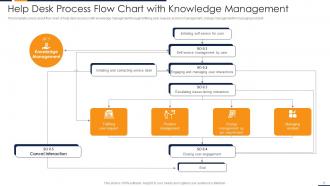
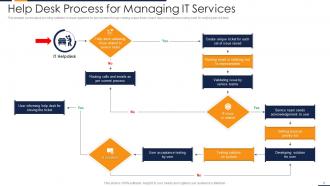


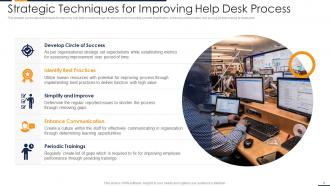







FAQs for Help desk process powerpoint
Here's the thing - most help desks fail because they're missing key pieces. You'll need decent ticket tracking, escalation rules that make sense, and SLAs people actually follow. Training your team properly is huge too. But honestly? The knowledge base is where everyone screws up. Half the time it doesn't exist, or it's so old nobody bothers with it. Track your resolution times and how happy customers are - that data tells you what's broken. I'd start by figuring out your biggest weakness first, then tackle that.
Track both speed and quality stuff to get the real story. Average resolution time and first-call resolution are good starting points. Ticket volumes too. Customer satisfaction scores matter but honestly, good luck getting anyone to actually fill those out lol. Agent utilization and escalation rates will show you where things are breaking down. Don't go overboard though - pick like 4-5 metrics that actually move the needle for your business. Set up a basic dashboard you can check weekly. Way easier to spot problems and tweak staffing when you're not drowning in data.
So ticketing software basically catches all your help desk requests and gives them numbers so nothing gets lost. Trust me, without it you'll be drowning in random emails - learned that the hard way. It automatically sends issues to the right people and lets you prioritize the urgent stuff. Customers can actually track their requests too instead of wondering if you forgot about them. Oh, and set up your categories and priority levels right from the start. That part's honestly kind of tedious but you'll thank yourself later when everything runs smooth.
Honestly, just nail these three basics: actually listen to what they're saying (don't just wait for your turn), speak like a normal person instead of using tech speak, and always circle back to make sure everything's good. The listening part is huge - acknowledge that they're frustrated first. I learned the hard way that setting realistic expectations upfront saves you tons of drama later. Oh, and that follow-up call? Even for tiny issues. That's what makes customers stick around vs. just tolerating your service.
Honestly, start with the basics - tech troubleshooting and customer service skills are non-negotiable. Your agents need to translate tech-speak into normal human language, which is harder than it sounds. Product training is obvious but still crucial. I'd throw in some psychology basics too - de-escalation really works when people are losing it over their broken laptop. Oh, and don't do a one-and-done training thing. Technology changes constantly, so you'll need regular refreshers. My old company skipped that part and it showed. Build a solid onboarding program first, then keep everyone updated.
Honestly, automation is a game-changer for help desk stuff. Start with the boring repetitive tasks - ticket routing, password resets, that kind of thing. Users can handle basic troubleshooting themselves through automated workflows, which means way fewer "I forgot my password" tickets clogging your system. Your team gets to work on actually interesting problems instead of walking people through the same steps over and over. I'd recommend picking your most common ticket types first and automating those. You'll probably notice a difference pretty quickly, then just keep adding more from there.
Start with first call resolution, response time, and customer satisfaction - those three will tell you everything. Ticket volume by category is clutch too, plus escalation rates so you know if people are getting stuck. Oh, and definitely watch agent utilization because nobody wants to be the person drowning while someone else is bored. Honestly though, don't go crazy with metrics - I'd stick to maybe 4-5 max that you'll actually use to make changes. Way too easy to get lost in data that looks important but doesn't help you fix anything. Get those basics down first, then you can always add more later.
So here's what works - send those quick rating surveys right when tickets close. Then do deeper quarterly ones to spot bigger patterns. Teams I've worked with have completely changed how they operate just from asking users what sucks. The real magic happens when you actually discuss this stuff in meetings and make changes based on it. Oh, and definitely tell people when their feedback leads to improvements! Otherwise they'll think you're just collecting responses for no reason. Honestly, users will share way more than you expect if you make it easy for them.
Ugh, ticket overload is the worst - plus unclear priorities and your team burning out constantly. First thing I'd do is set up a proper triage system that sorts tickets by urgency and impact. Cross-train your people so you're not screwed when the one person who knows something is out sick. Knowledge base is clutch too - let users fix their own basic stuff. Oh, and definitely audit your current tickets to find your top 3 headaches. That's where you'll see the biggest improvement fast. Trust me, it's a game changer once you get these basics down.
So multi-channel support lets people contact you however they want - email, chat, phone, social media, whatever. You're not forcing them into one box, which honestly makes way more sense. The trick is connecting everything to the same ticketing system so you can actually track what's happening across all platforms. People get help faster since they can pick what works best for them. Oh, and don't launch every channel at once if your team isn't ready - I've seen that backfire pretty badly. Start with what you can handle well, then expand from there.
Look, escalation procedures are basically your safety net when junior staff hit a brick wall. Without them, tickets just pile up while customers lose their minds waiting. You need clear rules about when to bump things up - maybe after 2 attempts or 24 hours, whatever works for your team. Define who handles what type of problem too. I learned this the hard way at my last job - we had zero process and it was chaos. Set those triggers now before you're drowning in angry customers and missed deadlines. Trust me, your resolution times will thank you later.
Dude, knowledge bases are game-changers for help desks. Your agents get instant access to all the solutions that actually work instead of winging it every time. Tickets get resolved so much faster. The repetitive questions? Way less painful to handle. Everyone stays on the same page too - doesn't matter if you're new or been there forever, you're giving consistent answers. Customers can help themselves which cuts down your ticket load (honestly one of the best parts). I'd start with whatever issues pop up most, then just keep adding to it as you go.
Honestly, it's all about getting your remote tools dialed in. Grab something like TeamViewer or LogMeIn for screen access - total lifesaver. Your ticketing system needs to work smoothly when everyone's virtual. Video calls are clutch now, way more than before. Sometimes you just gotta see what they're seeing, right? Oh and your knowledge base? Make it crazy detailed since you can't physically show people stuff anymore. Communication has to be crystal clear - like, overexplain everything. Have backup ways to reach users too because tech always fails at the worst times.
Dude, self-service portals are honestly clutch. Your users can fix their own stuff 24/7 without calling you every five minutes about password resets. We saw like a 35% drop in basic tickets when we rolled ours out. People actually prefer getting instant answers over waiting for someone to email them back - weird how that works, right? Plus your team gets to work on interesting problems instead of the same repetitive junk. I'd start with your most common FAQ stuff first. You'll probably notice patterns in what people search for too, which helps you figure out what other content to add later.
Pull your last 3 months of ticket data and see what jumps out. Recurring issues are huge red flags - same with peak request times and which departments flood you with tickets. Honestly, most teams ignore this stuff but it's pure gold for getting ahead of problems. Track user behavior too since it shows you where people get stuck. Then you can build resources before everyone starts asking the same questions. Oh, and set up some dashboards to watch trends in real time. That way you'll know when to bring in extra help or prep solutions. It's way better than constantly playing catch-up.
-
cool design
-
Very unique and reliable designs.
-
Qualitative and comprehensive slides.