


Strategy Workshop Powerpoint PPT Template Bundles




Try Before you Buy Download Free Sample Product
 Impress Your
 Audience
 100%
100% Editable
 Save Hours
 of Time


Our Strategy Workshop Powerpoint PPT Template Bundles are topically designed to provide an attractive backdrop to any subject. Use them to look like a presentation pro.
People who downloaded this PowerPoint presentation also viewed the following :
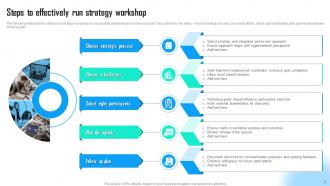
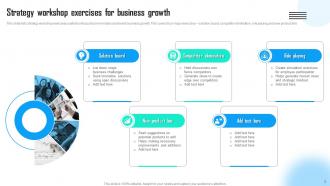
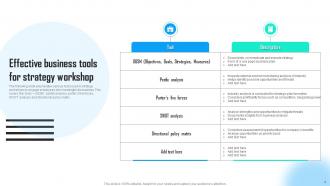
Strategy Workshop Powerpoint PPT Template Bundles with all 17 slides:
Use our Strategy Workshop Powerpoint PPT Template Bundles to effectively help you save your valuable time. They are readymade to fit into any presentation structure.

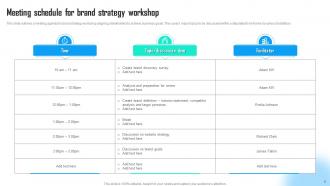
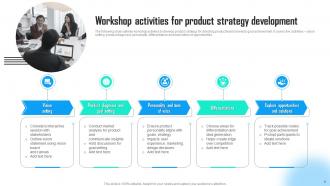
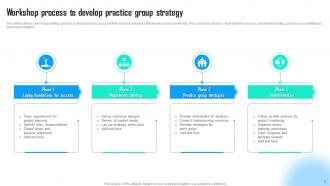
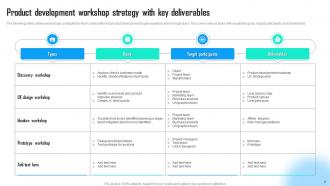





FAQs for Strategy Workshop Powerpoint
Definitely throw in agenda slides, SWOT frameworks, and goal-setting sections. Decision matrices are clutch when people get stuck arguing in circles - learned that the hard way. Breakout session guides help too. Timeline templates and stakeholder mapping are solid additions, plus leave tons of whitespace for scribbling notes. The whole thing needs structure but flexibility for whatever curveballs come up. Oh, and do a quick practice run beforehand! I skipped that once and had awkward gaps where slides didn't flow right. Way better to catch those issues early.
Honestly, visuals are a game-changer for strategy workshops. People zone out with endless bullet points - I know I do. Charts and diagrams help everyone actually understand what you're talking about. Your team can see how different parts connect instead of trying to picture it in their heads. Data patterns become obvious when they're visual. Plus people get way more involved in discussions when they can point to something concrete. The trick is keeping your visuals super simple though. You don't want fancy graphics stealing attention from your actual message. Clean and clear beats flashy every time.
Okay so first thing - nail down your main objective on slide one. Then break it into 3-4 chunks, maybe 45-90 minutes each with clear goals for every section. Mix up presentations with hands-on stuff because honestly, nobody can focus through endless slides. I always do: welcome → where we are now → where we're headed → how we'll get there → wrap-up. Build in extra time between sections (workshops never stick to schedule, ever). Oh and prep backup slides but don't feel like you have to use everything - better to end strong than cram it all in.
So first thing - definitely ask for their brand guidelines upfront, saves you so much headache later. For the conservative companies, go clean and simple: muted colors, formal fonts, nothing too flashy. Startups though? Go wild with bold colors and modern graphics - they eat that stuff up. Swap out those generic icons for industry-specific ones, it makes a huge difference. Also change up the language in your text boxes to match their vibe. Oh and don't feel like you have to use every slide - just duplicate the ones that work and ditch what doesn't fit.
Honestly, just go with blue or navy - can't go wrong there. Executives love that trustworthy, professional vibe. My go-to is always navy/white/gray because it works every single time. Dark greens are solid too if you're talking growth stuff. Gray works for analytical presentations. But seriously, stay away from bright reds and oranges. They make everything feel way too urgent when you're trying to show thoughtful strategy. Oh, and keep it to 2-3 colors tops - nobody wants to sit through a rainbow presentation. They should walk away remembering your brilliant ideas, not wondering why you chose neon yellow.
Dude, those interactive templates are seriously worth it! Polls, drag-and-drop stuff, breakout prompts - they stop people from checking out mentally. Nothing's worse than watching everyone's souls leave their bodies during a boring presentation, right? These actually get people talking instead of just nodding along. The voting slides are clutch for real-time feedback, and collaborative sections pull ideas out of even your quietest teammates. Honestly, start with that interactive SWOT template - I've seen it work magic on teams who usually just sit there silently.
Honestly, Miro's been a total lifesaver for my workshops - way better than people just sitting there watching slides. You can do real-time brainstorming with digital sticky notes and stuff. Mentimeter's solid too for live polls during presentations. Oh, and breakout rooms in Zoom work well when you want groups tackling different sections. I'd throw Teams or Slack into the mix for sharing ideas before and after. Just don't go crazy with too many tools though. Pick maybe two max or you'll confuse everyone. Trust me on that one.
Honestly, you'll know pretty quickly if people are engaged - are they throwing out ideas, asking questions, actually participating? Dead silence is never a good sign lol. But here's the thing: the real measure happens weeks later. Are teams actually doing what you talked about? Check if people mention your framework in other meetings or if those key decisions you made are getting executed. I've seen so many workshops where everything just vanishes afterward. If your template sparked real changes in how people work, then yeah - you crushed it.
Honestly, less is more with workshop slides. People will just read instead of participating if you cram too much text on there. Use big fonts - like 18pt minimum because nobody can see tiny text from the back. Keep your colors consistent but skip those crazy busy backgrounds that make everything hard to read. White space is your friend! I learned this the hard way when half my audience was squinting at my slides once. Don't go overboard with animations either - they're just distracting when you need people talking. Test everything on the actual screen beforehand so you're not scrambling last minute.
Stop dumping spreadsheet screenshots on people - nobody wants to squint at tiny numbers. Bar charts work great for comparing stuff, line graphs show trends, pie charts for market share breakdowns. Heat maps are actually pretty useful for regional performance too. Pick maybe 2-3 visuals max that back up your main points. Keep them simple and big enough so people in the back row can see. Honestly, the fancier you make it, the more likely people zone out trying to figure out what they're looking at instead of listening to your actual recommendations.
Honestly, storytelling is what saves strategy workshops from being total snoozefests. People zone out when you just throw data at them. Instead, build an actual story arc - kick off with the problem you're facing, ramp up the tension about what happens if nothing changes, then boom - your strategy becomes the solution that saves the day. Real customer examples work way better than abstract concepts too. I've seen too many workshops where slides just list random bullet points. Make each one move your story forward instead. Your template should flow like you're telling someone what happened, not reading from a manual.
Make everything way bigger than you think you need - at least 24pt fonts and high contrast colors. Screen sharing makes stuff look tiny and washed out. One concept per slide max, otherwise it gets overwhelming fast. Build in tons of interactive bits - polls, breakout instructions, spaces for people to type or draw. Remote workshops die without participation. I learned this the hard way when half my group went silent for 20 minutes straight. Test your slides in an actual video call first. What looks clean in PowerPoint can look like a hot mess on Zoom. Add more transition slides too since people zone out easier online.
Honestly, just go with clean, simple stuff that doesn't make people's heads spin. SWOT matrices and strategy maps work really well - same with pyramid diagrams and Porter's five forces. They show how everything connects without looking like a mess. Oh, and value chain diagrams too, though I feel like everyone uses those now. The trick is giving each part enough breathing room and not going crazy with colors. People should look at your slide and instantly get the flow of your strategy. Keep the text super minimal and let the actual layout tell the story. Trust me, less is way more here.
So basically, treat those slides like your actual game plan now. Update them with real deadlines and who's doing what as you go. Some teams I know literally just keep using the same deck for their quarterly check-ins - honestly pretty genius. Share pieces with people who missed the meeting to get them on board. The whole structure keeps everyone focused on what matters next. Oh, and definitely book a 30-day follow-up using that same template. You'll actually see what's moving and what's stuck.
Honestly, I'd hit them with a quick survey right after each session - like 5 simple questions max. Skip those boring "rate your experience" forms though, they're useless. Ask about specific stuff: could you follow the slides? Was the pacing okay? Can you actually use this back at work? Watch people during breaks too - you'll pick up way more from casual comments than formal feedback sometimes. But here's the thing that really matters: circle back in 2-3 weeks. That's when you'll find out if your content was genuinely helpful or just sounded good in the moment. Those follow-up conversations are pure gold.
-
I am really satisfied with their XYZ products. Used their slides for my business presentations and now I am taking their help for my son's high-school assignments. Super satisfied!!
-
Helpful product design for delivering presentation.