

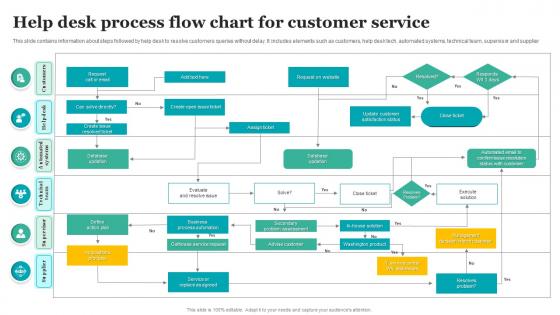
Help Desk Process Flow Chart For Customer Service




Try Before you Buy Download Free Sample Product
 Impress Your
 Audience
 100%
100% Editable
 Save Hours
 of Time


This slide contains information about steps followed by help desk to resolve customers queries without delay. It includes elements such as customers, help desk tech, automated systems, technical team, supervisor and supplier.
People who downloaded this PowerPoint presentation also viewed the following :
Help Desk Process Flow Chart For Customer Service with all 6 slides:
Use our Help Desk Process Flow Chart For Customer Service to effectively help you save your valuable time. They are readymade to fit into any presentation structure.





FAQs for Help Desk Process Flow Chart
So basically you've got ticket creation, then someone does initial triage to figure out what category it fits. After that it gets assigned to whoever handles that stuff. Investigation happens, they fix it, close it out with the user saying "yeah that worked." Most places throw in escalation when things go sideways - which honestly happens more than anyone wants to admit lol. Oh and definitely grab feedback at the end for those satisfaction metrics your boss probably cares about. The whole flow changes depending on your company setup, but this covers most scenarios. I'd map out what you're doing now first though, see where everything gets bottlenecked.
So basically, flowcharts give your help desk team a clear path for every ticket that comes in. No more standing around wondering what to do next. Decision-making gets way faster, and you won't have different agents giving totally random responses to the same problem. Training new people becomes a breeze too - they just follow the visual steps. Honestly, I think the escalation part is huge because you'll spot serious issues right away instead of letting them sit around. Map out your most common problems with decision points, and I bet you'll see faster ticket resolution in like a week.
Oh man, flowcharts are honestly game-changers for this stuff. They'll show you exactly where tickets get stuck - like those annoying approval bottlenecks or when nobody knows who should handle what. You'll also catch knowledge base gaps when your team keeps asking the same questions over and over. The visual part is key because it makes response time issues super obvious. Handoffs between departments? Total mess usually, and the chart will expose all that ping-ponging. I always tell people to map what you're doing now first, then go after the worst bottlenecks. Quick wins feel good.
So basically ticket creation is how everything starts in the help desk - users submit stuff and it gets auto-assigned priority levels, then routes to the right queue based on category. After that it's pretty standard: triage, tech assignment, troubleshooting, done. Here's the thing though - if users give detailed descriptions upfront, it'll save everyone a ton of headache later. I can't tell you how many tickets I've seen that just say "computer broken" and then we're playing 20 questions. Short version: push people to be specific when they submit.
Think of prioritization like triage at a hospital - you don't want someone with a paper cut going ahead of someone having a heart attack, right? Your help desk works the same way. When tickets come in, they get sorted by how urgent and impactful they are. System down? That's P1, gets handled immediately. Password reset? P4, can wait a bit. Without this sorting system, you'd have chaos - techs fixing minor stuff while everything's on fire. The priority level decides response times and who gets assigned what. Just make sure everyone knows the criteria so there's no confusion about what counts as urgent.
So definitely use those diamond decision shapes - that's where the magic happens. Start with triage, then throw in diamonds like "Can Level 1 handle this?" or "P1 incident?" Every "No" sends it up the chain. Oh, and color-coding different support tiers is honestly a game changer for readability. Make sure you're adding time limits too - like "escalate to Level 2 after 2 hours stuck." The whole point is making those criteria super obvious. Anyone should be able to glance at it and immediately get the flow, you know?
For help desk flowcharts, I'd go with Lucidchart or Visio first - they've got solid templates and team collaboration stuff. Miro's pretty sweet too if your team digs the whole virtual whiteboard thing. But honestly? Don't sleep on basic tools like Draw.io or even PowerPoint if you're just starting out. I made my first flowchart in PowerPoint like three years ago and it worked fine. The main thing is making sure everyone can jump in and edit together. Start with whatever you already have lying around, then switch later if it's not cutting it.
So you want feedback loops scattered throughout your help desk - after tickets close, during follow-ups, those satisfaction surveys everyone hates but still sends out. Here's the thing though: most companies just collect feedback and then... nothing. Total waste. You need to actually use what customers tell you to fix stuff - update your knowledge base, train your team differently, spot the patterns that keep coming up. I'd set up monthly reviews to go through everything you've gathered. Otherwise you're just annoying people with surveys for no reason.
So basically simple flowcharts are just linear - ticket comes in, gets sorted, assigned, fixed, done. Complex ones? Total nightmare with branches everywhere for different ticket types, approvals, escalations. Small teams usually do fine with simple ones. But if you're dealing with enterprise stuff where every request type needs its own workflow and SLA rules, then yeah you'll probably need the complex version. Honestly though, I'd say start basic and only add the crazy decision trees when you actually hit those pain points. No point overcomplicating from day one.
Dude, start with ticket routing - that's where the magic happens. Set up rules so tickets automatically land with the right teams based on keywords. Chatbots handle all those annoying "forgot my password" requests (seriously, why do people always forget passwords?). Status updates can run themselves too, keeps users happy without you lifting a finger. Escalation triggers are clutch when tickets get ignored too long. Even basic "we got your ticket" emails help. Pick whatever's driving you most crazy and tackle that first. You'll wonder why you waited so long to automate it.
Honestly, start with response times and resolution rates - those tell you the most. Your flowchart will show exactly where tickets are getting stuck (way better than staring at boring spreadsheets). Track escalation frequency too, plus how work gets distributed among your team. First-contact resolution is huge for customer happiness. The visual stuff makes patterns super obvious - like oh wait, why does everything jam up at this one step? I'd focus on maybe 2-3 metrics that match your worst headaches right now. Don't go crazy tracking everything at once or you'll just overwhelm yourself.
Honestly, flowcharts are like training wheels for new help desk people. Your newbies can follow a clear step-by-step path instead of drowning in those thick procedure manuals nobody wants to read. Each decision point shows them exactly what's next. Way easier to memorize the common stuff visually - cuts down on all those awkward "um, hold on" moments with customers. I'd definitely have new hires practice with real scenarios their first week, just tracing through the charts. It's basically GPS for support calls, which sounds nerdy but actually works pretty well.
Check your flow chart every quarter and after big process changes. Seriously, I can't tell you how many teams just let these things rot until nobody knows what's current anymore. Your help desk people are gold for this - they'll catch stuff you totally missed since they actually live with it daily. Keep track of versions (trust me on this one) and document what changed and when. Oh, and tell everyone right away when you update it. Set a reminder now for next quarter because you'll definitely forget otherwise.
Dude, you need to make a flow chart for your ticket escalation process. Having that visual map means IT, customer service, and management are all on the same page instead of everyone guessing what comes next. No more "wait, I thought you were dealing with this" confusion. During handoffs you can point right at the chart - "we're at step 5, hardware assessment goes to your team now." Honestly makes everything way less chaotic. Get your main people together to build one and you'll see the difference immediately. Worth the hour it takes, trust me.
Honestly, getting people to actually use the flowchart is gonna be your biggest headache. Most staff will push back hard - they're used to doing their own thing and hate being told there's a "right way" now. Training takes forever too, and some people will just pretend the new process doesn't exist. Oh, and you'll definitely find weird cases your chart doesn't cover. If you make it too strict, it'll actually slow everyone down instead of helping. Start with something basic first. Get your team leads on board before rolling it out to everyone - makes a huge difference. Then just be ready to adjust it when reality hits.
-
You know what? I'm so glad I opted for this PPT design. It has been a total game-changer for me and my presentations. Thank you!
-
I took a chance with SlideTeam. I never looked back. Great products and great service.