Process workflow presentation background images
Try Before you Buy Download Free Sample Product
Audience
Editable
of Time
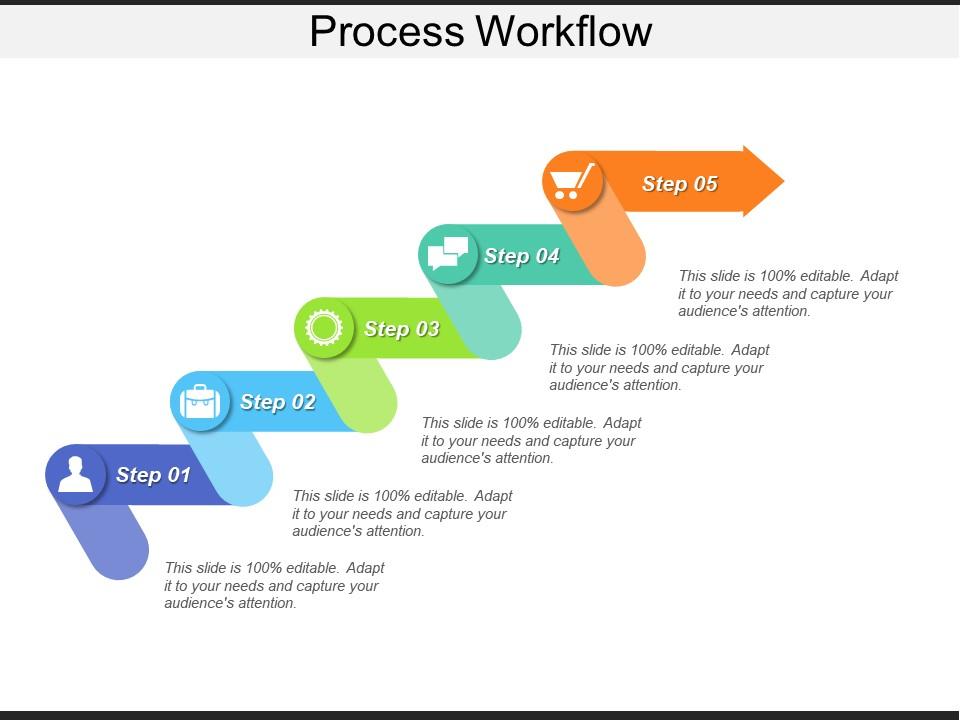
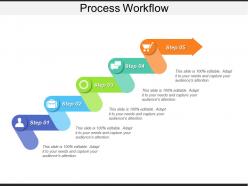
Capture and visualize your process requirements with our process workflow presentation background images PPT template. This presentation layout of process map flowchart has been designed by our professional team members and helps you to specify process steps in a structured format. With the help of this project tracker PPT template, you can track projects by category and the employee assigned to them. This workflow management system PowerPoint slide has multiple color step icons to present the progress of the business or show the timeline of achievements you have made so far. This template of business process flow diagram allows you to outline a workflow that gives the picture of potential weaknesses and to identify the critical areas of your process. Use this flow chart diagram presentation template to represent process metrics, metadata, and can be customized by adding new information. This workflow diagram slideshow can be used in multiple industries such as medical, military, finance, education and e-commerce. Get to the gist with our Process Workflow Presentation Background Images. Keep your focus firmly on core essentials.
People who downloaded this PowerPoint presentation also viewed the following :
Process workflow presentation background images with all 5 slides:
Cater for growing apprehensions with our Process Workflow Presentation Background Images. It will appease impatient crowds.
FAQs for Process workflow
You'll want clear triggers first - what actually starts this thing rolling? Then map out each step and assign someone to own it. Decision points are huge too, that's honestly where most stuff dies. Build in some feedback loops so you can spot problems before they blow up. Document everything somewhere people can actually find it (not buried in Sarah's inbox lol). Oh, and definitely map your current mess first - you'll be shocked at the gaps you find. Make sure there are measurable outcomes at the end so you know if it's even working.
Okay so visual aids are game-changers for workflow stuff. Instead of people squinting at boring text lists, they get flowcharts and color-coded steps that actually make sense. Your brain processes visuals way faster - it's like having GPS instead of those terrible written directions your dad used to print out. Icons and arrows show how everything connects. Different colors can separate task types, which honestly saves so much confusion during meetings. People stay way more engaged too. Just keep shapes simple and colors consistent. Even the most complicated process will click for everyone once they can see it laid out properly.
Don't go crazy with busy backgrounds - I learned this the hard way when nobody could read my text over some wild geometric pattern lol. High contrast is your friend here. Simple and neutral works best, then see how it actually looks with your content on top. File size matters too since huge images make everything load slow. Honestly, most people treat backgrounds like they're decorating a bedroom instead of making something functional. Your brand colors are fine, just test everything first. The background should help your process flow, not fight against it.
Workflow colors mess with people's heads more than you'd think. Red makes everyone feel rushed and stressed out - terrible for detailed stuff. Blues and greens? Way better for complex processes since they're calming. I overused yellow once and it was migraine city, but it's great in small doses for grabbing attention. Gray keeps things neutral so people focus on the actual content instead of getting distracted by colors. Really depends on what you're going for though. Quick action items can handle more energizing colors, but stick with calm ones for anything complicated.
Dude, case studies are a total game-changer for workflow presentations. People actually pay attention when you tell them "Team X cut their turnaround time by 30% doing exactly this" instead of just showing boring flowcharts. Stories stick way better than theory - I learned this the hard way after putting people to sleep with process diagrams. Your audience gets the "why" behind each step, not just the what. Honestly? Sprinkle 2-3 mini examples throughout instead of dumping them all at the end. Makes everything feel more real and less like you're reading from a manual.
Honestly, automation is pretty great for all that mind-numbing stuff - data entry, moving files around, sending those "hey your deadline's tomorrow" reminders. Frees you up for actual thinking work, you know? You can build workflows that push documents to whoever needs them and auto-generate reports too. Takes a bit to set up initially (and find the right platform for your budget), but once it's running? Total game changer. I'd start by looking at whatever eats up most of your time that doesn't actually need your brain involved.
Honestly, stakeholder feedback is like your sanity check for any workflow changes. Get input from everyone - users, managers, whoever actually does the work day-to-day. They'll catch stuff that looks great on paper but totally sucks when you're trying to get things done. People will tell you about weird bottlenecks, pointless steps, and where handoffs between teams go wrong. I've seen too many "perfect" processes fail because nobody asked the actual users what they thought. Set up regular check-ins while you're tweaking things so you can fix problems before rolling everything out company-wide.
So basically you'll want to match your workflow backgrounds to whatever industry you're in. Healthcare teams love clean, clinical looks with medical terms, while manufacturing goes for more industrial vibes. Finance people have totally different taste than creative types - honestly it's kinda wild how much aesthetics matter. Use icons and process flows your team already knows, plus any compliance stuff that's relevant. I'd start by looking at what workflows you have now and figure out where industry-specific tweaks would actually help people use them better. The whole point is making it feel familiar to your audience.
Honestly, just stick to the basics - bar charts for comparing how long each stage takes, flowcharts when there's decision points, line graphs for tracking progress. Don't go crazy with colors or fancy stuff that'll confuse people during reviews. I learned this the hard way after presenting what looked like a unicorn exploded on my slides. Maximum 2-3 charts or you'll lose everyone's attention. Your data should actually back up whatever changes you're suggesting, not just look nice. Test it on someone who doesn't know your workflow first - they'll catch confusing parts you missed.
Definitely test those workflow backgrounds on different screen sizes right from the beginning. High contrast between your text and background is crucial - keep designs simple and clean so they don't look terrible on smaller screens. I made this mistake once with a beautiful gradient that became completely unreadable on mobile, ugh. Your text needs to stay clear at different zoom levels too. Oh, and honestly? Subtle backgrounds work way better than flashy ones - they should support your content, not fight with it. Don't just rely on browser preview modes either, test on actual devices whenever you can.
Honestly, everyone's going super minimal now - lots of white space, way less clutter. Thank god because those busy templates were giving me headaches! Most stuff actually works on mobile now too, which seems obvious but here we are in 2024 finally figuring it out. You'll see tons of modular designs where you can drag sections around easily. Typography's gotten cleaner. Color coding helps separate different process stages without being overwhelming. Oh, and micro-animations are everywhere - little hover effects and stuff. Check out the newer template libraries, they're actually pretty solid examples of this shift.
Oh this is actually pretty straightforward! Just drop some "checkpoint" boxes between your main process steps where people can review stuff. Then draw arrows that circle back to earlier parts - makes the whole continuous improvement thing way more obvious. I like running a separate feedback track alongside the main workflow too, shows exactly where input comes in and affects the next round. Honestly, most people think processes are just straight lines, but highlighting one feedback loop in a different color? Game changer. They'll totally get that your process is built to actually evolve.
Honestly, just chunk it up into smaller pieces - nobody wants to see a massive flowchart that looks like spaghetti. I always start with the big picture first, then dive deeper when people actually need those details. Colors and little icons make a huge difference too, trust me on this. Oh and group your steps into phases or whatever makes sense. Here's what really works though: grab someone who's never seen your workflow before and watch them try to follow it. If they're squinting or asking "wait, what?" then you've got more simplifying to do. It's kinda like explaining directions to your house - you forget which parts are actually confusing until someone gets lost.
Oh man, this is such a real thing! Reading direction totally trips people up - left-to-right feels natural to us but completely backwards if you're used to Arabic or Hebrew. Colors are weird too. Red screams "danger" here but it's actually good luck in China. Don't even get me started on thumbs up icons... apparently that's rude in some places? Who knew. I'd definitely test your stuff with people from whatever regions you're targeting. Or just play it safe with basic arrows and simple shapes - they're pretty much foolproof anywhere.
Track cycle time first - that's your bread and butter metric. How long does each step actually take? Also watch your error rates and where stuff gets bottlenecked. Honestly, the employee satisfaction piece is huge too because if people hate the new system, good luck with adoption. Throughput rates matter, obviously. Rework frequency will tell you if things are actually working or just looking good on paper. Cost per transaction is solid if you can measure it without going crazy. Keep it simple though - maybe 4 key metrics on a dashboard you'll actually check weekly.
-
Innovative and attractive designs.
-
Content of slide is easy to understand and edit.