

Testing process flow powerpoint show





Try Before you Buy Download Free Sample Product
 Impress Your
 Audience
 100%
100% Editable
 Save Hours
 of Time


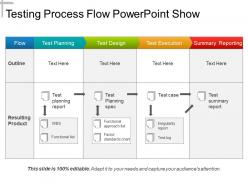
Do you want to highlight testing process with diagram? We are offering our one of the most creative, uniquely designed testing process flow PowerPoint show PPT design template to let you do it efficiently. You can use this PPT diagram to define testing life cycle phases and activities such as testing planning, test document and test case design, test execution and summary reporting etc. in front of your audience. PPT template is highly useful for manufacturing and production testing, test planning and control activities for business firm, defining software testing process flow for software firms. You can also describe the testing types, steps, best practices and metrics with this wonderful testing process flow PPT diagram. Design layout is powerful and can easily be understood by your audience. Testing professionals, quality managers use this PPT design to prepare test document and test cases. Keeping all these aspects in mind, just download this amazing PPT diagram and use it to highlight testing life cycle phases and process to assure quality of product in business. Demonstrate firmness and determination with our Testing Process Flow Powerpoint Show. Be the backbone of your enterprise.
People who downloaded this PowerPoint presentation also viewed the following :
Testing process flow powerpoint show with all 5 slides:
Handle hindrances with our Testing Process Flow Powerpoint Show. Cater for factors that inhibit growth.



FAQs for Testing process
So there are five main stages you'll hit. First is test planning - figuring out what you're actually testing and how. Then test design where you build your cases. Test execution comes next (this is where stuff either works or completely falls apart, honestly). After running everything, you do defect reporting to track what broke. Last bit is test closure - checking your coverage and writing down what you learned. Oh, and don't skip planning even when deadlines are crazy. I know it feels like extra work but it saves so much headache later.
Honestly, just figure out who's doing what at each step first. Test managers handle the big picture stuff - strategy, resources, all that. QA engineers write and run the actual tests. Developers are supposed to own unit testing but... good luck with that one, you'll probably have to bug them about coverage. Someone needs to make the final call on whether you ship or not. Document it all in a RACI matrix so there's no "I thought YOU were handling that" drama later. The worst thing is when stuff falls through the cracks because nobody claimed it.
So you're gonna see **Jira** literally everywhere for bug tracking and test management. **Selenium** is the go-to for web automation, and **Jenkins** handles CI stuff pretty well. For organizing test suites, **TestRail** and **Zephyr** are both decent - honestly can't go wrong with either one. **Postman** is perfect for API testing, super easy to use. Mobile testing? **Appium** is basically your only real option. Oh, and definitely pick something that plays nice with whatever dev tools you're already using. Trust me, switching platforms halfway through a project is the worst thing ever.
Daily standups are a lifesaver - both teams can flag issues before they become disasters. Make your bug reports super detailed with clear repro steps because vague ones are the worst. Shared tools like Jira help everyone stay in the loop on what's being tested and what's in development. Get your testers into sprint planning so they're not blindsided by new features. Oh, and definitely create a casual Slack channel where people can ask quick questions without all the formal process stuff. Honestly makes such a difference when communication flows naturally.
So I'd focus on the basics first - test execution rate, defect discovery rate, and coverage. Pass/fail ratios show you if your builds are stable. Defect density helps spot quality trends. Honestly, defect escape rate is my favorite metric even though it stings - tells you exactly what's slipping through. Time-to-resolution for blockers matters too since that stuff kills timelines. Oh, and testing velocity obviously. Don't go crazy tracking everything right away though. You'll just drown in data you don't actually need yet.
Look, automated testing is a total game-changer for speed. You can run hundreds of tests at once instead of manually clicking through the same boring stuff repeatedly. The best part? It catches bugs right when new code gets pushed, which honestly saves you from so many future headaches. Developers get way faster feedback too, so they can squash issues before they become nightmare problems. Oh and you'll actually have time to focus on the tricky scenarios that need real human brains. My advice - start with your most stable, frequently-run tests first.
Oh man, tight deadlines are the worst part honestly. Requirements will be vague as hell too. Plus your test environments will crash right before demos - I swear it's cursed or something. Jump into planning sessions early if you can, and bug people until they give you clear acceptance criteria. Stable test environments are a lifesaver. Also get cozy with the dev team now because you'll definitely need them when weird bugs pop up. Communication fixes like 80% of problems. Set up your test data stuff first thing and automate whatever boring tasks you can.
Start with the stuff that'll get you fired if it breaks - critical business functions and main user features. Those get tested first, no question. I always think about it like triage at a hospital, you know? Hit the high-risk areas early, especially anything that's changed recently or integration points between systems. Complexity matters too - the gnarlier the code, the higher it goes on my list. When crunch time hits (and it definitely will), you'll already know what you can't skip versus the nice-to-have features that can wait.
Honestly, user feedback is everything for testing strategy. Real users find bugs we totally miss in our sterile test setups - they're actually living with the product daily. Their complaints show you exactly where your testing has blind spots. I always use their feedback to update test cases and figure out which areas need way more attention. The tricky part is setting up a feedback system that actually works smoothly (we've all seen those fail spectacularly). But once you get that loop going, you can pivot your testing focus super quickly based on what's breaking in the real world.
Dude, agile flips everything upside down - no more waiting until the end to test stuff. Now you're writing test cases and running them constantly throughout development, usually in these 1-2 week sprints. Way better than waterfall where everything hit you like a truck at once, honestly. You catch bugs early when they're actually cheap to fix, and the feedback loop is so much tighter. The biggest change though? You're not the gatekeeper anymore - you're actually part of the dev team. Oh and treat testing like you're having an ongoing chat with developers, not like you're judging their final project or whatever.
Think of it like triaging at a hospital - you tackle the worst cases first. Map out what could really screw you over if it breaks, then throw most of your testing energy there. Critical user flows, sketchy integrations, anything that'd tank revenue. The boring low-risk stuff? Just do a quick smoke test and move on. I learned this the hard way after spending way too much time testing minor UI tweaks while missing a payment bug that cost us actual money. Smart testing isn't about being thorough everywhere - it's about being strategic with your time.
So basically manual testing is you clicking through everything step by step, automated runs scripts to do it for you. Manual's great because you can spot weird UI bugs and explore random scenarios - honestly it's kinda fun watching everything work. But it takes forever and you'll make mistakes. Automated testing catches the same bugs every time and runs way faster, though setting it up initially is a pain. Sometimes misses the subtle stuff too. For process flows? I'd start manual first to really get how everything works, then automate the main paths you test constantly.
Branch off main for every test cycle - that's step one. Keep your test stuff (scripts, data, all that) synced with whatever code version you're testing. I'll usually do something like "test/sprint-24" to match the dev branch. Tag everything with build numbers. Seriously, this'll save your ass when trying to trace bugs back to specific versions later. Oh and make sure everyone's committing test results and environment configs too - not just the code changes. The whole point is keeping that connection tight between what you tested and which exact code it was. Makes debugging way less painful.
So basically you want three things: what you tested, what actually happened, and what it all means. Write down your steps clearly enough that someone else could follow them. Screenshots are a lifesaver - trust me on this one, they'll save you from so many "but that's not what I saw" conversations later. Record your actual results next to what you expected to happen. Don't forget the boring stuff like environment and test data. Oh, and definitely note any weird glitches you run into. Future you will thank you when you're not trying to remember what the hell happened last month. Keep your team's format consistent so everyone knows where to look.
So CI/CD basically runs all your tests automatically whenever you push code. No more "oh crap I forgot to test that" moments. Unit tests, integration tests - everything fires off without you thinking about it. Bugs get caught right away instead of lurking around for weeks. Honestly, manual testing is such a pain and people totally skip it when deadlines hit. The feedback's way faster too since you're not waiting around for someone to remember to run stuff. Even if you just start with automating unit tests on commits, you'll notice the difference pretty quick.
-
Qualitative and comprehensive slides.
-
Thanks for all your great templates they have saved me lots of time and accelerate my presentations. Great product, keep them up!