

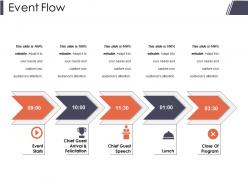
Event flow presentation portfolio





Try Before you Buy Download Free Sample Product
 Impress Your
 Audience
 100%
100% Editable
 Save Hours
 of Time


Announce your achievements in a grand fashion with our Event Flow Presentation Portfolio. Be able to herald them appropriately.
People who downloaded this PowerPoint presentation also viewed the following :
Event flow presentation portfolio with all 5 slides:
Demonstrate that you are driven by ambition with our Event Flow Presentation Portfolio. Display intense determination.
FAQs for Event
Okay so there are basically three phases you can't screw up: before, during, and after your event. Before is all the planning stuff - marketing, logistics, getting people hyped. During is when you're actually running the show and trying not to lose your mind while managing speakers, tech issues, and everything else (honestly the most stressful part). After the event, you'll want to follow up with people, get feedback, help folks stay connected. The thing is, they're all linked - if you bomb the planning phase, good luck salvaging the actual event. Oh and start mapping everything out way earlier than you think you need to.
Honestly, sketching out your event flow makes such a huge difference. People get it instantly when they can actually see the sequence instead of trying to follow along verbally. I always go for timelines - they're just so clean and logical. Flowcharts work great too, especially if you color-code different phases or departments. Your audience will spot timing problems way faster when everything's laid out visually. Trust me, even a simple diagram beats explaining step-by-step any day. Next time you're prepping a presentation, throw together a quick visual first. You'll be shocked how much quicker people catch on to your timeline.
Think of audience engagement like your GPS for events - it tells you when to reroute. People looking bored during that keynote? Time for an icebreaker or quick break. If they're super into something, milk it for a few extra minutes. I totally bombed an event once by ignoring the room's energy... never again! Short sentences work when people zone out. Always pack backup activities and build in wiggle room so you can pivot. The audience basically tells you what's working if you're paying attention.
Honestly, automation is a game changer for events. Start with something simple like registration workflows - they'll send confirmations and reminders automatically so you don't have to babysit your inbox. Digital check-ins are way better than those messy paper lists we used to deal with. Mobile apps help attendees find their way around while giving you data on what they're actually engaging with. The best part? Integration tools connect everything - your registration platform talks to your CRM, which talks to your email system. It's like having a personal assistant who never sleeps (and doesn't drink your coffee).
Event loops will absolutely wreck your UI if you're not careful. Memory leaks happen constantly when people forget to clean up listeners - I've done this so many times it's embarrassing. Propagation gets weird too, events just bubble everywhere you don't expect. Debugging async stuff? Pure pain. Always remove those listeners when done, use preventDefault() and stopPropagation() smartly. Keep handlers lightweight or throw heavy work into web workers. setTimeout can break up blocking operations nicely. Document your event flow though - trust me, you'll be confused later trying to figure out what you built.
Okay so virtual events are totally different - people's attention spans are like goldfish online, so you need 15-20 minute chunks max instead of those 30-45 minute sessions that work in person. Build in way more buffer time too because tech will definitely mess with you at some point. Here's the thing though - frontload your best stuff early since people start bailing after an hour. In-person events can build energy all day, but virtual? Not so much. Oh, and test everything with your actual speakers beforehand - I learned that one the hard way!
Honestly, I'd go with Lucidchart or Miro first - super easy drag-and-drop stuff. Figma's solid too, especially if your team's already in there doing design work. The collaboration is pretty sweet. For technical flows, EventStorming works well, or just grab a whiteboard when you're brainstorming with people. Sounds old school but it actually works. Mermaid's great if you want code-based diagrams living in your docs. Don't overthink the tool choice though - whatever your team knows already is probably fine. The actual mapping process matters way more than having the fanciest features.
Okay so communication is basically everything - without it your event's toast. Set up group chats, shared calendars, whatever works for your crew size. Regular check-ins are a must too. During the actual event, walkie-talkies are honestly a lifesaver (way better than trying to text with your hands full). I learned this the hard way when our catering team missed a major menu change... total disaster. The trick is nailing down who handles what BEFORE event day hits. Short bursts work better than long meetings btw - people actually pay attention that way.
Honestly, start with conversion rates at each step - that'll show you exactly where people are bailing out. Time-to-completion is huge too because nobody wants to sit through a marathon flow. I always check click-through rates and how long people actually stick around. Oh, and support tickets will absolutely explode if your flow is confusing people (learned that the hard way). Different user types behave totally differently though - what works for your regulars might completely lose new users. Pick maybe 2-3 metrics that actually matter for your goals first, then you can get fancy with the rest later.
Dude, you absolutely need backup plans for events - trust me on this one. When your main flow breaks (and it will), you'll want alternative routes mapped out ahead of time. I got burned during a product launch when our payment system crashed. Super awkward explaining that mess to the bosses. Look for your biggest failure points first, then build realistic workarounds. Don't just write these plans down though - actually run through them with your team. When everything's on fire, people need to know exactly what they're supposed to do without thinking about it.
Absolutely use that feedback data - it's your best friend for finding bottlenecks. Check out survey responses and see where people bailed during registration or the actual event. Complaints about long lines? Pure gold. Same with confusing transitions between sessions. I'd also look at which talks were packed vs. empty rooms (that tells you a lot about scheduling). Oh, and definitely note any tech failures that killed the flow. Here's the thing though - create some basic template you use every time so you can actually compare events. Pick maybe 3 key things to track consistently.
You need a super detailed run-of-show doc that goes to every speaker ahead of time. Assign one person to babysit each session - seriously, this is crucial. Always pad time between talks because someone WILL run long or have a meltdown with their slides. Set up a group text or Slack so speakers can give you heads up if they're running behind. Do quick tech checks with everyone beforehand to avoid disasters. Oh, and have someone backstage giving the next speaker a 5-10 minute warning before they're up.
Dude, culture absolutely changes everything about event planning. What works for one group can be a total disaster for another - I've literally watched this happen. Some people want to chat and build relationships first, others just want to dive into business. Then you've got religious stuff to consider, food restrictions, how formal people expect things to be. Even your break timing matters depending on who's coming. Honestly, the hierarchy thing trips up so many planners. Research your audience beforehand and definitely find someone from that community to bounce ideas off. It'll save you from looking clueless later.
Definitely build in 5-10 minute buffers between segments - trust me, everything takes longer than expected. Get your speakers and materials ready beforehand, and assign someone to give time warnings because people love to ramble. Natural breaks like lunch are perfect for absorbing delays without throwing off the whole day. Oh, and actually rehearse transitions with real people, not just in your head. Keep your timeline realistic but have a backup version that's 15% shorter just in case things go sideways. It's saved me more times than I can count.
Don't just slap story on top of your event - weave it into the actual mechanics. Map out your story beats first, then build touchpoints that move the narrative forward naturally. Registration = your premise, opening activities = tension building, key moments = actual plot points. Honestly, this stuff is way more engaging when done right. Your attendees need to feel like active characters making choices, not just sitting there watching things happen. Each stage should work like a chapter in a book. The real magic happens when your narrative actually influences what people do and decide, you know?
-
Innovative and Colorful designs.
-
Perfect template with attractive color combination.