Customer Credit Card Payment Process Flowchart

Rating:
80%
Customer Credit Card Payment Process Flowchart
Slide 1 of 6
Favourites Favourites

Try Before you Buy Download Free Sample Product

Audience Impress Your
Audience
Editable 100%
Editable
Time Save Hours
of Time
The Biggest Sale is ending soon in
0
0
:
0
0
:
0
0
Rating:
80%
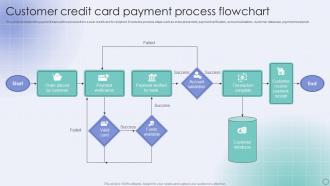
This slide illustrated the payment transaction process from a user credit card to recipient. It includes process steps such as order placement, payment verification, account validation, customer database, payment receipt etc. Introducing our Customer Credit Card Payment Process Flowchart set of slides. The topics discussed in these slides are Payment Verification, Transaction Complete, Customer Database. This is an immediately available PowerPoint presentation that can be conveniently customized. Download it and convince your audience.

FAQs for Customer Credit Card

So you're basically dealing with four big pieces: payment gateway integration, card encryption, transaction auth, and settlement. Stripe or Square handle most of the messy stuff between your app and the card networks, which is honestly a lifesaver. You'll need PCI compliance for security, fraud detection, and solid error handling when cards get declined. Flow's pretty straightforward - card info comes in, gets encrypted, auth request goes out, comes back approved or denied, then funds settle later. Oh and definitely log everything because customers will 100% call asking about random charges they don't remember.

Honestly, your payment gateway makes or breaks checkout. Stripe's pretty slick - keeps people on your site instead of bouncing them around. PayPal's got the trust factor but God, their interface looks like it's from 2010. Square and Shopify Payments are faster, which matters more than you'd think when customers are sitting there waiting. Some gateways redirect to sketchy-looking pages that'll kill your conversions instantly. Yeah, fees matter, but I'd rather pay an extra few cents than lose sales to a clunky process. Test a couple with real users - you'll see the difference right away.

Okay so PCI DSS compliance is like your bare minimum - you've gotta have that locked down. SSL/TLS encryption for everything, obviously. Don't store actual card numbers, use tokens instead. Only let the people who absolutely need access see payment stuff. Two-factor auth everywhere because honestly, passwords alone are garbage these days. Keep your payment software updated and audit things regularly. Never - and I mean NEVER - store full card numbers in plain text. That's asking for trouble. Oh, and assume hackers are constantly trying to get in because they probably are.

Dude, go with something like Stripe or Square - they're PCI-compliant and basically do all the security stuff for you. Don't even think about storing credit card info on your servers, that's a nightmare waiting to happen. Use tokenization instead. SSL encryption is a must, obviously. Your payment forms need to be on HTTPS pages. Oh, and keep updating your payment software regularly because hackers are annoyingly creative. If you're doing crazy volume, you might need yearly security audits too. Honestly though, just let the payment processor handle the scary parts - way less headache.

So there's basically three types of fees you'll deal with. Interchange fees are the biggest chunk - like 1.5-3.5% that goes straight to whatever bank issued the card. Then Visa/Mastercard take their cut too, around 0.1-0.3%. Your payment processor adds their own markup on top, which honestly varies all over the place. Debit's cheaper than credit, but those fancy rewards cards? They'll cost you more. AmEx is usually the worst offender. Rates change based on your business type and how much volume you're doing. Don't just accept their first quote though - negotiate that stuff.

So these fraud detection tools are like bouncers for your credit card transactions - they scan every payment in real-time looking for weird patterns. Location jumps, crazy spending spikes, stuff like that. Honestly, they're way better at spotting sketchy behavior than we'd ever be. When something's off, they'll either block it completely or make you do extra verification (you know, those annoying pop-ups). Yeah, it's frustrating when they flag your legit purchases, but they save you from way bigger headaches. Trust me, dealing with actual fraud is so much worse than a few extra security steps.

Dude, your payment UI is probably costing you serious money - like 20-30% of potential sales. People will literally abandon their cart if your checkout looks shady or takes forever to load. Security badges help build trust, and definitely don't make them fill out a million form fields. Companies get way too obsessed with testing button colors (seriously, orange vs green??) when they should focus on the basics first. Your error messages need to actually make sense, not sound like robot speak. Most people shop on mobile now, so test there. Oh, and if your page takes longer than 3 seconds to load, you're basically bleeding customers.

Ugh, declined transactions are the worst - kills the mood instantly. Chargebacks will drain your soul AND your wallet. Processing fees? They add up fast, trust me. Your gateway going down during Black Friday sales is like... peak nightmare fuel. Then you've got PCI compliance stuff which is honestly such a pain but you can't skip it. Oh, and customers bail if checkout takes forever or has like 10 steps. Integration problems between your system and processors create delays too. Pick a solid processor with upfront pricing and keep checkout super simple - 2-3 steps tops.

So basically mobile payments work through your phone's NFC chip or apps like Apple Pay instead of the old swipe-and-insert thing. The cool part is tokenization - merchants never see your actual card number, just some encrypted token that's unique to that one purchase. Way better security since intercepted data is useless to hackers. Regular cards expose your real info every single time. Oh, and processing fees are actually lower for mobile payments too - plus they settle faster. Honestly I'd push customers toward mobile whenever you can. Better for everyone really.

When someone pays with their card, they punch in all their details on your checkout page and hit submit. Their info gets encrypted and shot over to Visa or Mastercard or whoever. Those guys check with the customer's bank - do they have money? Is the card legit? Bank says yes or no pretty much instantly. If it's approved, the money moves from their account to yours, but honestly the actual cash won't show up in your account for like 1-3 days. Oh and make sure your checkout doesn't look sketchy or people will bounce!

So basically when you give people more payment options, way fewer people will ditch their cart at checkout. Some folks are obsessed with Apple Pay, others want their credit card points, and honestly PayPal people are weirdly loyal to it. I've definitely closed a tab when I couldn't use the method I wanted. You're just meeting customers where they already are. Plus it makes your site look current instead of stuck in 2015. I'd start with the big three - Apple Pay, Google Pay, PayPal - then add more if you want. Trust me, it's worth the setup hassle.

Ugh, chargebacks are the worst - they hit you twice. First you lose the sale AND the product, then your processor slaps you with fees (usually $15-25 each time). Get too many and they'll either jack up your rates or straight-up drop you as a client. Finding a new processor after that? Good luck with that mess. Keep your chargeback ratio under 1% or you're asking for trouble. Make sure your billing shows up clearly on statements, have decent customer service, and save everything for disputes. The paperwork is annoying but it's worth it.

Hey! So international payments are definitely trickier. Your processor handles currency conversion automatically, but exchange rates mean you'll get slightly different amounts than expected. Fees are higher too - usually 1-3% more. Processing takes longer since fraud screening kicks in way more often (honestly, it's pretty annoying). You'll want a gateway that actually supports international cards. Oh, and showing prices in different currencies upfront saves customers from that sticker shock at checkout. Makes the whole thing smoother for everyone.

Contactless payments are everywhere now - COVID basically forced that change overnight. Buy-now-pay-later stuff like Klarna is becoming the norm, and honestly, digital wallets are killing physical cards. Real-time fraud detection with AI is getting pretty sophisticated too. Crypto payments are still kinda niche though, unless you're in a specific market. Your customers basically want everything faster and more flexible now. I'd look at your current setup and see where you can squeeze in contactless or BNPL - even small changes make a difference. Oh, and make sure your checkout flow isn't clunky because people will just bail.

Honestly, just automate everything you can - get accounting software that syncs with your payment processor so transactions match themselves. Daily imports are a game changer instead of that monthly nightmare we all know too well. I learned this the hard way lol. Make your transaction descriptions consistent so you're not playing detective later trying to figure out what "PMT 12847" actually was. The real trick? Reconcile daily for like a week and see how much smoother everything runs. Way better than digging through piles of data when something's off.

Ratings and Reviews

80% of 100
Review Form
Write a review
Most Relevant Reviews
  1. 80%

    by Davies Rivera

    Like always a great experience with you guys. Always there on the drop of hat to help.
  2. 80%

    by Darell Vargas

    I was able to find the right choice of PPT template for my thesis with SlideTeam. Thank you for existing.

2 Item(s)

per page: