

Database architecture of employee management system




Try Before you Buy Download Free Sample Product
 Impress Your
 Audience
 100%
100% Editable
 Save Hours
 of Time


Our Database Architecture Of Employee Management System are topically designed to provide an attractive backdrop to any subject. Use them to look like a presentation pro.
People who downloaded this PowerPoint presentation also viewed the following :
Content of this Powerpoint Presentation
Description:
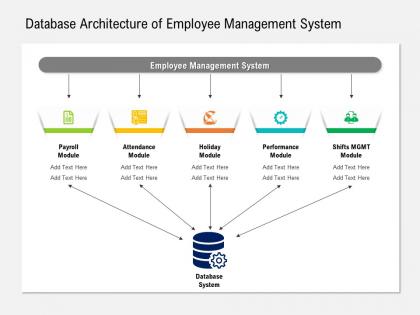
This image is a presentation slide titled "Database Architecture of Employee Management System.†It visually outlines the organization and connectivity of different modules within an employee management system to a centralized database system. The modules include Payroll, Attendance, Holiday, Performance, and Shifts Management (Shifts MGMT), with spaces under each module for additional text.
Starting from the top, the title sets the context for the slide, indicating the focus on the structural design of a database. Below the title, a banner labeled "Employee Management System" spans across the top, indicating that this is the overarching system to which the modules below are connected.
Each module is represented by an icon illustrating its function Payroll shows a calculator, Attendance a calendar, Holiday a beach umbrella and sun, Performance a target and arrow, and Shifts Management is represented by a group of people. Below each module's title is space for further elaboration ("Add Text Here"), suggesting customizable explanations or specifics about how each module interacts with the database.
The arrows pointing downwards connect the modules to the image of a database at the bottom center, illustrating that each module feeds into or interacts with a central database, characterized by a cylinder with a gear symbol indicating configuration or mechanics.
Use Cases:
Such a slide could be utilized in various industry presentations to explain the integration of employee management systems with a database:
1. Information Technology:
Use: Explanation of HR software offerings
Presenter: Software Architect or Product Manager
Audience: Potential Clients or Internal Development Teams
2. Human Resources:
Use: Training on a new employee management platform
Presenter: HR Systems Trainer
Audience: HR Department Staff
3. Consulting:
Use: Presentation of systems improvement for HR operations
Presenter: Management Consultant
Audience: Corporate Leadership or HR Management
4. Education:
Use: Teaching about HRIS systems in a business course
Presenter: Educator or Professor
Audience: Students or Professional Development Attendees
5. Healthcare:
Use: Demonstrating a healthcare staff management system
Presenter: Healthcare IT Specialist
Audience: Hospital Administration or Clinic Managers
6. Manufacturing:
Use: Showcasing employee management system for factory workers
Presenter: Operations Manager
Audience: Plant Management Team
7. Retail:
Use: Presenting a workforce management solution for retail chains
Presenter: Retail Operations Consultant
Audience: Retail Executives or Area Managers
Database architecture of employee management system with all 2 slides:
Use our Database Architecture Of Employee Management System to effectively help you save your valuable time. They are readymade to fit into any presentation structure.
FAQs for Database architecture of
Start with employee tables - basic info, contacts, job history stuff. Then build your HR modules on top: payroll, benefits, time tracking. You'll need auth layers and reporting too. Audit trails are clutch - HR lives for compliance documentation, seriously. Oh, and API integrations for connecting other systems. My advice? Get your core employee data structure right first. Don't overthink the database design but keep it clean. Build one module at a time based on what people actually need. I've seen too many projects try to do everything upfront and crash hard.
Honestly, normalization is a lifesaver for cleaning up messy databases. You stop duplicating the same department info everywhere and just reference it from one table instead. Way cleaner. Updates become super quick since you're only changing things in one spot rather than hunting through tons of employee records. No more headaches from having "Marketing," "Mktg," and "Marketing Dept" all meaning the same thing – been there, done that! Your queries run faster and you save storage space too. Just look for stuff that keeps repeating across your tables and split it out logically.
ER modeling is your roadmap for the whole Employee Management System database. Map out entities like employees, departments, projects first - then figure out how they connect. You'll spot key stuff like employee IDs, department assignments, salaries. Honestly, jumping straight into coding without this is asking for trouble. The diagram shows cardinality (one department, many employees) and stops you from duplicating data everywhere. Plus your foreign keys will actually work properly. I always sketch out a rough ER model before touching any SQL - saves me hours of headaches later.
So basically, cloud solutions auto-scale without you having to babysit everything. Storage grows with your team, and it handles those crazy spikes during open enrollment (you know how that goes). The best part? You're not playing the guessing game with capacity planning – I mean, who actually gets that right? It automatically deals with traffic surges while you only pay for what you actually use. Horizontal scaling across servers is way easier than trying to do it on-premise. Just look at your current usage patterns first to set up the right triggers.
Dude, first thing - encrypt everything sensitive like SSNs and salaries. Can't stress this enough with how crazy data breaches are getting. Set up role-based access so HR sees everything but managers only get their team's stuff. Multi-factor authentication is a must, and rotate those database passwords regularly. Oh, and definitely log who's accessing what - you'll thank me later when someone asks questions. One thing people forget (I did this once, oops) is anonymizing data in dev environments. Start with encryption and access controls - they'll give you the most protection upfront.
So basically, relational databases make you set up all your employee fields upfront - name, salary, department, whatever. Pretty rigid structure. MongoDB and similar NoSQL options? Way more flexible. You can throw in random fields later without breaking everything. Most HR systems still use relational though, which honestly makes sense since employee data doesn't change that much. But if you're constantly adding new employee types or your requirements keep shifting, NoSQL might save you some headaches. I'd probably sketch out what data you actually need first. That'll help you decide which direction to go.
Dude, you definitely need daily backups for that system - employee data is way too sensitive to mess around with. I'd do full backups weekly, then smaller incremental ones each day. Cloud storage plus local copies if you can swing it. Here's the thing though - test your recovery process every month because I've seen so many people discover their backups were corrupted when it was too late. Set up point-in-time recovery too since payroll errors are inevitable and you'll need to roll back to exact moments. Oh, and write down the recovery steps so anyone can handle emergencies. Honestly? Test your current setup this week first.
Dude, real-time analytics is a total game changer - you can catch problems the second they pop up instead of finding out weeks later through some boring monthly report. Like if turnover suddenly spikes in accounting or people start calling in sick way more than usual, you'll know immediately. Honestly beats the old way where issues would spiral out of control before anyone noticed. You can jump on training needs, move people around, or figure out why everyone's miserable before they all quit on you. Just don't go overboard with the dashboards or you'll drown in numbers that don't actually matter.
So you're mainly dealing with three key relationships: employee-to-department (many-to-one), that self-referencing manager thing where employees report to other employees, and employee-to-roles/projects (many-to-many). The manager relationship honestly screws with everyone's head at first since it points back to the same table. Use employee IDs as your primary keys, then set up foreign keys linking everything together. Index those foreign keys or you'll hate yourself later. Also, soft deletes are way better than hard ones - trust me on this, you'll want that historical data someday. Set up constraints so you don't get orphaned records when people quit. Start normalized, then tweak based on what queries you actually run.
So basically your EMS database stops being this isolated thing and becomes way more useful. You can hook it up to payroll systems like ADP, grab attendance from time-tracking apps, connect to HR platforms - all that stuff. No more entering the same data twice (which honestly saves your sanity). APIs handle the real-time syncing between everything. Your database sits in the middle while other tools do their specialized jobs. I'd start with whatever's driving you crazy first - maybe those manual payroll uploads? Find integrations that fix your biggest headaches and work from there.
For your EMS database, start with response times - anything over 2-3 seconds and users get annoyed (trust me on this one). Check how many transactions per second you're handling during busy periods. Database connection pools are huge too - if they're maxed out, everything crawls. Storage stuff matters: table sizes, index performance, all that. Bloated tables will bite you later. Don't forget error rates and failed queries. Set up alerts so you catch problems before your team starts complaining. These basics will cover most issues you'll run into.
Compliance is gonna make you add so many extra layers to your database from the start. Audit trails for every single change, encrypted storage for SSNs and that stuff, plus role-based access that gets crazy detailed. GDPR's "right to be forgotten" is honestly the worst - total pain to add later. You'll need separate tables for compliance reports too. Oh, and retention policies built into your schema. My advice? Figure out which regulations actually apply to your industry first, then build your data models around those rules. Way easier than trying to retrofit everything later - trust me on that one.
Honestly, start with basic replication - that's gonna give you the biggest bang for your buck. Set up master-slave (or master-master if you're feeling ambitious) so you can failover when things go sideways. Clustering with load balancing is solid too, but fair warning - it gets messy real quick when you're dealing with employee data consistency stuff. Oh, and obviously do automated backups with point-in-time recovery. Test your disaster recovery regularly too, can't tell you how many people skip that part. Master-slave replication first though - everything else can wait.
Set up an RBAC system with roles like Admin, HR Manager, Department Head, Employee. Link a roles table to your users table, then map out permissions - who sees salary data, edits personal info, runs reports, etc. Honestly, I always add custom permission flags because there's inevitably someone who needs bizarre access combinations that don't fit the standard roles. Check permissions at both database and app level. Oh, and definitely start by figuring out what each role actually needs to do before you build anything - saves you from redoing everything later.
So basically, think of a data warehouse like that storage unit where you dump all your old stuff - except it's for employee data. Performance reviews, salary history, who got promoted when, turnover rates... all that goes there instead of clogging up your main HR system. Running complex reports becomes way easier when you're not slowing down daily operations. Plus your executives get their precious annual analytics without making everyone else's system crawl. Honestly, just set up some automated processes to move data over regularly. You'll be so glad you did this when reporting season hits.
-
Out of the box and creative design.