

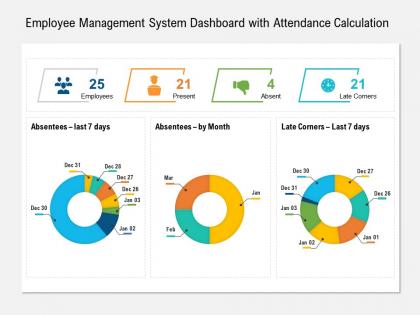
Employee management system dashboard with attendance calculation




Try Before you Buy Download Free Sample Product
 Impress Your
 Audience
 100%
100% Editable
 Save Hours
 of Time


Our Employee Management System Dashboard With Attendance Calculation are topically designed to provide an attractive backdrop to any subject. Use them to look like a presentation pro.
People who downloaded this PowerPoint presentation also viewed the following :
Employee management system dashboard with attendance calculation with all 2 slides:
Use our Employee Management System Dashboard With Attendance Calculation to effectively help you save your valuable time. They are readymade to fit into any presentation structure.


FAQs for Employee management system dashboard
Start with the obvious stuff - turnover rates, how long it takes to fill positions, and employee satisfaction scores. Absenteeism's pretty key too. Performance review completion rates are clutch because nobody wants those things dragging on forever. I'd also throw in training completion percentages and internal promotion rates to see if people are actually growing. Headcount by department makes sense, plus cost-per-hire if your budget's tight. Honestly though? See what your leadership actually wants to track first, then build from there. Don't overcomplicate it right out the gate.
Honestly, it's like having a command center for your team. Everyone can see what's happening without those annoying "where are we on this?" Slack messages every five minutes. Real-time updates on who's drowning in work, upcoming deadlines, that sort of thing. People actually start helping each other out because they can see when someone's getting buried. I'd probably start simple though - just basic project stuff and shared calendars. My old team tried to go all fancy right away and it was a mess. Build up from there once people aren't confused by it.
Honestly, you need data viz if you want to stay sane. Raw spreadsheets are a nightmare - who's got time to dig through rows of numbers? Good charts show you turnover spikes, performance dips, all that stuff instantly. I've seen people catch major issues early just because they had the right dashboard setup. Your boss will actually listen when you show them a clean graph instead of rambling about data points. Start with whatever metrics matter most to your team. Oh, and make sure the visuals aren't cluttered - simple beats fancy every time.
Honestly, start with just one type of feedback - maybe quarterly surveys or those quick pulse checks. Once you get that flowing automatically into your dashboard, you can add more stuff like anonymous suggestion boxes or real-time widgets. The visual breakdowns are clutch though - sentiment scores, heat maps by department, that kind of thing. Makes spotting patterns way easier than staring at spreadsheets. Oh, and definitely automate the data flow or you'll hate yourself later. I'd probably go with post-event surveys first since people actually remember to fill those out.
Focus on what managers check daily - employee status, performance stuff, approvals they need to handle. White space is clutch because these things get messy quick. Your search better work perfectly or people will lose their minds hunting through hundreds of employees. Group similar features together and stick with icons everyone already knows. Honestly, consistent colors and spacing make a huge difference even if it seems boring. Test with real managers ASAP - they'll spot problems you'd never see coming. Also maybe don't overthink the visual hierarchy thing, but make sure the most important info jumps out first.
Real-time analytics are honestly a lifesaver - you catch problems right as they're starting instead of finding out weeks later when everything's already gone sideways. Like if productivity suddenly tanks or someone's getting swamped with too much work, you'll see it happening live. Way better than those quarterly reviews that tell you what went wrong three months ago (super helpful, right?). You're making decisions based on what's actually happening now, not just your best guess. I'd start small though - pick your biggest 3 headaches and set up alerts for just those first.
Start with role-based permissions - people should only access what they need for their job. Multi-factor auth is a must too. Everything needs encryption, both when it's moving around and just sitting there. Audit logs are huge because if something goes sideways, you'll want to know exactly who touched what. Auto-logout for idle sessions helps, and yeah, force those password changes regularly. I swear, HR data breaches are the worst - suddenly you're neck-deep in legal mess for months. Just treat all that employee info like it could ruin your life if it gets out, because honestly? It could.
Dude, these dashboards are seriously helpful - they put all the new hire paperwork and training stuff in one place instead of scattered everywhere. You can actually see where people get stuck instead of guessing. Way better than those endless email threads we used to have, honestly. For training, just assign courses and set up those automated reminders (lifesaver for compliance stuff). Everything gets documented automatically too. Oh, and definitely map out your current process first - you'll be shocked how many random steps you're missing. Makes tracking so much easier.
So for employee dashboards, I'd probably go with **Tableau** or **Power BI** first - they're both really good at pulling from HR systems and making nice interactive reports. **Monday.com** and **BambooHR** are easier if you want something that just works out of the box. Excel still does the job for smaller teams, though it looks pretty basic. **Grafana's** cool if your team is technical and wants to customize everything (my old company loved that one). But honestly? Figure out where your employee data actually lives first, then just pick whatever connects to those systems without being a pain.
Honestly, these dashboards are pretty solid for keeping your team happy. You'll spot who's burning out or checking out way before things get messy. Instead of just crossing your fingers and hoping everyone's doing okay - which, let's be real, never works - you get actual data to work with. People feel more heard when you can jump on issues early. Plus it helps with the bigger stuff like figuring out promotions and making sure workload's fair. I'd say start by picking the metrics that actually matter for whatever's going wrong with your specific team right now.
Okay so definitely get real-time activity tracking and project visibility - that stuff's crucial. Time zones are a lifesaver when people are scattered everywhere, seriously. Goal tracking with actual deadlines, team availability status, performance dashboards. Video calls built right in, obviously. File sharing too because email chains are the worst. Honestly the biggest thing is having it all in one spot instead of bouncing between like ten different apps just to see if Mike uploaded those graphics yet. Oh and make sure the interface doesn't suck - you'll be staring at it constantly.
So basically you'd set up different dashboard views for each management level. C-suite sees the big picture stuff - overall turnover, company performance, you know. Department heads get their team's KPIs and attendance data. Middle managers just see their direct reports with stuff they can actually act on daily. The system filters it automatically which is honestly pretty cool. First thing I'd do? Figure out what metrics each level bugs you about most often - that's your starting point. Then just configure the permissions to match. Way easier than having everyone ask for custom reports constantly.
Honestly? Your biggest headaches will be messy data and people freaking out about being watched. Nobody likes feeling like Big Brother is tracking their every move - I get it. Get your team involved from day one so they don't feel blindsided. Be super clear about what you're measuring and why it actually helps them, not just the company. Start simple with basic stuff first. Train your managers to have real coaching conversations with the data instead of using it as a gotcha moment. Oh, and maybe don't roll out everything at once - people need time to adjust.
Your dashboard data is seriously a game changer for hiring. Look at which job boards or referrals actually bring in your best people - not just warm bodies. Retention patterns will tell you if Sarah in marketing keeps losing her team or if that one role just sucks to work. I'd dig into what makes your top hires different too. Skills gaps become super obvious when you're looking at the numbers instead of just winging it. Plus you can start predicting when you'll need more people based on who's probably leaving next. Way better than the old "post and pray" method.
Honestly, the best part is finally getting all your HR stuff to actually talk to each other. Right now you're probably jumping between like 5 different systems just to update one person's info - super annoying. But when everything's connected? You can see someone's whole journey from hire to promotion in one dashboard. Makes catching weird data errors way easier too. Plus leadership gets way better reports, which they love obviously. I'd probably start with whatever systems you use most - no point integrating the random ones first. It really does make everything smoother once you get it set up.
-
Excellent Designs.
-
Very well designed and informative templates.