


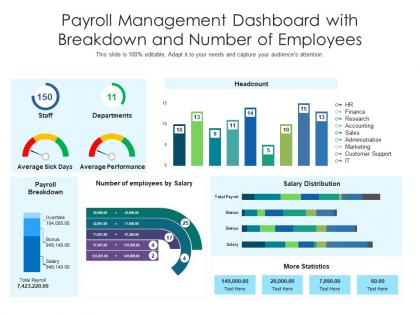
Payroll management dashboard with breakdown and number of employees




Try Before you Buy Download Free Sample Product
 Impress Your
 Audience
 100%
100% Editable
 Save Hours
 of Time


Our Payroll Management Dashboard With Breakdown And Number Of Employees are topically designed to provide an attractive backdrop to any subject. Use them to look like a presentation pro.
People who downloaded this PowerPoint presentation also viewed the following :
Payroll management dashboard with breakdown and number of employees with all 2 slides:
Use our Payroll Management Dashboard With Breakdown And Number Of Employees to effectively help you save your valuable time. They are readymade to fit into any presentation structure.
FAQs for Payroll management dashboard with breakdown and
Start with the obvious stuff - total payroll costs, labor percentages by department, overtime hours and costs. Headcount changes are huge too. Track payroll errors because those always pop up when you least expect them. Employee cost per hour plus benefits will probably shock whoever's looking at this dashboard (benefits costs are insane these days). Don't forget compliance metrics like tax withholdings accuracy - boring but necessary. Keep everything simple so you can actually spot trends without getting overwhelmed. Add fancier metrics later once everyone's used to checking it regularly.
Honestly, it's a game changer for morale. Employees can check their pay stubs whenever they want instead of bugging HR every time something looks off. The transparency is huge - they see exactly where their money's going with deduction breakdowns and can track their PTO without playing phone tag. Direct deposit stuff and tax docs are all right there too. People just feel more trusted when they don't need permission to access their own pay info, you know? I'd definitely showcase the most popular features first when you roll it out.
Dude, you get to see labor costs and overtime building up as it happens instead of getting smacked with surprises two weeks later. Your managers can actually watch their team costs in real-time, which honestly makes them way better at staffing decisions. Compliance stuff becomes so much easier too - you'll spot missed breaks or weird scheduling issues right away. I mean, finding out your department already burned through overtime budget while there's still time to fix it? That's huge. Way better than the old "oops we're screwed" discovery method most places still use.
Dude, visual analytics is a game changer for payroll data. Instead of drowning in spreadsheets, you'll actually see what's happening—overtime spikes, weird department costs, seasonal stuff jumps right out. Interactive dashboards let people dig into specifics and compare different time periods super easily. Executives get the budget picture instantly, HR spots pay equity issues. Honestly, I wish more companies would just start with basic trend charts first. Those usually blow people's minds because suddenly patterns that were totally hidden become obvious. Way better than the old "here's 47 Excel tabs" approach.
Definitely get multi-factor authentication set up first - that's your best bet. Role-based access is huge too so people can't snoop around where they shouldn't. Encrypt everything, especially with payroll stuff (learned that one the hard way). Audit trails will save your butt when things go sideways, trust me. Session timeouts are a must because nobody logs out properly. Do regular security checks, but honestly? Start by looking at who still has access. I bet there's at least three people who quit months ago still floating around in there. Regular assessments after that.
So automation basically gets rid of all those stupid typos and forgotten overtime entries that always mess things up. My dashboard syncs straight from our time tracking and handles tax stuff automatically - saves me like 2-3 hours each payroll cycle, which is huge. Plus it catches weird inconsistencies before you run everything, so no more dealing with pissed off employees after the fact. The bulk processing thing is honestly a game changer - you just approve everyone at once instead of clicking through each person individually (so tedious). I'd definitely start with the repetitive stuff first like taxes and direct deposits.
Dude, mobile access for payroll dashboards is seriously clutch. Your employees aren't gonna wait until 9am Monday to check if their overtime got processed correctly - they'll want answers at like 10pm on Sunday. Same with managers who need to approve stuff while they're traveling or whatever. I learned this the hard way at my last job actually. A responsive dashboard that actually works on phones (not just technically loads but is genuinely usable) means way fewer headaches for everyone. Problems get solved faster, people stay happier, and you don't have bottlenecks waiting for folks to get back to their desks.
Honestly, just ask each department what's bugging them most - like their top 3-5 headaches. Then build around that. HR probably wants all the employee data and compliance stuff, managers just need their team's hours and overtime (and whether they're over budget lol). Finance will want cost breakdowns and forecasting. Most systems are pretty drag-and-drop these days - you can filter by department codes and set up different permissions so people only see what they need. It's way more intuitive than you'd think once you actually start messing around with it.
Don't try to shove every single payroll metric onto one dashboard - I've seen this mistake destroy projects. Focus on daily essentials: processing status, exception alerts, deadlines. Critical stuff goes front and center, not buried in tabs where people won't see it. Your mobile view better work perfectly since everyone checks this stuff on their phones anyway. User permissions need to be bulletproof from the start because payroll data is crazy sensitive. Honestly, half the "must-have" features you think you need can wait. Build something simple first, then add features based on how people actually use it.
Honestly, start with something simple like overtime prediction - test it for a month before going crazy with complex stuff. AI can spot patterns you'd never catch manually, like predicting labor costs or flagging weird payroll spikes. Set up alerts for budget issues or compliance problems. The predictive analytics are pretty cool too - they'll forecast turnover based on pay patterns and suggest salary bumps to keep good people. Machine learning does the heavy lifting here. I'd avoid rolling out everything at once though, that usually backfires. Pick one feature first and see how it goes.
Honestly, payroll dashboards are a game changer for staying compliant. Real-time alerts mean you'll catch overtime violations or tax deadline issues right away - way better than finding out during an audit (been there, it sucks). Everything's centralized so your data stays organized and audit-ready. The automated reporting handles federal, state, and local stuff without you having to babysit it. I'd definitely set up those automated compliance reports ASAP. Trust me on this one - you don't want to be scrambling around come December trying to pull everything together.
Honestly, the easiest thing is setting up widgets that compare your actual spending to what you budgeted. I'd break it down by salaries, overtime, benefits - you know, the usual stuff. The variance percentages are super helpful because you can spot problems right away. Green means you're under budget, red means... well, you're probably stressed lol. Those trend charts are clutch too - they'll show if you're always running over or if it's just busy season hitting hard. Oh, and definitely set alerts at like 80% so you're not panicking when the month's almost over. Test it with last quarter's numbers first.
So for payroll dashboards, PowerBI and Tableau are honestly your best options - great visuals and they play nice with most HR systems. I've seen some really clean setups with both. If you're more of a tech person, maybe check out Grafana or build something custom with React. Oh, and if you're already using QuickBooks or ADP for payroll, their built-in dashboards aren't terrible. My advice? Figure out what metrics you actually need first - like, write them down. Then pick whatever tool handles your current data sources without making you want to pull your hair out.
So it's pretty straightforward - your role determines what payroll stuff you can actually see and do. Basic employees only get their own pay stubs and tax documents. Managers can view their team's info like salaries, bonuses, time tracking, all that. HR sees literally everything company-wide since they handle everyone's payroll anyway. The dashboard automatically hides what you can't access, which is honestly pretty smart. If you think your permissions are wrong, just bug your admin about it. They can usually sort it out pretty quick.
Real-time dashboards are everywhere now - they'll predict who's gonna quit based on pay data and catch compliance stuff before it blows up. Mobile is basically required since managers need to approve things while they're out. Desktop-only feels ancient honestly. Most platforms integrate with HR systems now and do pay equity analysis automatically. Oh, and customizable alerts are clutch. When you're shopping around, focus on the dashboard flexibility and notification features. Those make or break daily workflow.
-
Best way of representation of the topic.
-
Helpful product design for delivering presentation.