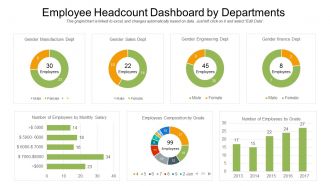
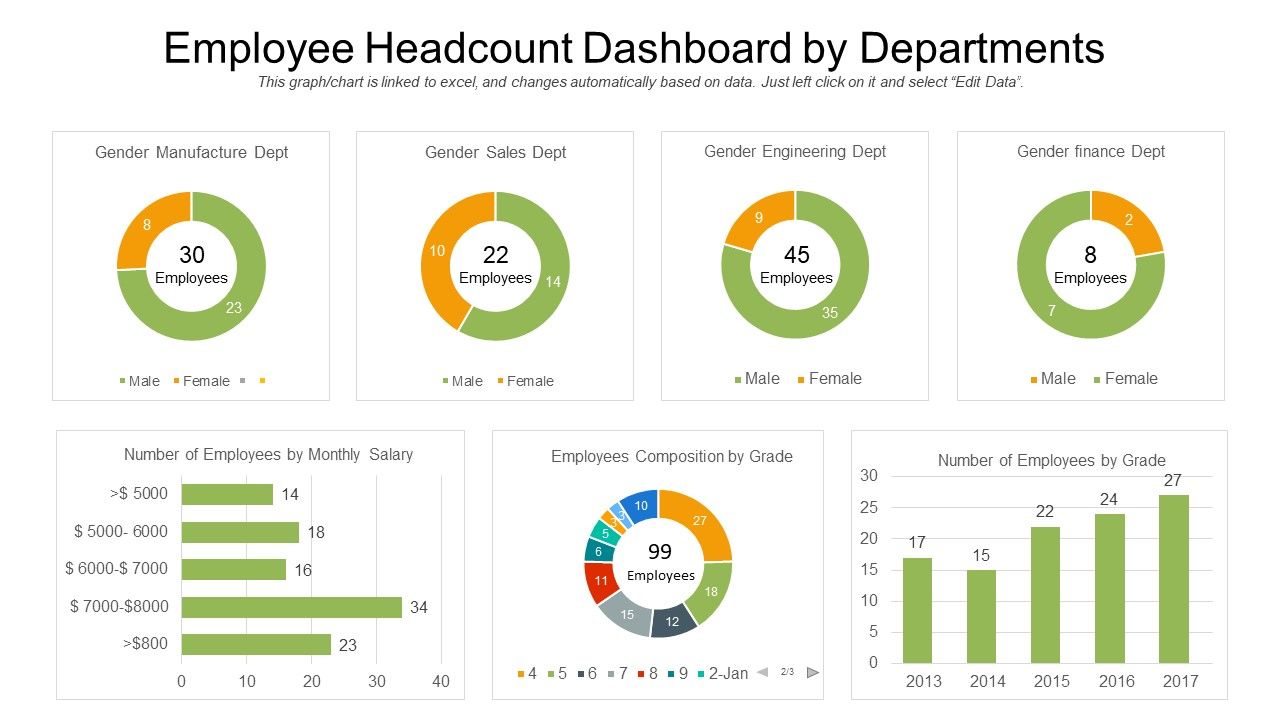
Employee headcount dashboard by departments
Try Before you Buy Download Free Sample Product
Audience
Editable
of Time
Our Employee Headcount Dashboard By Departments are topically designed to provide an attractive backdrop to any subject. Use them to look like a presentation pro.
People who downloaded this PowerPoint presentation also viewed the following :
Employee headcount dashboard by departments with all 2 slides:
Use our Employee Headcount Dashboard By Departments to effectively help you save your valuable time. They are readymade to fit into any presentation structure.
FAQs for Employee headcount
Start with the basics - total headcount, new hires, terminations, and net change. Break it down by department and location too, that's where you'll spot the interesting patterns. Turnover rate is essential, plus time-to-fill for open roles. Oh and definitely include your forecast vs actual numbers because finance will ask for that anyway. I'd add span of control if you're tracking how efficient your managers are. Keep the main view simple though. You can always click into the weedy details when someone inevitably asks about that one specific team's hiring in Q2.
Monthly works fine, but weekly is way better if you can manage it. You'll catch stuff like sudden turnover or hiring spikes before they become real problems. Honestly, I've watched teams do quarterly updates and they always miss the important shifts - headcount changes too fast for that. Weekly might sound like overkill, but trust me, it's not. Start monthly though, see how it goes. If you feel like you're constantly behind on what's happening with your team numbers, bump it up to weekly. The whole point is matching whatever pace your company actually moves at.
Honestly, color coding will save your life - pick one palette for departments, different one for job status. Progress bars work great for headcount goals, and throw in some trend lines to show growth over time. Managers are always rushing, so put your key numbers right at the top where they can't miss them. Add filters so people can dig into specific teams or locations. Oh and skip pie charts completely - they're terrible for comparing department sizes. Horizontal bars are way cleaner. Good visual hierarchy makes everything flow naturally, plus clear labels and simple icons help people actually understand what they're looking at.
Honestly, headcount trends are like a reality check for your business. They show you what's actually happening versus what you *think* is happening. Growing teams? That's where your real priorities are, not whatever's in your fancy strategy presentation. Shrinking departments usually mean budget issues or you're pivoting focus - either way, something to dig into. I check mine monthly and compare against business goals. Misalignment there means you've got some course-correcting to do. It's basically your early warning system for when you're putting too much (or too little) resources somewhere important.
Look, raw headcount numbers don't tell you squat about what's actually happening. Demographics show you WHO you're hiring and losing - that's where the gold is. You might discover you're bleeding women engineers at the senior level, or your "diverse" hiring isn't translating to promotions. Honestly, I've seen companies totally miss these patterns for years. Track different groups separately and you'll spot bias in hiring or retention that would otherwise fly under the radar. It's basically your reality check for whether DEI efforts are actually working or just nice-sounding BS.
Your headcount dashboard is perfect for tracking diversity stuff - gender, ethnicity, age breakdowns across different teams and levels. Honestly, seeing the actual numbers is kind of a wake-up call sometimes. You can spot where representation is lacking and figure out which departments need better recruiting. The visual layout makes it way easier to digest than spreadsheets (thank god). Slice the data however you want to see progress on your diversity goals. Just make sure leadership actually reviews this regularly with you - otherwise it's just another report collecting digital dust.
Honestly, I'd go with Power BI if you're already using Microsoft stuff - it connects super easily with Excel and SharePoint. Tableau's solid but man, the pricing adds up quick (we found that out the hard way last year). For something more basic? Google Data Studio actually works pretty well if your data's in Google Sheets. Short sentences work better here. The key is picking whatever meshes with your current HR setup first, then worrying about fancy features later. Don't overthink it - most headcount dashboards are pretty straightforward anyway.
Dude, headcount data is like having a crystal ball for your hiring needs. Pull the last year's worth of changes and you'll see exactly when departments grow, where people bail most often, and seasonal patterns. The turnover stuff is honestly where you strike gold - shows you exactly what's broken retention-wise. Map it against how long roles actually take to fill (some take forever, trust me). You can predict when to start recruiting before you're scrambling. Works way better than just winging it every quarter.
Don't cram everything onto one screen - people just get overwhelmed and ignore it. Skip the vanity metrics that look cool but don't help anyone make real decisions. Define what "active employee" actually means upfront because that debate gets messy fast! Your data needs to be reliable and update regularly, or people stop trusting it. Clean design works best. Focus on trends instead of random snapshots, and always break things down by department or team. Honestly, I'd start super simple and only add features when users specifically ask for them. Way easier than building some complex monster nobody wants.
Ugh, org changes will totally wreck your headcount dashboard if you're not careful. Roles get renamed, people switch departments, cost centers flip around - suddenly your categories are meaningless. I learned this the hard way when our last restructure happened and nobody updated anything for like a month. Your stakeholders will be staring at data that makes zero sense. The trick is updating your dashboard structure right when changes happen, not later when everyone's already annoyed. Otherwise you're basically using an old GPS in a city that just built new highways.
Dude, start with turnover rate - anything over 15-20% annually and you've got issues. Employee engagement should hit 70%+ favorable, and try to fill positions in under 30 days (good luck with that one, honestly). Internal promotions are clutch too - around 20-30% of roles filled from within shows people actually want to stick around. Don't forget absenteeism rates and span of control stuff. The exact numbers shift depending on your industry, but tracking these monthly will catch problems early. Oh, and these metrics work best when you look at them together, not individually.
Look, turnover data is where you actually see what's happening with your team - like whether people are quitting or getting laid off. Track your turnover rate and how long people stick around, plus why they're leaving. The exit reason stuff is honestly where you'll find the real tea about what's going wrong. I'd set up some kind of alert when it hits certain numbers so you can jump on issues fast. Oh and definitely look at trends over time - that's how you catch problems before they blow up. Way more useful than just counting heads going in and out.
Start with role-based access - only give people data they actually need for their jobs. Most folks just want the big picture numbers anyway, not every single detail. Strip out names, employee IDs, and specific salary info before you share anything. Use secure file sharing instead of emailing spreadsheets around (I've seen that go wrong too many times). Add labels so people know what's sensitive. Also, review who has access regularly since people switch roles and you don't want old permissions sitting there forever.
Honestly, engagement metrics are like the missing piece when you're trying to figure out your headcount stuff. Say turnover jumps or retention tanks - those engagement scores tell you if people are just checked out or if there's something else going on. I'm kind of obsessed with comparing both datasets during monthly check-ins because you'll catch weird patterns. Like when engineering grew 30% but engagement dropped 15%? That's your red flag that growth is moving too fast. It's basically detective work, and way more interesting than just staring at spreadsheets all day.
Honestly, real-time data is a total game changer for headcount dashboards. You'll spot turnover spikes and hiring slowdowns as they happen instead of finding out weeks later when it's too late to fix anything. Set up alerts so you don't have to babysit the thing constantly - though I probably check mine more than I should anyway. Your leadership team will actually get accurate projections for budgets instead of guessing based on stale data. Plus you can jump on retention issues before half your team quits. The instant visibility into department growth patterns alone makes it worth the setup hassle.
No Reviews