


0514 payroll process flowchart powerpoint presentation





Try Before you Buy Download Free Sample Product
 Impress Your
 Audience
 100%
100% Editable
 Save Hours
 of Time


Our 0514 payroll process flowchart Powerpoint Presentation draw in the crowds. Their brilliance is a definite attraction.
People who downloaded this PowerPoint presentation also viewed the following :
Content of this Powerpoint Presentation
“The biggest thrill wasn’t in winning on Sunday, but in meeting the payroll on Monday,” Art Rooney, US football player.
What is a business without an efficient system of Payroll Processing? A business establishment deals with tasks and responsibilities, including compensating employees which is of major importance. Payroll processing, when done right, is an employee retention strategy. This helps companies stay safe from legal consequences. On the other hand, paying employees unfairly can hurt employees’ sentiments and discourage them from performing their work.
To learn more about the employee management system, check this PPT Slide!
By using a streamlined payroll processing system, HR professionals ensure that they pay employees correctly, thereby keeping them happy and motivated. For an explanation of the Payroll System Service Implementation Process, check out the special slide. Click here!
Payroll Processing differs from company to company. Certain organizations may hire a specific person to manage and administer their payroll internally. It might also delegate the task to human resources. At the same time, some companies hire an external entity or use a platform to automate their payment processing or accounting requiring minimal internal monitoring and effort. To know more on the payroll accounting process, click here!
The procedure of Payroll Processing is an essential but complicated business process. It includes steps, for example, setting up salary structures, collecting employee data, etc. So, a lot of times there can be errors in calculation.
A flow chart can be designed to ensure that the payroll procedure works well and satisfies all stakeholders. Flowcharts, in general, are good tools to visualize and document business processes. This is especially true in payroll processing, where a lot of questions have only Yes/No answers. Creating a PowerPoint Presentation with a flowchart template helps you showcase steps involved in the payroll process for employees, managers, or executives.
You can use a good Flowchart PPT Slide template offered by SlideTech Systems to make your work easier. Let us now have a look at the template for a better understanding:-
Template 1 - Payroll Process Flowchart

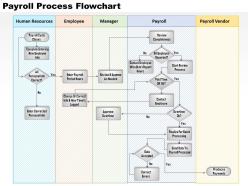
Use this slide to prepare the flowchart for your payroll processing. Here, you can see five columns with titles mentioned as Human Resources, Employee,Manager, Payroll, and Payroll Vendor.
In this PPT Slide, under Human Resources, there is ‘personal information of all employees’ which is a significant aspect of conducting the payroll process. Moving on from the HR column, under Employees, there is a payroll period. This is a time frame used to calculate the earned wages. This is contingent on company policies and industry standards. The payroll periods could be bi-weekly, semi-monthly, and its decision depends on what works becomes a win-win for both the employer and the employees. Having a regular payroll period makes the accounting processes simpler.
The next section of the flowchart slide showcases the manager’s review and approval as needed.Without approval of the manager the payroll process cannot be complete. The Payroll column demonstrates All Employees Reported? Contact Employees Who Didn’t Report Hours, Start Review Process, Send Data To Payroll Processor, etc. Finally, under Payment Vendor there is Process Payments which suggests the completion of Payroll Processing.
PS Provide a structured framework for calculating the payroll of your company. Check out the best template to streamline and explain the payroll process.
0514 payroll process flowchart powerpoint presentation with all 5 slides:
Consolidate your gains with our 0514 payroll process flowchart Powerpoint Presentation. Build on the firm base you have created.
FAQs for 0514 payroll process
So first things first - map out what you're already doing, then spot the mess-ups. You'll need the basics: collecting employee data, tracking hours, calculating gross pay, handling deductions, and getting people paid. Build in approval steps because catching screw-ups early beats dealing with angry employees later (learned that one the hard way). Include decision points for overtime and tax stuff, plus show who hands what off to who between departments. Oh, and don't skip the compliance checks and record keeping - boring but necessary. Start simple, then add the fixes for your biggest bottlenecks.
So basically, a flowchart creates these checkpoints where you can't skip the compliance stuff - tax calcs, overtime rules, minimum wage, all that. Without it, things slip through constantly (learned that the hard way at my old job). Each step gets documented, which is clutch during audits since you can literally point to your process and show you're following labor laws. Map out what you're doing now first. Then figure out where to drop in those compliance checks. It's like having training wheels but for not getting fined by the government.
Dude, payroll software is seriously worth it. Gone are the days of manually entering hours - time tracking syncs automatically now. Tax calculations happen instantly, and direct deposits go out without you touching a single spreadsheet. The compliance stuff is huge too since the software updates itself when tax laws change (which feels like constantly these days). Your whole flowchart gets way cleaner. Fewer approval steps, less data entry, way fewer headaches. I'd sketch out what you're doing now first, then figure out which painful steps you can automate. Trust me on this one.
Okay so first thing - map out literally every step of your payroll process. I'm talking everything from when timesheets come in to when people get paid. Time each step and see where stuff consistently gets stuck. Trust me, the bottlenecks will jump out at you once you see the whole picture laid out. Usually it's something like waiting forever for manager approvals or someone manually entering data (which honestly takes way longer than it should). Once you know where the slowdowns are, that's what you tackle first. Those spots give you the biggest bang for your buck.
Don't overcomplicate it from the start - that's the killer mistake. You'll just confuse people and miss obvious stuff. Build it simple first. Get HR, finance, and IT involved early since they all deal with different pieces of this mess. Honestly, I've seen way too many flowcharts that look gorgeous but totally ignore real scenarios like fixing mistakes or handling retroactive changes. Oh, and compliance stuff - can't forget that headache. Map out your error handling too! What happens when someone screws up? Most people only chart the perfect scenario, which is basically useless.
Honestly, a good payroll flowchart is a game-changer for keeping people happy. Your employees get paid right and on time - which, let's be real, is pretty much all they care about when it comes to payroll. Map out your process and you'll catch errors before they happen. Plus your payroll team won't be running around like headless chickens when someone asks why their check looks weird. I've seen this save so much drama at companies. Trust goes way up when people see you've got things organized. Start by writing down what you're doing now, then figure out where things usually get stuck.
Check your employee handbook first - that's your starting point. Then dig into any union stuff if you've got it. Federal compliance docs are huge too, like FLSA rules and tax tables. State wage laws matter obviously. Your company's overtime and PTO policies will come up constantly. The compliance rabbit hole is honestly insane but you can't mess it up. Grab your payroll software docs and last year's audit reports - they'll show you exactly where things usually break. I'd map out each decision point from these docs. Trust me, it saves so much drama later.
Honestly? Quarterly reviews are the minimum, but I'd check it whenever big stuff changes. New software rollout, team restructuring, compliance headaches - all perfect reasons to update it. Staff turnover is huge too since processes always shift a bit with different people. Don't be one of those companies that waits three months to fix obvious bottlenecks your team's complaining about. Set a calendar reminder and just treat it like regular maintenance. Trust me, you'll be so grateful when you're onboarding someone new and your flowchart actually matches reality instead of some outdated mess from 2022.
Honestly, I'd start with Draw.io since it's free and surprisingly good for mapping out payroll flows. Lucidchart and Visio are both excellent if your company will pay - they handle complex stuff with multiple decision points really well. Miro's my favorite when you're bouncing ideas around with teammates because it feels more like sketching on a whiteboard. They all have templates and symbols built in, which saves you from creating everything from scratch. I always test things out in Draw.io first, then switch to something fancier if I need more bells and whistles.
Honestly, those flowcharts are game-changers for training new HR people. New hires can actually see the whole process mapped out - from timesheets all the way to cutting checks. Way better than just explaining it verbally, you know? They'll know exactly which approvals they need and when, plus who handles what part. I swear it cuts training time in half. The visual part really helps them catch potential problems before they happen too. My advice? Have them walk through a couple real payroll cycles with the chart in hand. Makes everything click faster.
Company size totally changes your payroll flowchart game. Small businesses? Pretty straightforward - grab timesheets, crunch numbers, take out deductions, print checks. Done in like 5 steps. Medium companies start getting messier with different departments and approval chains. But large companies - ugh, that's when it gets crazy. You're juggling multiple locations, union stuff, tons of benefit options, plus compliance headaches across states or even countries. Honestly, the approval stages alone will make your head spin. My advice? Keep it simple at first, then add the complicated bits as you actually need them.
Start with tracking how long each payroll run takes - that's your biggest win right there. Error rates are huge too, like how many corrections you're making after the fact. Employee satisfaction surveys about pay accuracy help, but honestly those can be hit or miss depending on who responds. Cost per cycle is worth measuring if you can figure out how to calculate it properly (it's messier than it sounds). Compliance audit results matter obviously. I'd focus on processing time and error rates first since they're easier to benchmark. You can always add the fancier metrics later once you've got those dialed in.
Oh man, add a "Tax Law Update Review" step right before you calculate payroll. We got burned last year when a state tax change slipped past us - total nightmare. Make it a checkpoint where you double-check current rates and withholding rules against what's actually in your system. Set up quarterly meetings between payroll and compliance teams too, because those law changes sneak up fast. The trick is making tax verification mandatory, not optional. Also throw in some alerts or you'll definitely forget. Trust me on this one.
Look, your employees are gonna spot payroll problems way before you do - they're the ones checking their paychecks every two weeks, right? Build their feedback directly into your flowchart so they can flag discrepancies or suggest fixes. It's like having quality control built right in. Trust me, catching issues early beats dealing with angry employees later. Plus it shows you actually care about getting things right, which goes a long way. Just make sure you clearly mark in the flowchart where and how they can give input. Maybe add a step for follow-up too.
Dude, when payroll gets messed up, that flowchart is literally a lifesaver. You can trace backwards through every step to find where someone screwed up - data entry, approvals, whatever. It shows you who to call immediately too. Without it you're basically stumbling around blind while people freak out about their paychecks. The flowchart also helps you tell employees how long the fix will take since you can see which steps happen together vs. one after another. I learned this the hard way last year - always keep that thing nearby.
-
Great designs, Easily Editable.
-
Very unique, user-friendly presentation interface.