

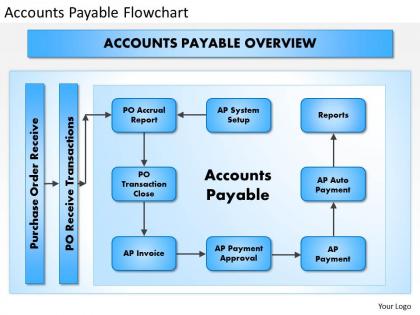
0414 accounts payable flowchart powerpoint presentation




Try Before you Buy Download Free Sample Product
 Impress Your
 Audience
 100%
100% Editable
 Save Hours
 of Time


Our 0414 Accounts Payable Flowchart Powerpoint Presentation are artistically fashioned. Be assured of exceptional handiwork.
People who downloaded this PowerPoint presentation also viewed the following :
0414 accounts payable flowchart powerpoint presentation with all 5 slides:
Go before any gathering with our 0414 Accounts Payable Flowchart Powerpoint Presentation. They will have a beneficial effect.
FAQs for 0414 accounts payable
So basically you've got invoice receipt, then verification against your PO and delivery stuff, approval workflow, payment processing, and recording everything in accounting. Most places do a vendor master file check upfront too - seriously saves you from weird issues down the road. Each stage needs someone owning it with clear approval limits. Three-way matching is usually where things get stuck if it's not dialed in right. Honestly? Map out what you're doing now first. Figure out where it's getting bogged down, then fix those spots before you mess with the whole thing.
Honestly, flowcharts are game-changers for catching AP mistakes. They force you to hit every checkpoint - can't skip ahead without matching invoices to POs or getting approvals first. Think of them as safety nets that grab errors before they snowball. Your team gets a clear visual of what happens next, so no more "I thought someone else handled that" situations. I'd start by sketching out how you currently do things (probably messier than you think), then spot where screwups usually happen. That's where you build in your strongest checks. It'll standardize everything across the board too.
For AP flowcharts, I'd probably go with Microsoft Visio first - it's got solid templates and plays nice with other Office stuff. Lucidchart's really good too, especially if your team needs to collaborate online. Oh, and there's Draw.io (they renamed it diagrams.net or something) which is totally free. Interface is kinda ugly but it gets the job done. PowerPoint works fine if you're doing something super basic. SmartDraw's decent too, though honestly I don't see it used much anymore. Start with whatever software your company already pays for, then switch if you need fancier features later.
Honestly, automation makes your AP flowchart way cleaner - all those approval boxes and manual routing steps just disappear. You get automatic invoice data capture instead of someone typing everything in. Exception handling becomes built-in, so weird cases get routed to the right person without anyone babysitting the process. Start with mapping what you do now (I know, boring but necessary). Then figure out where automation can cut steps. The visual gets so much simpler it's almost weird at first. Way fewer handoffs too. You'll probably end up wondering why you didn't do this sooner.
Start by mapping out what you're actually doing now - seriously, don't just wing it from scratch. Hit all the big stuff: getting invoices, approvals, checking vendors, payments. Use standard symbols so people don't get confused (boxes for steps, diamonds for yes/no decisions). Honestly, if it looks like a hot mess on paper, that's perfect - means you'll find tons of ways to fix it! Make sure the decision points are super clear and throw in timing when you can. Oh, and definitely run it by your AP team before you call it done. They'll spot the weird gaps you totally missed.
So basically, flowcharts make your whole payment thing way more predictable for vendors. You'll have clear approval steps mapped out, which cuts down on those annoying "hey where's my check?" calls - trust me, vendors hate making those as much as you hate getting them. Delays become less of a thing because everyone knows what comes next. The real win though? You can actually see where stuff gets stuck and fix it before it screws up relationships. My advice: start by documenting whatever messy process you have now, then figure out where the usual slowdowns happen and clean those up first.
So there's three groups handling different pieces. Purchasing creates the POs and receives stuff when it comes in. Then AP staff do the matching - invoices to POs, coding expenses, cutting actual payments. Finance handles approvals and reconciliations at month-end. It's basically like passing a baton between teams. Everyone stays in their lane but you gotta communicate when weird stuff pops up or payments are urgent. Discrepancies are where things usually get messy, honestly. Just know who to bug for what and you'll be fine!
Honestly, just trace through your flowchart and look for where stuff gets backed up. Time each step - you'll quickly see what's dragging. Approval processes are usually the worst offenders, no joke. Check for those annoying loops where invoices ping-pong between departments forever. Decision points where things sit waiting? Major red flags. Manual steps that need multiple people or outside vendors will slow you down too. Oh, and anywhere external input is required - that's trouble. Once you find these problem spots, focus on redesigning just those parts instead of overhauling everything.
So with AP flowcharts, you can track processing times, approval bottlenecks, error rates - all that stuff. The visual part is honestly the best feature because you'll instantly see where invoices get stuck (usually Karen's inbox, let's be real). Cycle times from receipt to payment are huge too, plus you can spot duplicate payment risks and see how workload gets spread across your team. Most people obsess over processing times since they affect vendor relationships and those early payment discounts. Oh, and compliance gaps become super obvious. Start by mapping what you're doing now, then add whatever metrics actually matter to your goals.
Flowcharts are seriously a game changer for training AP newbies. Shows them the whole process visually - from when invoices come in to final payment. Way better than handing someone a thick manual, you know? Walk them through each step and they can see what happens when stuff gets stuck in approvals or whatever. Honestly wish my old boss had done this when I started - would've saved me so many awkward questions. Your new hires can just check it themselves instead of bugging you every five minutes. Make sure you include the normal flow plus those weird exceptions that always pop up. Trust me, it'll cut your training time way down.
So updating your AP flowchart will fix a bunch of stuff that's probably driving you crazy right now. Think duplicate payments, approval bottlenecks, three-way matching disasters. Those department handoffs where finance and procurement just blame each other? Yeah, you can clean that up too. Missing fraud controls, workflows that don't play nice with your ERP - all fixable. Here's the thing though: map out where invoices actually get stuck (not where they're supposed to flow). Then redesign those messy spots with clearer decision points. Oh, and make sure someone's actually accountable for each step.
Honestly, flowcharts are a game-changer for audits. They show auditors exactly how your AP process works - like who approves what and where all the controls happen. Way better than trying to explain everything on the spot, which never goes well in my experience. Auditors can quickly see if you're doing proper segregation of duties and spot any sketchy areas. Having it all mapped out proves you actually care about your internal controls too. Just make sure you keep it current - nothing worse than showing them an outdated process that doesn't match reality anymore.
So basically, manual AP flowcharts are a total mess - you've got like 15+ steps with physical invoices being shuffled around, routing slips, people signing stuff left and right. It's honestly painful to watch sometimes. Automated flowcharts? Way cleaner. Maybe 6-8 digital steps tops, with approvals built right in and everything updates instantly. Plus you get real-time reporting and exception handling that manual processes can't touch. I'd start by mapping out what you're doing now first, then figure out the automated version. You'll probably be shocked at how much redundant crap you can cut out.
Mapping out your AP process is a game changer - you'll finally see where everything gets stuck instead of just feeling like it's always a mess. I swear, once you visualize it, those weird delays and unnecessary approval steps become super obvious. Invoice bottlenecks? They jump right out at you. Redundant tasks eating up time? Same thing. It's honestly so much easier to pitch improvements to your boss when you've got a flowchart instead of just complaining about how things suck. Pick your top 2-3 biggest pain points from the visual and tackle whatever's gonna save you the most money first.
Honestly, tech integration is a game changer for AP - it automates basically everything and cuts down on so many mistakes. OCR scanning handles invoices automatically, plus you get electronic approvals instead of chasing people around with paper. Real-time reporting is clutch too. The automated vendor payments alone will save you hours every week (seriously, I wish we'd done this sooner at my old job). Everything syncs up with your ERP so data just flows between departments without anyone manually entering stuff twice. I'd start with whatever's currently your biggest pain point - that's where you'll see results fastest.
-
Great product with highly impressive and engaging designs.
-
Out of the box and creative design.