


Sales Process Flow Chart Of Company




Try Before you Buy Download Free Sample Product
 Impress Your
 Audience
 100%
100% Editable
 Save Hours
 of Time


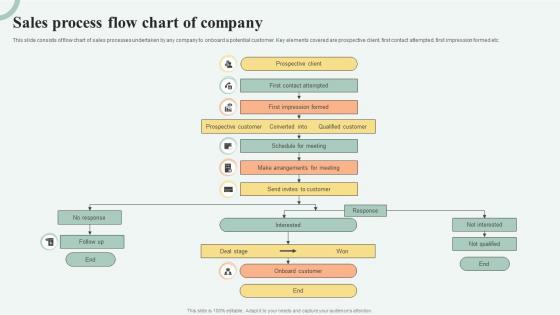
This slide consists of flow chart of sales processes undertaken by any company to onboard a potential customer. Key elements covered are prospective client, first contact attempted, first impression formed etc.
People who downloaded this PowerPoint presentation also viewed the following :
Sales Process Flow Chart Of Company with all 6 slides:
Use our Sales Process Flow Chart Of Company to effectively help you save your valuable time. They are readymade to fit into any presentation structure.





FAQs for Sales Process Flow
So basically you've got seven main stages: lead gen, qualification, needs assessment, proposal/presentation, objections, closing, and follow-up. Most places adjust these to fit their own sales cycle. Honestly, qualification is where everything falls apart if you mess it up - don't waste weeks chasing someone who's just window shopping. You want clear criteria for each stage so your team knows when to move a lead forward. Like, when does a random inquiry actually become a real prospect? Figure that out first. The framework's pretty standard across companies, but the timing and specifics change depending on what you're selling.
So basically, having a sales flowchart means everyone on your team follows the same steps instead of just making it up as they go. When you map it out visually, you'll actually see where deals keep dying - maybe after demos or whatever. That's where you focus your coaching. New people get up to speed way faster too since they can literally see the whole process. Oh and honestly? Start by figuring out where your current deals stall most. Those are the stages that need fixing first. It's kind of obvious once you see it all laid out.
Honestly, most people go way overboard and create these insanely complicated flowcharts that nobody wants to follow. Skip the decision points where deals might tank? Big mistake - that's literally the whole point. Also, I've seen so many teams build these things without talking to their actual sales reps first. Like, of course it won't work in real life! Start basic with your main stages, test it out with a couple people, then make it fancier later. Oh and build in some feedback loops or you're just guessing. Keep it simple at first - trust me on this one.
Each industry moves totally different through the buying process, so you've gotta customize those stages. B2B tech deals drag on forever with like 10 people involved in decisions. Retail's way faster. Finance and healthcare though? They have all these compliance hoops that make the flowcharts look insane - but you can't skip them. Talk to your sales team first about what actually happens with different clients. They'll tell you the real story, not what you think should happen. Then map your flowchart around those patterns instead of some generic template.
Honestly, Lucidchart's probably your best bet - it's made for this stuff and has a solid free trial. Visio's good too if you're already using Microsoft everything. I've been using Miro a lot lately though, love the whole whiteboard vibe and it's way more fun to work with than most tools. Your team might dig that. If you just need something basic, Google Drawings works fine or even Canva (yeah I know, weird right?). I'd definitely try Lucidchart first since it's built specifically for process mapping. Way better than trying to force PowerPoint into doing something it wasn't meant for.
Dude, colors are your best friend here. Green for done stuff, yellow for what's happening now, red for where things get stuck. Different shapes work great too - circles for decisions, rectangles for actions. I know it sounds weird, but stick figures actually nail it when showing who hands what off to who. Make your arrows thicker for high-volume stuff, thinner for the small potatoes. Keep everything spaced out nice and clean. Honestly, if someone new can't look at it and get the gist without you explaining every little detail, you're probably overthinking it.
Track your conversion rates at each funnel stage - lead to prospect, prospect to demo, demo to close, all that stuff. Average deal size matters too. Sales cycle length will tell you if things are dragging. Win/loss ratios are obvious but people skip them somehow. Watch how long deals sit in each stage because bottlenecks just murder your momentum. Lead sources are key - I bet you'll be surprised which ones actually work vs which ones you think work. Pipeline velocity shows how fast everything moves through your system. Start there, then add metrics when you find specific problems.
Honestly, flow charts are a game changer for training new sales people. Hand it to them day one and they'll actually know what they're doing instead of wandering around lost. Shows them the whole process from hello to handshake, step by step. I wish my first manager had done this - would've saved me weeks of confusion. The visual thing really helps too, especially when they hit those weird spots where deals get stuck. Have them pull it out during their first few sales calls. Builds confidence fast and you won't be answering the same questions constantly.
Look, customer feedback is your reality check on whether your sales process actually works. You can draw the prettiest flowchart ever, but if people are getting frustrated at step 3? That's where you need to fix things. I've watched teams completely redo their qualification stage after customers said they felt rushed - which honestly makes total sense. Pain points show you exactly where the bottlenecks are happening. There's usually a huge gap between what you think customers experience and what's really going on. Set up feedback loops and don't be stubborn about changing your process when you learn something new.
Honestly? Update it whenever something actually changes in how you sell - like every quarter or after big stuff happens. New product launch, team gets reshuffled, that kind of thing. Don't stress about every tiny detail though, that's just wasted time. The whole point is making sure it matches what you're actually doing now, not whatever you had mapped out months ago. I always forget this stuff too, so maybe throw a reminder in your calendar? Quick team check during regular meetings works pretty well to catch when things drift off course.
Most sales flow charts hit the same basic steps - prospect ID, qualifying leads (BANT's still huge), demos, proposals, negotiating, then closing. HubSpot and Salesforce have solid examples you can check out. Honestly, I've seen teams waste way too much time making theirs look Pinterest-perfect when a simple version works fine. The real trick is matching your actual sales process, not whatever you learned in business school. SaaS companies usually nail this stuff since they live and die by their funnels. Oh, and don't overthink the qualification stage - that's where most people get stuck.
Dude, when marketing and sales actually talk to each other, your whole process just clicks. No more leads getting lost in the void between teams - which honestly drives me crazy when I see it happen. You'll hit way better conversion rates because everyone knows exactly when to pass things off. Map out that handoff point super clearly first though. Short cycles, cleaner qualification, fewer bottlenecks. It's wild how much smoother everything runs when both sides are using the same playbook instead of doing their own thing.
Look, without clear roles your sales team turns into a circus - trust me, I've seen it happen. Prospects get hit up by three different people or worse, they slip through the cracks completely. Super frustrating for everyone involved. Map out who owns what at each step: SDRs qualify, AEs demo, CSMs handle the handoff. Simple stuff but it makes a huge difference. Your team actually knows when to pass things along instead of playing guessing games. Just write down each step in your process first, then stick one person's name next to it. Done.
Definitely show them the actual flowchart instead of just talking about it. Start big picture, then dive into each stage with examples from deals they already know. Honestly, people's eyes glaze over if you get too abstract, so connect every step to metrics they actually care about. Make time for questions too - there's always confusion about who hands off what to whom. Short sentences work better than long explanations. The main thing is everyone needs to see exactly where they fit and what kicks off the next stage. Oh, and don't just describe the process - literally walk through it visually or you'll lose half the room.
Don't dump the whole flowchart on them at once - trust me, I've watched rooms full of people mentally check out when you do that. Walk through each step with your cursor or pointer. The tricky spots are usually decision points and when work moves between teams, so spend extra time there. Ask questions as you go to keep people engaged. Oh, and definitely make two versions - execs want the simple overview while your team needs all the nitty-gritty details they can reference later. Learned this one the hard way too!
-
Loved the templates on SlideTeam, I believe I have found the go to place for my presentation needs!
-
No second thoughts when I’m looking for excellent templates. SlideTeam is definitely my go-to website for well-designed slides.