


Sales Process Flowchart For Business Development




Try Before you Buy Download Free Sample Product
 Impress Your
 Audience
 100%
100% Editable
 Save Hours
 of Time


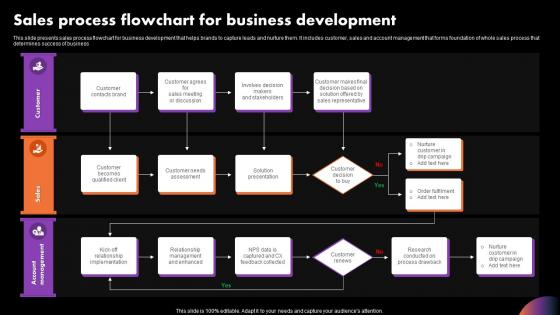
This slide presents sales process flowchart for business development that helps brands to capture leads and nurture them. It includes customer, sales and account management that forms foundation of whole sales process that determines success of business
People who downloaded this PowerPoint presentation also viewed the following :
Sales Process Flowchart For Business Development with all 6 slides:
Use our Sales Process Flowchart For Business Development to effectively help you save your valuable time. They are readymade to fit into any presentation structure.





FAQs for Sales Process Flowchart
Most sales flowcharts have like 6-7 stages: lead gen, qualifying leads, first contact/discovery, figuring out what they need, presenting your proposal, negotiating, then closing. Some companies throw in follow-up stuff at the end. But honestly? Every company does it differently depending on their industry. What matters is mapping out how your prospects actually move through things, not copying some random template online. I'd walk through a couple recent deals you closed and see if your current stages actually match what happened. That's way more useful than overthinking the "perfect" process.
Honestly, flowcharts are game-changers because everyone finally gets the same playbook. No more "where the hell is this lead?" moments that make you want to scream. Your marketing and sales teams can actually see those handoff points clearly, so communication gets way better. People start sharing updates without being asked because they get how everything connects. The visual part makes spotting problems in meetings so much easier too - like, you can literally point to where things are getting stuck. I'd start by mapping what you're doing now with your whole team. You'll probably find some weird gaps you didn't even know existed.
Oh man, biggest mistake? Making it way too complicated from the start. People go nuts trying to map every little detail and end up with this monster flowchart nobody touches. Keep it simple - maybe 5-7 main steps your leads actually go through. Also, don't build this thing alone! Your sales team will completely ignore it if they weren't involved. Been there. Make sure you add decision points too, like what happens when deals just... die. Start basic, test it for a few weeks, then fix what's broken. Way better than overthinking it upfront.
Dude, flowcharts are honestly game-changers for this stuff. You can actually *see* where deals get stuck instead of just guessing. Map out your whole process - leads to close - and you'll start noticing weird patterns. Like maybe everyone's getting hung up at the proposal stage, or demos are taking way too long to turn into decisions. Way better than staring at boring spreadsheets all day. The visual thing just clicks differently in your brain, you know? Once you spot where the slowdowns happen, then you can figure out what's actually causing the mess and fix it.
Honestly, Draw.io is probably your best bet since it's free and pretty solid. Lucidchart's great too if you don't mind paying - both have good collaboration stuff when your team wants to mess with it later. If you're already using Microsoft everything, Visio works but feels like overkill half the time. Miro's cool for the more visual brainstorming type stuff. Even PowerPoint can work in a pinch, though that feels a bit janky for flowcharts. I'd mess around with Draw.io first and upgrade later if you need fancier features.
Honestly, just map out what actually happens with your customers instead of cramming them into some cookie-cutter template. B2B software? Add demo stages and tech evaluations. Retail is way more straightforward - people either buy or they don't. Healthcare's a nightmare with all the compliance stuff you'll need to check off. Here's what I'd do: shadow your sales team for a few calls first. You'll be shocked at how different reality is from what you think happens. Then identify your specific touchpoints and build the flowchart around those. Each industry's totally different, so don't be afraid to get weird with it.
Honestly, customer feedback is like a reality check for your sales process. Your flowchart might look perfect on paper, but if people are getting lost at step 3 or feeling pressured during demos, that's where you need to fix things. So many teams ignore this and then can't figure out why their conversion rates are trash. Collect feedback after demos, during negotiations, post-purchase - the whole journey. Then actually use it to update your process. I'd do this monthly so you're not stuck with some outdated system that doesn't match what customers are experiencing.
Honestly, flowcharts are game-changers for sales teams. When everything's visual, your reps can actually see the whole process instead of getting lost in some boring manual. Colors and icons make it super obvious where decision points are - I've literally watched salespeople pull these up during calls because they're so easy to follow. Plus you'll spot problems way faster when the process is mapped out like that. Oh, and here's a pro tip: color-code different deal sizes or customer types. Makes it way more practical for real situations. Trust me, dense text documents just collect dust.
Track your conversion rates between each stage and how long deals sit in each phase. The visual format is perfect for catching bottlenecks - like when prospects camp out at the proposal stage forever. Also measure win/loss ratios, average deal size, and which lead sources actually work. Honestly, it becomes this super useful diagnostic tool for your whole funnel. I'd start with just 3-4 metrics that match your biggest headaches right now. You can always add more later once you're not drowning in data.
Honestly, I'd check it monthly if your industry moves fast. Quarterly is the bare minimum though. Customer behavior changes, new tools pop up, your team finds weird bottlenecks - there's always something. When conversion rates tank or your reps keep hitting the same wall, don't wait for your next scheduled review. Just dive in right then. I'm terrible at remembering this stuff, so I literally put a recurring reminder on my calendar. Otherwise I'll just keep saying "yeah, I should probably look at that process thing" for like six months straight. Trust me, it's worth staying on top of.
Honestly, defined roles are a game changer - they stop leads from falling through the cracks. No more of that "wait, I thought you were calling them back" nonsense. Handoffs get smoother too since everyone knows their part. New hires actually love it because they're not guessing what they should be doing. I'd start by writing down who currently does what in your process. You'll probably find some weird gaps where nobody's really owning certain steps. We had like three people all thinking someone else was doing follow-ups last month - total mess.
So basically you want to add different branches for different customer types instead of one boring generic path. Hot leads get one flow, cold prospects another, referrals their own thing - you know? Throw some percentage rates at the decision points so your team knows what to actually expect. I'd probably start with your three biggest customer scenarios first since those matter most. Oh and add conditional steps that only kick in for big deals or specific customer types. Makes way more sense than those perfect-world diagrams that don't match reality at all.
Dude, automating your sales flow is honestly a game changer. You'll save so much time on stuff like lead scoring and follow-up emails that just run themselves. No more relying on Karen to remember to call that prospect back (we know how that usually ends). Everything gets tracked automatically, so your data actually means something. The best part? Your sales team can stop doing boring admin work and focus on what they're good at - closing deals. I'd start small though. Maybe automate how leads get assigned first, then add more pieces. Trust me, once you see how smooth it makes everything, you'll wonder why you waited so long.
Honestly, sales flowcharts are perfect for training new people. I'd have them shadow calls first while following the flowchart - shows them exactly what questions to ask and when to move prospects along. It's like giving them a roadmap they can actually reference during real calls so they don't get lost. Role-playing different scenarios works great too, especially for those tricky decision points that always trip people up. Once they're comfortable, let them take the lead using the flowchart as backup. Way better than just throwing them into calls blind, which I've seen way too many companies do.
So here's what's worked for me - start by mapping where people are dropping off in your current funnel. That'll show you the real problem spots. Then set up conditional routing so leads get filtered by budget/authority right away. No point having your team chase tire-kickers, you know? Build feedback loops too - track why deals die and use that intel to fix earlier stages. Analytics tools are honestly clutch for catching bottlenecks you'd never notice otherwise. Oh, and don't force every deal through the same boring process. Create separate tracks for big vs small deals. Way more efficient that way.
-
The presentations are very helpful. I am always able to get appropriate templates for the different topics related to my profession.
-
Enough space for editing and adding your own content.