


Ecommerce Website SEO Process Flowchart




Try Before you Buy Download Free Sample Product
 Impress Your
 Audience
 100%
100% Editable
 Save Hours
 of Time


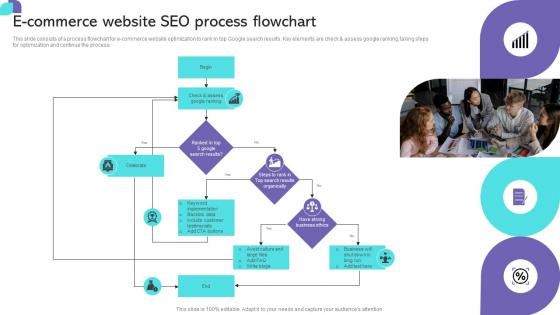
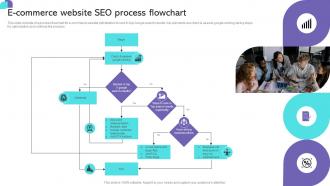
This slide consists of a process flowchart for ecommerce website optimization to rank in top Google search results. Key elements are check and assess google ranking, taking steps for optimization and continue the process.
People who downloaded this PowerPoint presentation also viewed the following :
Ecommerce Website SEO Process Flowchart with all 6 slides:
Use our Ecommerce Website SEO Process Flowchart to effectively help you save your valuable time. They are readymade to fit into any presentation structure.





FAQs for Ecommerce Website
So basically ecommerce SEO is all about getting people to buy stuff, not just read your content. You're targeting keywords like "best running shoes under $100" instead of "how to choose running shoes." Product pages become your main focus - descriptions, categories, all that technical schema stuff (which honestly is such a headache but you gotta do it). Your site structure needs to make sense for both Google and actual humans browsing around. Inventory changes constantly so you'll deal with way more duplicate content issues. Oh and conversion rates matter just as much as rankings since traffic means nothing if nobody's buying.
Honestly, just write good descriptions that real people want to read - but sneak your keywords in naturally. Don't copy-paste between products because Google will basically ignore you for duplicate content. Put your main keywords in those first 160 characters since that's what people see in search results. I'd start with whatever's selling best already. Include the actual details customers search for - specs, benefits, how it helps them. Oh and there's some boring technical stuff like heading tags you should probably do too, but the content is what really matters. Takes forever but it's worth it.
Dude, site speed is critical for ecommerce SEO. Google actually ranks you based on how fast your pages load, and slow sites tank your conversion rates like crazy. People bounce if your site takes longer than 3 seconds - especially on mobile where everyone's impatient. First thing I'd do is run PageSpeed Insights on your main product pages to see what's broken. Then compress your product images because they're probably massive. Browser caching helps too, and definitely get a CDN set up. Oh, and if you're on some $5/month hosting plan, that's probably your problem right there. Worth upgrading.
Dude, reviews and user content are seriously your best friend for SEO. Search engines eat up that fresh, authentic stuff way more than boring product descriptions. Your customers naturally use those long-tail keywords people actually search for - it's like free keyword research. Google's gotten pretty good at spotting genuine content too, which helps your rankings. The social proof thing is huge for getting people to click and stick around on your site. Oh, and if you've got local customers, reviews definitely help with local search results. Just start asking for reviews after people buy something, maybe throw in a small discount for their next order.
Use keywords people actually type in - like "running shoes" instead of fancy terms nobody searches for. Your URL setup should be simple: /category/subcategory/product. Don't go more than 3-4 levels deep or people will bounce (I've seen sites with like 8 clicks to reach a product - insane). Each category page needs its own content, not just a product dump. Breadcrumbs help everyone navigate better. Oh, and definitely peek at what your competitors are doing - they've probably already figured out what works in your space. Clean structure beats fancy every time.
Look, product-specific keywords are where the money is. You want exact product names, model numbers, stuff like "best wireless headphones under $200" - way more targeted than generic terms like "buy electronics online." Those broad keywords? Super competitive and honestly kind of a waste of time when you're starting out. Product keywords convert better because people searching for them actually want to buy something. Put those specific terms on your product pages, then use the general ones for category pages or blog posts. I'd start with your actual product names first - that's the easiest win you'll get.
Yeah mobile is everything now - Google literally looks at your mobile site first when deciding rankings. Most shoppers are on phones anyway, so if your pages load like garbage or the checkout's a pain, you're screwed. I always tell people to test their site on an actual phone, not just resize their browser (totally different experience). Fast images, easy navigation, buttons you can actually tap without zooming in. Run it through Google's mobile test thing too. Oh and make sure your product photos don't take forever to load - people bounce so fast these days.
Okay so schema markup is basically telling Google exactly what you're selling in a way their bots can understand. Your products will show up with star ratings, prices, whether stuff's in stock - all that good info right in search results. People click way more when they see that vs boring plain text listings. I actually just helped my cousin add this to his bike shop site and he got like 25% more clicks almost immediately. Pretty wild difference. Google eats this structured data up because it makes their life easier. Honestly, just start with your top sellers first - don't overwhelm yourself trying to do everything at once. You'll see the impact pretty quick.
Start with the obvious stuff - compress your images so they don't take forever to load, and ditch those terrible "IMG_1234.jpg" filenames for something descriptive. Alt text is huge too (though honestly, most people ignore it completely). WebP format works great for product photos. Oh, and create an image sitemap - makes it way easier for Google to find everything. The thing that really moves the needle though? Adding structured data markup to your product images. It's what gets them showing up in Google Shopping results, which is where the money is.
So Google actually pays attention when your products get shared and liked on social media - it's like a quality signal to them. Create content people actually want to share, respond to customers who post about your stuff, and push for reviews that spread across platforms. Social engagement won't directly boost your rankings (that's not really how it works), but it brings traffic and creates backlinks when people share your pages. Your social profiles can even show up in search results too, which is pretty cool. Just optimize your bios with keywords and post consistently - focus on stuff that'll get people talking.
Dude, the worst ecommerce SEO screwups I keep seeing? Duplicate content from all those product variations - drives me crazy. Thin category pages are another big one. Site speed issues will kill you too, but everyone ignores the technical stuff until it's too late. Stop cramming keywords into product descriptions like it's 2010 - Google's not that dumb anymore. You're also missing out if you don't push for customer reviews. That user content is gold and actually helps conversions. Oh, and watch out for faceted navigation creating duplicate URLs. Sneaky problem that'll eat your crawl budget alive.
Dude, you're totally missing out if you're not doing local SEO. So many ecommerce stores ignore this - it's wild. People search "near me" constantly, plus you've got shoppers who want to buy online and pick up in-store. Two birds, one stone. Get your Google Business Profile dialed in first. Then work on getting your name, address, phone number consistent everywhere online. Oh, and create pages for each location - that actually moves the needle. My friend's shop doubled their walk-ins once they got serious about this stuff. The whole local + online thing just works better together, you know?
Focus on making stuff people actually want to link to - like solid product guides or industry research that solves real problems. Guest posting still works great if you pick the right blogs. Building relationships with influencers takes time but pays off. I'd definitely hit up your suppliers and vendors first since you already have those connections. Cross-promotion with businesses that complement yours is pretty underrated too. Honestly, just avoid any sketchy link schemes - they're not worth the risk. Start by checking what your biggest competitors are doing for ideas.
Don't just delete those pages - that's like throwing away money you already earned with SEO. Keep the URL alive with an "out of stock" page if the product might return. Include when you expect restocks and throw in some similar products. For stuff that's gone forever? Do a 301 redirect to the closest category or related item. I've watched sites completely tank their traffic by deleting product pages (such a waste). The whole point is keeping that link value while still being helpful to whoever clicks through. Trust me, users hate hitting dead ends way more than seeing a useful "currently unavailable" message.
Start with Google Analytics 4 and Search Console - both free and they'll cover your basics for traffic and search stuff. Search Console's performance reports are honestly amazing for tracking rankings. Then grab SEMrush or Ahrefs for keyword research and spying on competitors. Oh, and Screaming Frog is clutch for technical audits. Since you're doing ecommerce, track your product pages and category rankings religiously. Also watch those conversion paths from organic search - that's where the money is. Set up monthly reports so you can catch trends before they bite you.
-
The website is jam-packed with fantastic and creative templates for a variety of business concepts. They are easy to use and customize.
-
“Excellent service from the customer support team when I wanted a slide that was a bit different from those on their standard menu. Super helpful.”