


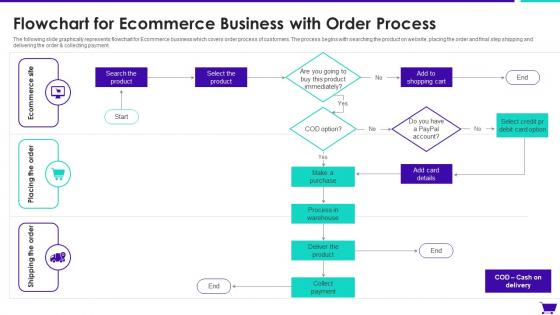
Flowchart For Ecommerce Business With Order Process




Try Before you Buy Download Free Sample Product
 Impress Your
 Audience
 100%
100% Editable
 Save Hours
 of Time


The following slide graphically represents flowchart for Ecommerce business which covers order process of customers. The process begins with searching the product on website, placing the order and final step shipping and delivering the order and collecting payment.
People who downloaded this PowerPoint presentation also viewed the following :
Flowchart For Ecommerce Business With Order Process with all 6 slides:
Use our Flowchart For Ecommerce Business With Order Process to effectively help you save your valuable time. They are readymade to fit into any presentation structure.





FAQs for Flowchart For Ecommerce Business
Honestly, start by mapping what you've got now - that'll show you where things are breaking down. The flow's pretty basic: browsing, cart, checkout, payment, confirmation, inventory check, then shipping and delivery tracking. But here's the thing - most companies completely ignore what happens after delivery. Reviews, returns, follow-ups? That's where you can actually stand out. Each step needs clear handoffs so customers aren't texting you like "where's my stuff??" I'd bet money you'll find at least two obvious bottlenecks once you map it out.
Honestly, UX is make-or-break for checkout conversion. People will abandon ship so fast if anything feels clunky. Map out your biggest drop-off points first - usually it's stuff like surprise shipping fees or forcing people to create accounts. Nobody has patience for that anymore. Streamline everything: fewer form fields, guest checkout, smooth payment flow. Each step should feel obvious to users. I'd probably tackle the worst pain points one at a time rather than redesigning everything at once. Also, test on mobile since half your traffic is probably coming from phones anyway.
Okay so inventory is basically what makes or breaks your whole order system. When someone buys something, you need to check if it's actually in stock, then lock those items down so you don't accidentally sell them twice. Trust me, overselling is a headache you don't want. Your system should also ping you when stuff's running low and handle backorders when things go out of stock. The key thing? Keep everything synced across wherever you're selling - your website, Amazon, whatever. Real-time updates are crucial or you'll have angry customers wondering where their stuff is.
Dude, you gotta automate the boring stuff first. Payment processing, inventory checks, shipping labels - all that repetitive crap that eats up your day. Once you set it up, orders just flow through without you constantly checking on everything. No more manual data entry mistakes either, which honestly used to drive me crazy. The system validates orders and checks stock levels automatically. I'd start with inventory updates and shipping notifications - those two alone will save you hours. It's wild how much time you get back once everything runs itself.
Ugh, inventory sync problems are the absolute worst - I've seen stores oversell items they don't even have. Payment failures happen more than you'd think too. Cart abandonment though? That's what really tanks your sales. Shipping calculations get super messy, especially international stuff. Then you've got all these systems that refuse to play nice together - your storefront, payments, fulfillment. Customers freak out when they don't know where their order is. Start by mapping your whole process, then figure out where things usually break so you can fix them before they screw you over.
Honestly, flowcharts are perfect for this kind of thing. Map out your whole order process step by step and you'll instantly see where stuff gets stuck. Maybe payments are taking way too long, or your inventory system is being weird - whatever it is, you'll spot it right away instead of just wondering what's going wrong. Time each step once you've drawn it out. The longest delays? Those are your biggest problems to tackle first. It's basically like getting that overview you need to actually fix things rather than playing guessing games with your workflow.
So you'll definitely need Stripe or PayPal for payments, plus inventory and CRM systems. Email automation handles confirmations and shipping stuff. Google Analytics is basically mandatory at this point - everyone uses it. Your warehouse system connects for fulfillment, and fraud detection is smart too. Oh, and tax calculation APIs if you're selling everywhere. The tricky part is getting everything to actually work together without breaking. I'd map out what you already have first, then figure out what's missing. Way easier than trying to do it all at once.
So basically the payment gateway is like a middleman between your checkout and the actual payment processing. Customer clicks "buy now" and their card info gets encrypted and shot over to the gateway. Then it handles all the bank stuff - checking with card networks, getting approvals, the whole nine yards. Super handy because you don't have to deal with storing sensitive data or jumping through PCI compliance hoops (which honestly sounds like a nightmare). You'll get back either approved or declined. Log those responses though - trust me, you'll need them when payments start failing and you're trying to figure out why.
Track your order completion rate and cart abandonment - those are huge. Payment failures will quietly destroy your profits, trust me. Also watch average time from cart to checkout, plus how long orders take to actually ship out. Customer acquisition cost per completed order matters too. Returns and refunds show you where people are getting frustrated earlier in the process. Oh, and unexpected shipping costs? Total conversion killer. I learned that one the hard way. Set up weekly dashboard reviews instead of waiting for monthly reports - you'll catch problems way faster.
Check your reviews and support tickets for patterns - customers usually tell you exactly what's broken. Angry reviews are gold mines, honestly. If everyone's complaining about checkout being confusing or shipping info being unclear, boom - there's your problem areas. Map those complaints to your actual order steps, then fix the stuff that's killing your conversions first. Those give you quick wins. Also set up feedback collection at key points (checkout, shipping, delivery). The customers who almost bought but didn't? They'll tell you why if you ask.
Honestly, the checkout experience makes or breaks customer loyalty. People will straight up abandon your site if the payment flow sucks - I've literally seen 70% of repeat customers disappear because of clunky processes. Customers remember bad experiences way more than good products sometimes, which is kinda backwards but whatever. Smooth checkout builds trust and keeps them coming back for more. Short version: less friction equals more loyalty. You should probably map out your current flow first and see where people are bouncing. That'll tell you everything you need to know.
Add a separate branch after delivery for return requests - I usually draw this as a dotted line since it's not the main flow (nobody wants returns anyway). Split it into return processing and refund workflows. Include return authorization, item inspection, restocking, and refund processing with different timelines depending on payment method. The annoying part is connecting it back to inventory management, but you gotta do it. This way you cover all the edge cases without making your main flow look like spaghetti. Keep it as an optional path that doesn't clutter everything up.
Honestly, shipping is what makes or breaks your whole operation. Think of it as the thing everything else has to bend around. Where your warehouse sits, which carriers you work with, how fast you can get stuff out - that all decides when customers actually get their orders. And trust me, people notice delays. Costs are huge too because sticker shock at checkout kills sales faster than anything. You'll also need way more inventory in some zones than others, which gets expensive. My advice? Figure out your shipping reality first, then build everything else to fit. Otherwise you're just setting yourself up for headaches later.
Look, your order process is make-or-break for keeping customers around. Smooth checkout and clear shipping updates build trust - nobody wants to wonder if their package fell into a black hole, you know? Map out every step and spot where people might get confused or bail. Most sites honestly screw up the basics here. Keep customers in the loop with good communication. When people feel confident they'll actually get what they paid for, they come back. It's really about killing those little annoying moments that make someone think "never shopping here again."
Map out every touchpoint from cart to delivery - even boring stuff like email confirmations (customers stress about those more than you'd think). Start with the normal flow, then add all the ways things go wrong: payment fails, you're out of stock, shipping gets weird. Show who handles each step and what kicks off the next one. Your customer service team should actually be able to use this thing when people call confused. Oh, and definitely test it with some real orders afterward - you'll always miss something the first time around.
-
Easily Understandable slides.
-
Innovative and Colorful designs.