


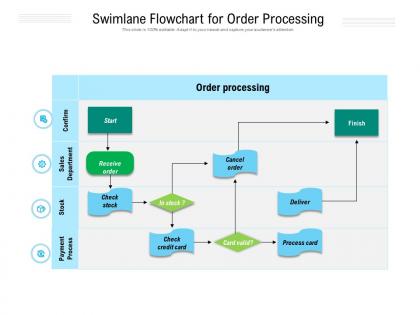
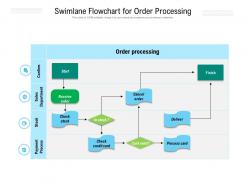
Swimlane flowchart for order processing




Try Before you Buy Download Free Sample Product
 Impress Your
 Audience
 100%
100% Editable
 Save Hours
 of Time


Our Swimlane Flowchart For Order Processing are topically designed to provide an attractive backdrop to any subject. Use them to look like a presentation pro.
People who downloaded this PowerPoint presentation also viewed the following :
Swimlane flowchart for order processing with all 2 slides:
Use our Swimlane Flowchart For Order Processing to effectively help you save your valuable time. They are readymade to fit into any presentation structure.
FAQs for Swimlane flowchart
Start by mapping out what you've got now - order comes in, gets validated, inventory check, payment processing, then fulfillment and shipping. Validation's honestly the most critical part because catching pricing or shipping screwups early saves you so much drama later. Most places add fraud checks or approval steps depending on their setup. Each handoff point needs to be crystal clear so orders don't just sit there forever. I'd look at where your delays usually happen first - that'll tell you exactly which stages are broken and need fixing.
Honestly, flowcharts are game-changers for order processing. They map out every step so you won't miss anything or do stuff twice. Bottlenecks become super obvious - like when orders get stuck waiting for approval while everything else flows fine. Training new people becomes so much easier since they can just follow the visual instead of memorizing random steps. I learned this the hard way at my old job lol. You'll spot which parts take forever and can actually fix them. Just start by drawing out what you're doing now, then attack the biggest pain points first.
So basically you've got ovals for start/end, rectangles for actual steps like "process payment," and diamonds for yes/no decisions. Arrows show which way things flow - pretty straightforward. Oh and parallelograms are clutch for inputs/outputs but everyone forgets about them. They're perfect when you need to show data going in or reports coming out. Sometimes you'll see little circles that just connect different parts when your chart gets too sprawled out across the page. Honestly though? Don't overthink it. Stick with the basic shapes and people will actually use your flowchart instead of staring at it confused.
Talk to your end users first - what do they actually need to see? I'd focus on the big decision points and where things get stuck or need approval. Those are your real headaches. Don't go super granular though, it just confuses everyone (learned that one the hard way). Major process steps and handoffs between teams matter most. You want enough detail so someone could actually follow it, but honestly? If your flowchart starts looking like spaghetti, you've gone too far. Test it with a few people before you finalize anything.
Honestly, scope creep will be your biggest headache. Plus getting departments to actually agree on how things work currently? Good luck with that. I swear, once you start mapping processes, every team has their own version of "reality" - marketing says one thing, ops says another. It gets messy fast. Exception handling sucks too because there's always some random edge case that breaks your nice clean flowchart. Pro tip though: just focus on the happy path first. Get that solid, get people nodding along, then you can tackle all the weird exceptions later.
Break it down into swim lanes - basically showing who handles what at each step. Map out everything from when the customer hits "buy" through payment, inventory checks, shipping, all of it. I always color-code departments because honestly it makes spotting bottlenecks way easier (and there's always at least one hiding somewhere). Use those diamond shapes for decision points like "is it in stock?" but don't go crazy with details. Oh, and number the steps if it gets complicated. The whole point is making something anyone can glance at and actually understand without needing a manual.
Honestly, Lucidchart's probably your best bet - super solid for complex order flows and the collaboration stuff actually works. Visio's good too but more corporate-y. If you're trying to avoid paying, draw.io is legit amazing for a free tool. I mess around with it constantly for quick stuff. Your team already on Figma? That could work. Google Drawings is pretty bare bones but hey, sometimes you just need something fast. Really though, I'd start with whatever software you guys already have lying around first - might save you the headache of learning something new.
When you map out your order process in a flowchart, the slowdowns become super obvious. Manual handoffs between departments? Total pain points. Same with approval steps that drag on forever or inventory checks that create huge backlogs. Honestly, I was shocked when I first did this - you don't realize how messy things are until you see it all laid out. Look for spots where multiple paths merge together, that's usually where stuff gets jammed up. Way better than just randomly trying to fix things without knowing what's actually broken.
So automation just takes over all the boring stuff - inventory checks, payments, shipping updates, you know the drill. Your team stops manually updating every single order status because the system does it automatically when things happen. Orders flow from received to shipped without anyone babysitting them. Honestly, it's pretty sweet because you cut out human mistakes and everything moves way faster. Your people can actually focus on the tricky customer problems instead of checking stock levels all day. Though I guess you still need someone to set it all up first.
Returns are actually pretty valuable - they create this feedback loop that shows you what's going wrong. When stuff comes back, you can spot patterns like sizing problems or defective batches. The customer feedback does the same thing. Both help you tweak your process, like maybe you start inspecting certain products more carefully or change how you package things. I'd track this monthly (boring but necessary) so you can see if your order accuracy is actually improving. It's one of those things that seems annoying but ends up saving you headaches later.
Honestly, you've got to actually pay attention to your data at every step. Track the boring stuff - processing times, error rates, complaints. Do monthly check-ins where you map bottlenecks and ask your team what's slowing them down. They see the daily mess you don't. Customer feedback matters too since they deal with your final product. Here's the thing though - don't try fixing everything at once. Pick one pain point, test it for a few weeks, see what happens. Then move on. Oh and those monthly reviews? They're way more useful than the quarterly ones everyone does.
Honestly, flowcharts are perfect for this stuff. Start with processing times at each stage - that's where you'll catch the worst bottlenecks. Error rates and completion percentages are gold too. I always focus on conversion rates between stages first since that shows you exactly where orders die. Resource utilization matters, but don't get too deep in the weeds initially. Pick your top 3-4 problem areas and track those hard. Once you've got baseline data, it's way easier to set realistic SLAs that actually make sense. The visual aspect is clutch - you can literally see where everything goes sideways instead of guessing.
B2B is just way more complicated - you've got approval chains, credit checks, custom pricing deals that need to get sorted before anything ships. Individual customers? They just want to buy stuff and move on. With B2B you're constantly managing accounts and bigger orders usually need someone to step in manually. Honestly, it can be a pain. B2C flows almost run themselves once you set them up right. So yeah, design your workflows totally different. Speed matters most for regular customers, but business clients expect those extra checkpoints even if it slows things down.
First thing - map what's actually happening right now, not what you think should be happening. Talk to everyone who deals with orders because they'll spot stuff you totally missed. Make it visual but don't go crazy with tiny boxes everywhere. I once made one so complicated I couldn't even follow my own flowchart later (embarrassing much?). Test it with a few real orders before you launch anything. Oh, and schedule regular reviews - processes change way faster than you'd expect, trust me.
Look, your stakeholders are living in that process every single day - they'll spot stuff you'd completely miss. Talk to people in sales, warehouse, customer service. Trust me, where orders actually get stuck is never where you think it'll be. Each team deals with totally different headaches and roadblocks. Short interviews with 2-3 people per department should do it. Here's the thing though - when they help you build the flowchart, they're way more likely to actually use it later instead of just ignoring whatever you come up with.
No Reviews