Sales Process Flowchart Using CRM Sales CRM Unlocking Efficiency And Growth SA SS

Rating:
90%
Sales Process Flowchart Using CRM Sales CRM Unlocking Efficiency And Growth SA SS Sales Process Flowchart Using CRM Sales CRM Unlocking Efficiency And Growth SA SS
Slide 1 of 9

or

Favourites Favourites

Try Before you Buy Download Free Sample Product

Audience Impress Your
Audience
Editable 100%
Editable
Time Save Hours
of Time
The Biggest Sale is ending soon in
0
0
:
0
0
:
0
0
Rating:
90%
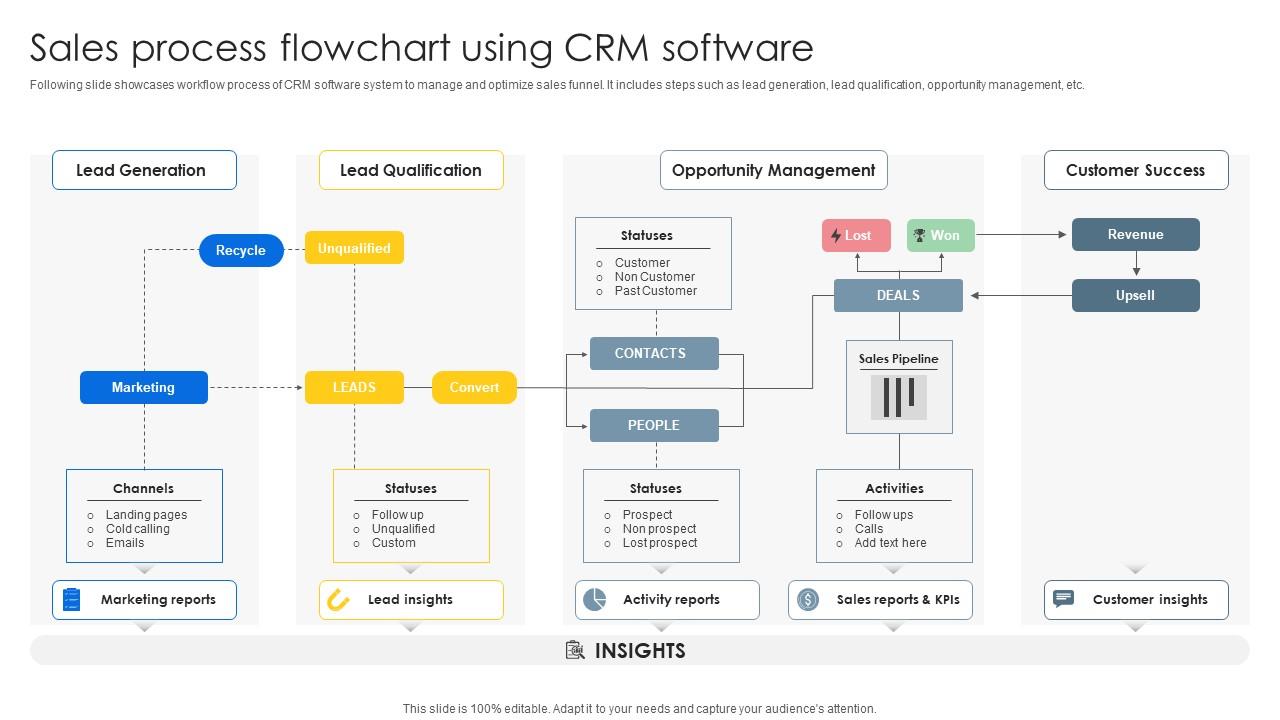
Following slide showcases workflow process of CRM software system to manage and optimize sales funnel. It includes steps such as lead generation, lead qualification, opportunity management, etc. Present the topic in a bit more detail with this Sales Process Flowchart Using CRM Sales CRM Unlocking Efficiency And Growth SA SS. Use it as a tool for discussion and navigation on Lead Generation, Lead Qualification, Opportunity Management. This template is free to edit as deemed fit for your organization. Therefore download it now.

FAQs for Sales Process Flowchart Using CRM Sales CRM Unlocking Efficiency And

Look, it's basically like giving everyone a map so nobody's confused about what happens next. No more leads getting lost or your team standing around wondering who's supposed to do what. Makes everything consistent too - way easier to figure out what's actually working when everyone follows the same steps. New people pick it up super fast with a visual guide, which honestly saves you so much training time. I'd start by sketching out whatever messy process you have now, then hunt down where things keep getting stuck. Those bottlenecks are usually pretty obvious once you see it all laid out.

Honestly, having that flowchart mapped out is a game-changer for avoiding those awkward "wait, whose job was this?" situations. Your whole team gets on the same page about handoffs between marketing, sales, and customer success. When everything's visual like that, bottlenecks jump out at you immediately. New hires can actually see how everything connects instead of just getting a verbal explanation (which let's be real, never sticks). Just make sure you put it somewhere accessible and don't let it collect dust - processes change and your flowchart should too.

So you basically want to map out every step from when someone first shows interest to signing the contract. Lead qualification first, then discovery calls, demos, negotiation - the usual stuff. Timeline estimates help too. Oh, and don't forget the follow-up part because honestly most people suck at that even though it's super important. You should add decision points showing what happens when deals go sideways or people ghost you (because they will). Keep whoever's doing what really clear. Make it visual but not overcomplicated - nobody wants to stare at some confusing flowchart when they're trying to close deals.

Dude, mapping out your sales process is a game changer - you'll instantly see where everything gets stuck. Like, maybe 40% of your leads die at the proposal stage and you never even noticed. I swear it's like turning on a light in a dark room. Track how long deals sit in each step and which team members are creating roadblocks. Oh, and you can actually measure conversion rates between stages instead of just winging it. Honestly beats the hell out of guessing what's broken and hoping random fixes work.

Honestly, Lucidchart and Miro are gonna be your best friends here - super easy drag-and-drop stuff. Visio's okay if you're already paying for Microsoft everything, but it feels kinda outdated tbh. Canva has some nice templates that'll make your flowcharts look way more professional than they deserve to be lol. The main thing is making sure your whole sales team can actually get into whatever tool you pick and mess with it when things change. Oh, and start with Lucidchart's free tier first - no point paying until you know it works for your team.

Yeah, they're totally different by industry. B2B software has these crazy long nurturing cycles with like 5 different decision-makers. Retail? Super straightforward and transactional. Healthcare gets messy with all the compliance stuff - those flowcharts honestly look like someone threw up regulatory requirements everywhere. Manufacturing usually throws in technical demos and custom work phases. SaaS companies are obsessed with trials and getting people onboarded smoothly. The basic bones are the same (lead, qualify, pitch, close), but everything else changes. Check out a few flowcharts from companies in your space - you'll spot the patterns pretty quick.

Look, customer feedback is what tells you if your sales process actually works or just looks pretty on a flowchart. They'll straight up tell you where things go wrong - maybe your follow-ups feel annoying or you're skipping steps they care about. I've noticed the best fixes come from asking "what confused you?" after closing deals (or losing them, honestly). Their responses show which parts create friction versus build trust. Use what they say to adjust your timing and messaging. Your flowchart should reflect what converts people, not what sounds smart in theory.

Honestly, you can automate almost every part of your sales process. Lead capture forms that dump straight into your CRM are clutch. Email sequences work great for nurturing too. I'd also automate follow-ups, proposal stuff, and basic lead scoring - saves so much time. Here's what I'd do: look at all the boring manual tasks you're doing right now. That's where you start. Don't go crazy though - pick one or two things first, see how it goes, then add more. And definitely tackle your biggest time-waster first. For me it was follow-up reminders, but yours might be different.

Honestly, the biggest trap is overcomplicating things - too many branches and your team will just get lost. Focus on the main steps that actually move deals forward. Your sales team needs to be part of this process since they're using it daily (learned this the hard way lol). Skip those cookie-cutter templates that don't fit your business. And here's the thing - you don't need every weird edge case mapped out from day one. Build the main customer path first. You can always add separate charts later for the messier scenarios.

Just walk your new reps through each step during role-plays. Seriously, have them follow the chart with real scenarios - makes everything click better. Those managers who put giant versions on the wall? Looks ridiculous but totally works. During one-on-ones, you'll spot exactly where people get stuck or skip stuff. The visual thing helps way more than just explaining it verbally. Oh, and create exercises where they explain each decision point - that's honestly the fastest way to catch what they don't actually get yet.

Conversion rates between stages are your best starting point - that's where you'll see the biggest impact right away. I'd also track time spent in each phase and where people drop off. Lead velocity and pipeline value are solid metrics too. The visual layout beats spreadsheets any day for spotting bottlenecks, trust me on that one. Average deal size, sales cycle length, and win/loss ratios by stage round out the essentials. Don't go crazy tracking everything though - pick maybe 3-4 metrics your team actually cares about and stick with those.

Check it monthly if your team's actually using it regularly. Quarterly works as a bare minimum though. Major changes? Do them when conversion rates tank, you add new tools, or switch up your methodology. But here's the thing - waiting for the "perfect moment" is just procrastination in disguise. Your reps going off-script constantly? That's a red flag right there. Same goes if they're always asking about confusing steps. Fix it now, not later. Honestly, just throw a recurring reminder on your calendar and treat it like any other business review. I know it sounds boring, but consistency beats perfection every time.

Dude, flowcharts are honestly game-changers for new sales reps. Think of it as their GPS through the whole process - lead qualification, follow-ups, closing, all that stuff. Way better than dumping a massive training binder on them (who even reads those anymore?). They can see exactly what step comes next and why it matters. I've noticed new hires get way less stressed when they have something visual to follow. The whole sales cycle makes sense instead of feeling random. Just hand it over day one and they'll actually know what they're doing instead of panicking every call.

So your sales flowchart is basically the roadmap your CRM should follow. Map out every step from leads to closed deals, then set up your CRM to track those exact stages. Most platforms let you customize pipeline stages - honestly, this part's pretty straightforward once you dive in. The key is getting your whole team to follow the same process every time. I'd start by comparing what you have in your CRM now against your flowchart. You'll probably spot some gaps right away. It's like having a recipe but your kitchen's missing half the ingredients, you know?

Look, having a flowchart is honestly a game changer for sales. You'll know exactly where each prospect sits in your pipeline and what step comes next. No more awkward moments when someone calls a lead that Jim already contacted yesterday - we've all been there, right? Your whole team stays on the same page, which means customers get consistent treatment no matter who handles them. The real win though? You can actually see where people are bailing out of your process. Maybe it's after the demo, maybe it's during follow-up. Once you spot those problem areas, you can fix them and watch your conversion rates climb.

Ratings and Reviews

90% of 100
Review Form
Write a review
Most Relevant Reviews
  1. 80%

    by Eddy Guerrero

    “I required a slide for a board meeting and was so satisfied with the final result !! So much went into designing the slide and the communication was amazing! Can’t wait to have my next slide!”
  2. 100%

    by Edgardo Chapman

    “Superb. What a great finding. Thankful for SlideTeam. We were paying people to make slides which went all in vain. We are so happy to have found you.”

2 Item(s)

per page: