


Sequential Steps Of Software Deployment Process




Try Before you Buy Download Free Sample Product
 Impress Your
 Audience
 100%
100% Editable
 Save Hours
 of Time


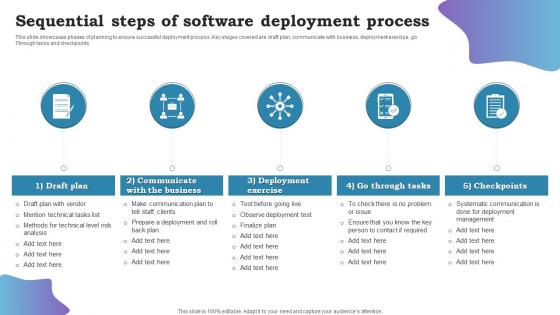
This slide showcases phases of planning to ensure successful deployment process. Key stages covered are draft plan, communicate with business, deployment exercise, go Through tasks and checkpoints.
People who downloaded this PowerPoint presentation also viewed the following :
Sequential Steps Of Software Deployment Process with all 6 slides:
Use our Sequential Steps Of Software Deployment Process to effectively help you save your valuable time. They are readymade to fit into any presentation structure.





FAQs for Sequential Steps Of
Key phases of the software deployment process include planning and preparation, environment setup, code deployment, testing and validation, and monitoring and maintenance. These phases streamline software releases by ensuring thorough preparation, minimizing downtime, and enabling rapid issue resolution, with many organizations finding that structured deployment ultimately delivers faster time-to-market and enhanced operational reliability.
Organizations can assess deployment readiness by evaluating infrastructure capacity, team training levels, user acceptance testing results, security compliance status, and rollback procedures. Through comprehensive readiness assessments, companies in sectors like healthcare and finance minimize deployment risks, reduce downtime, and ensure smoother transitions, ultimately delivering faster implementation timelines and better user adoption rates.
Version control enables deployment teams to track code changes, manage release branches, coordinate team contributions, and maintain deployment history throughout the software lifecycle. Through systems like Git, organizations streamline rollback procedures, automate integration processes, and ensure consistent deployments across environments, with many development teams finding that robust version control ultimately delivers faster release cycles and significantly reduces deployment risks.
Rollback plan best practices include automated backup creation, version control integration, database snapshot management, infrastructure state preservation, and clear rollback triggers definition. These safeguards streamline recovery by enabling one-click reversions, maintaining data integrity, and establishing decision criteria, with many organizations finding that comprehensive rollback strategies reduce deployment risks while ensuring faster service restoration during critical failures.
Automated deployment tools enhance the deployment process by minimizing human errors, accelerating release cycles, and ensuring consistent configurations across environments. These platforms streamline code integration, testing, and production releases through continuous integration pipelines, with many software companies finding that automated deployments reduce deployment time by up to 90% while delivering improved reliability and faster feature delivery.
**INPUT**: What strategies are effective for managing dependencies in software deployment? **OUTPUT**: Effective dependency management strategies include containerization, version pinning, automated dependency scanning, isolated staging environments, and progressive rollout approaches. These methods streamline deployment by minimizing conflicts, ensuring consistent environments, and enabling rapid rollbacks, with many organizations in banking and retail finding that strategic dependency management ultimately delivers faster releases and reduced system downtime. [Word count: 54 words]
Deployment method choice significantly impacts success through cost considerations, scalability requirements, security protocols, and maintenance overhead. Cloud deployment enables rapid scaling, reduced infrastructure costs, and streamlined updates, while on-premises offers enhanced control and data security, with many organizations finding that hybrid approaches deliver optimal flexibility and competitive advantage.
Common software deployment challenges include environment inconsistencies, dependency conflicts, insufficient testing, rollback complexities, and communication gaps between development and operations teams. These obstacles can be mitigated through containerization technologies, automated testing pipelines, and comprehensive staging environments, with many organizations finding that implementing CI/CD practices significantly reduces deployment risks while accelerating release cycles.
User training and documentation are critical for deployment success, directly impacting user adoption, reducing support costs, and minimizing operational disruptions during transitions. Comprehensive training programs enable organizations to maximize software ROI while proper documentation ensures consistent usage across teams, with many companies finding that well-trained users adapt faster and require significantly less ongoing technical support.
Key deployment success metrics include deployment frequency, lead time for changes, mean time to recovery, change failure rate, and system performance indicators like response time and uptime. These metrics enable organizations to assess deployment efficiency, identify bottlenecks, and minimize risks, with many development teams finding that tracking these measurements delivers faster releases, improved reliability, and enhanced user experiences.
Effective stakeholder communication during deployment involves establishing clear communication channels, providing regular progress updates, setting realistic expectations about timelines and potential impacts, and maintaining transparency about any issues or delays. Organizations streamline this process through automated status dashboards, scheduled briefings, and dedicated communication protocols, with many finding that proactive communication significantly reduces deployment-related concerns and enhances stakeholder confidence.
Security considerations during software deployment include encrypted data transmission, access control implementation, vulnerability scanning, secure configuration management, and authentication protocols. These measures streamline deployment security by minimizing breach risks, ensuring compliance standards, and protecting sensitive data, with many organizations finding that proactive security integration ultimately delivers operational confidence and competitive advantage.
End-user feedback improves future software deployments by identifying usability gaps, revealing performance bottlenecks, and highlighting feature adoption patterns that technical teams might overlook. This input enables organizations to refine deployment schedules, enhance user training programs, and prioritize fixes more strategically, ultimately delivering smoother rollouts and higher user satisfaction rates.
Testing in different environments before deployment ensures applications perform reliably across varied configurations, operating systems, and user conditions while identifying potential issues early. This multi-environment approach minimizes production failures, reduces costly rollbacks, and enhances user experience, with many organizations finding that comprehensive testing across development, staging, and production-like environments ultimately delivers faster deployment cycles and greater customer satisfaction.
Organizations ensure regulatory compliance during deployment through automated compliance checks, regulatory framework integration, audit trail documentation, and pre-deployment validation testing. These safeguards streamline adherence to standards like HIPAA, SOX, and GDPR by embedding compliance controls directly into deployment pipelines, ultimately delivering faster approvals and reduced regulatory risk.
-
These stunning templates can help you create a presentation like a pro.
-
“Slides are formally built and the color theme is also very exciting. This went perfectly with my needs and saved a good amount of time.”