

Flow Chart Of Software Release Process




Try Before you Buy Download Free Sample Product
 Impress Your
 Audience
 100%
100% Editable
 Save Hours
 of Time


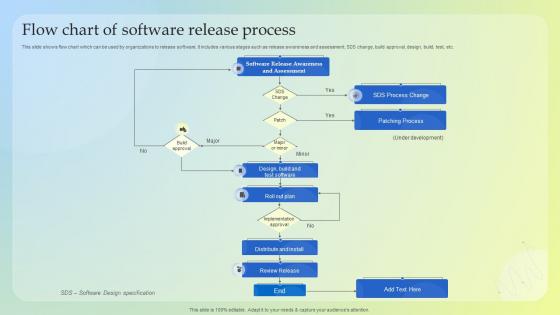
This slide shows flow chart which can be used by organizations to release software.It includes various stages such as release awareness and assessment, SDS change, build approval, design, build, test, etc.
People who downloaded this PowerPoint presentation also viewed the following :
Flow Chart Of Software Release Process with all 6 slides:
Use our Flow Chart Of Software Release Process to effectively help you save your valuable time. They are readymade to fit into any presentation structure.





FAQs for Flow Chart Of
So there's basically five stages to nail down: planning (scope + timeline), development, testing, deployment, and monitoring after launch. Most teams totally bomb the testing phase - seriously, don't rush that part. Development's just your usual coding stuff. Planning sets everything up front. For deployment, always have a rollback ready because things break at the worst times. Document the whole thing so you're not reinventing the wheel every release. Oh, and monitoring catches issues once you're live. Start by figuring out where your releases usually fall apart, then fix that piece first. Way easier than overhauling everything at once.
Dude, version control is like having a time machine for your code. Track every change, branch out for new features, and if you mess up? Just roll back. No sweat. Multiple devs can work together without stepping on each other's toes, and tagging releases keeps you sane - you'll always know what actually shipped. Honestly though, GitFlow is clutch here. Keep your main branch clean while chaos happens elsewhere. I learned this the hard way after a 3am deploy went sideways. Set up those branches early and stick to the workflow, trust me.
Oh dude, CI is a game changer! It runs all your tests automatically whenever someone commits code, so you catch bugs right away instead of discovering them at 2am before a deadline (been there, not fun). Your main branch actually stays stable, which is honestly amazing. You won't be scrambling to fix random integration issues anymore - though I still somehow manage to break things occasionally lol. The whole release process gets way faster too. Just make sure your CI environment matches production as much as possible or you'll still get surprised.
Honestly, automation tools are total lifesavers - they can literally cut your release time in half. All that repetitive stuff like building, testing, and deploying just happens automatically without you babysitting it. No more screwing up version numbers or forgetting to update configs either. CI/CD pipelines will become your best friend (I sound like a sales pitch lol but seriously). They test everything and won't let broken code through. The rollback features are clutch too - you can deploy without sweating bullets knowing you can undo stuff fast if needed. My advice? Start with just automating builds first, then add more pieces once everyone's used to it.
Don't skip the obvious stuff - code freeze, testing done, deployment scripts ready. Break your checklist into three parts: before (get approvals, prep environments), during (have backups and rollback ready), and after release checks. Get your QA and DevOps people involved when you're making it. Database migrations are where things usually blow up, trust me on that one. Be specific with each item instead of writing useless stuff like "test everything." Actually follow it every time though - I see teams build these things then ignore them. Update it when you find holes, and turn it into a template so you're not reinventing the wheel.
Honestly, pin down your dependency versions as soon as possible - floating versions will bite you later. Set up automated tests that check different dependency combos during development. I learned this the hard way when everything broke right before a release once. Semantic versioning helps communicate breaking changes to your team. Also document any weird version constraints you discover along the way. Staging environment should match your prod dependencies exactly when testing releases. Get dependency scanning tools running in your CI pipeline. Being proactive about this stuff saves so much headache down the road.
Track your deployment success rate and how often you're rolling back - that's the bread and butter stuff. Lead time from commit to production matters too. When things go sideways, measure how fast you recover. User metrics are just as crucial though - crash rates, performance hits, support tickets flooding in. Feature adoption tells you if people actually want what you built. Honestly our error rate spike from last month still makes me cringe! Oh, and set up those dashboards beforehand. Trust me on this one - you don't want to be frantically building charts while your release is potentially burning down.
User feedback is what drives your sprint planning - it's literally what tells you what to build next. Collect it through user testing, support tickets, analytics, whatever works. Then dump it all into your backlog grooming sessions. Agile's great because you can change direction fast when users hate something or desperately want a feature you never thought of. Most teams review feedback weekly and tweak their sprints from there. Honestly, even quick user interviews can flip your whole roadmap upside down. If you're not collecting feedback systematically yet, start now.
Feature flags are clutch - they let you roll things out slowly and pull back fast if stuff breaks. Blue-green deployments are solid too for instant switches. Build up your automated testing pipeline first though, catches most problems before users even see them. Actually, I'd say that's probably the biggest game-changer. Get monitoring and alerts dialed in so you know right away when numbers look off. Oh, and write your rollback steps beforehand - trust me, you don't want to figure that out when everything's on fire at 3am.
Dude, you NEED good documentation for releases - I can't stress this enough. Write down your deployment steps, rollback procedures, and release notes before you even touch that deploy button. Trust me on this one. I've been stuck in too many 2 AM disasters where nobody could remember how to undo something that broke. Short sentences help when you're panicking. Document what's changing, how to deploy, and how to roll it back quickly. Seriously, start doing this now - you'll thank yourself later when you're not googling "how to revert" while your site's down.
Oh man, deployment nightmares are the worst. Database migrations will bite you if you don't test them properly - learned that the hard way. Your staging setup never matches production exactly, so config issues always surface at 2am when you're trying to deploy. Network problems and permission errors love showing up during go-live too. Third-party services going down right when you need them? Classic. Honestly, rollback plans save your sanity more than anything else. Do a full rehearsal in something close to prod first - trust me on this one.
So waterfall is like the old school way - you plan everything out, spend months testing, then do these massive releases. Pretty stressful honestly. Agile switched things up with smaller releases every couple sprints. But DevOps? That's where it gets cool. You're pushing stuff out constantly with automated pipelines doing the work for you. Goes from quarterly releases to potentially daily ones. The whole point is smaller releases = smaller problems when something breaks. I'd say pick based on how much your team likes automation and whether your users can deal with constant updates (some hate change lol).
Testing is honestly your best friend - catches bugs before users see them and makes sure everything actually works. Run unit tests, integration, and end-to-end at different pipeline stages. I've watched releases completely blow up when teams skip this step. Not pretty. Automate whatever you can so manual testing doesn't become your bottleneck. Oh, and definitely set up CI/CD to block releases if critical tests fail. You don't want those 2am "everything's broken" calls, trust me on that one.
Honestly, just map out who needs what info and stick to it. Executives want the big picture stuff - timelines and impact. Your dev team needs all the technical details. Don't make the mistake I see everywhere of sending one massive email that tries to cover everything. Nobody reads those anymore. Mix up your channels - Slack for quick hits, email for the official stuff, dashboards for ongoing updates. Oh and definitely don't wait around for people to come ask you what's happening. Set up regular check-ins and stay ahead of it.
Definitely do those post-release reviews! Get everyone together within a week or two - any longer and people start forgetting the messy details. I learned this the hard way when we waited a month once and nobody could remember why deployment took 6 hours longer than expected. Be honest about what went wrong and what worked well. Don't make it a blame game though - focus on fixing the process. The key is actually following through on 2-3 concrete changes for next time. Otherwise you're just venting, which feels good but doesn't help much. Oh, and write down the main takeaways somewhere you'll actually find them later.
-
They guys always go the extra mile to meet the expectations of their customers. Almost a year has been associated with them.
-
You can rely on SlideTeam whenever you run out of designs for your presentation. Thank you so much SlideTeam!