


Release management with five steps flow chart





Try Before you Buy Download Free Sample Product
 Impress Your
 Audience
 100%
100% Editable
 Save Hours
 of Time


Presentations are a big part of business. Make your presentations perfect with these high quality Release Management With Five Steps Flow Chart.
People who downloaded this PowerPoint presentation also viewed the following :
Content of this Powerpoint Presentation
Description:
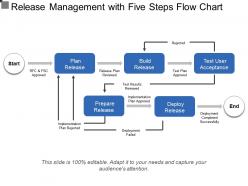
This image presents a flow chart detailing a five-step process for release management. It illustrates the progression from planning to deployment of a product, feature, or update. The flow begins at "Start," where an RFC (Request for Change) & FSC (Full Service Coordination) are approved, suggesting that an initial change request and coordination effort have been given the go-ahead.
The next step is "Plan Release," where the release plan is reviewed. Success leads to "Build Release" where the built product undergoes user acceptance testing (UAT). If the "Test User Acceptance" phase results in the test plan being approved (and the test results reviewed), the flow advances to "Deploy Release." Successful deployment marks the end of the release management cycle.
The chart also includes feedback loops for rejected steps: If the implementation plan is rejected during the "Prepare Release" phase, it cycles back to "Plan Release." If the build is rejected at the user acceptance testing phase, the process returns to "Build Release." A failed deployment reverts to the deployment step for reevaluation.
Use Cases:
Industries where this type of release management process can be critical:
1. Software Development:
Use: Format for structured software release cycles
Presenter: Software Project Manager
Audience: Development team and stakeholders
2. IT Services:
Use: Implementing IT system changes or updates
Presenter: IT Service Manager
Audience: IT department and service users
3. Telecommunications:
Use: Managing the release of new network features or updates
Presenter: Network Operations Manager
Audience: Engineering and technical support teams
4. Financial Services:
Use: Deployment of new financial products or banking software upgrades
Presenter: Financial Product Manager
Audience: Risk management and compliance teams
5. Healthcare:
Use: Rolling out new healthcare IT systems or platform updates
Presenter: Healthcare IT Coordinator
Audience: Healthcare providers and administrative staff
6. Automotive Manufacturing:
Use: Introducing new vehicle features or manufacturing system upgrades
Presenter: Production Engineer
Audience: Production team and quality assurance personnel
7. E-Commerce:
Use: Launching new website features or service offerings
Presenter: E-Commerce Manager
Audience: Web development team and digital marketers
Release management with five steps flow chart with all 5 slides:
Our Release Management With Five Steps Flow Chart are fully functional. They can adjust and adapt to your every demand.


FAQs for Release management with five
You need solid release planning and change management first. Testing environments that actually match production are huge - seriously, most failures I've seen come from that mismatch. Set up clear communication between dev, ops, and stakeholders. Documentation and approval workflows keep quality in check. Automated deployment cuts down on mistakes. Don't forget rollback procedures because things go wrong. Post-release monitoring helps you catch issues fast. I'd start by looking at what you're doing now and see where the gaps are. Oh, and deployment coordination ties it all together.
So basically you're shipping stuff way more often instead of those huge quarterly releases that make everyone panic. Weekly or daily drops sound nuts at first, but you catch problems faster. Old school teams do these massive planning phases and pray everything works when it goes live - such a nightmare. Agile keeps you continuously pushing small pieces of functionality. My advice? Figure out what features you can chop into smaller chunks that actually ship. Makes everything less stressful and your users get value sooner instead of waiting months for updates.
Jenkins and Git are pretty much everywhere for CI/CD and version control. Docker's the go-to for containers. Most places also run Kubernetes for orchestration, plus monitoring stuff like Datadog or New Relic. Oh, and artifact repos like Nexus. Honestly though? The whole toolchain thing gets crazy overwhelming - there's always some new tool everyone's obsessing over. GitHub Actions and GitLab CI are getting huge now since they just work better with what you're already doing. My advice: just pick what fits your current setup and don't stress about the shiny new stuff.
Get a communication plan going that hits all your people - devs, QA, ops, business folks, customers. During release week, do daily standups and create a shared channel for real-time updates. Status dashboards are honestly a lifesaver, they cut down on so many random "what's going on?" pings. Define your escalation paths early. When stuff breaks (it will), everyone knows who to call. Document as you go - not just for now, but you'll thank yourself later. Oh and during those stressful deployment windows? Overcommunicate like crazy. Better to annoy people with updates than leave them guessing.
Coordination chaos will kill you every time - that's the worst part. Broken deployments are brutal too, plus scope creep just destroys your timeline. Set up automated testing and have rollback plans ready because you'll need them. Release checklists help a ton. Keep stakeholders updated constantly or they'll dump "critical" features on you at the worst moment (been there!). Document everything now and actually stick to your feature cutoff dates. I know it sounds boring but trust me on this one.
Dude, automation will totally change how you do releases. Start with just automating builds first - don't try to do everything at once. Once you add automated testing and deployment, your whole process becomes so much more predictable. No more staying up until 2am manually clicking through stuff (been there, not fun). Everything follows the same steps every time, which cuts down on those random errors that always seem to happen. Your releases get way faster too. I'm probably overselling it a bit, but honestly once you get the hang of it, you'll wonder how you ever did releases manually.
Think of testing as your safety net - it catches bugs before they blow up in production. You've got unit tests while coding, integration tests when everything connects, then user acceptance testing right before launch. Honestly, it feels like extra work until it saves you from a 2am emergency call (been there). Short tests are better than long ones, trust me. The trick is weaving testing into each step instead of cramming it all at the end. Way less stressful that way.
Dude, CI/CD is a game changer - it basically runs your whole release process automatically. No more staying late because deployments went sideways. Testing happens before anything touches production, so you catch the weird bugs early instead of during crunch time. Honestly, the feedback loop alone makes it worth it since you're always tweaking things that actually matter. I'd say start with automating tests first, then work on the deployment stuff. Takes like 20 minutes to set up the basics. Trust me, once you have it running you'll feel kinda dumb for doing manual releases for so long.
Track your deployment frequency and lead time first - those are the big ones. Mean time to recovery matters too, plus keep an eye on defect escape rates and rollbacks (production surprises suck). Customer satisfaction and feature adoption rates show if people actually want what you built. Oh, and don't ignore the boring operational stuff like error rates after releases. Honestly, I'd just build a simple dashboard with maybe 3-4 metrics that actually matter for your product. Way better than drowning in data you'll never look at.
Ugh, those silos are the worst. Start with getting everyone in the same room - dev, ops, and QA need regular standups together, plus maybe a shared Slack channel. Half these issues happen because people literally don't know what's going on with other teams. Get them using the same dashboards and CI/CD tools so at least they're looking at identical data. Oh, and change how you handle releases - make all three teams sign off together instead of passing it down the line like some weird game of telephone. Weekly sync meetings are a good starting point, then you can build from there.
Honestly, treat every release like its own separate project with proper tracking. Different branches for each one - this saved my butt so many times when things got chaotic. Documentation is huge here because you'll forget what's supposed to ship when (I always do). Get automated testing set up on each branch or you'll be hunting bugs at 2am. Have one person - just one - managing the release schedule and keeping teams coordinated. Oh, and those feature cutoff dates? Stick to them no matter how much people complain. Start with a shared tracker today and assign owners to everything.
Start by listing everything that's changing - new features, bug fixes, infrastructure stuff. For each change, think about what could break, how likely that is, and how bad the damage would be. I always make a simple grid rating things high/medium/low for both probability and impact. Also consider timing - launching during busy periods or before holidays is asking for trouble. Honestly, get your whole team involved in this process. They'll spot risks you'd never think of, and it's way better than trying to figure it out solo.
Honestly, plan your rollback stuff before you even touch production. Blue-green deployments are clutch - you can flip back instantly if things go sideways. Database backups are obvious but make sure you've actually tested restoring them (learned this the hard way once). Feature flags are pretty sweet too since you can just turn off broken features without rolling everything back. Rolling deployments let you stop halfway through when problems show up. Automate whatever you can so you're not panicking and clicking buttons manually. Oh, and test your rollback procedures regularly - they're worthless if they don't work when you actually need them.
Don't wait till the end to update your docs - that's just asking for trouble. Update release notes and user docs while you're actually developing stuff. Then wrap everything up before you deploy. Trust me, I've watched so many teams panic when their wikis are completely useless. Document your config changes, rollback steps, and any weird issues too. When something breaks at 2am (and it will), you'll be grateful the troubleshooting info is actually accurate. Oh and make a quick checklist - sounds boring but it works. Just verify everything's current before hitting deploy.
AI automation is huge right now - testing, deployments, the whole thing. GitOps is becoming standard too, where you manage releases through version control. Progressive delivery stuff like feature flags and canary releases are everywhere now. Honestly the amount of manual grunt work that's just gone is crazy. Oh and platform teams are building these self-service tools so devs don't have to wait around for ops approval. Start with feature flags if you haven't already - they're pretty much expected at this point. Automated rollbacks too.
-
Illustrative design with editable content. Exceptional value for money. Highly pleased with the product.
-
Commendable slides with attractive designs. Extremely pleased with the fact that they are easy to modify. Great work!