

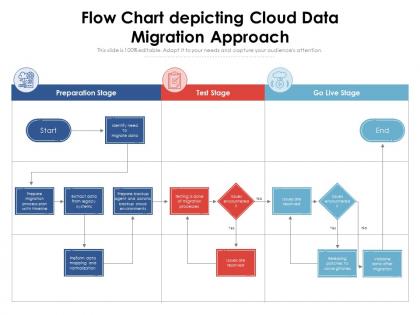
Flow chart depicting cloud data migration approach




Try Before you Buy Download Free Sample Product
 Impress Your
 Audience
 100%
100% Editable
 Save Hours
 of Time


Our Flow Chart Depicting Cloud Data Migration Approach are topically designed to provide an attractive backdrop to any subject. Use them to look like a presentation pro.
People who downloaded this PowerPoint presentation also viewed the following :
Flow chart depicting cloud data migration approach with all 2 slides:
Use our Flow Chart Depicting Cloud Data Migration Approach to effectively help you save your valuable time. They are readymade to fit into any presentation structure.
FAQs for Flow chart depicting cloud
Start with an audit - figure out what data you're actually moving and where it's going. Pick your migration tools (seriously, there's like a million options now). Design your target setup, then - and this is huge - run pilot tests first. Don't skip this part! Test performance, make sure everything actually works. When you do the real migration, break it into chunks instead of moving everything at once. Oh, and budget way more time for testing than seems reasonable. Trust me on that one - data always finds new ways to break.
Start with auditing what you've got - data volumes, system dependencies, bandwidth capacity. Those numbers will totally dictate your timeline. Check your team's cloud skills too (honestly, that's usually the biggest headache). Test everything with a pilot migration using non-critical data first. Budget's another big one - both upfront costs and what you'll pay monthly after. Oh, and definitely score your readiness across technical, security, and financial stuff before diving in. I learned that the hard way on a previous project. Short pilot runs save you from nasty surprises later.
Honestly, start with security stuff - check their certifications, especially for sensitive data. Pricing gets tricky because it's not just storage costs, those data transfer fees will destroy your budget if you're not careful. Performance and scalability need to match what you're doing now plus room to grow. Data center location matters too for speed and regulations. Oh, and their migration support varies wildly between providers - some are awesome, others leave you hanging. I'd definitely get quotes from three companies minimum. Run a small test migration first though, saves headaches later.
Data integrity and security concerns basically control every choice you make during cloud migration. You can't just treat them as afterthoughts. Encryption for data in transit and at rest is mandatory. Access controls matter too. Honestly, compliance stuff can be brutal depending on your industry - I've seen projects get completely derailed by regulatory requirements. Build validation checkpoints throughout the whole process so you can catch corruption or breaches early. My suggestion? Test everything with a small, non-critical dataset first. Get your security protocols and validation processes working smoothly before you touch anything that actually matters to your business.
Oh man, you're gonna hit some rough patches - data security risks and system compatibility issues are the worst offenders. Your network bandwidth will probably choke during transfers too (learned that the hard way). Start with a solid data audit and use tools that do incremental transfers so you're not down forever. Encrypt everything, obviously. Test in staging first and have a rollback plan because things will go sideways. Honestly though? Budget like triple the time you think it'll take. Everyone underestimates migration timelines and then panics when deadlines hit.
Do it during off-peak hours for sure - learned that the hard way once. Start by replicating your data to the cloud first, then sync changes bit by bit while everything's still running. Don't do the whole "big bang" thing, it's honestly a nightmare waiting to happen. Set up parallel environments so you can actually test stuff before flipping the switch. Always have a rollback plan ready (trust me on this). Oh, and make sure your team knows the timeline and have IT support ready during the cutover.
Honestly, there's a bunch of stuff that'll save you headaches. AWS has Database Migration Service and DataSync. Azure's got their Database Migration Service plus Data Factory. Google Cloud has Transfer Service and Database Migration Service too. But here's the thing - sometimes third-party tools like CloudEndure, Carbonite, or Zerto actually work better than what the cloud providers give you. Weird, right? If you're moving VMs around, definitely check out Veeam or Commvault for backups. Start with your cloud provider's free assessment tools though. Figure out what mess you're actually working with first.
Okay so first thing - run validation checks between your source and destination. Compare row counts, checksums, sample records, all that stuff. I'm super paranoid about this step because finding missing data weeks later is absolutely terrible. Test your apps thoroughly to make sure they can actually access the migrated data. Also run some performance benchmarks - you want to know if queries are still fast enough. Oh and check that user permissions transferred over right. Honestly, document everything you find because stakeholders will definitely ask you to prove it worked later.
Dude, compliance basically runs the whole show when you're migrating stuff to the cloud. You can't just move data around wherever - there's all these rules about where it can live, how it gets encrypted, who can access it. GDPR, HIPAA, whatever applies to your business will lock you into specific cloud regions and security setups. I learned this the hard way on a project last year. My advice? Figure out your compliance stuff first, then pick your cloud strategy around that. Way easier than trying to retrofit everything later when you realize you screwed up.
You gotta map and classify your data before migrating - it's like getting a blueprint of what you're actually dealing with. Figure out where everything lives, what format it's in, and how systems connect. Classification tells you what's sensitive, what needs compliance stuff, and what's mission-critical. Skipping this is honestly asking for trouble later. Oh and start with your most important datasets first - don't try to boil the ocean. This groundwork helps you pick the right cloud storage and avoid expensive screw-ups down the road.
Honestly, hybrid is the way to go here. You're not throwing everything into the cloud at once like some kind of madman. Keep your sensitive stuff on-premises where you can actually control it. Then slowly move the less critical data over - gives you time to figure out what works and what doesn't. The whole compliance thing becomes way more manageable too. I mean, nobody wants to deal with everything breaking at the same time, right? You can test your approach, scale things up or down during the move. Just start by figuring out what absolutely has to stay local first.
So you've got a few ways to tackle this. Most people go with the "strangler fig" approach - basically you swap out legacy pieces bit by bit while keeping everything running. Sounds clean but it's actually pretty messy in practice. You could also just lift-and-shift the old apps to cloud VMs first, then fix them up later. API bridges work too if you need your legacy stuff talking to new cloud services. Oh, and definitely start with something non-critical first - learned that one the hard way. Don't jump straight into your mission-critical systems.
After your migration, focus on these four things: response times, throughput, error rates, and how much resources you're actually using. Response times tell you if stuff's running smooth. Throughput shows you're still handling the same data volumes as before. Error rates - pretty obvious why that matters, but any sudden spikes mean you've got problems. Resource utilization is huge for keeping costs down (cloud bills can get scary fast if you're not watching). Get dashboards set up in your first week and compare everything to your old baseline numbers. Honestly, catching issues early beats dealing with angry users later. Way less stressful.
Honestly, skip the boring PowerPoint stuff and get people actually using the system with practice data. Different teams need different training though - accounting doesn't work the same way as sales, you know? I'd set up hands-on workshops for each department. Quick reference cards are clutch, plus maybe some short videos they can watch again later. Oh, and don't make it a one-and-done thing. Pick some tech-savvy people from each team to be your go-to helpers when things inevitably go wrong. People learn way better when they're actually clicking around instead of just watching someone else do it.
Multi-cloud setups are everywhere now - companies don't want to get stuck with one vendor anymore. Smart move, honestly. AI migration tools are getting crazy good too, way less messy than the old manual processes. Oh, and "data fabric" - total buzzword but it actually works. Zero-downtime migrations? Yeah, that's just expected now, not some premium feature. You should probably check if your current tools can handle this stuff, especially if you're planning big moves soon. The landscape changed fast.
-
Best way of representation of the topic.
-
Qualitative and comprehensive slides.
-
The content is very helpful from business point of view.
-
Graphics are very appealing to eyes.