


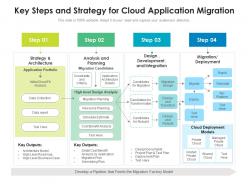
Key steps and strategy for cloud application migration





Try Before you Buy Download Free Sample Product
 Impress Your
 Audience
 100%
100% Editable
 Save Hours
 of Time


Our Key Steps And Strategy For Cloud Application Migration are topically designed to provide an attractive backdrop to any subject. Use them to look like a presentation pro.
People who downloaded this PowerPoint presentation also viewed the following :
Key steps and strategy for cloud application migration with all 2 slides:
Use our Key Steps And Strategy For Cloud Application Migration to effectively help you save your valuable time. They are readymade to fit into any presentation structure.

FAQs for Key steps and strategy for
Honestly, the money savings alone make it worth it - no more buying servers you'll barely use. When your business grows (or has those crazy busy seasons), you can just scale up instantly instead of scrambling for hardware. Remote work is so much easier too since everyone can access stuff from anywhere. Security updates happen automatically, which saves your IT folks tons of headaches. Small companies especially don't have to stress about backup systems failing at 2am anymore - been there, not fun! I'd probably move your least critical apps first, just to test the waters. The "pay for what you actually use" thing is pretty addictive once you see those first bills.
Honestly, you've got four main things to figure out first. Look at your current setup and see what's connected to what - some old systems are just brutal to migrate. Does your team actually know cloud stuff, or will you need to train people? That's huge. Budget for both the actual move AND what you'll pay monthly after. But here's the real kicker: map out every single dependency because if you move something that breaks half your other apps, you're screwed. Oh, and definitely try a pilot run with something low-stakes first.
Honestly, the three big headaches are security, costs spiraling, and apps not playing nice together. Everyone panics about security at first but encryption and compliance stuff usually sorts that out. Costs get crazy when teams don't figure out their actual usage patterns first - it's like shopping hungry, you know? Legacy systems are where things get messy though. Those old apps have weird dependencies that nobody documented, so stuff just breaks randomly during the move. Start with an audit, test on something that won't tank your business if it goes sideways, and add 20% buffer time because migrations always take longer.
Honestly, it comes down to how much you want to deal with. IaaS like AWS gives you total control but you're stuck managing everything - the OS, updates, all that stuff. Only worth it if you've got weird requirements or compliance headaches. PaaS is where it's at for most projects though - Heroku lets you just push code and forget about servers. Way less stress. SaaS obviously does everything for you but then you can't really customize much. I'd say figure out if you actually need to mess with the underlying setup first. Most people think they do but don't really.
Yeah, don't sleep on data security - I've watched teams totally mess this up by treating it like homework they can do later. First thing: figure out what data you're actually moving and how sensitive it is. Compliance stuff matters too, so check that before picking a provider. Your cloud provider's security controls need to make sense for your situation. Encryption in transit and at rest is non-negotiable. Identity management setup can't be sloppy either. Honestly, just start with a solid data inventory and risk assessment. That'll basically tell you everything else you need to know about your approach.
Dude, compliance will literally dictate which cloud providers you can even use. Map out your regulatory stuff first - GDPR, HIPAA, whatever applies to you. Some data just can't cross borders, period. Get your compliance team involved from the start because I've seen so many teams pick a provider only to find out later it won't pass their audits. That's a nightmare you don't want. Create a compliance checklist and run it by legal before you start looking at vendors. Trust me, it'll save you major headaches down the road.
Honestly, don't just look at the monthly cloud bills - that's where people mess up. You've gotta add up everything you're spending now: hardware, licenses, maintenance, power bills, staff time, all of it. Cloud costs are trickier than they seem - compute and storage are obvious, but data transfer fees can bite you. Migration isn't cheap either. Training your team costs money, consultants are expensive (learned that one the hard way), plus you might have downtime. Sure, you'll save on hardware headaches, but you'll probably need someone who actually knows cloud stuff. I'd make a 3-year spreadsheet and add 20% padding for surprises.
Hey! So blue-green deployments are gonna be your lifesaver here. Run both environments side by side, then just flip the switch once you've tested everything. Start with your less important stuff first - good way to work out any kinks in your process. Save the critical apps for like 2am when nobody's around lol. Database replication is key too, plus having your load balancers ready to failover. Honestly though? The planning phase is where you'll make or break this whole thing. Test everything in staging and have a solid rollback ready - trust me on this one.
So I'd definitely run both systems side by side - hybrid setup, basically. Don't go cold turkey, that's asking for trouble. Move the non-critical stuff first to test things out. Your legacy systems can handle the important operations while you slowly shift workloads over. APIs will help keep data synced between old and new. Honestly feels like juggling but way less risky. Give yourself 12-18 months minimum - I learned that the hard way on a previous project. Just budget for running both infrastructures at once, it gets expensive but worth it.
Start with mapping tools like AWS Migration Hub or Azure Migrate - seriously, you can't move stuff you don't understand. AWS Database Migration Service and Azure Site Recovery are lifesavers for actually moving workloads without breaking everything. Monitoring is huge too. CloudWatch and Azure Monitor work great, though I'm partial to Datadog honestly. Terraform or Ansible will keep your configs from becoming a total mess. Oh, and don't skip the assessment phase - I know it's boring but it'll save you tons of headaches later.
Honestly, start training way before you think you need to. People hate change unless they actually get why it's happening - so explain the real benefits, not just "here's new software." Find those tech-savvy people on your team who can help train everyone else (saves you so much headache). Communication becomes everything here. Over-communicate the timeline and what's changing. Skip the boring documentation dumps - do actual hands-on workshops instead. Oh, and don't expect people to love it immediately. Change sucks for most folks, so give them time and celebrate the small victories when someone finally gets it.
Honestly, most people just throw way too much hardware at their problems from day one. Right-size those instances first - you're probably burning cash on stuff you don't even use. Get monitoring set up so you can actually see what's happening with your costs. Auto-scaling saves me tons when traffic gets weird. Oh, and reserved instances are clutch for anything predictable - spot pricing too if you can swing it. Move old crap to cold storage regularly. Your wallet will thank you. I do monthly reviews now and actually follow through on AWS's suggestions instead of just ignoring them like I used to.
Honestly, you gotta measure both the techy stuff and business side to know if it actually worked. Performance metrics are obvious - faster load times, less downtime, cost savings vs your old setup. But user happiness matters just as much, maybe more? Definitely set your baselines before you start so you're not guessing later. Track if you hit your timeline and what random problems came up (there's always something weird). The trick is deciding what "success" looks like upfront instead of just crossing your fingers and hoping it feels better afterward.
Honestly, cloud migration is like getting superpowers for your tech stack. You can spin up stuff in minutes instead of waiting weeks for approvals. No more begging IT for resources or capacity planning nonsense - just instant scaling when traffic spikes. Your teams can actually experiment without those massive upfront costs killing every good idea. The AI and analytics tools you get access to? Would cost a fortune to build yourself. I'd start by looking at your customer-facing apps first, or anything that needs to scale fast. Those usually see the biggest wins right away.
So migration strategies are totally changing right now. Edge computing means you'll probably want some hybrid setup - keep processing close to users instead of shoving everything into one data center. The AI automation stuff is honestly crazy good at making migrations way less painful and faster too. Most companies are going multi-cloud now instead of getting stuck with one provider. Oh and weirdly, carbon footprint is actually becoming a real deciding factor when picking cloud services. My take? Don't lock yourself into rigid timelines because this tech moves so damn fast you'll need room to adjust.
-
Great product with effective design. Helped a lot in our corporate presentations. Easy to edit and stunning visuals.
-
Great designs, really helpful.
-
I discovered this website through a google search, the services matched my needs perfectly and the pricing was very reasonable. I was thrilled with the product and the customer service. I will definitely use their slides again for my presentations and recommend them to other colleagues.