

Key features of cloud computing resources




Try Before you Buy Download Free Sample Product
 Impress Your
 Audience
 100%
100% Editable
 Save Hours
 of Time


Our Key Features Of Cloud Computing Resources are topically designed to provide an attractive backdrop to any subject. Use them to look like a presentation pro.
People who downloaded this PowerPoint presentation also viewed the following :
Content of this Powerpoint Presentation
Description:
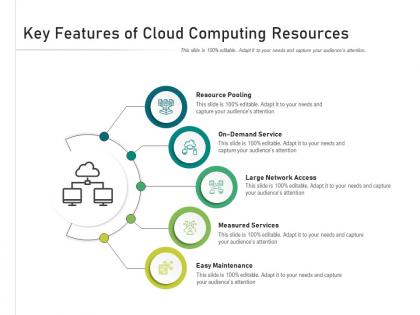
The image is a PowerPoint slide titled "Key Features of Cloud Computing Resources," which outlines the fundamental characteristics of cloud computing services. The slide is designed with a central image of two computers connected to a cloud, symbolizing cloud computing, with circular icons branching out to represent different features:
1. Resource Pooling:
This represents the cloud provider's ability to serve multiple customers with provisioned resources, with a location-independent resource pooling characteristic.
2. On-Demand Service:
It signifies the ability of users to provision computing capabilities such as server time and network storage as needed automatically.
3. Large Network Access:
This denotes broad network access capabilities that allow services to be available over the network and accessed through standard mechanisms by heterogeneous thin or thick client platforms.
4. Measured Service:
Cloud systems automatically control and optimize resource use by leveraging a metering capability at some level of abstraction appropriate to the type of service.
5. Easy Maintenance:
This indicates cloud computing resources can be maintained and managed without requiring much effort or interaction with the service provider.
Use Cases:
Cloud computing features are crucial across various industries:
1. Technology and IT Services:
Use: Providing scalable infrastructure and platforms for software services.
Presenter: Cloud Solutions Architect
Audience: IT professionals, CTOs
2. Healthcare:
Use: Hosting patient records and health apps in compliance with regulations.
Presenter: Health IT Manager
Audience: Healthcare providers, compliance officers
3. Finance and Banking:
Use: Implementing cloud-based solutions for banking operations and customer service.
Presenter: Financial Technology Strategist
Audience: Bank executives, IT security teams
4. Education:
Use: Delivering educational content and tools through cloud platforms.
Presenter: EdTech Consultant
Audience: Educators, administrative staff
5. Retail:
Use: Managing e-commerce platforms and customer data on cloud services.
Presenter: E-commerce Manager
Audience: Marketing teams, data analysts
6. Manufacturing:
Use: Leveraging cloud computing for supply chain management and operations.
Presenter: Operations Director
Audience: Supply chain managers, operational staff
7. Government:
Use: Implementing e-governance platforms and public sector services on the cloud.
Presenter: Government IT Specialist
Audience: Public administrators, policy advisors
Key features of cloud computing resources with all 2 slides:
Use our Key Features Of Cloud Computing Resources to effectively help you save your valuable time. They are readymade to fit into any presentation structure.
FAQs for Key features of
Okay so there's three main types. IaaS gives you raw servers and storage - you handle everything else yourself. PaaS includes the platform stuff too like databases and runtime environments, so you just worry about your actual code. With SaaS you're just using the finished software like Gmail. The pizza analogy actually works pretty well here - IaaS is buying all the ingredients, PaaS is getting pre-made dough, SaaS is just ordering delivery. More convenience means less control though. I'd say pick based on how much your team actually wants to mess with infrastructure setup. Most startups I know go PaaS route honestly.
Dude, cloud computing is basically like renting computing power instead of buying it. You can instantly scale up when you need more resources - like during Black Friday sales - then scale back down when things are quiet. Only pay for what you actually use. Before this, companies had to guess how much hardware they'd need and buy it all upfront. Such a waste of money honestly. Now startups can compete with huge companies since they get access to the same tech without dropping millions on servers. Your costs flex with your business instead of being this massive fixed expense sitting there doing nothing half the time.
Honestly, the biggest things to watch out for are data breaches and losing control over your own stuff. Your data's sitting on someone else's servers now, which feels weird at first - I get it. Misconfigured access settings are a huge problem too. Plus you've got compliance headaches if you're dealing with GDPR or HIPAA requirements. Oh, and don't forget about potential downtime screwing up your day. The thing is, security becomes this shared responsibility between you and the provider. Really dig into vetting your cloud company first. Set up solid access controls and audit your configs regularly. That's your best bet.
Honestly, most places overprovision by like 30-40% which is just throwing money away. Start with rightsizing your stuff and set up auto-scaling so you're only paying for actual usage. Cost monitoring tools are clutch - they'll ping you when spending goes crazy. Reserved instances will save you a fortune if your workloads are predictable. Oh, and definitely clean up those forgotten dev environments regularly because that junk adds up stupid fast. We do monthly cost reviews with the team now and it's been a game changer for catching issues early.
So basically cloud computing is what makes remote work actually doable. Your files and apps live online instead of being trapped on your office desktop - game changer honestly. You can work from literally anywhere with decent wifi. Google Workspace and Office 365 let everyone edit stuff at the same time, which still blows my mind when I watch three people typing in one doc. Just make sure your company isn't cheap about the setup because nothing's worse than laggy cloud apps when you're trying to get stuff done.
So basically you gotta know where your data actually sits and what laws cover it. GDPR in Europe? Totally brutal about personal info. Other places are way more chill. Pick cloud regions that match your compliance stuff - some industries like healthcare have crazy strict rules. Oh, and always double-check your provider's certifications first. You don't want surprises later. The main thing is making sure you can control where everything gets stored and processed. Trust me, data residency requirements can bite you if you're not careful.
So basically cloud providers spread your stuff across tons of data centers in different regions - if one craps out, another one automatically takes over. They're constantly running backups and testing their failover systems to avoid those nightmare scenarios. Most promise 99.9% uptime, though Amazon had that epic outage last year that took down half the internet lol. Load balancing helps prevent single points of failure too. Just don't assume they're handling everything automatically - you'll want to actually set up multi-region deployment and automated backups yourself.
Multi-cloud is honestly a game changer - you avoid getting trapped by one provider's weird pricing or crappy services. Pick what works best from each platform, like AWS for compute power and Google for their ML stuff. Plus you've got backup if one crashes (which happens more than you'd think). Managing multiple clouds is definitely trickier than sticking with one, but the redundancy makes it worth the headache. I'd say start with two providers max and expand once your team figures out the workflow.
Dude, microservices totally changed everything. Instead of one giant app, you break stuff into tiny independent pieces that can scale separately. Way faster deployments, and your team won't accidentally break each other's work anymore. The weird part? You actually plan for things to fail from the start. Infrastructure becomes code too, which is kinda wild when you first see it. Honestly, just containerize something small first - maybe that login service or whatever. Once you watch it actually work, the whole concept clicks. Your apps become way more resilient and you can push updates without sweating.
Track both tech stuff and business impact - that's key. Compare your old server costs to what you're paying now in the cloud. Response times and uptime matter too. Your devs shipping code faster? That's huge. Don't ignore security incidents or compliance issues either. Honestly, most teams get way too caught up in infrastructure costs and completely forget about user experience - drives me crazy. Monthly dashboard reviews with stakeholders help catch problems early. Oh, and team productivity metrics are gold if you can measure them properly.
So there's a bunch of ways to do this. AWS, Azure, and GCP all have pre-built stuff like image recognition and NLP that you can just hook into with APIs. Way easier than starting from zero. You can also rent GPU instances to train models without dropping crazy money on hardware - which honestly saved my ass on a project last year. The auto-scaling thing is pretty sweet for when your app gets hit with traffic. Oh, and platforms like SageMaker handle a lot of the annoying setup work. I'd definitely check out your cloud provider's AI marketplace first before building anything custom.
Security's gonna be your biggest headache - everyone freaks out about handing data to outsiders, which honestly makes sense. Costs are super tricky to predict too, especially when things scale fast and suddenly your bill explodes. Your IT team will need time to learn all the new tools, and that's way harder than it sounds. Oh, and compliance stuff is a nightmare depending on your industry. Start small with just one project instead of moving everything at once. That way you can figure out what breaks before it actually matters. Trust me, don't go all-in right away.
Dude, PaaS is a game changer for dev/ops drama. No more fighting over who broke what environment - everything's consistent from day one. Your devs can push code without stressing about server stuff, while ops gets these nice dashboards to actually see what's happening. The CI/CD pipelines are built right in, so deployments stop being this terrifying event. Plus it handles scaling automatically, which honestly saves so much midnight troubleshooting. I'd try Heroku first - it's dead simple to get started and you'll see your release cycles speed up like crazy. Azure App Service is solid too if you're already in that ecosystem.
So cloud stuff is weird environmentally - it's way more efficient than old-school data centers because Amazon and Google actually know what they're doing with infrastructure. Most companies are terrible at that honestly. But then everyone uses way more computing power because it's so cheap and easy now, which kinda sucks. The big providers are throwing money at renewable energy though. I'd just pick someone with decent green policies and don't go crazy over-provisioning your instances. Actually reminds me I need to check if we're still paying for those dev servers nobody uses.
So edge computing doesn't kill traditional cloud - it's more like bringing some of that processing power way closer to your devices. Your heavy stuff like big analytics still lives in the main cloud. But anything that needs split-second responses? That runs at the edge instead. Super critical for IoT gadgets and self-driving cars where even tiny delays can mess things up. Honestly, the seamless handoff between edge and cloud is pretty slick. Just figure out which apps actually need lightning-fast response times first - that's where you'll see the real difference.
-
Great experience, I would definitely use your services further.
-
Easily Editable.
-
Great designs, really helpful.
-
The content is very helpful from business point of view.
-
Wonderful templates design to use in business meetings.