Cloud computing deployment models cloud service models it

Rating:
96%
Cloud computing deployment models cloud service models it
Slide 1 of 9
Favourites Favourites

Try Before you Buy Download Free Sample Product

Audience Impress Your
Audience
Editable 100%
Editable
Time Save Hours
of Time
The Biggest Sale is ending soon in
0
0
:
0
0
:
0
0
Rating:
96%
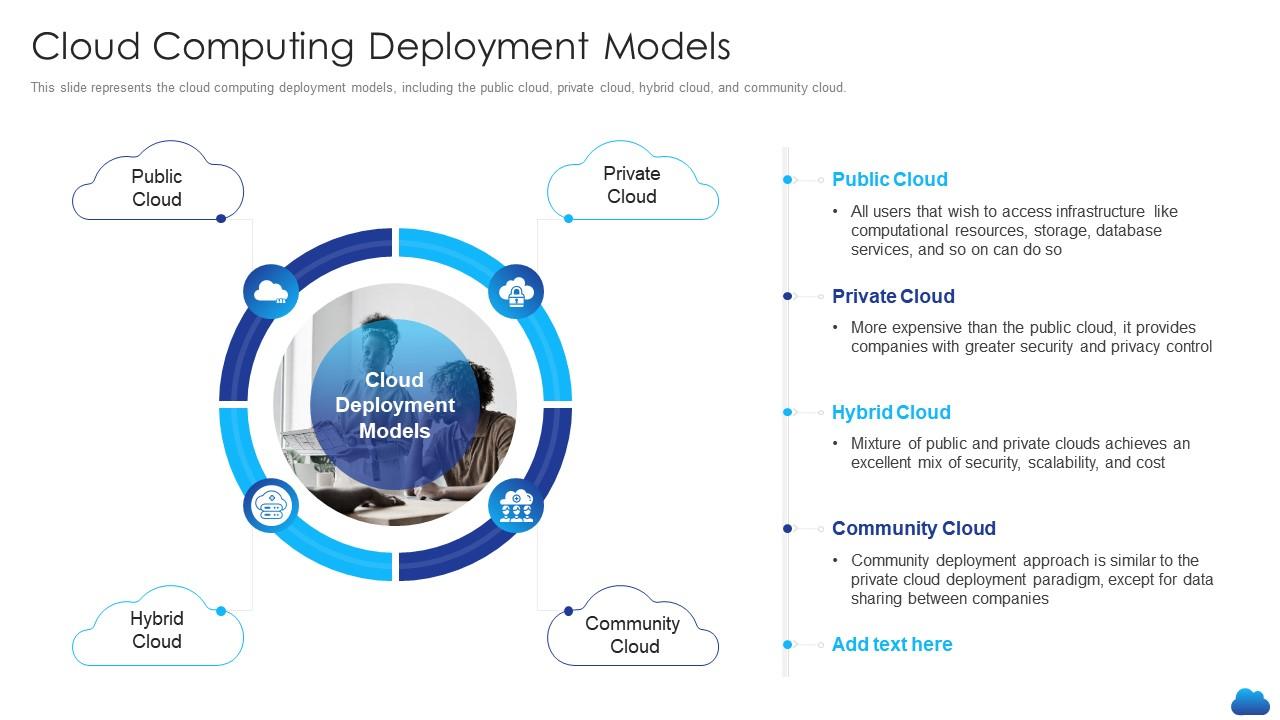
This slide represents the cloud computing deployment models, including the public cloud, private cloud, hybrid cloud, and community cloud. Increase audience engagement and knowledge by dispensing information using Cloud Computing Deployment Models Cloud Service Models It. This template helps you present information on four stages. You can also present information on Deployment, Resources, Infrastructure using this PPT design. This layout is completely editable so personaize it now to meet your audiences expectations.

FAQs for Cloud computing deployment models cloud

So basically, public clouds like AWS are shared - you're renting space but it scales like crazy. Private clouds? That's your own dedicated setup. Way more secure and you can customize everything, but damn expensive. Most companies I know go hybrid though - sensitive stuff stays private, everything else goes public. Honestly makes the most sense financially. I'd say start with public cloud for most things. Only add the private stuff later if you actually need it for compliance or whatever. Why overcomplicate it from the start, you know?

Honestly, cloud computing is a game changer for scaling fast. You can spin up resources instantly instead of waiting weeks for server setup - I've seen companies deploy apps in minutes that used to take forever. When demand spikes, everything scales automatically. No more being stuck with expensive hardware that'll be outdated in two years. You only pay for what you use, which is huge for experimenting without breaking the bank. My buddy's startup went from 100 to 10k users overnight and their infrastructure handled it perfectly. Traditional setups just can't compete with that flexibility.

Definitely start with encryption - everything needs it, data sitting around, moving between systems, all of it. Multi-factor auth is non-negotiable these days. Role-based access is clutch too, people shouldn't see stuff they don't need. Identity management is honestly where things go wrong most of the time, so don't sleep on that. Get your monitoring and logging set up right away, not after you've already moved everything over. Oh and actually understand what your cloud provider covers vs what you're responsible for - that shared responsibility thing trips people up. I'd run security checks before, during, and after the whole process.

So SLAs are basically contracts that spell out what your cloud provider will actually deliver - uptime percentages, how fast they'll fix issues, that kind of stuff. Most providers promise like 99.9% uptime, which sounds great until you do the math on what that downtime actually means for your business. Don't just skim through them either. The compensation part is key - some companies give decent credits when they screw up, others... not so much. I learned this the hard way with a client last year. Response times matter too, especially if you're running anything critical. Worth reading before you sign up.

Dude, first thing - set up those billing alerts or you'll get a nasty surprise. Most people way oversize their instances because they're scared of slowdowns, but you're probably fine with smaller ones. Auto-scaling is clutch so you're not paying for stuff you don't use. Oh, and reserved instances save you tons if your workloads are predictable. The worst thing though? People spin up test servers and totally forget about them - I've done this more times than I care to admit. Set up policies to kill idle resources automatically. Monthly cost reviews are boring but necessary.

Honestly, the worst parts are usually security headaches and those surprise bills - cloud costs can get crazy fast if you're not watching. Your team's gonna struggle too since this stuff works totally different from regular setups. Data migration is a nightmare, and if you're in something like healthcare or finance? Good luck with compliance. Oh, and trying to make it play nice with your existing systems... that's fun. My advice? Start with something small first - maybe just one project. You can figure out what works without risking your main stuff. Way less stressful that way.

Honestly, cloud stuff is a game changer for remote work. Your whole team can get to the same files and apps from anywhere - no more "oh that's saved on my desktop at work" drama. Real-time document editing is pretty sweet, plus you can hop on video calls whenever. Everything stays synced automatically so nobody's working on old versions. I'd probably start with Google Workspace or Microsoft 365 since they play nice together. The vacation thing is real though - I've definitely answered Slack messages from the beach before. Just make sure whatever tools you pick actually talk to each other properly.

Honestly, cloud backup changed everything for us. You're not stuck buying tons of hardware that just sits there doing nothing most days. Your data gets copied to multiple locations automatically, so if something crashes, you're back up in hours instead of being down for days. The cost thing is huge too - you just pay for what you actually store. I'd start by looking at solutions that play nice with whatever systems you already have. Oh, and definitely check what recovery speeds they promise because some are way better than others. The whole setup practically runs itself once you get it going.

So basically, IoT devices dump tons of data that needs somewhere to go - that's where cloud storage comes in. The cloud also handles all the heavy AI processing since your smart thermostat obviously can't run complex algorithms on its own. Without cloud connectivity, most IoT stuff would be pretty much useless tbh. You get massive computational power without building your own server farm, which is nice. Scale becomes way easier too when you're dealing with thousands of connected devices. Oh and definitely budget for cloud costs upfront if you're thinking about any projects - that stuff adds up faster than you'd expect!

Honestly, I'd start with your must-haves vs nice-to-haves list first. Security's probably your biggest concern - does the provider actually meet your compliance needs? Don't get fooled by just looking at base pricing either. Those scaling costs and data transfer fees will bite you later (trust me on this one). Check their uptime guarantees and where their data centers are located relative to your users. Performance tanks if you're routing halfway across the world. Also think about integration headaches with your current tools. Their support better be responsive when stuff breaks at 2am. Score each provider against your criteria and you'll have a clearer picture.

Pick cloud providers who already handle GDPR/HIPAA compliance - saves you tons of headaches. But you're still responsible for data classification and who gets access to what. The contracts are brutal to read through, honestly. Focus on where your data lives and encryption requirements. Set up user permissions properly and turn on audit logging. Also, check regularly who can access stuff - people forget about old accounts all the time. Document everything because when regulators show up, they want to see exactly what you did and when. Trust me on that one.

Yeah, multi-cloud sounds great on paper - you get flexibility, avoid being stuck with one vendor, cherry-pick the best services. Your apps are way more resilient too. But man, it gets messy quick. You're suddenly dealing with different APIs everywhere, costs can get out of hand if you're not watching, and don't even get me started on the networking nightmare between providers. Security gets complicated when you've got stuff scattered around. Honestly? I'd stick with one main cloud provider first, maybe add a second one later for specific things. Going full multi-cloud right away is just asking for headaches.

Honestly, cloud computing is what makes digital transformation actually work. You can spin up new resources instantly instead of waiting forever for hardware approvals (which, let's be real, is painful). It's perfect for experimenting with AI or analytics without dropping crazy money upfront. The best part? You can test stuff quickly and cheaply - fail fast without risking everything. Plus everyone can access the same data from anywhere, so no more department silos. I'd say pick one manual process that drives you nuts and see what cloud tools could automate it. That's usually the easiest way to start.

Auto-scaling groups are a game changer for handling traffic without burning cash during slow times. I'd start by auditing whatever you've got running right now - trust me, those old dev instances add up fast. AWS Cost Explorer or Azure Cost Management will show you exactly where your money's disappearing. Tag everything from the start so you can actually track costs by team or project. CloudWatch alarms catch the expensive stuff before it destroys your budget. Oh, and monitoring tools aren't optional if you want to spot waste early. Automation's really the key here.

So basically you want dashboards tracking uptime, response times, and error rates for your cloud stuff. AWS CloudWatch and Azure Monitor are solid options - though honestly their default setups can be a total mess to navigate at first. I'd start simple with just uptime and latency monitoring. Set clear SLAs with performance targets, then mix synthetic monitoring (those automated tests) with real user data to see what's actually happening. Oh and definitely review your thresholds regularly since usage patterns shift over time. Way easier to build up complexity than start overwhelming yourself.

Ratings and Reviews

96% of 100
Review Form
Write a review
Most Relevant Reviews
  1. 80%

    by Smith Diaz

    Great experience, I would definitely use your services further.
  2. 100%

    by Clint Perry

    Presentation Design is very nice, good work with the content as well.
  3. 100%

    by Darnell Tucker

    Great designs, really helpful.
  4. 100%

    by Don Hansen

    Great product with highly impressive and engaging designs.
  5. 100%

    by Darron Hunter

    Much better than the original! Thanks for the quick turnaround.

5 Item(s)

per page: