


Cloud Computing Infrastructure Powerpoint PPT Template Bundles




Try Before you Buy Download Free Sample Product
 Impress Your
 Audience
 100%
100% Editable
 Save Hours
 of Time


Our Cloud Computing Infrastructure Powerpoint PPT Template Bundles are topically designed to provide an attractive backdrop to any subject. Use them to look like a presentation pro.
People who downloaded this PowerPoint presentation also viewed the following :
Cloud Computing Infrastructure Powerpoint PPT Template Bundles with all 17 slides:
Use our Cloud Computing Infrastructure Powerpoint PPT Template Bundles to effectively help you save your valuable time. They are readymade to fit into any presentation structure.
-
Cloud Computing Infrastructure
-
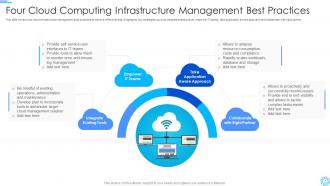
Four Cloud Computing Infrastructure Management Best Practices
-
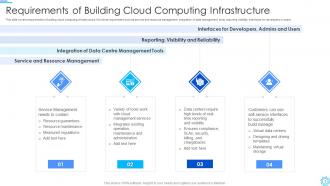
Requirements of Building Cloud Computing Infrastructure
-
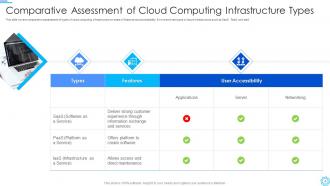
Comparative Assessment of Cloud Computing Infrastructure Types
-
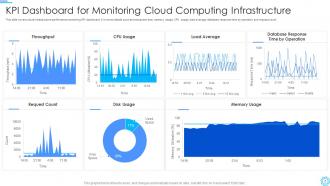
KPI Dashboard for Monitoring Cloud Computing Infrastructure
-
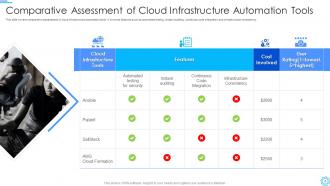
Comparative Assessment of Cloud Infrastructure Automation Tools
-
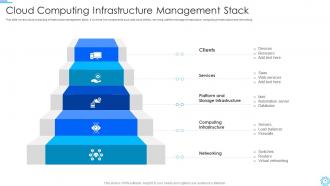
Cloud Computing Infrastructure Management Stack
-
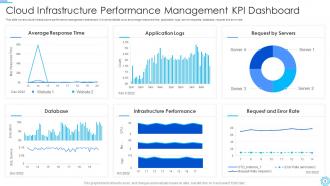
Cloud Infrastructure Performance Management KPI Dashboard
-
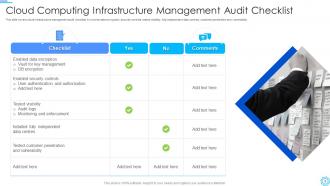
Cloud Computing Infrastructure Management Audit Checklist
-
Cloud Computing Infrastructure Management Icon
-
Cloud Computing Infrastructure Services Icon
-

Thanks for watching
-

-

-

-

-

FAQs for Cloud Computing Infrastructure Powerpoint
So you've got three main buckets to think about: compute stuff (VMs, containers), storage (databases, file systems, object storage), and networking (load balancers, VPNs, firewalls). APIs and monitoring tools are your management layer that connects everything. Security services handle identity and encryption - honestly, this part gets messy fast if you don't plan ahead. Each cloud provider packages these differently, which is kinda annoying. I'd map out what your workload actually needs first, then match those requirements to specific services. Way easier than trying to reverse-engineer it later.
So cloud scalability is pretty sweet - your systems automatically grow or shrink depending on how busy you are. Traffic spike hits? Your setup scales up instantly without you panicking about buying servers. Quiet day? It dials back down so you're not wasting money. I've seen it work and it's honestly impressive how smooth it is. You can handle those crazy holiday rushes, launch stuff without infrastructure nightmares, and your costs stay reasonable. My advice? Start small and just let it grow as you need it.
So there's basically four ways to do this - public, private, hybrid, and multi-cloud. Public ones like AWS are cheap since you're sharing resources, but you can't customize much. Private gives you way more control and security, though it'll cost you big time. Hybrid's probably what most companies end up doing - keep the sensitive stuff locked down privately but use public cloud for the rest. Multi-cloud just means spreading everything across different providers so you're not screwed if one goes down. Honestly depends on your budget and how paranoid you are about security. I'd figure out what data absolutely can't leave your building first.
So basically public cloud is like renting an apartment - they handle everything, you just pay monthly. Private means you own the whole building, which is expensive but you control it all. Most companies I know go hybrid tbh, keeps the sensitive data on their own servers while using public cloud for the random stuff. You'll need your own infrastructure for the private side plus some way to connect them (which can be a pain). Oh and figure out what actually needs to be private first - a lot of companies overthink that part.
So virtualization is basically how cloud computing works - they take one massive server and chop it up into tons of smaller virtual machines. It's like subdividing a house into apartments, except with computers. You get your own little isolated space without buying the actual hardware, which is honestly pretty sweet. The whole thing makes cloud stuff way cheaper and more flexible since you can scale up or down whenever. Oh and fun fact - when you fire up an AWS instance or whatever, you're probably sharing that physical server with like 10+ other people's VMs. Wild to think about.
Honestly, just nail down these three things: encryption, access controls, and monitoring. Encrypt everything - data sitting around and data moving between systems. Most cloud providers make this dead simple now. Identity management is huge too, like seriously don't give people more access than they need. I've watched companies get totally wrecked because someone had admin rights who shouldn't have. Set up good logging so you'll actually notice if something sketchy happens. Oh, and here's the thing everyone forgets - your cloud provider secures the infrastructure, but you still gotta configure everything properly on your end.
Automated scaling and monitoring first - they'll save you so much pain later. Right-size instances regularly, grab reserved instances for predictable stuff, and definitely set cost alerts before things blow up. Tags are super boring but you'll thank yourself later when you're hunting down mystery charges. Storage lifecycle policies are clutch, automate your backups, and honestly infrastructure as code everywhere you can. Treat it all like actual code - version control, testing, keep it clean. I do monthly cost reviews religiously because resource creep is sneaky as hell.
Your cloud provider choice really matters for performance - network setup, where their data centers are, hardware quality, all that stuff. AWS has the most mature services and biggest global footprint. Google Cloud kills it for data analytics and ML workloads. If you're already using Microsoft stuff, Azure just makes sense honestly - way less headache integrating everything. Each one has different latency and availability zones that'll hit your app speed differently. Oh, and don't just pick based on marketing - actually benchmark your workload on 2-3 providers first. You'll be surprised by the real differences.
Honestly, data transfer costs will probably hit you harder than you expect - plus the downtime during migration is always a nightmare. Your security setup needs a complete overhaul since cloud works totally different from on-prem stuff. Legacy apps are the real pain though, they're stubborn and might need serious refactoring to work properly. Oh and your team will definitely need training on new skills they don't have yet. I'd test everything with a small pilot project first before touching anything critical. Trust me on that one.
First thing - map out what you're actually using right now. CPU, memory, storage, network stuff. Check your peak times, not just averages (we got burned on this last year, trust me). Growth projections matter too, especially if you get seasonal rushes. Compliance requirements are a pain but you can't ignore them if you're in a regulated space. Honestly, the smartest move is starting with a pilot migration using your most predictable workload. That way you get real numbers instead of just guessing. Begin small, then scale up based on what you actually see happening.
Yeah, cloud computing definitely has an environmental impact. Data centers eat up about 1% of the world's electricity - those servers running constantly plus all the cooling systems really add up. But here's the thing: companies like AWS and Google are actually going pretty hard on renewable energy these days. Most of the time you're better off using their services than running your own servers anyway, carbon-wise. If your company cares about this stuff (and honestly, more should), just pick providers who are serious about sustainability. Oh, and don't go crazy with unnecessary computing power you don't actually need.
So edge computing is moving your processing power closer to where data actually gets created instead of sending everything back to some massive data center. Way faster response times and you're not eating up bandwidth like crazy. IoT stuff really benefits from this - nobody wants their smart doorbell lagging, you know? AWS and Azure jumped on this trend pretty quick because they had to. When you're planning infrastructure, think hybrid approach. Keep the heavy lifting centralized but move anything that needs quick responses to edge nodes. Honestly makes a huge difference for real-time apps.
Honestly, just nail these four things and you'll be solid: scalability, security, reliability, and cost optimization. Auto-scaling is a must - I've seen too many people blow their budgets on resources they're not even using. Bake security into everything from the start with proper identity controls, encryption, all that stuff. Design like everything's gonna break eventually because it will. Spread things across multiple zones and have a backup plan. Oh and monitor your costs religiously - those bills can get out of hand fast. Start with AWS's well-architected framework if you're feeling lost.
Start with automated backups across different cloud regions - super easy to set up these days. Make sure your data copies to at least one location that's far away geographically. If one region crashes, you won't be panicking at 2am (trust me on this one). Cloud DR is actually pretty sweet because you can test recovery without breaking anything in production. Set up alerts so you know right away when stuff goes sideways. Document your recovery steps and test quarterly. Honestly, a broken disaster plan is way worse than having none at all.
So compliance stuff is basically keeping you legal and not broke. Different industries have different rules - healthcare's way stricter than gaming companies, obviously. GDPR, HIPAA, all that fun paperwork exists to protect data and your wallet from insane fines. Honestly, I've seen companies scramble to add compliance later and it's a nightmare. Build it into your cloud setup from the start. Think of these standards as helpful guardrails, not just more red tape. Figure out which ones actually apply to your business first, then design around them. Way easier than retrofitting everything later, trust me.
-
The designs are super attractive. Me and my team love using SlideTeam’s presentations.
-
Great quality product.