

Data Warehouse Powerpoint Ppt Template Bundles





Try Before you Buy Download Free Sample Product
 Impress Your
 Audience
 100%
100% Editable
 Save Hours
 of Time


Our Data Warehouse Powerpoint Ppt Template Bundles are topically designed to provide an attractive backdrop to any subject. Use them to look like a presentation pro.
People who downloaded this PowerPoint presentation also viewed the following :
Data Warehouse Powerpoint Ppt Template Bundles with all 16 slides:
Use our Data Warehouse Powerpoint Ppt Template Bundles to effectively help you save your valuable time. They are readymade to fit into any presentation structure.
-

Data Warehouse
-
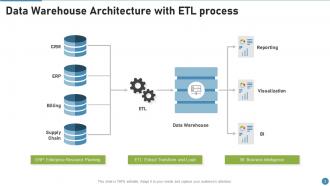
Data Warehouse Architecture with ETL process
-

Data Warehouse Image with Modern Telecommunication Network
-
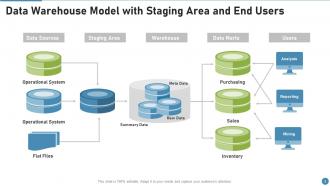
Data Warehouse Model with Staging Area and End Users
-
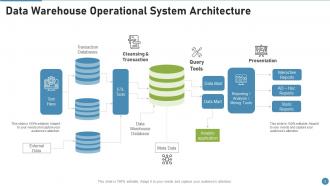
Data Warehouse Operational System Architecture
-
Data Warehouse Server and Gear Icon
-
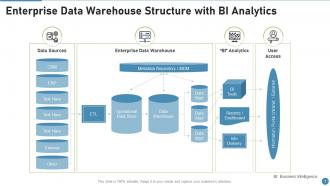
Enterprise Data Warehouse Structure with BI Analytics
-

ETL Data Warehouse with Source System
-
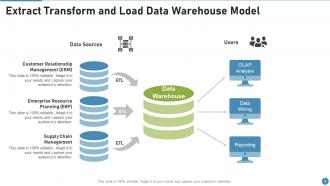
Extract Transform and Load Data Warehouse Model
-
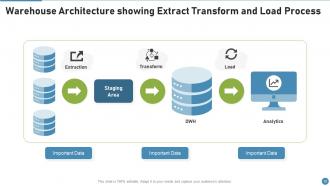
Warehouse Architecture showing Extract Transform and Load Process
-

Thank You
-

-

-

-

-

FAQs for Data Warehouse Powerpoint
So you've got your data sources - databases, files, APIs, all that stuff. Then there's the ETL layer that pulls everything together and cleans it up. Your actual warehouse is where it all gets stored. You'll need reporting tools obviously. The metadata repository is super important too (basically tracks what everything means). Most setups have a staging area where you can mess around with the data before it goes live. Honestly, I'd start by figuring out what data sources you're working with first. Makes it way easier to design the whole flow backwards from there.
So ETL is just your data pipeline, right? You grab data from wherever - databases, APIs, random files. Then comes the fun part: transforming it to actually fit your warehouse format. Honestly, this is where everything breaks 90% of the time. Cleaning data is such a pain, but you gotta validate and restructure it all. After that mess, you load everything into your warehouse. Oh, and definitely set up monitoring from day one. I learned that the hard way - stuff always crashes during transforms and you'll want to know immediately.
So basically, regular databases handle your everyday stuff - processing orders, updating records, that kind of thing. Data warehouses are totally different though. They're built for analyzing tons of historical data from everywhere. It's like comparing your daily planner to an entire library archive, you know? Regular databases are super fast for transactions, but warehouses store massive amounts of info and structure it differently (denormalized, which sounds fancy but just means faster queries). Honestly, if you're doing any serious trend analysis or complex reporting, you'll want the warehouse. Regular transactional databases just aren't built for that heavy lifting.
Think of data marts like mini versions of your main data warehouse, but built for specific teams. Sales gets their own little slice, marketing gets theirs, etc. Way faster than making everyone search through the massive central warehouse every time they need something. Plus teams can work independently without stepping on each other's toes - which honestly saves so much drama. You're still pulling from that single source of truth, just giving people pre-filtered views of what they actually care about. I'd start by seeing which teams keep asking for the same reports over and over.
Start with star schema - it's way simpler than you think. Denormalize your dimensions even though it feels wrong after years of OLTP normalization. Surrogate keys are non-negotiable for dimensions, and plan for slowly changing dimensions from the beginning (learned that one the hard way). Naming conventions matter more than most people realize - pick something consistent and stick with it religiously. Partition those big fact tables by date, seriously. Your future self will curse you during maintenance windows if you don't. Oh, and don't overthink it initially. Add complexity later when you actually hit limitations, not because some blog post said you should.
Okay so data warehousing is basically what makes your BI stuff actually functional. You know how all your data is scattered across different systems in weird formats? A warehouse pulls it all together into one clean spot. Way easier for analysts to work with - like having an organized desk instead of chaos everywhere (learned this the hard way lol). It handles the quality control and standardizes everything so your historical data makes sense. Oh and it's built for those heavy queries that power dashboards. Honestly, skip this step and your analytics team will hate you forever.
Dude, cloud computing completely changed the game for data warehousing. Instead of dropping crazy money on hardware upfront, you can just scale up storage and compute power whenever you need it. Snowflake, BigQuery, Redshift - they all handle the messy infrastructure stuff so you don't have to deal with server maintenance (thank god). You literally only pay for what you use, which is amazing for budgets. Automatic backups and security come standard too. Honestly, if you're still stuck with on-premise stuff, migrating to cloud is probably worth looking into. The numbers usually make sense.
Look, bad data will absolutely wreck your warehouse - it's that simple. You'll get duplicates, missing stuff, formats that don't match, old records nobody cleaned up. Then your reports are trash and honestly? Wrong numbers are way more dangerous than no numbers. I've seen teams completely abandon warehouses because they couldn't trust anything. Daily ops get screwed, big decisions get made on garbage data. The whole thing spirals fast. Catch it early with validation rules and keep an eye on your quality metrics. Way easier to prevent than fix later.
Honestly depends on what you're working with budget-wise. Cloud stuff like Redshift, BigQuery, and Snowflake are everywhere now - Snowflake's actually pretty slick with how they split storage from compute. Oracle and SQL Server still exist but they'll cost you. For moving data around, there's Informatica, Talend, or go with Apache Airflow if you don't mind getting your hands dirty with open source. Oh and you'll want Tableau or Power BI for the pretty charts at the end. Start with figuring out how much data you're dealing with and what your team actually knows how to use.
Dude, just go with star schema. It's so much easier to query and way faster since you don't have all those normalized dimension tables slowing things down. Your users will thank you for the quick response times. Yeah, snowflake schema saves some storage by normalizing everything, but come on - storage costs basically nothing now. Plus business users can actually understand star schema when they're building reports, which is huge. I mean, unless you've got some crazy redundant dimension data eating up tons of space, star schema wins every time. Trust me on this one.
Okay so first thing - encrypt everything, like seriously everything at rest and moving around. Set up role permissions so Karen from accounting can't peek at HR files, you know? Audits are annoying but SOX and GDPR don't mess around. Mask or tokenize the sensitive stuff, especially anything with personal info. I'd set up monitoring for weird access patterns - people do dumb things. Document it all because auditors are obsessed with paper trails. Oh and review permissions every quarter! Data creep is so real, people just accumulate access over time and forget to clean it up.
Real-time analytics is the big thing everyone's talking about - companies are ditching batch processing for data that updates constantly. Cloud-native stuff is everywhere now, especially serverless that scales itself. Honestly the "AI-powered" labels are getting ridiculous, but the automation for catching data issues actually works pretty well. Teams are also moving toward data mesh where each group manages their own domain data instead of one central team doing everything. Oh and definitely test real-time features on your most important dashboards first before rolling it out everywhere.
Think of it like finally organizing your messy garage - data warehousing puts all your company's info in one spot so you're not constantly digging through different systems. No more getting three different answers to the same question (which honestly drives me crazy). You'll have clean historical data that actually makes sense when you're trying to spot patterns or present to your boss. The cool part is seeing how sales, marketing, and ops all connect when everything's together. I'd say figure out what decisions your team makes daily, then work backwards to see what data you need consolidated. Way less headache.
Dude, data quality will absolutely wreck you - I'm talking 70% of your time just cleaning garbage data. Then you've got business people arguing over basic stuff like what even counts as a "customer." Performance becomes a joke when queries take forever to run. People hate change too, so good luck getting anyone to actually use the new system. And don't get me started on scope creep - suddenly everyone wants their random reports thrown in. Honestly? Pick one small area first. Get your data governance sorted and make sure business folks agree on definitions before you touch any ETL work. Trust me on this one.
Look, ROI on data warehouses is pretty straightforward once you break it down. Compare your setup costs against the real improvements you're seeing. Track stuff like how report generation dropped from days to hours, or how much more accurate your forecasts became. Revenue bumps from better insights count too. The "better decisions" part is honestly the hardest to pin down with numbers, but you can usually connect it to concrete wins - more sales, less waste, whatever. Don't overthink the perfect calculation at first. Just grab your baseline metrics before you start, then check the same things again in 6-12 months. That'll show you what's actually working.
-
Use of different colors is good. It's simple and attractive.
-
Awesomely designed templates, Easy to understand.
-
Easy to edit slides with easy to understand instructions.