

Data warehouse it powerpoint presentation slides




Try Before you Buy Download Free Sample Product
 Impress Your
 Audience
 100%
100% Editable
 Save Hours
 of Time


A corporation or other organizations data warehousing is the safe electronic storing of information. The objective of data warehousing is to build a treasure mine of historical data that can be accessed and analyzed to offer helpful insight into the business operations. Here is a professionally designed template on Data Warehouse IT that presents the companys current situation, gap analysis, the need for a data warehouse in the business, OLAP, OLTP, ETL, Schemas, MPP, etc. In this template, we have covered the features of data warehouse different architectures such as primary, three-tier, etc. Moreover, in this DSS, we have included various types of data warehouses, cloud and modern data warehouses, components, general stages, etc. In addition, this PPT contains working of data warehouse, data warehouse design guidelines, approaches such as top-down and bottom-up, implementation of data warehouse, etc. Furthermore, this template includes comparing data warehouse with other storage systems such as database, operational database system, Data Lake, and data mart. Lastly, this deck comprises the impacts of data warehouse implementation on business, a 30-60-90 days plan, a roadmap to implement a data warehouse, and a dashboard. Get access now.
People who downloaded this PowerPoint presentation also viewed the following :
Content of this Powerpoint Presentation
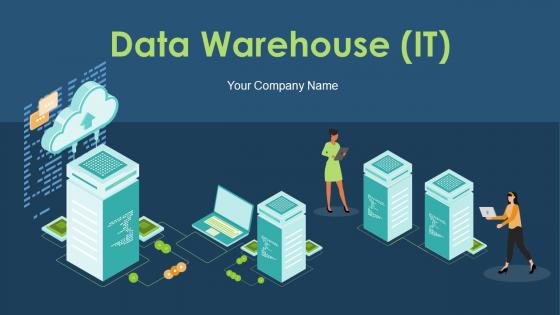
Slide 1: This slide introduces Data Warehouse (IT). State Your Company Name and begin.
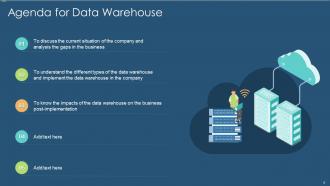
Slide 2: This is an Agenda slide. State your agendas here.
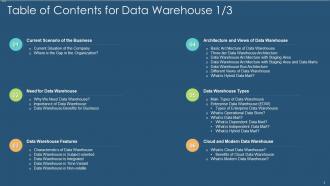
Slide 3: This slide presents Table of Contents for Data Warehouse.
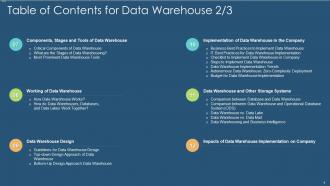
Slide 4: This is another slide continuing Table of Contents for Data Warehouse.
Slide 5: This is another slide continuing Table of Contents for Data Warehouse.
Slide 6: This slide shows Table of Content highlighting Current Scenario of the Business.
Slide 7: This slide depicts the current situation of our company by displaying the ratio of unstructured and structured data.
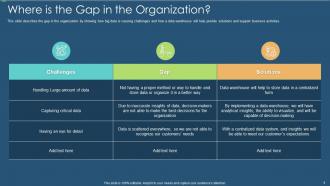
Slide 8: This slide presents gap in the organization by showing how big data is causing challenges.
Slide 9: This slide shows Table of Contents for Data Warehouse.
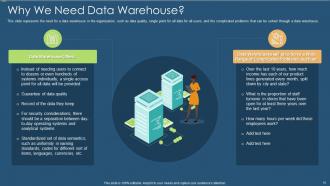
Slide 10: This slide displays need for a data warehouse in the organization, such as data quality, single point, etc.
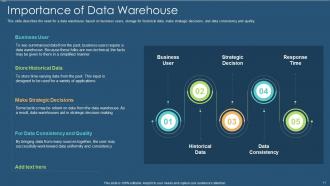
Slide 11: This slide shows need for a data warehouse based on business users, storage for historical data, etc.
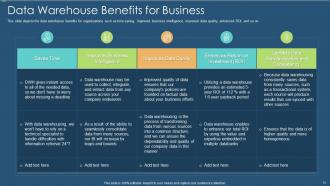
Slide 12: This slide depicts the data warehouse benefits for organizations such as time-saving, improved business intelligence, etc.
Slide 13: This slide presents Table of Contents for Data Warehouse.
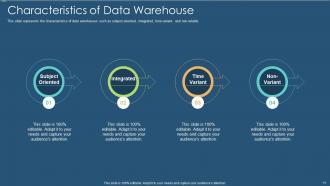
Slide 14: This slide shows characteristics of data warehouses such as subject-oriented, integrated, time-variant, and non-volatile.
Slide 15: This slide represents the subject-oriented feature of data warehouse and various operational applications.
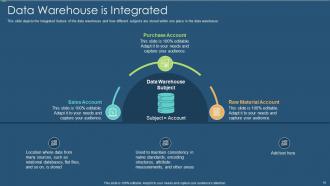
Slide 16: This slide depicts the integrated feature of the data warehouse and how different subjects are stored.
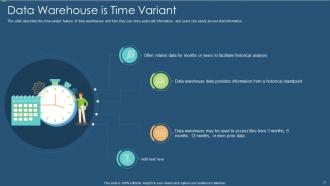
Slide 17: This slide shows time-variant feature of data warehouses and how they can store years-old information.
Slide 18: This slide illustrates the non-volatile feature of the data warehouse.
Slide 19: This slide shows Table of Contents for Data Warehouse.
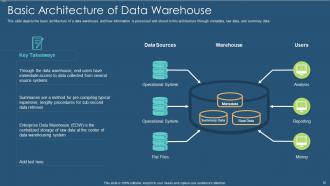
Slide 20: This slide displays the basic architecture of a data warehouse and how information is processed and stored in this architecture.
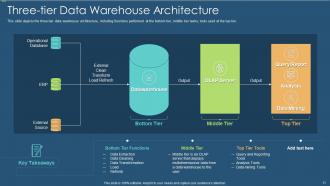
Slide 21: This slide depicts the three-tier data warehouse architecture, including functions performed.
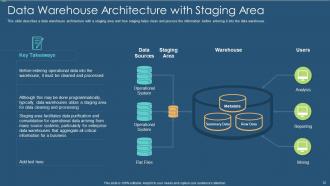
Slide 22: This slide describes a data warehouse architecture with a staging area.
Slide 23: This slide presents a data warehouse architecture with a staging area and data marts.
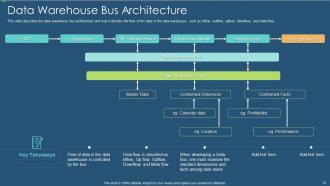
Slide 24: This slide shows data warehouse bus architecture and how it decides the flow of the data in the data warehouse.
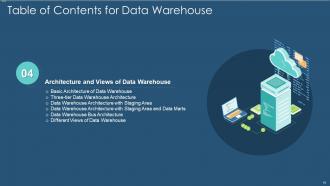
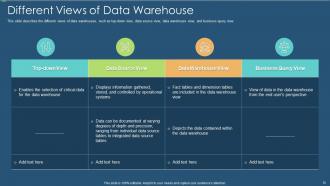
Slide 25: This slide displays different views of data warehouses, such as top-down view, data source view, data warehouse view, etc.
Slide 26: This slide shows Table of Content for the presentation.
Slide 27: This slide depicts the various types of data warehouses, such as enterprise data warehouses, operational data stores, etc.
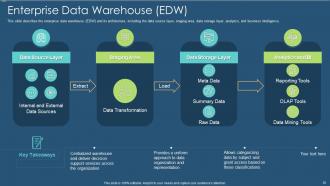
Slide 28: This slide presents the enterprise data warehouse (EDW) and its architecture, including the data source layer, staging area, etc.
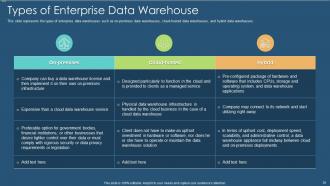
Slide 29: This slide represents the types of enterprise data warehouses such as on-premises data warehouses, cloud-hosted data warehouses, etc.
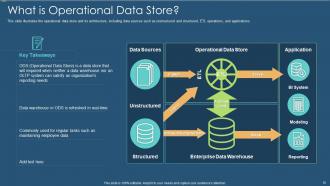
Slide 30: This slide illustrates the operational data store and its architecture, including data sources such as unstructured and structured.
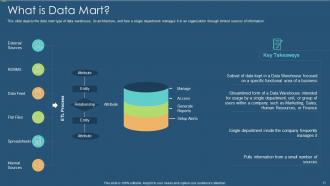
Slide 31: This slide depicts the data mart type of data warehouse, its architecture, and how a single department manages it.
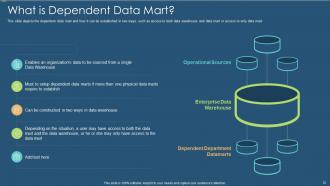
Slide 32: This slide depicts the dependent data mart and how it can be established in two ways.
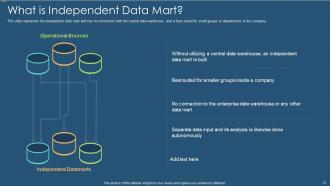
Slide 33: This slide presents the independent data mart and has no connection with the central data warehouse.
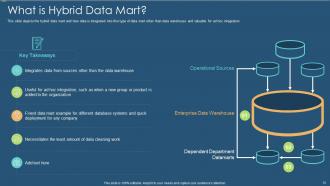
Slide 34: This slide depicts the hybrid data mart and how data is integrated into this type of data mart other than data warehouse.
Slide 35: This slide shows Table of Contents for Data Warehouse.
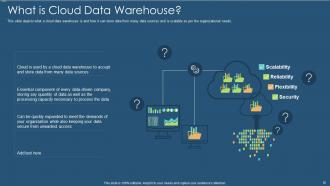
Slide 36: This slide depicts what a cloud data warehouse is and how it can store data from many data sources.
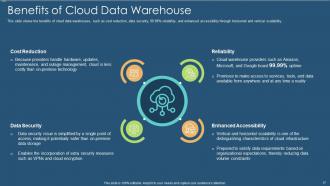
Slide 37: This slide shows the benefits of cloud data warehouses, such as cost reduction, data security, etc.
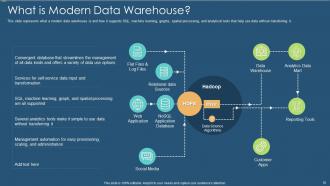
Slide 38: This slide represents what a modern data warehouse is and how it supports SQL, machine learning, etc.
Slide 39: This slide shows Table of Contents for Data Warehouse.
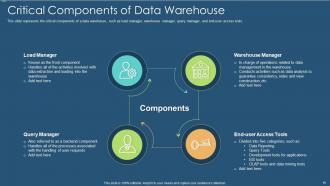
Slide 40: This slide displays the critical components of a data warehouse, such as load manager, warehouse manager, etc.
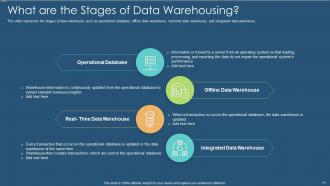
Slide 41: This slide represents the stages of data warehouse such as operational database, offline data warehouse, etc.
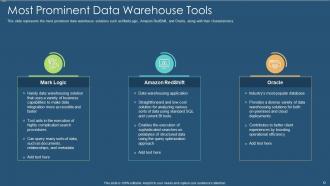
Slide 42: This slide represents the most prominent data warehouse solutions such as MarkLogic, Amazon RedShift, and Oracle.
Slide 43: This slide shows Table of Contents for Data Warehouse.
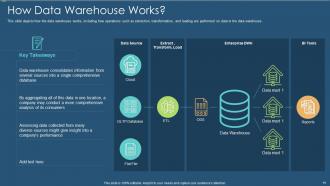
Slide 44: This slide depicts how the data warehouse works, including how operations such as extraction, transformation, etc.
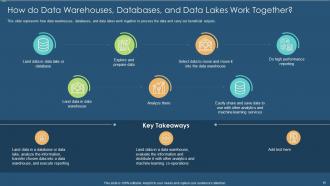
Slide 45: This slide represents how data warehouses, databases, and data lakes work together.
Slide 46: This slide shows Table of Contents for Data Warehouse.
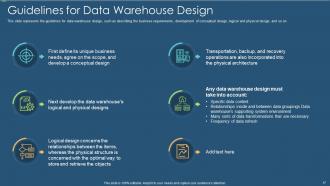
Slide 47: This slide represents the guidelines for data warehouse design, such as describing the business requirements, development of conceptual design, etc.
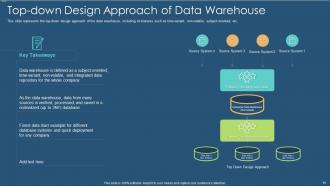
Slide 48: This slide presents the top-down design approach of the data warehouse, including its features such as time-variant, non-volatile, subject-oriented, etc.
Slide 49: This slide depicts the bottom-up design approach of the data warehouse and how data mart is built firstly in this approach.
Slide 50: This slide shows Table of Contents for Data Warehouse.
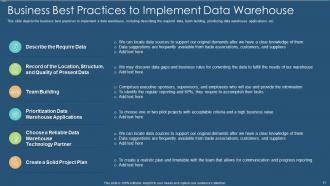
Slide 51: This slide depicts the business best practices to implement a data warehouse.
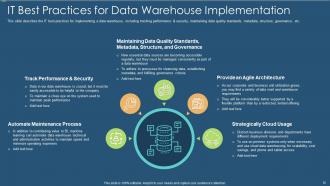
Slide 52: This slide describes the IT best practices for implementing a data warehouse, including tracking performance & security, maintaining data quality standards, etc.
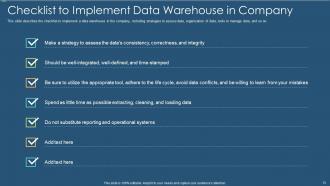
Slide 53: This slide shows Checklist to Implement Data Warehouse in Company.
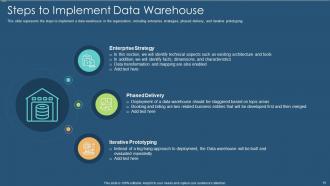
Slide 54: This slide represents the steps to implement a data warehouse in the organization, including enterprise strategies, phased delivery, etc.
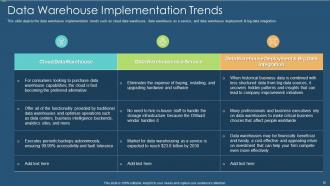
Slide 55: This slide depicts the data warehouse implementation trends such as cloud data warehouse, data warehouse as a service, etc.
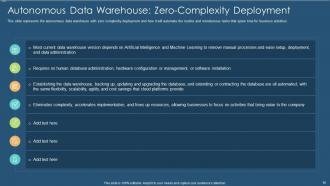
Slide 56: This slide represents the autonomous data warehouse with zero complexity deployment and how it will automate the routine.
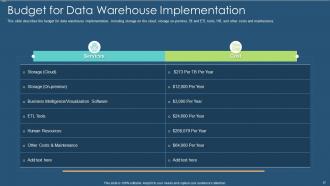
Slide 57: This slide describes the budget for data warehouse implementation, including storage on the cloud, storage on-premise, etc.
Slide 58: This slide shows Table of Contents for Data Warehouse.
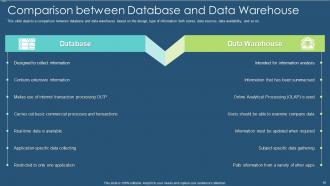
Slide 59: This slide depicts a comparison between database and data warehouse based on the design, type of information, etc.
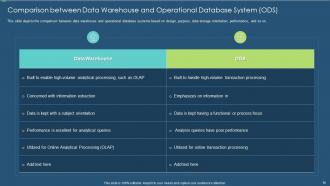
Slide 60: This slide displays the comparison between data warehouse and operational database systems based on design, purpose, etc.
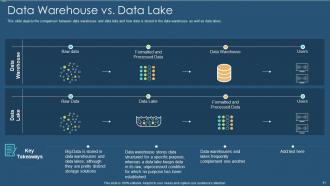
Slide 61: This slide depicts the comparison between data warehouse and data lake and how data is stored in the data warehouse.
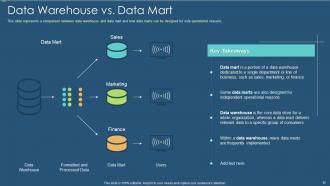
Slide 62: This slide represents a comparison between data warehouse and data mart and how data marts can be designed for sole operational reasons.
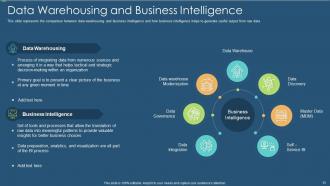
Slide 63: This slide presents the comparison between data warehousing and business intelligence and how business intelligence helps to generate useful output from raw data.
Slide 64: This slide shows Table of Contents for Data Warehouse.
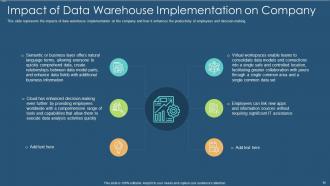
Slide 65: This slide represents the impacts of data warehouse implementation on the company.
Slide 66: This slide shows Table of Contents for Data Warehouse.
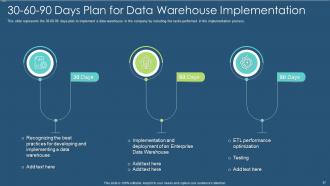
Slide 67: This slide represents the 30-60-90 days plan to implement a data warehouse in the company.
Slide 68: This slide presents Table of Contents for Data Warehouse.
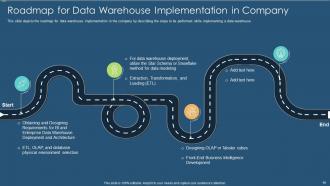
Slide 69: This slide depicts the roadmap for data warehouse implementation in the company.
Slide 70: This slide displays Table of Contents for Data Warehouse.
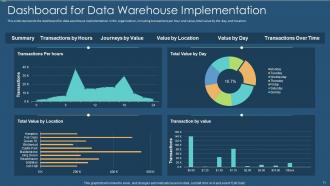
Slide 71: This slide shows dashboard for data warehouse implementation in the organization.
Slide 72: This slide is titled as Additional Slides for moving forward.
Slide 73: This slide presents Table of Contents for Data Warehouse.
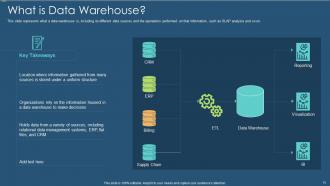
Slide 74: This slide represents what a data warehouse is, including its different data sources and the operations performed.
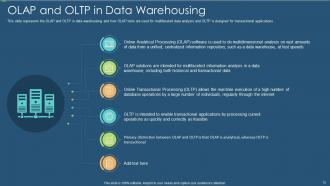
Slide 75: This slide displays the OLAP and OLTP in data warehousing and how OLAP tools are used for multifaceted data analysis.
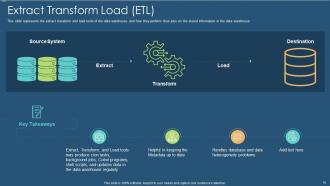
Slide 76: This slide represents the extract transform and load tools of the data warehouse and how they perform their jobs.
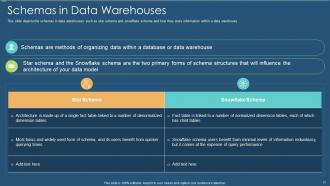
Slide 77: This slide depicts the schemas in data warehouses such as star schema and snowflake schema.
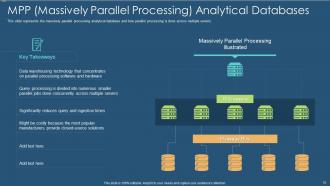
Slide 78: This slide represents the massively parallel processing analytical database and how parallel processing is done.
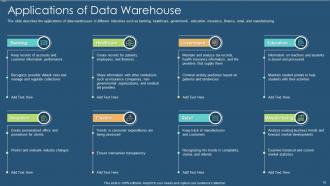
Slide 79: This slide describes the applications of data warehouses in different industries such as banking, healthcare, government, etc.
Slide 80: This slide shows Icons Slide for Data Warehouse (IT).
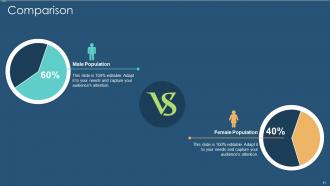
Slide 81: This is a Comparison slide to state comparison between commodities, entities etc.
Slide 82: This is About Us slide to show company specifications etc.
Slide 83: This slide presents Post It Notes. Post your important notes here.
Slide 84: This slide shows Circular Diagram with additional textboxes.
Slide 85: This slide displays Puzzle with related icons and text.
Slide 86: This slide shows SWOT describing- Strength, Weakness, Opportunity, and Threat.
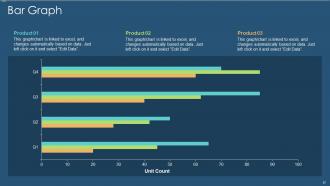
Slide 87: This slide shows Bar Graph with three products comparison.
Slide 88: This slide presents Venn diagram with text boxes.
Slide 89: This is a Thank You slide with address, contact numbers and email address.
Data warehouse it powerpoint presentation slides with all 89 slides:
Use our Data Warehouse IT Powerpoint Presentation Slides to effectively help you save your valuable time. They are readymade to fit into any presentation structure.











FAQs for Data warehouse it
So basically, regular databases handle your everyday stuff - customer orders, inventory, that kind of thing. Data warehouses are different though. They're built for digging into trends and doing big-picture analysis across your whole company. Your typical database needs to be super fast for transactions and updates. Warehouses don't care about that - they just store tons of historical data from everywhere so you can run complex reports. The structure's totally different too, which honestly makes queries way faster when you're doing analytics. If you're trying to spot patterns or need serious reporting, go with a warehouse.
So basically you've got ETL - Extract, Transform, Load. First you pull data from wherever it lives (databases, APIs, random files). Then comes the transform part, which is honestly a pain but super crucial - you're cleaning up inconsistencies and making everything follow the same format. I swear this step breaks more projects than anything else. After that's sorted, you load it into your warehouse where analysts can actually use it. The big thing is documenting those transformation rules so people don't spend weeks figuring out why the numbers look weird.
So ETL is basically how you move data from all your messy sources into something actually useful. First you extract it - pulling from databases, APIs, whatever random files people dump on you (ugh). Then comes the transform part, which honestly is where most of the work happens - cleaning everything up, making formats consistent, fixing all the weird quirks. Finally you load it into your warehouse. It's kinda like meal prep, you know? You wouldn't just throw random ingredients together and expect it to work. Same deal here - skip the cleanup and your warehouse becomes this nightmare of bad data nobody wants to touch.
You know how you're always getting different numbers from sales and marketing? That's exactly why you need a data warehouse. It becomes your single source of truth so you can actually trust your reports. Performance gets way faster too since everything's built for analytics. Your team stops burning hours trying to figure out why the numbers don't match up. Honestly, it's nice making decisions based on real data instead of just winging it. I'd figure out what's driving you crazy with reporting right now - that's probably where you should start.
You've got three main types to pick from: centralized, federated, and hub-and-spoke. Most places go centralized first - everything dumps into one big warehouse that powers your analytics. Pretty straightforward. Federated keeps your data spread out but tries to give you one unified view (though honestly it gets messy real quick). Then there's hub-and-spoke where you have a main hub with smaller data marts for different teams. I've seen companies start simple with centralized, then branch out when they get bigger. Oh, and definitely map out what data you have and who needs what before deciding - saves you headaches later.
So basically a data warehouse pulls everything from your scattered systems into one spot. No more hunting through random spreadsheets (ugh). You can actually see historical trends and run those complex queries without losing your mind. The whole thing's already cleaned up, so you're not wondering if your numbers are even right. Plus spotting patterns becomes way easier when everything's organized the same way. Honestly, dashboards are a game-changer for stuff your team does over and over. Start there - figure out what decisions you're constantly making and build around those first.
Build your dimensional model with fact tables for metrics and dimension tables for attributes. Keep grain consistent per fact table. Don't normalize everything like OLTP - denormalization actually helps query performance here. Surrogate keys work better than natural keys, and SCD Type 2 is pretty standard for slowly changing dimensions. Design around how your users will actually report on the data (this sounds obvious but you'd be surprised). Also, write down your business rules early because guaranteed someone will question why your numbers don't match their random Excel file later.
So it really depends on what you're working with. Cloud-wise, AWS Redshift and Google BigQuery are solid, but Snowflake's everywhere right now - honestly can't escape the hype. Traditional stuff like SQL Server and Oracle still work great if you're staying on-premise. You'll need ETL tools too - Informatica's pricey but good, Talend's decent, Apache Airflow if you want open source. Oh and obviously Tableau or Power BI for dashboards. My take? Figure out your data size and budget first. Then just pick things that actually talk to each other - integration headaches aren't worth it.
Yeah, so traditional data warehouses are basically designed for that old-school "dump everything in overnight" approach. Not great for real-time stuff. But honestly, the newer cloud ones like Snowflake and BigQuery have gotten way better at this. You can set up change data capture to stream updates in, or just run micro-batches every few minutes instead of waiting all day. Works pretty well for most use cases. Though if you really need true real-time - like milliseconds matter - you'll probably want something like Kafka feeding into your warehouse. Bit more complex but way faster.
Track the basics first - query speed, uptime, and whether your data's actually fresh. Business-wise, see if people are using it and making better calls with the data. I'd honestly start with maybe 4-5 metrics max that your stakeholders care about. Storage costs matter too since those can sneak up on you fast. Also check if you're cutting down manual data grunt work - that's usually where you see the biggest wins. Don't overthink it initially, you can always add more tracking later once you've got the core stuff dialed in.
Data validation at every entry point is your lifesaver here. We got burned by months of crappy data because we skipped this step - don't make our mistake! Set up automated checks that catch duplicates and missing stuff before it hits your warehouse. You'll also want clear governance policies so people actually know who owns what data. Monthly audits help catch problems early, though honestly they're kind of a pain to schedule. Oh, and data lineage tracking is huge - when things break (and they will), you can actually trace back to see where it started.
Honestly, the scariest part is when those cloud bills start rolling in - they can get out of control super quick if you're not watching. Data security's obviously huge too. Your team will need time to learn all the new interfaces, which is kind of a pain. Downtime during the actual migration is another headache, plus you might deal with some lag issues at first. Oh and vendor lock-in is real - once you're in, switching gets messy. I'd definitely test everything with some non-critical stuff first. Way better to mess up on practice data than your actual warehouse, you know?
Think of data warehouses as your company's master filing cabinet - but way smarter. All your messy data from different systems gets cleaned up and stored in one spot. No more digging through random databases when you need to pull a report (seriously, that's the worst). Your analytics tools can actually run fast queries since everything's already organized. Historical stuff stays put too, so you can track trends going back years. Oh, and your team won't waste half their time just trying to find the right data. Set it up once, then focus on the actual insights.
Think of data governance as your cleanup crew for the data warehouse. Without it? Total chaos - nobody knows who owns what, definitions don't match up, and the quality is all over the place. You'll want clear rules for who can access stuff and where everything comes from. Set up defined roles and regular check-ins to keep things running smooth. Honestly, just start by writing down your current data sources and who's responsible for each one. I know it sounds boring but it'll save you so much drama later when people start pointing fingers about bad data.
Cloud-native stuff and real-time analytics are where everything's moving. Data mesh is getting popular too - basically letting different teams own their data instead of one central group handling it all. Modern data lakes are honestly becoming the new warehouses since they handle messy, unstructured data way better. AI automation is pretty cool right now, optimizing queries and managing pipelines automatically so you don't have to micromanage. Serverless makes scaling less of a headache. I'd mess around with Snowflake or BigQuery if you haven't yet - that's clearly where things are headed.
-
Awesomely designed templates, Easy to understand.
-
Unique research projects to present in meeting.
-
The Designed Graphic are very professional and classic.
-
Awesomely designed templates, Easy to understand.