


Cloud Computing Service Models Powerpoint Presentation Slides




Try Before you Buy Download Free Sample Product
 Impress Your
 Audience
 100%
100% Editable
 Save Hours
 of Time


Cloud computing is a burgeoning industry that enables businesses to move away from on premise IT infrastructure and instead depend on internet based services. Grab our efficiently designed Cloud Computing Services Models template that gives a brief idea about cloud service provider companies, an overview of cloud computing, architecture and types, etc. In our cloud computing ppt presentation, we have covered how different industries utilize cloud computing and standard cloud service models such as infrastructure as a service IaaS, platform as a service PaaS, and software as a service SaaS. In addition, this PPT contains the introduction of IaaS, its characteristics, types of IaaS environments, service provided by service providers, pros and cons, reasons to choose the IaaS model, and top service providers for IaaS. Also, the presentation includes the PaaS introduction, types, elements included in PaaS, and SaaS introduction and types of SaaS solutions. Furthermore, this template compares three cloud service models, IaaS, PaaS, and SaaS, and provides a checklist to implement each model. Lastly, this Cloud based Services deck comprises a 30 60 90 days plan and a roadmap to implement cloud computing service models in the organization. Get access now.
People who downloaded this PowerPoint presentation also viewed the following :
Content of this Powerpoint Presentation
Slide 1: This slide displays title i.e. 'Cloud Computing Service Models' and your Company Name.
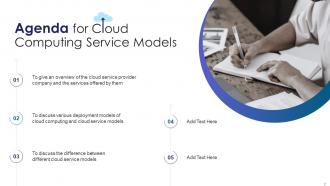
Slide 2: This slide presents agenda.
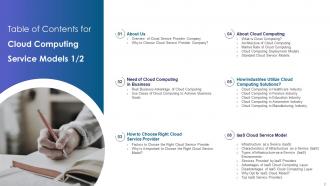
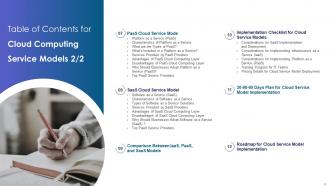
Slide 3: This slide exhibits table of contents.
Slide 4: This slide also shows table of contents.
Slide 5: This slide depicts title for two topics that are to be covered next in the template.
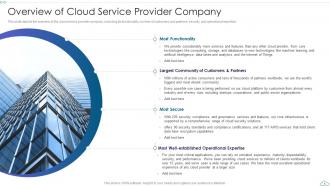
Slide 6: This slide depicts the overview of the cloud service provider company, including its functionality, number of customers and partners, etc.
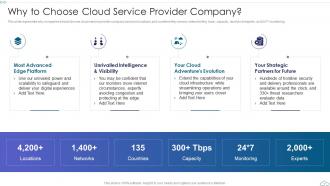
Slide 7: This slide represents why companies should choose cloud service provider company based on locations and countries they served, etc.
Slide 8: This slide depicts title for two topics that are to be covered next in the template.
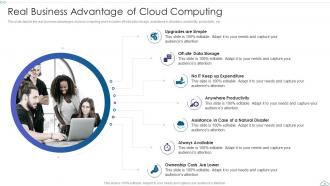
Slide 9: This slide depicts the real business advantages of cloud computing and it includes off-site data storage, assistance in disasters, etc.
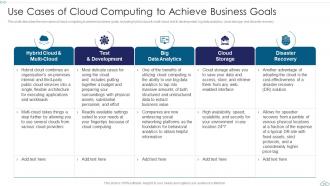
Slide 10: This slide describes the use cases of cloud computing to achieve business goals, including hybrid cloud & multi-cloud, test & development, etc.
Slide 11: This slide depicts title for two topics that are to be covered next in the template.
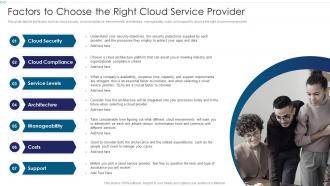
Slide 12: This slide depicts the factors such as cloud security, cloud compliance, service levels, architecture, manageability, costs, etc.
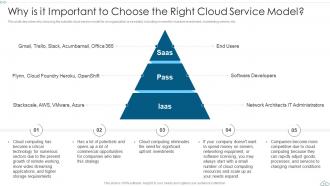
Slide 13: This slide describes why choosing the suitable cloud service model for an organization is essential.
Slide 14: This slide depicts title for five topics that are to be covered next in the template.
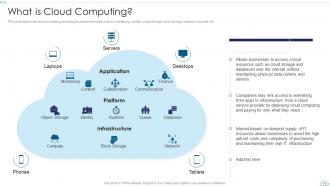
Slide 15: This slide represents cloud computing, including its various elements such as monitoring, content, object storage, etc.
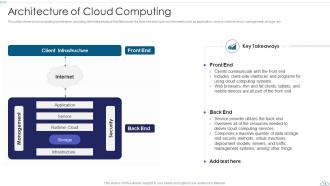
Slide 16: This slide shows cloud computing architecture, including client infrastructure that falls under the front end and back end elements.
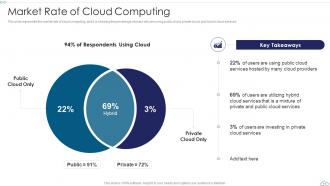
Slide 17: This slide represents the market rate of cloud computing, and it is showing the percentage of users who are using public cloud, private cloud, etc.
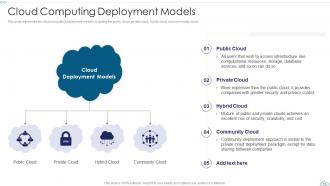
Slide 18: This slide represents the cloud computing deployment models, including the public cloud, private cloud, hybrid cloud, and community cloud.
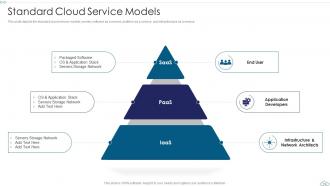
Slide 19: This slide depicts the standard cloud service models, namely software as a service, platform as a service, and infrastructure as a service.
Slide 20: This slide depicts title for five topics that are to be covered next in the template.
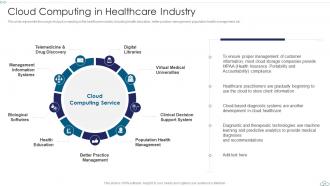
Slide 21: This slide represents the usage of cloud computing in the healthcare industry including health education, better practice management, etc.
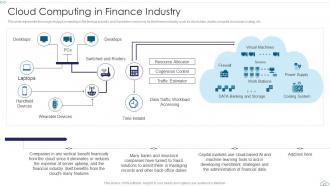
Slide 22: This slide represents the usage of cloud computing in the finance industry, and it provides many tools for the finance industry.
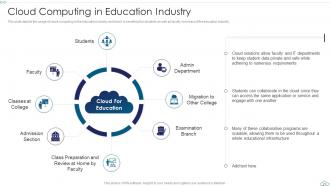
Slide 23: This slide depicts the usage of cloud computing in the education industry and how it is beneficial.
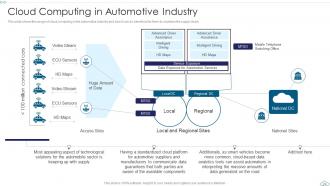
Slide 24: This slide shows the usage of cloud computing in the automotive industry and how it can be beneficial for them to maintain the supply chain.
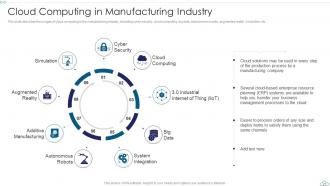
Slide 25: This slide describes the usages of cloud computing in the manufacturing industry, including cyber security, cloud computing, big data, etc.
Slide 26: This slide depicts title for eight topics that are to be covered next in the template.
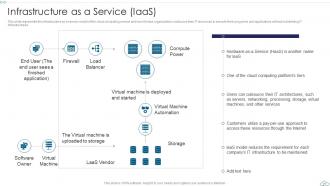
Slide 27: This slide represents the infrastructure as a service model of the cloud computing service and how it helps organizations outsource their IT resources.
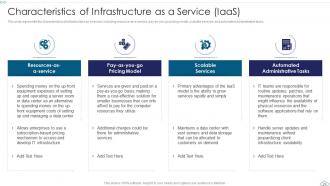
Slide 28: This slide represents the characteristics of infrastructure as a service, including resource-as-a-service, pay-as-you-go pricing model, etc.
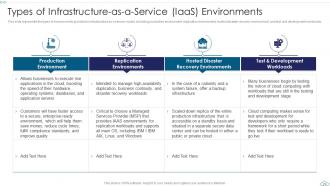
Slide 29: This slide represents the types of environments provided in infrastructure as a service model, including production environment, etc.
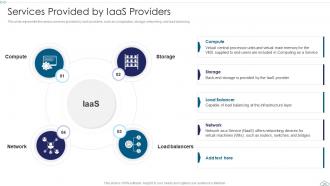
Slide 30: This slide represents the various services provided by IaaS providers, such as computation, storage, networking, and load balancing.
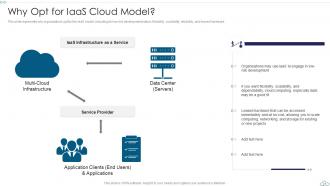
Slide 31: This slide represents why organizations opt for the IaaS model, including its low-risk development nature, flexibility, scalability, etc.
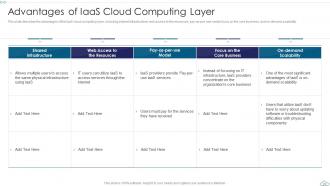
Slide 32: This slide describes the advantages of the IaaS cloud computing layer, including shared infrastructure, web access to the resources, etc.
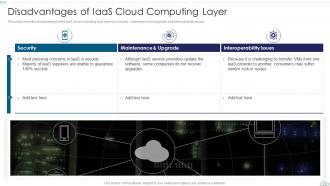
Slide 33: This slide shows the disadvantages of the IaaS cloud computing layer based on security, maintenance and upgrade, and interoperability issues.
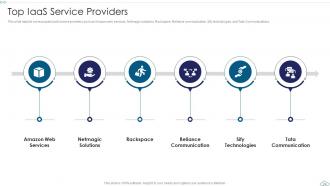
Slide 34: This slide depicts some popular IaaS service providers such as Amazon web services, Netmagic solutions, Rackspace, Reliance communication, etc.
Slide 35: This slide depicts title for nine topics that are to be covered next in the template.
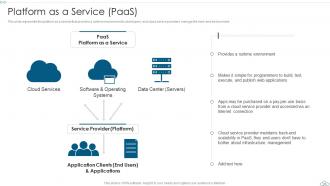
Slide 36: This slide represents the platform as a service that provides a runtime environment to developers.
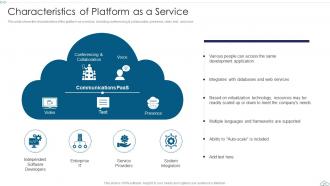
Slide 37: This slide shows the characteristics of the platform as a service, including conferencing & collaboration, presence, video, text, and voice.
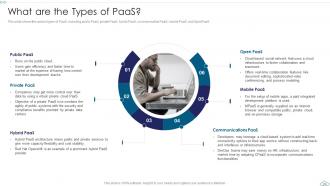
Slide 38: This slide shows the various types of PaaS, including public PaaS, private PaaS, hybrid PaaS, communication PaaS, mobile PaaS, and OpenPaaS.
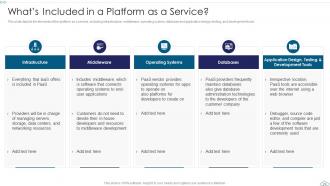
Slide 39: This slide depicts the elements of the platform as a service, including infrastructure, middleware, operating system, etc.
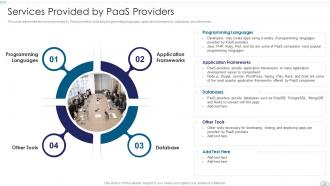
Slide 40: This slide represents the service provided by PaaS providers, including programming languages, application frameworks, databases, and other tools.
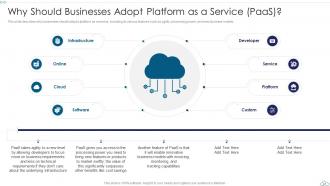
Slide 41: This slide describes why businesses should adopt a platform as a service, including its various features such as agility, processing power, etc.
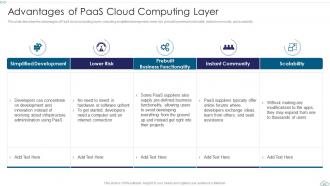
Slide 42: This slide describes the advantages of PaaS cloud computing layers, including simplified development, lower risk, etc.
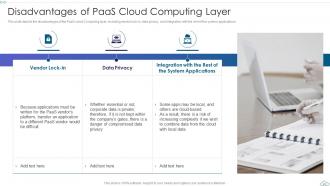
Slide 43: This slide depicts the disadvantages of the PaaS cloud Computing layer, including vendor lock-in, data privacy, etc.
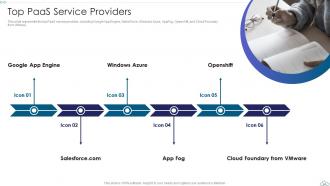
Slide 44: This slide represents the top PaaS service provides, including Google App Engine, SalesForce, Windows Azure, AppFog, Openshift, etc.
Slide 45: This slide depicts title for eight topics that are to be covered next in the template.
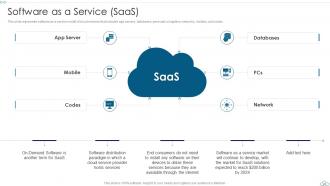
Slide 46: This slide represents software as a service model of cloud services that includes app servers, databases, personal computers, networks, etc.
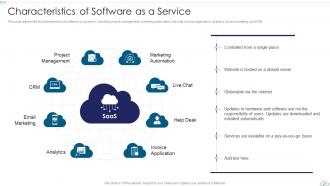
Slide 47: This slide represents the characteristics of software as a service, including project management, marketing automation, live chat, etc.
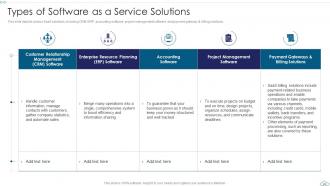
Slide 48: This slide depicts various SaaS solutions, including CRM, ERP, accounting software, project management software, etc.
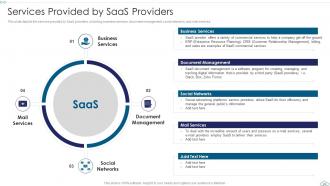
Slide 49: This slide depicts the services provided by SaaS providers, including business services, document management, social networks, and mail services.
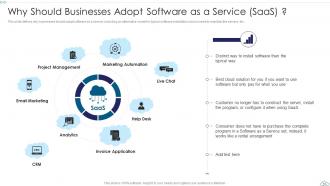
Slide 50: This slide defines why businesses should adopt software as a service, including an alternative model for typical software installation.
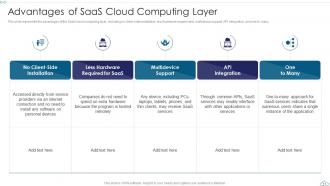
Slide 51: This slide represents the advantages of the SaaS cloud computing layer, including no client-side installation, less hardware requirement, etc.
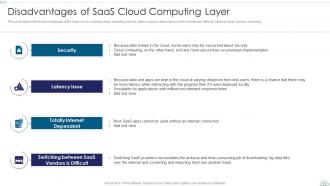
Slide 52: This slide represents the disadvantages of the SaaS cloud computing layer, including security, latency issues, etc.
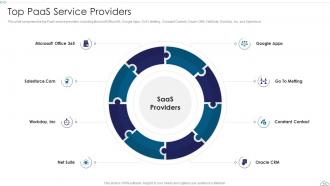
Slide 53: This slide comprises the top PaaS service providers, including Microsoft Office365, Google Apps, GoTo Metting, Constant Contact, etc.
Slide 54: This slide depicts title for the topic that is to be covered next in the template.
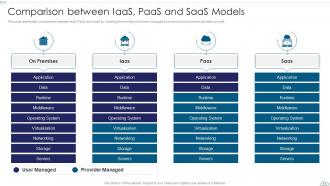
Slide 55: This slide represents a comparison between IaaS, PaaS, and SaaS by showing the number of services managed by users and cloud service providers.
Slide 56: This slide depicts title for five topics that are to be covered next in the template.
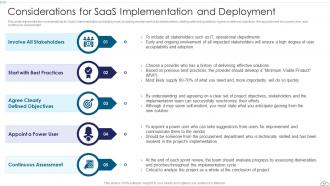
Slide 57: This slide represents the considerations for SaaS implementation and deployment, including involvement of all stakeholders, etc.
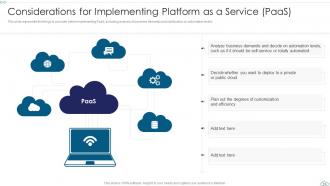
Slide 58: This slide represents the things to consider before implementing PaaS, including analysis of business demands and clarification on automation levels.
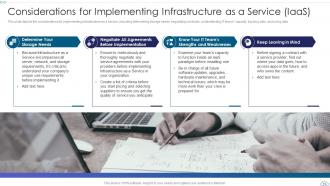
Slide 59: This slide depicts the considerations for implementing infrastructure as a service, including determining storage needs, etc.
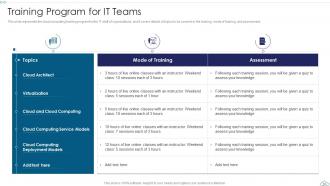
Slide 60: This slide represents the cloud computing training program for the IT staff of organizations.
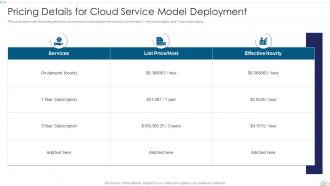
Slide 61: This slide represents the pricing details for cloud service model deployment based on on-demand, 1-year subscription, and 3-year subscription.
Slide 62: This slide depicts title for the topic that is to be covered next in the template.
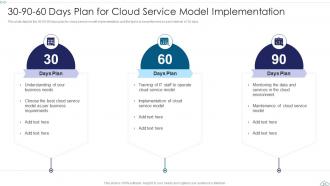
Slide 63: This slide depicts the 30-60-90 days plan for cloud service model implementation and the tasks to be performed on each interval of 30 days.
Slide 64: This slide depicts title for the topic that is to be covered next in the template.
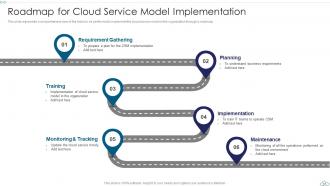
Slide 65: This slide represents a comprehensive view of the tasks to be performed to implement the cloud service model in the organization through a roadmap.
Slide 66: This is the icons slide.
Slide 67: This slide presents title for additional slides.
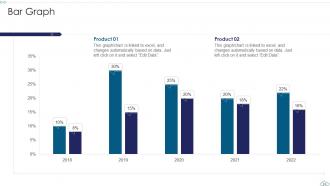
Slide 68: This slide exhibits yearly bar graph for different products. The charts are linked to Excel.
Slide 69: This slide depicts posts for past experiences of clients.
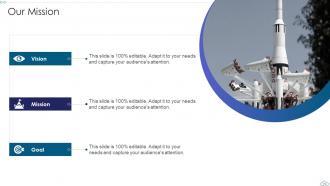
Slide 70: This slide presents your company's vision, mission and goals.
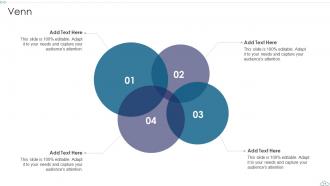
Slide 71: This slide displays Venn.
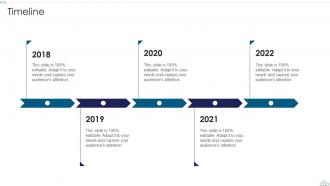
Slide 72: This slide exhibits yearly timeline of company.
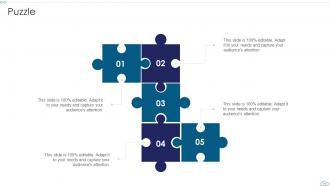
Slide 73: This slide shows puzzle for displaying elements of company.
Slide 74: This is thank you slide & contains contact details of company like office address, phone no., etc.
Cloud Computing Service Models Powerpoint Presentation Slides with all 79 slides:
Use our Cloud Computing Service Models Powerpoint Presentation Slides to effectively help you save your valuable time. They are readymade to fit into any presentation structure.





FAQs for Cloud Computing Service Models
So there's basically three types: IaaS gives you raw computing stuff like servers and storage - AWS EC2 is the classic example. PaaS sits on top of that and lets you build apps without dealing with all the server headaches underneath. Then SaaS is just ready-made software like Gmail or Salesforce that you use straight up. You probably use tons of SaaS apps already and don't even think about it. Each one handles different amounts of the technical complexity - just depends whether you want more control or you'd rather have someone else handle the messy bits.
So basically, IaaS is like renting a bare-bones server - you get the raw computing stuff but have to set up everything yourself from scratch. PaaS is way more hands-off since they handle all the messy infrastructure bits and you just throw your code at it. Honestly, it's kinda like the difference between buying ingredients to cook vs getting a meal kit delivered. IaaS gives you more control if you're into that, but man, it's a lot more work. If you just want to build your app without dealing with server headaches, PaaS is probably your friend.
Dude, SaaS is honestly amazing for this stuff. You don't have to deal with servers breaking down or constantly updating software - everything just works from your browser. Your team can jump right in instead of waiting forever for IT to set things up. Monthly payments are so much easier to budget than dropping thousands upfront on licenses (learned that the hard way at my last job). The best part? Adding new people takes like 30 seconds when you're hiring. I'd say look at what you're currently babysitting server-wise and see what you can move over. Trust me, it'll save you hours every week.
Honestly, IaaS is your best bet when you need total control over everything - like the OS, security configs, all that stuff. Perfect for migrating those old legacy apps that are super picky about their environment. Your dev team will love having full admin access to tweak performance however they want. Plus you won't get stuck with vendor lock-in, which is nice. Most web apps work fine with PaaS and it's way less headache, but sometimes you just need that granular control. Got weird compliance rules or some funky architecture? IaaS lets you build exactly what you need without compromise.
So basically, IaaS means you're doing all the heavy lifting - patching, encryption, app security, everything. PaaS splits it between you and the provider. SaaS? They handle almost everything except user permissions and data stuff. But here's where it gets weird - the more the provider does, the less you can see what's actually happening under the hood. Makes compliance a pain sometimes. Honestly, I'd sit down and figure out exactly which security pieces each option covers before you pick one. Don't want any nasty surprises later.
IaaS looks cheap upfront but you'll end up spending way more on staff to manage everything. PaaS costs more monthly though it saves you tons of development time. SaaS has the highest subscription fees, but honestly? It's usually your cheapest option overall since they handle literally everything for you. Don't just look at the monthly price tag - that's where people mess up. Calculate what you'll actually spend including all the hidden labor costs. Those backend expenses add up ridiculously fast and can totally blow your budget if you're not careful about factoring them in from the start.
Honestly, it's all about trading control for ease. IaaS gives you total flexibility to scale however you want, but you're dealing with way more headaches. SaaS scales the least but requires literally zero work on your end. PaaS is kinda the goldilocks zone - especially for startups. The platform handles scaling automatically while you focus on building your actual product. I'd probably go PaaS unless you have some weird infrastructure requirements. You can always switch later anyway, and you'll ship stuff way faster in the meantime.
PaaS customization is actually pretty sweet - you get solid control without dealing with all the server headaches. Runtime environments, app settings, databases, third-party integrations... you can tweak most of what matters. The platform just handles the boring infrastructure stuff. Think of it like renting a kitchen where you can rearrange everything and cook whatever you want, but someone else deals with the plumbing and electrical work. Just don't get stuck with a provider that locks you into their weird proprietary setup - I've seen that backfire before. Find one that gives you flexibility without the vendor handcuffs.
Honestly, multi-cloud basically forces you to stick with stuff that works everywhere - think containers and standard APIs. Don't get sucked into those fancy proprietary platform services from one vendor. That's like... the opposite of what you're trying to do, right? Kubernetes is solid for orchestration, and standardized SaaS integrations are your friend. You want things that'll move between AWS, Azure, GCP without turning into a nightmare migration project. I'd start by looking at what you've got now and figuring out which services would make you cry if you had to move them tomorrow.
Your integration headaches really depend on what you pick. SaaS locks you into their APIs - some rock, others are terrible. PaaS gives more control but watch out for vendor lock-in when connecting outside stuff. With IaaS you get total flexibility, though now all the integration mess is on you. Data consistency across services will drive you crazy. Different auth methods too. Network lag becomes this annoying thing you didn't expect. Honestly? Map your current integrations first before deciding anything. Saves so much pain later.
Honestly, most companies just mix and match these days. Public cloud's great for scaling up fast and saving money. Private keeps your sensitive data locked down tight. Hybrid? That's where you get the best of both worlds - and frankly, it's what actually works in practice. I mean, who really needs pure anything anymore? You can run your regular apps on public cloud while customer data stays private. The trick is making sure everything talks to each other securely. Figure out what absolutely can't leave your control first, then build everything else around that core stuff.
Track stuff like uptime and response times first - that's your bread and butter. User satisfaction scores matter too, obviously. Most SaaS platforms already have analytics built in which is nice because who wants to build that from scratch? I'd also watch adoption rates and how much people actually use different features. Support tickets tell you a lot about pain points. Oh and don't ignore the business side - like whether it's actually saving money or boosting productivity. Honestly though, just figure out what metrics make sense for your situation and set up some kind of regular check-in.
Hey! So software startups definitely get the most out of PaaS - they can just build their apps without dealing with server nonsense. Banks and financial companies are big users too since they need to deploy stuff fast but keep everything secure. E-commerce sites basically live on it, especially during crazy shopping seasons when traffic spikes everywhere. Gaming and healthcare also use it a ton when their workloads go all over the place. Honestly, if you're building custom apps or deploying updates constantly, it's probably worth checking out. Way less headache than managing your own infrastructure.
Honestly, the higher up you go from IaaS to SaaS, the beefier the SLAs get. IaaS is pretty basic - just uptime promises for your VMs and storage, usually around 99.9%. PaaS throws in some app performance metrics and database stuff on top of that infrastructure coverage. But SaaS? They go all out since they're running the whole show. Application uptime, backups, security incidents, even how fast pages load for users. Makes sense when you think about it - they control everything, so they can promise more. Oh, and definitely check what actually gets you those credits when things break. Some providers are sneaky about that part.
Honestly, I'm seeing way more specialized stuff coming - like industry-specific platforms and edge computing everywhere. AI's getting baked into most SaaS tools now, which is pretty cool. Serverless and containers are kind of taking over (makes scaling so much less painful). The whole IaaS/PaaS/SaaS thing is getting messier since everyone's doing integrated stacks now. Oh, and definitely start thinking about multi-cloud setups. Getting locked into one vendor is becoming a real pain competitively. I probably should've mentioned this earlier, but hybrid approaches are where most companies are heading.
-
Making a presentation has never been this easy for me. Thank you SlideTeam for offering a splendid template library.
-
“Immediate response, professional support, and effective solutions that were customized and immediately provided. Well done- Thank you!”